

Charged for currency that never showed up? Here is why your Top War delivery is delayed, where to check your inventory, and how to recover missing funds fast.
You confirm a purchase, see your banking app charge go through, and switch back to Top War: Battle Game only to see an unchanged balance. Merge queues sit idle, hero recruitments stall, and event timers continue ticking while your account balance reflects zero change.
Filing a hasty payment dispute can freeze your profile. Most delayed transactions stem from routine server latency, unclaimed in-game mail, or packaged inventory items. This guide covers the essential troubleshooting sequence, clears up common currency naming confusion, and explains how to gather storefront transaction IDs for rapid support resolution.
The 5-Minute Triage Checklist for Missing Currency
Before submitting a ticket, run through this five-step sequence. Payment gateways and game databases process high transaction volumes, which occasionally causes brief fulfillment delays.
- Force-close and restart the game client: Swipe the app completely out of your active app switcher rather than just minimizing it. Reopening forces a clean login handshake, updating your balance from the server database.
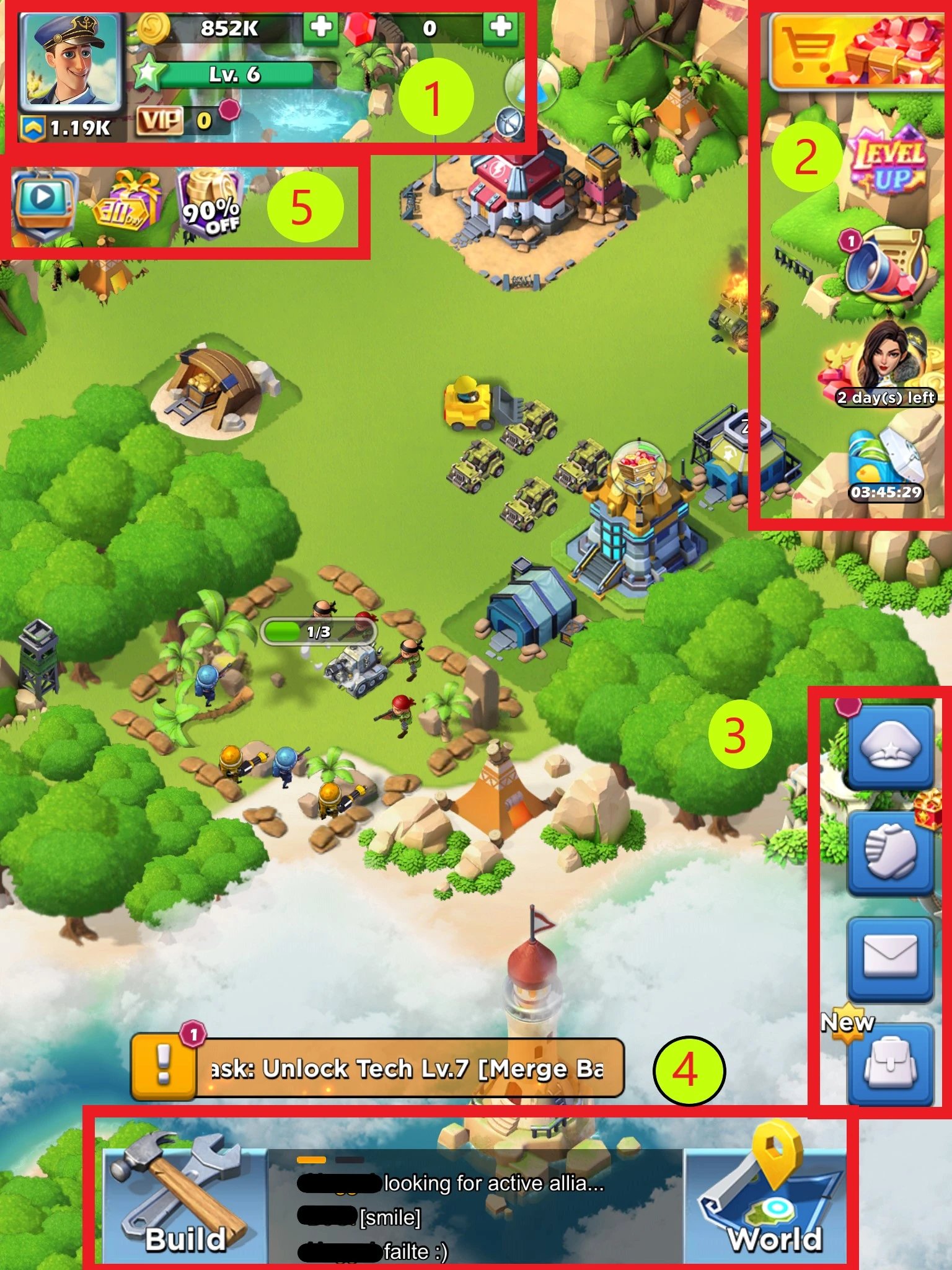
- Inspect your in-game mailbox: Tap the envelope icon on the main screen. Many bundles, compensations, and direct purchases arrive as system mail attachments rather than direct wallet balance injections.
- Examine your bag inventory: Open your commander backpack. Certain bundles and currency packs arrive as boxed items, tokens, or resource chests that require tapping "Use" to credit your profile.
- Check your banking or app store order status: Verify whether the charge is marked "Completed" or "Pending". A pending status means the payment gateway has not yet signaled the game server to dispatch the items.
- Wait out the 5 to 30-minute processing window: Standard automated top-ups credit within 2 to 5 minutes, though network congestion or fraud screening can extend fulfillment up to 30 minutes.
If your balance remains unchanged after completing these checks and waiting 30 minutes, the order requires manual receipt verification.


Currency Naming Confusion: Gold Bricks, Gold Blocks, or Gems?
Searching for "Top War Gold Bricks" often stems from terminology overlap across mobile strategy games.
Top War: Battle Game features Gems and Gold Blocks as its primary premium currencies for hero recruitment, unit merging, and base upgrades. In contrast, "Gold Bricks" serves as the official premium currency for Last War: Survival. Because both games share similar merge and strategy mechanics, players and third-party storefronts frequently interchange the terms.
Top War: Battle Game Currency Model:
- Gems / Gold Blocks: Used for Hero Recruitment, Base Merging, Tech Upgrades, Lucky Fortune
- Packaging: Direct wallet balance, Backpack items, In-Game Mail claimables

Last War: Survival Currency Model:
- Gold Bricks: Universal cash-equivalent token
If you purchased a package listed as "Gold Bricks" for Top War on an external platform, check whether your profile received equivalent Gems, Gold Blocks, or event vouchers. If you mistakenly bought currency intended for a different title using an incompatible ID format, contact that store's support team directly to re-route or refund the order.
Delivery Timelines and Why Recharge Orders Stall
Every digital purchase follows a multi-step pipeline: payment gateway clearance, receipt token validation, API dispatch, and server-side balance updates.
The table below outlines expected delivery speeds across standard purchase channels and the primary bottlenecks for each.
| Purchase Channel | Normal Delivery Time | Maximum Normal Delay | Primary Cause for Delay |
|---|---|---|---|
| In-App Store (Google / Apple) | Instant to 2 minutes | 15 minutes | Store billing settlement verification |
| Direct UID Automated Recharge | 2 to 5 minutes | 30 minutes | Peak server event traffic or API queues |
| Web Milestone / Event Grants | 5 to 10 minutes | 60 minutes | Batch server distribution to in-game mail |
| Third-Party Order Review | 10 to 30 minutes | 2 to 4 hours | Manual payment fraud check or incorrect UID |
Standard direct top-ups process almost instantly, but peak game events can cause momentary backlogs in the delivery queue.
When exploring third-party recharge options, choosing a platform that uses direct UID integration reduces delivery friction. You can check secure Top War recharge options to compare standard denominations and review live catalog availability.
Deliveries usually stall for one of three reasons:
- App Store Verification Lag: Google Play or Apple occasionally flags a transaction for randomized security checks, holding the payment in a "Pending Authorization" state before releasing the fulfillment token to the game developer.
- Server Event Load: During major alliance wars, cross-server battles, or server-wide Lucky Fortune events, thousands of players make purchases simultaneously, creating a queue on the server's currency distribution worker.
- Character Data Mismatch: If you enter a typo in your UID or select the wrong server region during a direct recharge, the system either fails to route the package or delivers it to an inactive alt character on the same profile.
Where Missing Purchases Land: Balance Bar, Inventory Bag, and Mailbox
Players reporting missing funds often check only the top-right currency counter. Top War delivers items and bundles across three separate locations.
1. The In-Game Mailbox (Envelope Icon)
Bonus currency grants, milestone packages (such as free web milestone rewards of 2,000, 4,000, 6,000, or 18,000 currency units), and manual support credits route directly to your mailbox. Look for system messages titled "Purchase Confirmation," "Recharge Reward," or "Event Distribution." Open the message and tap "Claim." If your mailbox is at capacity, delete older battle logs so incoming reward mails can render.
2. The Commander Backpack (Bag)
Promotional bundles often deliver boxed packages directly to your backpack rather than crediting raw currency. Tap the Bag icon at the bottom of your screen, open the "Treasures" or "Items" tab, and look for unopened chests, VIP point consumables, or Gold Block tokens. Tap the item and select "Use" to add the funds to your active balance.
3. Direct Balance Bar Synchronization
Standard raw currency packs credit straight to your top-right balance. If the numbers do not refresh, force a server-side state write by completing a quick in-game action—such as merging two low-tier units, starting a short research node, or pressing Alliance Help.
Extracting Purchase Receipts: Google Play and Apple App Store
Official support tickets require storefront transaction IDs. Customer support cannot verify missing orders from bank statements alone.
| Platform | Identifier Format | Character Count | Where to Locate |
|---|---|---|---|
| Google Play Store | GPA.XXXX-XXXX-XXXX-XXXXX | Variable (~20 chars) | Google Play > Profile > Payments & Subscriptions > Budget & History |
| Apple App Store | M-XXXXXXXXXX | 10 characters | iOS Settings > Apple ID > Media & Purchases > Purchase History |
| Direct Web Top-Up | Platform Order Number / Invoice ID | 8 to 24 characters | Store confirmation email or customer account dashboard |
Always capture an uncropped screenshot showing the full transaction ID, purchase timestamp, item title, and total amount billed.
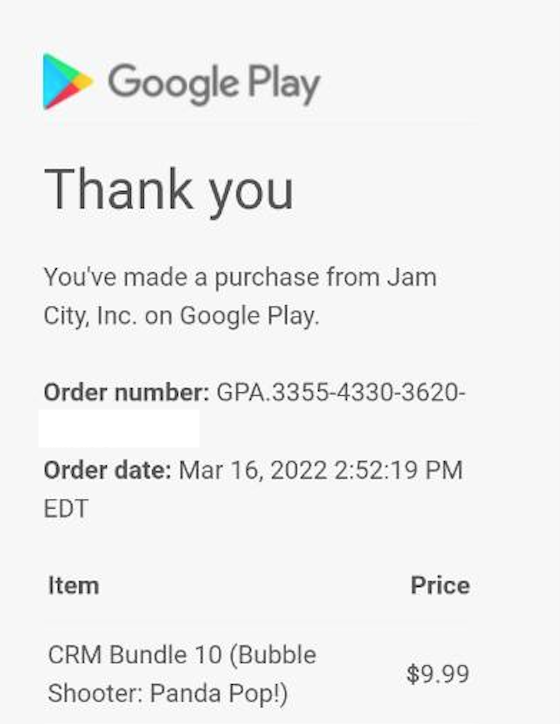
Finding Your Google Play GPA Order ID (Android)
- Open the Google Play Store app on your mobile device.
- Tap your profile icon located in the top-right corner.
- Select Payments & Subscriptions, then tap Budget & History.
- Locate the Top War transaction and tap it to reveal the receipt details.
- Note the transaction ID starting with GPA. (e.g.,
GPA.3341-8920-1142-99124).
Finding Your Apple Order ID (iOS)
- Open your iPhone or iPad Settings menu.
- Tap your Apple ID name banner at the very top.
- Select Media & Purchases, then tap View Account.
- Scroll down and tap Purchase History.
- Find the Top War purchase and tap it. Your receipt displays a 10-character Order ID starting with M-.
Pricing Tiers, Denominations, and First-Time Purchase Bonuses
Pack values scale from $4.99 to $999.99 across official and third-party channels. Matching your billed receipt against in-game inventory confirms whether an order partially delivered or stalled completely.
| Pack Denomination | Official Store Base Price | Third-Party Discount Range | Standard In-Game Utility |
|---|---|---|---|
| 500 Pack Tier | $4.99 | ~$3.80 - $4.50 | Entry-level speedups and daily pack triggers |
| 1,000 Pack Tier | $9.99 | ~$7.50 - $8.90 | Basic recruit tickets and building merge upgrades |
| 2,000 Pack Tier | $19.99 | ~$15.00 - $17.50 | Battle Pass activation and mid-tier event packages |
| 5,000 Pack Tier | $49.99 | ~$37.50 - $44.00 | Heavy hero recruitment and base expansion pushes |
| 10,000 Pack Tier | $99.99 | $69.94 - $82.00 | Major Lucky Fortune participation and elite hero shards |
| 100,000 Pack Tier | $999.99 | Bulk tier pricing | High-end alliance war preparation (includes 5% bonus) |
Third-party recharge platforms typically offer 10% to 32% pricing discounts compared to standard mobile storefronts by bypassing native app store processing surcharges.
If you are planning your next resource push, you can buy Top War Gold Blocks at competitive market pricing through verified UID delivery methods.
First-Top-Up Multipliers (x2 Rewards)
When purchasing an eligible first-recharge tier, authorized platforms trigger the active 2x multiplier. If you buy a 10,000 pack with an active bonus, the base 10,000 units usually credit to your balance immediately, while the additional 10,000 bonus units arrive as a system mail attachment.
Gift Codes vs. Direct Recharges
Gift codes differ fundamentally from direct account top-ups. Top War processes all promo and gift codes exclusively in-game via Profile > Settings > Gift Code. The publisher maintains no external web redemption page for codes; avoid third-party websites claiming to redeem gift codes online.
Safe Recharges vs. Account Bans: Security Protocols
Protecting your account requires knowing how legitimate recharge pipelines work. Unauthorized purchase methods and login sharing create immediate security and ban risks.
Legitimate UID Top-Up Protocol:
[Player Provides UID + Region] -> [Authorized Server API Credit] -> [Safe Balance Delivery]

High-Risk Account Sharing Protocol (DANGEROUS):
[Player Shares Login + Password] -> [Unauthorized Device Login] -> [Account Flagged / Banned]
What Legitimate Top-Ups Ask For vs. Scam Warning Signs
- Legitimate Platforms Require: Your public digital User ID (UID), your Server/Region number, and your character name for routing confirmation. They interact directly with payment distribution protocols without ever touching your login session.
- Scams and High-Risk Platforms Require: Your game login credentials, Facebook/Apple/Google account passwords, or two-factor authentication codes. Never share your password with any service offering cheap currency.
To safeguard your game progression, always use a reliable direct UID top-up for Top War that only requires your public account identifier.
The Chargeback Trap
Filing an immediate dispute through your credit card provider, bank, or PayPal creates severe complications. Rivergame enforces an automated zero-tolerance policy for payment reversals.
When a financial institution reverses a charge, the game server flags the transaction as fraud and deducts the corresponding currency. If you have already spent those resources, your account drops into a negative balance, triggering an automatic suspension until the negative amount is repaid. Always exhaust customer support channels before contacting your bank.
Submitting a Missing Purchase Support Ticket
If self-troubleshooting fails after 30 minutes, file a structured ticket with Rivergame customer support. Including complete verification details in your first message avoids multi-day back-and-forth delays.
Locating Your Account Metrics
Tap your commander portrait in the top-left corner of the main screen. Your Commander Profile displays all key support metrics:
- User ID (UID): Located right under your player name. Tap the small copy icon beside it to copy the numeric string directly to your clipboard.
- Commander Name: Your exact in-game handle, including any special symbols or clan tags.
- Server / Region: The server number where your character resides (e.g., Server 1240).
- VIP Level & Commander Level: Your current base progression markers.
- Combat Power (CP): Your total power score, which confirms profile authenticity.
Template for Rivergame Customer Support
Submit your support request through the in-game help menu (Profile > Settings > Help / Support) or via their official support email. Use the following structured format:
Subject: Missing Purchase Delivery - UID: [Your UID Here]

Hello Top War Support Team,

I completed a purchase on [Date and Exact Time], but the currency has not arrived in my account balance, bag, or in-game mailbox after completing client restarts.

Account Details:
- Character Name: [Your In-Game Name]
- User ID (UID): [Your Copied UID]
- Server/Region: [Your Server Number]
- VIP Level: [Your VIP Level]
- Commander Level: [Your Level]

Transaction Details:
- Package Purchased: [e.g., 10,000 Pack Tier / $99.99]
- Storefront: [Google Play / Apple App Store / Web Direct]
- Transaction / Order ID: [GPA.XXXX-XXXX-XXXXX or Apple M-XXXXXXXXXX]
- Billing Total: [Amount and Currency, e.g., $99.99 USD]

I have attached an uncropped screenshot of my official purchase receipt and a screenshot of my current in-game balance. Please review the transaction and credit the missing package to my character.

Thank you,
[Your Name]
Attach two clear image files: your complete app store invoice showing the order ID and timestamp, and a screenshot of your main game screen showing your current currency balance and mailbox status.
Strategy Guide for Every Budget Tier
Allocating your spend efficiently maximizes resource yields while minimizing transaction risks.
+-------------------------------------------------------------------------+
|                       SPENDER STRATEGY ROADMAP                          |
+-------------------+-----------------------------------------------------+
| F2P Commanders    | Maximize free web milestone distributions (2,000 to  |
|                   | 6,000 currency via mail) and in-game gift codes.    |
+-------------------+-----------------------------------------------------+
| Mid Spenders      | Target 2,000 Pack ($19.99) for monthly passes and    |
| ($20 - $100/mo)   | 10,000 Pack tiers ($69.94-$82.00) during x2 resets. |
+-------------------+-----------------------------------------------------+
| Heavy Spenders    | Pick 100,000 bulk packs for 5% baseline bonus.      |
| ($500+/mo)        | Always run a $4.99 test order on new channels first.|
+-------------------+-----------------------------------------------------+
Free-to-Play (F2P) Commanders
- Focus on official publisher reward center milestones that distribute free currency directly to your in-game mailbox (often providing 2,000, 4,000, or 6,000 currency rewards).
- Redeem active community gift codes strictly inside the app via Profile > Settings > Gift Code.
- Never enter your UID on unverified third-party websites promising "free generator" currency.
Mid-Tier Spenders ($20 to $100 Monthly)
- Prioritize the 2,000 Pack Tier ($19.99) to unlock premium Battle Pass reward tracks, which return the highest resource-to-dollar ratio for active players.
- When buying currency directly, save your budget for the 10,000 Pack Tier ($99.99 base, or $69.94 to $82.00 via discounted top-up platforms) during seasonal 2x first-purchase resets.
- Always verify that your purchase credited the expected VIP points alongside raw currency.
Heavy Spenders and Alliance Whales ($500+ Monthly)
- The 100,000 Pack Tier ($999.99) provides the best bulk value with its built-in 5% bonus currency allocation.
- When purchasing high-volume packs from third-party platforms, execute a small $4.99 test transaction first if you have recently switched servers or created a new character profile. Once the test order lands within the standard 2 to 5-minute window, proceed with larger bulk orders.
- Keep an archive folder of all GPA and Apple order receipts on your device for fast tax or support reconciliation.
Frequently Asked Questions
Why have my Gold Bricks or Gems not arrived after payment?
Delivery can be delayed by app store billing verification queues, temporary game server congestion during peak events, or network latency. In most cases, currency delivers within 5 to 30 minutes once payment confirmation clears the processor.
What should I do first if my Top War purchase does not appear?
Force-close the Top War app completely and restart it to trigger a fresh server synchronization. Next, check both your in-game mailbox (envelope icon) and your backpack inventory for claimable bundle items or reward attachments.
How do I find my Top War User ID (UID) for purchase support?
Tap your commander avatar portrait in the top-left corner of the main game screen. Your numeric User ID is displayed directly below your player name, accompanied by a copy button for instant clipboard copying.
Where do I locate my Google Play order receipt ID?
Open the Google Play Store, tap your profile icon, and navigate to Payments & Subscriptions > Budget & History. Locate your Top War transaction to find the order number beginning with GPA..
Where can iOS players find their Apple transaction Order ID?
Open your device Settings, tap your Apple ID banner at the top, and go to Media & Purchases > View Account > Purchase History. Select your Top War purchase to locate the 10-character Order ID starting with M-.
Is 'Gold Bricks' the official currency in Top War: Battle Game?
No, Top War: Battle Game officially utilizes Gems and Gold Blocks for recruiting heroes, merging units, and base upgrades. Gold Bricks is the premium currency of Last War: Survival, though players and third-party stores frequently use the terms interchangeably.
Should I request an immediate bank chargeback if currency is missing?
No, you should never initiate an immediate chargeback before contacting support. Reversing a payment through your bank triggers automated anti-fraud flags that can cause negative account balances and permanent account bans.
Resolving Stalled Deliveries with Zero Friction
Missing currency can cause concern, but delivery hangs almost always stem from routine server delays or unopened inventory packs.
If an order remains unfulfilled after checking your mailbox and bag, prepare your numeric UID, server region, and storefront Order ID. Submitting these details directly to customer support ensures prompt fulfillment without triggering the negative balance penalties associated with bank chargebacks.






Comments