

Paid for Lunite but your balance is empty? Here is how to diagnose server delays, verify your UID, and recover missing Wuthering Waves purchases fast.
You approved the charge, but your in-game wallet still sits at zero.
During high-traffic banner launches, purchases frequently lag behind bank notifications. In most cases, the currency is not lost—it is held in a payment gateway queue, stalled by client cache desync, or credited to another server region.
Do not tap purchase again. Spamming the button risks double-billing while the first transaction processes. Instead, use this diagnostic checklist to verify payment status, check your UID, and escalate to Kuro Games support if needed.
Why Your Lunite Delivery Is Delayed After Payment
Every Lunite purchase crosses three checkpoints: your payment provider, the platform storefront (App Store, Google Play, or PC processor), and the Kuro Games server. An interruption at any stage creates a delivery delay.
Client-side caching causes most immediate display issues. When external billing wraps up, the game client does not always ping the server automatically. The billing server registers the transaction, but your device continues showing the cached wallet total.
Relaunching the game forces an immediate database query. Active VPNs, dropped packets, and regional store mismatches can also stall the authorization token.
In-game history menus—including Convene logs—also carry a 30-minute internal cache delay, meaning recent balance shifts may not show up right away.
| Elapsed Time | Suspected Cause | Immediate Action Required |
|---|---|---|
| 0 – 15 Minutes | Client cache lag or local session desync | Fully close game, disable VPN, relog to refresh balance |
| 15 – 60 Minutes | Platform gateway queue or store token delay | Check platform purchase history for "Completed" status |
| 1 – 24 Hours | Bank authorization hold or fraud review | Verify bank deduction vs pending authorization hold |
| 24+ Hours | Database drop or UID delivery mismatch | Collect invoice details and open a Kuro Games support ticket |
Takeaway: Never attempt a repeat purchase within the first 60 minutes; give the server buffer time to process the initial token before escalating.

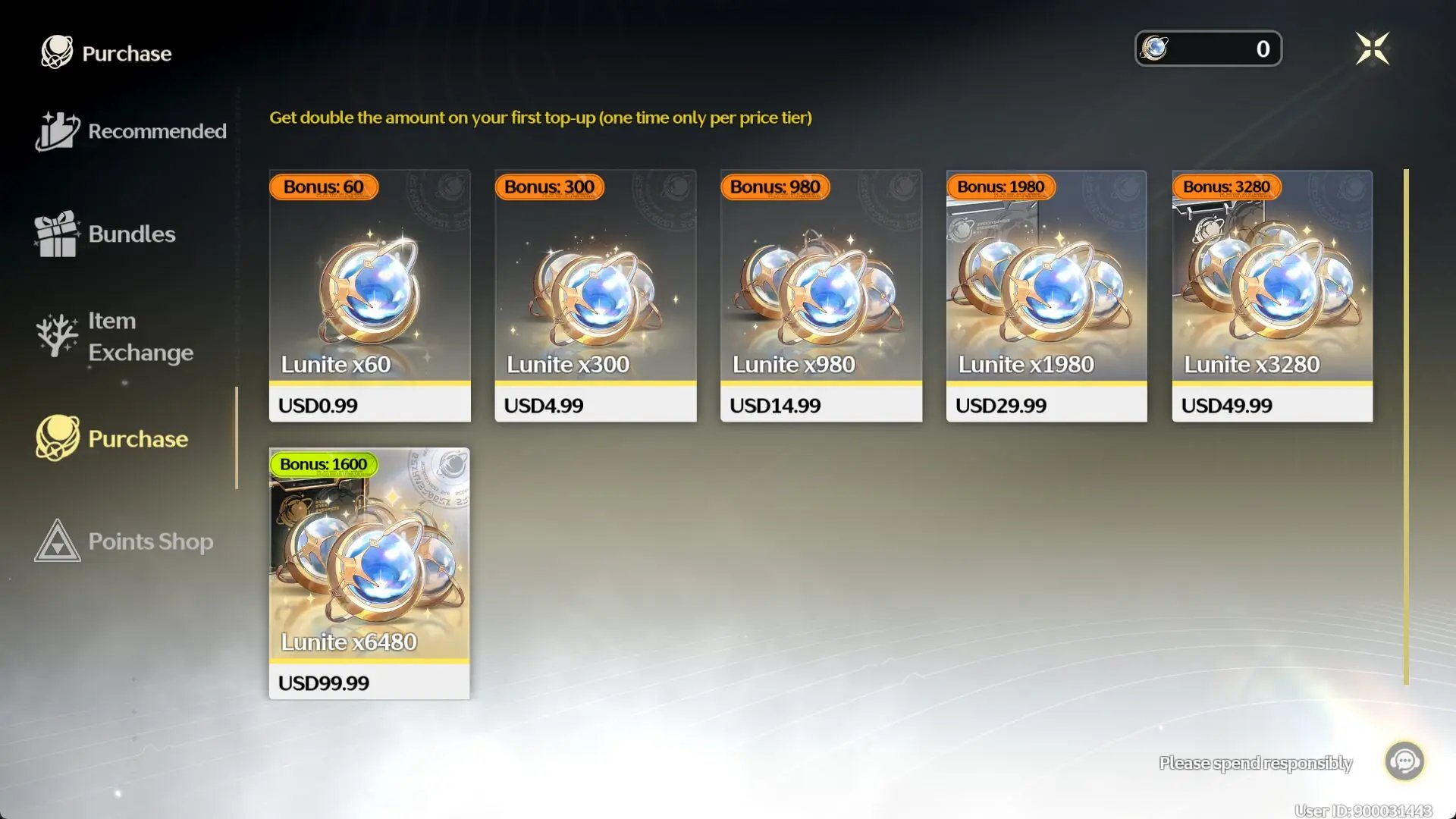
60 Lunites
 60 LunitesUSD 0.78Buy Now
300+30 Lunites
300+30 LunitesUSD 3.74Buy Now980+110 Lunites
980+110 LunitesUSD 11.10Buy Now1980+260 Lunites
1980+260 LunitesUSD 22.14Buy Now3280+600 Lunites
3280+600 LunitesUSD 36.64Buy Now6480+1600 Lunites
6480+1600 LunitesUSD 72.02Buy NowLunite Subscription
 Lunite SubscriptionUSD 3.74Buy Now
Checking for Server Mismatches and Incorrect UIDs
Wuthering Waves divides player data across five regional servers: America, Asia, Europe, HMT (Hong Kong, Macau, Taiwan), and SEA (Southeast Asia). Profiles and currency balances are hard-locked to their respective servers.
Logging into Europe when your main save is on America drops you into a blank profile with zero Lunite. The funds exist, but on a different server partition.
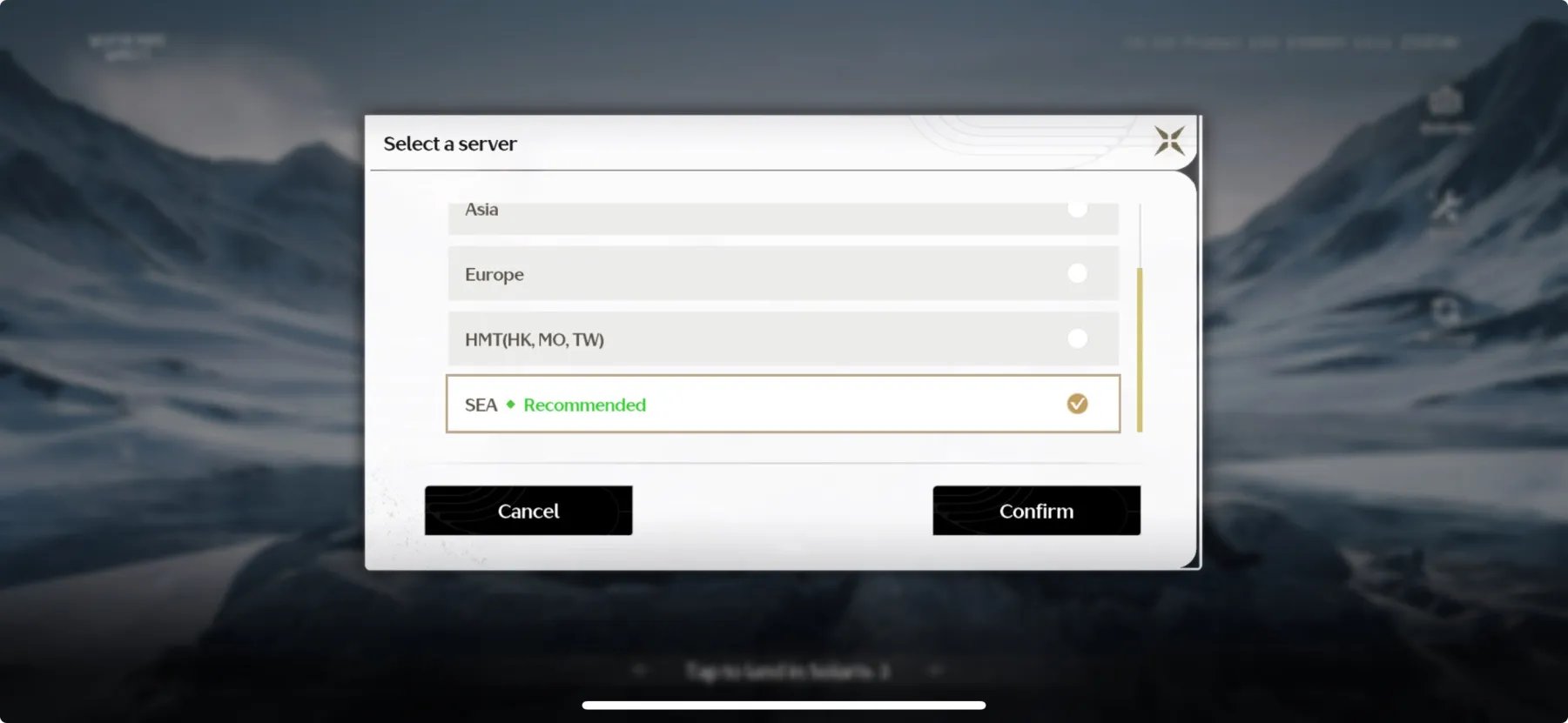
To verify your active profile:
- Open the game menu and access the Terminal.
- Navigate to Settings > Account Settings > User Center.
- Check your linked email address and confirm your login credentials match your primary profile.
- Look at the bottom right corner of your screen to verify your 9-digit Player UID and regional server tag.
If purchasing via web top-up, double-check every digit of that UID. Kuro Games cannot reassign or transfer currency once delivered to an existing account matching a typo.
Lunite Subscription Mechanics: Upfront vs Daily Delivery
The $4.99 Lunite Subscription does not deliver 3,000 currency units upfront.
Upon purchase, you receive 300 Lunites instantly. The remaining 2,700 Astrites arrive in daily increments of 90 Astrites across 30 days.
Key monthly pass rules:
- Daily Reset Time: Claims refresh at 4:00 AM server time.
- No Automatic Mail Queuing: Missing a daily login forfeits that day's 90 Astrites. They do not queue in the mailbox.
- Stacking Mechanics: Purchasing multiple passes adds 30 days to the duration clock. It does not increase the 90 Astrite daily payout.
- The 180-Day Cap: Pass duration caps at 180 days. Purchasing a pass while capped grants 330 Lunites directly instead of extending the duration.
If you bought the pass expecting an instant 3,000 Lunites, check your wallet for the initial 300 boost.
| Purchase Type | Retail Price | Upfront Lunite | Total Astrite Value | Pulls Yielded (160/pull) | Payout Schedule |
|---|---|---|---|---|---|
| Lunite Subscription | $4.99 | 300 | 3,000 | ~18.75 Pulls | 300 instant + 90 daily over 30 days |
| Lunite x300 Pack | $4.99 | 300 (+300 first time) | 300 (or 600 first time) | 1.87 to 3.75 Pulls | 100% Instant delivery |
| Lunite x980 Pack | $14.99 | 980 (+980 first time) | 980 (or 1,960 first time) | 6.12 to 12.25 Pulls | 100% Instant delivery |
| Lunite x1980 Pack | $29.99 | 1,980 (+1980 first time) | 1,980 (or 3,960 first time) | 12.37 to 24.75 Pulls | 100% Instant delivery |
Takeaway: The Lunite Subscription offers unmatched value over 30 days, but players needing emergency banner pulls must rely on direct top-ups.
Confirming Payment Status Across Official Billing Platforms
Always confirm the transaction status with your payment provider before opening a ticket. A push notification from your banking app often reflects a temporary pre-authorization hold rather than a settled charge. If the payment gateway fails to capture the hold, the funds release back to your account automatically.
Apple App Store Verification (iOS & Mac)
- Open your device Settings, tap your name, and select Media & Purchases.
- Tap View Account and open your Purchase History (covering up to 90 days).
- Check the transaction status for Wuthering Waves. If it reads "Pending", Apple has not settled the charge with Kuro Games yet.
- You can also visit
reportaproblem.apple.comto review your official invoice and Order ID.
Google Play Verification (Android & PC)
- Navigate to
payments.google.comusing your web browser. - Sign in with the Google account linked to your device.
- Open the Activity tab to check your transaction receipts.
- Ensure the status reads "Completed". If the charge shows as canceled or refunded, your bank may take up to 10 business days to clear the authorization hold back to your balance.
When you use a reliable external option like the top up Wuthering Waves Lunite platform, review the automated email receipt and order dashboard to confirm the delivery status before checking your in-game mail.
Lunite Pricing Tiers and First-Purchase Double Bonus Rules
Lunite converts to Astrites at a 1:1 ratio, with Convene pulls costing 160 Astrites each.
Each top-up tier includes a one-time First Top-Up Double Bonus. The first purchase of a specific tier awards double the base amount. Subsequent top-ups on that same tier drop to a smaller standard bonus.
If a pack delivered less currency than expected, check whether your account had already consumed that tier's first-time multiplier.
| Pack Tier | Base Price | First-Time Double Bonus | Secondary Top-Up Bonus | Total First-Time Lunite | Total Recurring Lunite |
|---|---|---|---|---|---|
| Lunite x60 | $0.99 | +60 Lunite | +0 Bonus | 120 Lunite | 60 Lunite |
| Lunite x300 | $4.99 | +300 Lunite | +30 Bonus | 600 Lunite | 330 Lunite |
| Lunite x980 | $14.99 | +980 Lunite | +110 Bonus | 1,960 Lunite | 1,090 Lunite |
| Lunite x1980 | $29.99 | +1,980 Lunite | +260 Bonus | 3,960 Lunite | 2,240 Lunite |
| Lunite x3280 | $49.99 | +3,280 Lunite | +600 Bonus | 6,560 Lunite | 3,880 Lunite |
| Lunite x6480 | $99.99 | +6,480 Lunite | +1,600 Bonus | 12,960 Lunite | 8,080 Lunite |
Takeaway: The first-time bonus doubles your value across every individual pack tier once; plan your large spending around untouched tiers for maximum efficiency.
If you want to restock your premium currency safely and lock in fast deliveries, you can buy Wuthering Waves currency directly to avoid complex store routing delays.
Safe Recharging Practices vs Dangerous Account Traps
Third-party recharge services operate under two distinct models:
- Direct UID-Only Top-Up (Safe): You provide only your in-game Player UID and Server Region. The storefront injects the currency directly via official developer API integrations. You never reveal your password, email, or account recovery data.
- Account Login Top-Up (Dangerous Trap): The seller asks for your login email, password, and two-factor authentication (2FA) verification codes. An unknown agent manually logs into your account to purchase currency using regional arbitrage or stolen payment cards.
Never share login credentials or 2FA codes. Handing account access to third parties breaches Kuro Games terms of service and risks account theft, chargeback disputes, and negative currency bans.
To keep your account completely secure:
- Only use services that require your UID and Server ID.
- Never share your Kuro Games login password or SMS/email verification codes.
- Avoid deals that offer discounts dramatically below standard market rates, as these often stem from fraudulent carding rings.
Choosing a legitimate Wuthering Waves top-up service ensures your currency is credited via clean UID routing without putting your profile at risk.
Recommended Lunite Purchase Plans for Every Spender Tier
Maximize your pulling efficiency by matching pack tiers to your monthly budget.
Budget & Low Spenders ($5 – $15 per month)
- Primary Focus: Lunite Subscription ($4.99).
- Strategy: Keep your 30-day monthly pass active at all times. For $4.99, you secure 3,000 Astrite equivalents (roughly 18 pulls) as long as you log in daily. If you have extra budget, buy the $0.99 (60 Lunite) and $4.99 (300 Lunite) packs once to claim their first-time double bonuses.
- My Verdict: Avoid buying non-bonus $0.99 or $4.99 direct packs. Their pull-per-dollar conversion without the double bonus is terrible.
Mid-Tier Spenders ($30 – $80 per month)
- Primary Focus: Monthly Pass + First-Time Double Bonus Packs ($14.99 x980 and $29.99 x1980).
- Strategy: Maintain the Lunite Subscription for baseline pull income. When target character banners arrive, clear the untouched double-bonus tiers starting from the $29.99 pack down to the $14.99 pack.
- My Verdict: The $29.99 tier with first-time bonus yields 3,960 Lunites (almost 25 pulls), making it the sweet spot for snagging a limited 5-star weapon or character guarantee.
Heavy Spenders & Whales ($100+ per month)
- Primary Focus: High-tier packs ($49.99 x3280 and $99.99 x6480).
- Strategy: Clear all first-time double tiers immediately. Once exhausted, stick exclusively to the $99.99 pack for standard top-ups. The +1,600 bonus on the $99.99 tier offers the highest recurring bonus ratio (+24.6% extra currency) compared to the smaller packs.
- My Verdict: Never buy multiple small packs once their double bonus is gone. Stacking recurring $99.99 packs delivers significantly more Astrites per dollar than buying several $14.99 or $29.99 packs.
How to Submit a Kuro Games Customer Support Ticket for Missing Currency
If you have waited 24 hours, confirmed that the money settled on your bank or platform statement, and relogged without seeing your Lunite, it is time to open an official support ticket.
Step-by-Step In-Game Ticket Process
- Launch Wuthering Waves and open the Terminal menu.
- Tap the Feedback icon (represented by a speech bubble / support icon).
- Select Customer Service > Payment & Top-Up Issues.
- Fill out the missing purchase report form with precise details.
Information You Must Provide
To ensure the support team does not reject your ticket or send an automated generic response, have these five items ready:
- Player UID: Found on your profile screen or bottom right corner.
- Server Region: America, Asia, Europe, HMT, or SEA.
- Exact Date & Time of Transaction: Include time zone (preferably UTC).
- Product Purchased: (e.g., Lunite x1980 Pack or Lunite Subscription).
- Full Payment Invoice/Receipt: A clean screenshot of your Apple App Store, Google Play, or merchant invoice showing the Order ID / Transaction ID, amount paid, and completed status.
Copy-Paste Support Ticket Template
Subject: Missing Lunite Purchase – UID [Insert UID Here] – [Insert Server Here]
Dear Kuro Games Support Team,
I completed a purchase for [Insert Item, e.g., Lunite x1980 Tier] on [Insert Date and Time UTC], but the currency has not been credited to my account after 24 hours.
Here are my account and transaction details: - Player UID: [Insert your 9-digit UID] - Server: [America / Asia / Europe / HMT / SEA] - In-Game Name: [Insert character name] - Item Purchased: [e.g., Lunite x1980 Pack] - Transaction / Order ID: [Insert platform order number] - Total Amount Paid: [e.g., $29.99 USD]
I have restarted my client, verified my server selection, and confirmed that the transaction successfully cleared my billing account.
Attached is the official purchase invoice showing the completed order ID and timestamp. Please investigate my transaction log and credit the missing Lunites to my profile.
Thank you for your assistance, [Your Name / In-Game Name]
Frequently Asked Questions
Why is my Lunite not showing up after a successful payment?
Transactions can experience temporary delivery lag caused by network bottlenecks, payment gateway processing queues, or cached game client states. Fully close Wuthering Waves, restart your device, and relog to refresh your wallet balance from the server.
Did I log into the wrong server in Wuthering Waves?
Character progression and currency balances are strictly server-locked across America, Asia, Europe, HMT, and SEA. Check the server selector on the title screen to ensure you have loaded the exact region where your primary character profile exists.
How does the Lunite Subscription deliver its currency?
You receive 300 Lunites immediately upon purchase, while the remaining 2,700 Astrites are claimed as 90 Astrites per day over 30 days upon logging in. If you fail to log in on any given day, that day's 90 Astrites are permanently lost.
How can I confirm my purchase actually went through?
Check your official billing history through Apple App Store purchase history, Google Play order activity, or your bank account statement. Ensure the transaction is marked as completed rather than pending or canceled before requesting assistance.
What should I do if my payment cleared but Lunite never arrives?
Wait up to 24 hours for backend payment verification to clear before opening an in-game customer support ticket via the Terminal menu. Provide your Player UID, server region, and a complete screenshot of your official purchase receipt showing the transaction ID.
What happens if I buy multiple Lunite Subscriptions at once?
Purchasing an additional subscription extends your active pass duration by 30 days rather than doubling your daily 90 Astrite payout. If your active subscription time exceeds the 180-day cap, the purchase automatically converts into 330 Lunites instantly without adding extra days.
The Final Triage: When to Wait and When to Escalate
Most missing Lunite issues resolve within an hour once client caches refresh or store gateways clear.
The recovery checklist: Wait 60 minutes, restart the game, and verify your server region. If the charge settles on your statement and 24 hours pass with no delivery, submit an in-game support ticket. Avoid initiating payment chargebacks through your bank, as unpaid charge reversals trigger negative balance penalties and account locks.
Submit the support template with your transaction invoice attached, allowing Kuro Games to manually credit your account balance.






Comments