

Locate your Infinite Borders Game ID, Friend ID, and server details instantly with this exact UI navigation path through the in-game Lord Manual interface.
Locating Your Infinite Borders Game ID in the Lord Manual
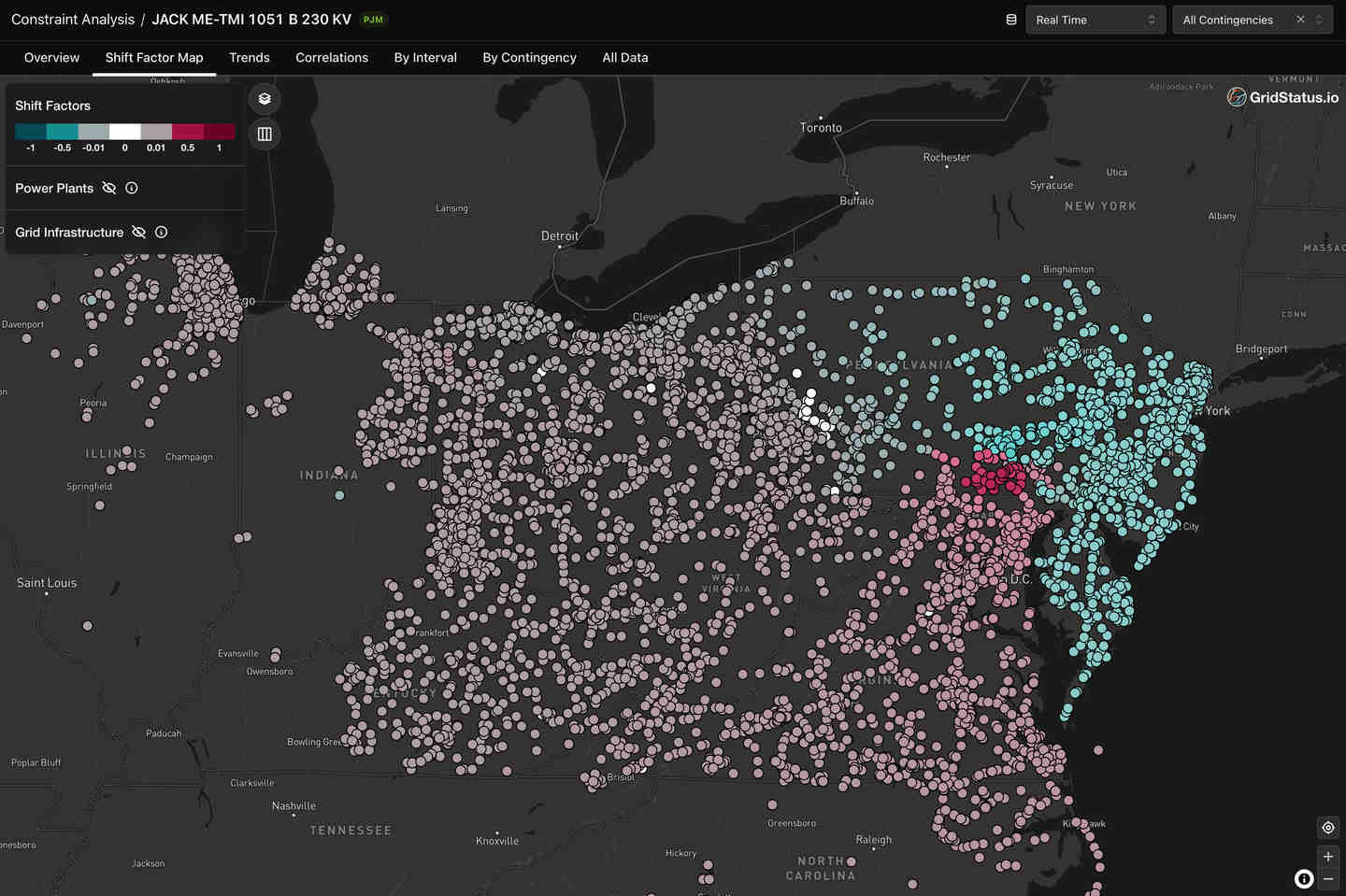
Your account identification number sits inside the Lord Manual rather than on the primary heads-up display. Reaching it takes two taps from the main stronghold screen.
Steps to open your profile overview:
- From the main map view, find the bottom management banner.
- Tap Domestic Affairs on the lower menu tray.
- Find your player name and current level on the top bar.
- Tap the Lord Avatar circle next to your name.
- The Lord Manual interface will open.
Your numeric Game ID is displayed directly on this screen. This number is your permanent UID across the 2.25 million grid map. It remains fixed if you migrate regions, finish a campaign season, or rename your lord.
Copy this number or take a screenshot immediately. Alliance officers require it for rosters, and support teams need it to trace sync errors or missing deliveries.
The table below details where each key account identifier is located in the menus.
| Profile Identifier | Menu Navigation Path | Primary Purpose |
|---|---|---|
| Game ID (UID) | Domestic Affairs > Avatar (Lord Manual) | Permanent account identifier for customer support and account verification |
| Friend ID | Domestic Affairs > Avatar > Profile Details | Shareable player code used by others to send social and alliance requests |
| Name Modification | Lord Manual > Brush Icon (Adjacent to Name) | Display name adjustment (requires a fixed cost of 500 Jades) |
| Server & Season Status | Login Screen / Season Course UI | Verifies active season cycle, campaign progress, and server number |
Using this path ensures you retrieve the correct numeric code before contacting player support or processing external account actions.

Infinite Borders - Infinite Borders - 288 Jades
 Infinite Borders - Infinite Borders - 288 JadesUSD 3.26Buy Now
Infinite Borders - Infinite Borders - 300 Jades Tribute Pack
Infinite Borders - Infinite Borders - 300 Jades Tribute PackUSD 4.08Buy NowInfinite Borders - Infinite Borders - 720 Jades
Infinite Borders - Infinite Borders - 720 JadesUSD 8.17Buy NowInfinite Borders - Infinite Borders - 1440 Jades
Infinite Borders - Infinite Borders - 1440 JadesUSD 16.36Buy NowInfinite Borders - Infinite Borders - 3790 Jades
Infinite Borders - Infinite Borders - 3790 JadesUSD 40.90Buy NowInfinite Borders - Infinite Borders - 7150 Jades
Infinite Borders - Infinite Borders - 7150 JadesUSD 81.81Buy NowInfinite Borders - Infinite Borders - 14350 Jades
Infinite Borders - Infinite Borders - 14350 JadesUSD 163.64Buy NowInfinite Borders - Infinite Borders - 28310 Jades
Infinite Borders - Infinite Borders - 28310 JadesUSD 327.28Buy Now
Game ID vs Friend ID: Knowing the Difference in Your Profile
Game IDs and Friend IDs serve completely different functions.
Your Game ID is your primary database record. It binds directly to your server profile, general cards, tactical stratagems, and currency balances. Use your Game ID for account recovery, roster registration, or support tickets.
Your Friend ID, found within the profile sub-tabs, is a public handle for social requests. Other players use it to search for your profile, send troop dispatches, or mail letters. It cannot verify billing ownership or alter account data.
Submitting a Friend ID when a registrar or billing portal requests a Game ID will cause lookup errors. When preparing for seasonal recruitment or recharging your balance using secure Infinite Borders Jade top-up options, having the exact numeric Game ID ready ensures transactions route directly to your character.
Checking Active Server Number, Season Progress, and Regional State
Server numbers and seasonal states dictate alliance matchmaking and map layouts across the 2.25 million tile grid.
To check active season details while logged in, open the Season Course window under the Domestic Affairs sub-menu. The top header shows your server tag (such as S1, S2, or Conquest Season groups) alongside the milestone countdown.
From the game's title screen, your current server appears directly above the "Enter Game" button. Tapping this selector brings up the regional map overview, which lists population density and congestion levels for every starting territory.
The table below lists the meaning behind each regional tag at season launch.
| Regional Status Tag | Map Condition | Tactical Significance for Lords |
|---|---|---|
| Selectable | Low to moderate player density | Open for immediate character creation and baseline resource expansion |
| Crowded | High player density near spawn zones | Slower initial expansion due to competing lord boundary claims |
| Full | Maximum capacity reached | Locked for new character creation; requires selecting an alternate state |
| Contested Land | High-value conflict border zones | Active strategic choke points with heavy territorial skirmishing |
Selecting an available region ensures your group can spawn in the same province without hitting capacity locks.
Seasonal resets wipe owned tiles and city facility levels, but your roster of over 300 Three Kingdoms generals (Han, Wei, Shu, Wu, and Qun) and researched battle stratagems stay permanently attached to your Game ID.
Accessing Other Lords' Profiles and Managing Social Relations
Scouting foreign profiles provides vital intel on opposing commanders across the map.
To inspect another player's Lord Manual:
- Tap any territory tile owned by the target player.
- Select the Letter icon on the interaction wheel.
- The target's public Lord Manual will open with their seasonal battle stats and achievements.
This view shows player honours, likes, and combat records, which alliance officers check before sending invitations.
Your own manual tracks incoming attention. The Recent Visitors log in the bottom-right corner records everyone who viewed or liked your profile. Hostile officers in your visitor log often signal incoming border probes or siege plans.
For unwanted contact, the Relation Management button in the lower-left corner lets you handle incoming requests, manage friends, and blacklist disruptive accounts.
Modifying Your Display Name and Account Profile Customization
Player names can be changed directly in the Lord Manual without affecting account records.
To change your lord name:
- Open Domestic Affairs and tap your Avatar.
- Find your display name at the top of the profile card.
- Tap the small Brush icon next to the text.
- Enter your new name in the prompt.
- Confirm the change.
Renaming costs a flat fee of 500 Jades. The update reflects immediately in alliance lists, chat, and leaderboards, while your numeric Game ID and friend connections stay unchanged.
Avoid spending Jades on name edits during the initial 48-hour beginner protection phase. Those Jades yield better value when directed into facility acceleration or tactic research.
Utilizing Game ID for Account Safety, Cross-Platform Play, and Support
Game IDs sync progress across PC client and mobile versions.
Checking your Game ID on a new install confirms your client connected to your existing save rather than generating a fresh profile on an unintended server.
Your Game ID stores the following structural data:
- Formation Deployments: Tracks march configurations across Grand Camp, Center, and Vanguard positions. Unlocking the Vanguard slot requires a Level 5 Castle and a Level 1 Commander Hall.
- General Card Archives: Stores all collected heroes across Infantry, Archer, and Cavalry types.
- Stratagem Research: Keeps tactics extracted by dismantling 3-star, 4-star, and 5-star cards.
- Beginner Safeguards: Monitors your 48-hour beginner period, which provides reduced stamina costs and 100% resource refunds on recalled march orders.
If purchase deliveries or season rewards stall, support staff use this ID to locate your specific server data node on the grid.
Managing In-Game Currencies and Account Upgrades with Your UID
Resource planning relies on three main currencies tied to your account profile.
Jade Talismans serve as the primary paid currency. They fund Famous General recruitment, double strategy EXP gains during skill training, complete defensive builds instantly, or convert into other utility tokens.
Tiger Talismans exchange directly from Jade Talismans at a 1:1 ratio. Pulling from Famous General pools, EX card packs, or limited Season Card Packs automatically opens a 1:1 conversion window if your Tiger Talisman stock is short.
Standard Jades handle quick construction finishes inside your settlements at a flat 20 Jades per building queue. Save standard Jades for card recruitment unless rushing a Level 5 Castle is critical for an early-game alliance push.
Players frequently purchase Infinite Borders Jade Talismans ahead of new campaign drops to fund recruit pools. Before you get Infinite Borders recharge packages, verify your Game ID from the Lord Manual to guarantee your balance credits to the correct character profile.
The table below lists standard conversion values and utility costs.
| Currency / Resource Action | Cost / Conversion Rate | In-Game Utility & Effect |
|---|---|---|
| Player Name Change | 500 Jades | Modifies in-game identity in the Lord Manual and alliance roster |
| Instant Construction Bypass | 20 Jades per completion | Skips building wait timers for rapid city facility upgrades |
| Tiger Talisman Conversion | 1:1 from Jade Talismans | Required currency for Famous General, EX, and Season Card Packs |
| Strategy EXP Boost | Variable Jade Talismans | Doubles combat strategy experience yields during skill training |
Keeping track of your conversion ratios prevents overspending on instant timers when building queues can run passively.
Troubleshooting Profile Display Issues and ID Verification
Menu sync delays and season migrations can cause temporary profile discrepancies.
Character Missing After Server Reset
At the end of a season, all lords transfer to the campaign deployment lobby while the map resets. If your stronghold appears empty, check the title screen header to confirm you selected your current active campaign shard instead of an archived server.
Profile Not Updating After a Name Change
If your old name persists in chat channels after spending 500 Jades, log out to the title screen and reconnect to refresh the local cache.
ID Copy Errors on Mobile
With both Game ID and Friend ID visible in adjacent Lord Manual menus, mistyping digits is common. Take a screenshot of the manual or copy the digits carefully before submitting them for roster checks or account actions.
FAQ
Where do I find my Game ID in Infinite Borders?
Open Domestic Affairs from the bottom menu tray and tap the avatar circle next to your character name. Your numeric Game ID is printed directly on the main Lord Manual screen.
Is my Game ID the same as my Friend ID?
No. Your Game ID is a permanent database record used for account binding and customer support. Your Friend ID is a public handle used by other lords to send friend requests.
How can I check which server and season I am currently playing on?
Check the server name on the title screen above the "Enter Game" button, or open the Season Course window in Domestic Affairs to view your active server and season timeline.
How much does it cost to change my Lord name?
A name change costs 500 Jades. Open the Lord Manual and tap the brush icon beside your current display name to begin.
Can other players view my Lord Manual and stats?
Yes. Tapping any player's territory tile and selecting the Letter icon opens their public Lord Manual. Views are logged under the Recent Visitors panel.
Can I use the same Infinite Borders account on PC and mobile?
Yes. Infinite Borders supports cross-platform play between PC and mobile. Logging in with your linked account loads your Game ID, generals, and currency across devices.
How do I manage incoming friend requests and blocked players?
Open the Lord Manual via Domestic Affairs and tap Relation Management in the lower-left corner to accept requests, remove friends, or manage blocked users.
Final Take on Infinite Borders Account Identification
Locating your Game ID takes two taps via Domestic Affairs and the Lord Manual avatar. Keeping this number recorded ensures smooth alliance coordination, fast support recovery, and accurate account top-ups.
Treat your Game ID as your primary account anchor, reserve your Friend ID for social invites, and confirm your server status before opening new seasonal campaigns.






Comments