Infinite Borders Top Up: Fast and Secure Jade Recharge
Infinite Borders is a seasonal Three Kingdoms grand strategy title where timing, tactical coordination, and resource management determine the fate of entire alliances. Expanding your territory, capturing strategic commanderies, and leading legendary generals like Guan Yu, Lu Bu, and Cao Cao require steady access to premium currency. Jades are the core premium resource used to recruit 5-star heroes, accelerate critical construction queues, research advanced battle tactics, and secure seasonal advantages.
On XPTopup, you can complete your Infinite Borders top up directly using only your in-game Player ID. You never have to share your login credentials, password, or account recovery details. With direct crediting straight to your server profile, topping up is simple, secure, and fast.
How to Top Up Infinite Borders Jades on XPTopup
Recharging your Infinite Borders account takes only a few minutes. Follow these direct steps:
- Select Your Jade Denomination: Review the available Jade packs on the product list and pick the amount you want to purchase.
- Enter Your Player ID: Input your exact Infinite Borders Player ID into the designated input field.
- Confirm Server & Details: Double-check your Player ID digits to ensure the resources go to the correct character.
- Complete Payment: Choose your preferred local or global payment method at checkout and finalize the transaction.
- Check Your In-Game Balance: Open Infinite Borders on your mobile device or PC client. Your Jades will appear directly in your character balance or in-game mailbox.
How to Find Your Infinite Borders Player ID
To ensure your Jade top up reaches your account without delay, you must provide your exact numeric Player ID. You can locate your ID inside the game client at any time.
- Launch Infinite Borders on your iOS, Android, or PC client and log into your server.
- From the main strategy map, tap your Lord Avatar / Profile Icon located in the top-left corner of the screen.
- Open your profile summary window.
- Locate your Player ID (UID) displayed directly below your Lord nickname.
- Tap the copy icon next to the number or record the exact sequence of digits accurately.
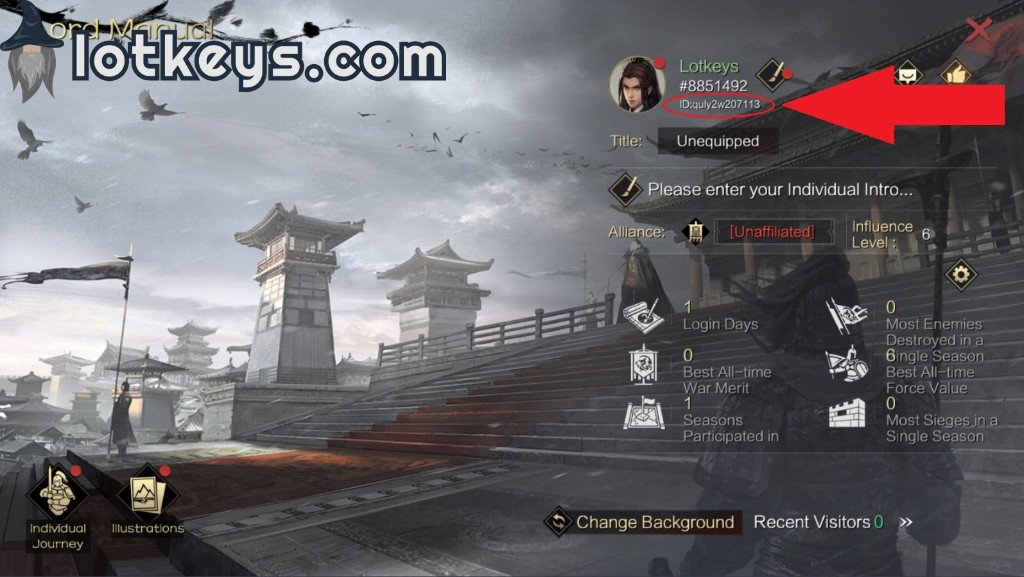
Make sure to enter the exact numbers into the XPTopup checkout field before completing your order.
Infinite Borders Jade Currency & In-Game Uses
Jades represent the primary premium currency in Infinite Borders. Managing your Jade balance effectively gives your alliance a decisive edge during seasonal campaigns and land wars.
1. General Recruitment (Hero Summons)
Recruiting top-tier 5-star generals is essential for building dominant frontline and tactical formations. Jades are required for standard summons, time-limited event pools, and exclusive Conquest season recruitment banners. Pulling duplicate generals also allows you to convert them into valuable tactical skills or unlock general potential.
2. Tactical Skill Research & Conversion
Unlocking high-tier command and active combat tactics requires transforming spare hero cards and investing resources. Jades allow lords to convert cards into higher skill experience yields, speeding up the time it takes to level up critical combat skills before major alliance sieges.
3. Construction and March Acceleration
During early season land-grabs (land rushes), rapid base progression is crucial. Jades can be used to instantly finish critical facility upgrades, expand warehouse capacities, and quickly recall or reposition marching troops across long distances.
4. Policy Expansion and Seasonal Perks
Each season introduces unique regional administration policies, tactical items, and season pass features. Jades provide access to advanced policy slots and specialized seasonal benefits that support sustained military campaigns.
Safe Top-Up: Why Player ID Only Recharge Protects Your Account
Account safety is essential when investing in long-term strategy games. XPTopup processes Infinite Borders recharges exclusively through direct Player ID submission.
- Zero Password Sharing: We never request your NetEase, Google, Apple, or social login credentials. Your password remains strictly private.
- No Risk of Account Hijacking: Because no login access is granted, your game data, bind settings, and personal details remain completely secure.
- Official Server Delivery: Top-ups are credited directly to your player profile through official game server routing, preventing authorization errors and account flags.
- Transparent Processing: Live checkout pricing shows your final total with no hidden fees or unauthorized secondary charges.
Available Infinite Borders Top Up Packs & Denominations in 2026
XPTopup provides a full selection of Jade denominations to match your strategic requirements, from small daily summons to major seasonal Conquest investments. Live pricing is displayed directly on the product selection menu.
| Pack Name | Currency Amount | Best In-Game Use |
|---|---|---|
| Small Jade Pack | 60 - 300 Jades | Daily discounted summons, rapid build acceleration |
| Medium Jade Pack | 980 - 1980 Jades | Early season land rushes, skill point conversions |
| Large Jade Pack | 3280 - 6480 Jades | Multi-pull banner recruitment, seasonal milestone events |
| Supreme Jade Bundle | High-tier Jade bundles | Alliance war preparations, Conquest season initial push |
Note: Exact Jade amounts, bonus first-recharge promotions, and live prices are shown on the active order interface above.
Infinite Borders Recharge Troubleshooting and Support
If you experience any delay or have questions about your top-up, use the following checklist to resolve common issues:
- Verify Your Player ID: Ensure the digits entered at checkout match your current server profile ID precisely.
- Restart the Game Client: Close the Infinite Borders application completely and relaunch it. Check both your direct Jade balance and your in-game system mail.
- Check Server Maintenance: If the game server is undergoing routine weekly maintenance or seasonal reset updates, Jade crediting will complete as soon as the servers reopen.
- Contact Customer Support: If your order shows completed on XPTopup but your Jades have not appeared after a short period, contact our support team with your order reference number and Player ID for prompt verification.