


You can top up Zenless Zone Zero Monochromes and an Inter-Knot Membership without a credit card by using digital wallets such as PayPal, Apple Pay, Google Pay, and Cash App on authorized web portals, or by redeeming cash and prepaid balance through mobile app stores. Because Zenless Zone Zero connects progression through a unified HoYoverse account, currency delivered through numeric User ID (UID) web checkouts syncs across PC, mobile, and PlayStation 5 profiles operating on the same server region without requiring account passwords.
Digital Wallets and Web Checkout Options
Third-party web storefronts let players bypass standard credit card gateways by integrating local digital wallets and mobile payment channels directly into checkout.
On external web platforms such as Codashop, players can settle orders through alternative payment channels including PayPal, direct bank payments, Cash App, Google Pay, and Apple Pay (Codashop). These digital wallets draw directly from connected checking accounts, debit cards, or stored app balances, removing the need for a credit line.
If you prefer using PayPal, checkout gateways authenticate the transaction through your account login or phone prompt. This avoids exposing card numbers to third-party merchant forms while keeping transaction records inside your personal wallet app.

300 + 30 Monochromes
 300 + 30 MonochromesUSD 4.06Buy Now
1980 + 260 Monochrome
1980 + 260 MonochromeUSD 25.58Buy Now980 + 110 Monochrome
980 + 110 MonochromeUSD 12.80Buy Now3280 + 600 Monochrome
3280 + 600 MonochromeUSD 41.04Buy Now60 Monochrome
60 MonochromeUSD 0.83Buy NowInter-Knot Membership
 Inter-Knot MembershipUSD 4.06Buy Now
8080 Monochrome * 2
 8080 Monochrome * 2USD 164.23Buy Now
8080 Monochrome * 4
8080 Monochrome * 4USD 328.46Buy Now8080 Monochrome * 8
8080 Monochrome * 8USD 656.93Buy Now6480 + 1600 Monochrome
6480 + 1600 MonochromeUSD 82.12Buy Now
Direct UID Top-Up vs In-App Purchases
In-app store checkouts on mobile and console route through platform payment systems. In contrast, external web platforms use direct UID delivery systems.
Platforms such as XPTopup credit purchased Monochrome or Inter-Knot Memberships directly to your in-game profile using only your numeric User ID (UID) and server region (XPTopup). You do not need to share HoYoverse passwords, email credentials, or third-party login credentials. Items arrive directly in your balance or in-game mailbox.
Selecting the correct server cluster is critical when using UID-only checkouts:
- Zenless Zone Zero maintains separate server databases: America, Europe, Asia, and TW/HK/MO.
- Entering a UID under the wrong server region can cause verification to fail.
- If a profile happens to exist under that UID on the selected incorrect server, the currency delivers to that empty profile instead (XPTopup).
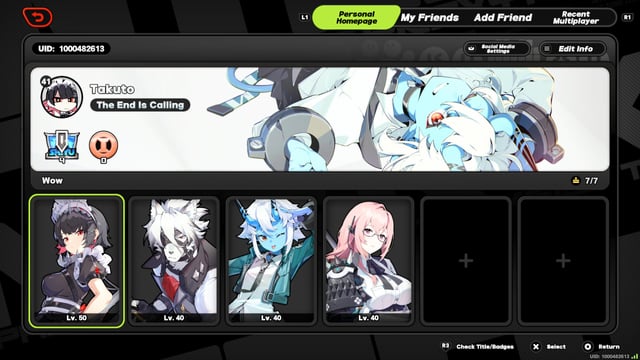
Player interface references differ regarding on-screen UID placement: documentation records show the UID in the bottom-right corner of the screen, while other in-game views place it in the lower-left corner. Verify your exact number via your main profile menu before confirming an external order.
Using Physical Cash and Prepaid Store Cards
If you lack both a credit card and a digital banking wallet, physical cash offers a viable workaround through app store balance cards (Pokibit).
Google Play allows players to convert physical currency into digital balance at participating retail locations (Google Support). You pay cash at the store counter to fund your Google Play account directly. The retailer may add an extra service fee for processing the cash deposit, and balances loaded into your digital account cannot be refunded or transferred back to cash (Google Support).
Once funded, you can execute purchases inside the Android game client using your prepaid Google Play balance without credit verification.
Prepaid Card Declines and Mobile Payment Pitfalls
Attempting to substitute a credit card with an off-the-shelf prepaid card often causes payment failures. Automated bank filters and gaming payment processors frequently flag prepaid Visa gift cards as high-risk, leading to immediate declines at checkout (TOPUPlive).
PayPal transactions and regional debit cards can also encounter verification errors on mobile devices when automated fraud-detection systems detect rapid transaction attempts or regional mismatches between your IP address and billing registry (TOPUPlive). If an external order fails repeatedly, switching from an in-app mobile checkout to an established web top-up portal using direct digital wallet authentication generally clears the processing block.
Inter-Knot Membership Duration Rules
The Inter-Knot Membership grants an initial deposit of 300 Monochrome followed by 90 Polychromes per day across a 30-day active period. While stacking multiple subscriptions is possible, strict duration ceilings apply.
- You can only extend membership validity if your current remaining duration is under 179 days (Codashop).
- Purchasing an Inter-Knot Membership when your remaining validity is 179 days or greater will not increase your subscription days (Codashop).
- In this scenario, the system issues an immediate compensation payout of 330 Monochromes instead of extending the daily reward cycle (Codashop).
Because 330 Monochromes fall far short of the standard 3,000 Polychrome equivalent yielded across a full 30-day cycle, check your remaining subscription days in-game before purchasing additional passes.
Cross-Platform Progression and Monochrome Syncing
Cross-progression in Zenless Zone Zero is tied directly to your HoYoverse account. Game data, character rosters, inventory items, and currencies sync across PC, PlayStation 5, iOS, and Android (TOPUPlive).

External top-ups delivered through your numeric UID credit your centralized account balance. As long as your PC, mobile, and PlayStation 5 accounts remain bound to the identical HoYoverse credentials and login server, your Monochromes and memberships are available across all connected hardware (TOPUPlive). Documented cross-progression covers PC, PlayStation 5, and mobile platforms, despite occasional unverified community claims of broader console availability.
Available Monochrome Packages and Conversion
Monochrome serves as the premium currency in Zenless Zone Zero, used to acquire character skins and bundle packs or converted at a 1:1 ratio into Polychrome for Signal Search banner pulls. Verified external portals offer standard pack allocations matching base game denominations (XPTopup):
- 60 Monochrome
- 300 + 30 Monochromes
- Inter-Knot Membership (300 Monochrome immediately plus 90 daily Polychromes for 30 days)
- 980 + 110 Monochrome
- 1980 + 260 Monochrome
- 3280 + 600 Monochrome
- 6480 + 1600 Monochrome
Check live platform checkout pages for current localized checkout options, applicable merchant transaction fees, and regional tax policies before finalizing payment.
Frequently Asked Questions
Do I need to share my HoYoverse password to top up without a credit card on third-party sites?
No. Legitimate third-party platforms require only your in-game User ID (UID) and server region to deliver currency directly without accessing your account credentials (XPTopup).
What happens if I buy an Inter-Knot Membership when I already have 179 days or more remaining?
Your membership duration will not extend, and the game will convert the purchase into a 330 Monochrome compensation payout instead of normal daily benefits (Codashop).
Do Monochromes purchased via UID-based web top-ups transfer between PC, console, and mobile?
Yes. Zenless Zone Zero supports cross-progression through your HoYoverse account, so long as your devices are connected to the same server region (TOPUPlive).
Comments