How to Top Up Zenless Zone Zero Monochrome with UID
Topping up your Zenless Zone Zero account on XPTopup requires only your User ID (UID) and server region. You never need to hand over your login credentials, HoYoverse password, or third-party linked accounts. All items are delivered directly to your in-game mailbox or credited straight to your balance.
Follow these steps to complete your purchase on XPTopup:
- Select Your Item: Choose the amount of Monochrome or the Inter-Knot Membership package you want to purchase from the product catalog.
- Enter Your UID: Type your numeric Zenless Zone Zero User ID into the UID field.
- Select Your Server: Pick your designated game server (America, Asia, Europe, or TW, HK, MO) from the dropdown menu.
- Review and Confirm: Double-check that your UID and server match your active profile in the game client.
- Complete Checkout: Proceed to payment. Current pricing, regional rates, and payment methods are displayed directly on the live checkout screen.
- Receive In-Game Items: Launch Zenless Zone Zero on PC, mobile, or console to verify that your Monochrome balance or active membership status has updated.
Where to Find Your Zenless Zone Zero UID and Server
Your Zenless Zone Zero UID is a unique identifier tied to your account on a specific regional server. Entering the correct combination ensures your Monochrome arrives in your account without delays.
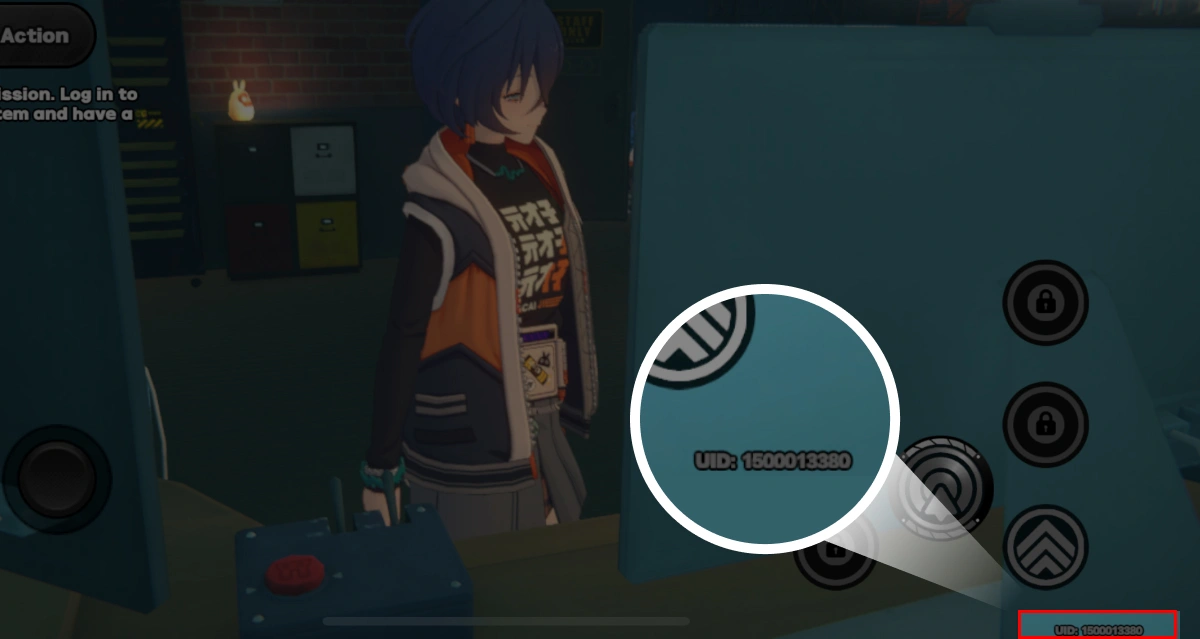
Here is how to locate your UID and active server:
- Bottom-Left Screen Display: Your UID remains visible on the lower-left corner of the screen during normal gameplay and exploration in New Eridu.
- Main Menu / Pause Screen: Open the main game menu (Esc on PC, the top-left menu icon on mobile, or the Options button on console). Your UID is printed directly beneath your avatar icon and Inter-Knot level.
- Inter-Knot Profile Card: Click on your personal profile banner inside the menu to view your full Inter-Knot details, badge display, and UID.
- Identifying Your Server: Your server was selected when you first logged in on the title screen. If you play with friends or connect across multiple devices, make sure you choose the exact same region (America, Asia, Europe, or TW, HK, MO) in the order form that appears on your game's start screen.
Monochrome vs Polychrome: Currency and Gacha Guide
Zenless Zone Zero utilizes several intertwined currencies to handle Signal Searches (the gacha system), Battery Charge replenishment, and cosmetics. Understanding the distinction between paid and free currencies helps you plan your banner spending efficiently.
| Currency / Item | Acquisition Method | Primary In-Game Purpose |
|---|---|---|
| Monochrome | Direct purchase via top-up | Converts 1:1 to Polychrome; purchases specialty bundles in the 24-Hour Store |
| Polychrome | Daily commissions, Hollow Zero, Shiyu Defense, events, or converted Monochrome | Converted directly into Master Tapes or Encrypted Master Tapes (160 per tape) |
| Encrypted Master Tape | Purchased with 160 Polychrome or exchange shops | Pulls on limited-time Agent and W-Engine Signal Searches |
| Master Tape | Purchased with 160 Polychrome, level rewards, or standard shops | Pulls on the permanent Standard Signal Search banner |
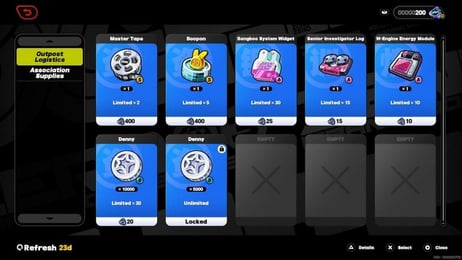
| Boopon | In-game events, Hollow Zero progression, and shop exchanges | Pulls on dedicated Bangboo Signal Search banners (cannot be bought directly with cash) |
How Conversion Works
Monochrome functions as the premium paid currency in Zenless Zone Zero. Once you purchase Monochrome on XPTopup, you can either keep it as Monochrome to buy exclusive character skins and bundle packs in the store, or convert it into Polychrome at a 1:1 ratio.
From there, 160 Polychrome can be converted into 1 Encrypted Master Tape to pull on limited-time S-Rank Agent or W-Engine banners. It can also be spent to recharge your Battery Charge up to six times per day if you want to farm character promotion materials, Drive Discs, and skill chips faster.
Inter-Knot Membership vs Direct Monochrome Top-Up
When purchasing through XPTopup, you can pick between direct Monochrome packs and the monthly subscription pass known as the Inter-Knot Membership.
Inter-Knot Membership
- Immediate Reward: 300 Monochrome delivered upon purchase.
- Daily Reward: 90 Polychrome delivered every day you log in for 30 consecutive days (2,700 total Polychrome).
- Total Value: 3,000 Polychrome equivalent across the full 30-day period.
- Best For: Consistent daily players who want the highest return on their spending over time.
- Stacking Limit: You can stack the duration of the pass up to a set maximum limit in-game. Purchasing an additional pass extends your active duration by another 30 days while immediately granting the 300 upfront Monochrome.
Direct Monochrome Top-Up
- Immediate Delivery: The entire purchased amount is credited instantly to your account.
- First-Time Top-Up Bonuses: In-game first-purchase bonus tiers apply if your account is eligible for them.
- Best For: Players who need immediate pulls for a limited-time S-Rank banner ending soon, or players buying bundles directly from the supply shop.
Supported Regional Servers: America, Asia, Europe, TW, HK, MO
Zenless Zone Zero separates player databases across distinct global server clusters. Account progress, character rosters, and friend lists do not transfer between different regional servers.
When topping up on XPTopup, you must pick the server region corresponding to your game client:
- America: Serves players across North America, South America, and Canada.
- Asia: Serves players across Japan, South Korea, Southeast Asia, and surrounding territories.
- Europe: Serves players across the European Union, UK, Middle East, and adjacent zones.
- TW, HK, MO: Dedicated server cluster for players in Taiwan, Hong Kong, and Macau.
Ensure your selected server matches the exact region shown on your game login screen. Sending a top-up to the correct UID on the wrong server will either fail verification or credit an empty profile on that regional server if one exists.
Safe Top-Up Best Practices: Why You Should Never Share Your Password
Account safety is critical when purchasing game currencies online. Many unofficial third-party services request login credentials, verification codes, or access to your linked social accounts. This creates severe risks, including stolen credentials, unlinked emails, unauthorized purchases, and account bans for violating publisher terms of service.
Why UID-Only Top-Up is the Safest Method
- No Password Required: XPTopup operates strictly through your public UID and Server selection. You never disclose your HoYoverse password or email access.
- Direct Balance Updates: Funds are sent directly into your game account through standard delivery channels.
- Zero Risk of Account Takeover: Because no login session is initiated, third parties cannot modify your account security settings, delete your Drive Discs, or dismantle your W-Engines.
- Simple and Transparent: You control your account access entirely from your own PC, console, or mobile device.
Always verify your UID before completing payment, and avoid any platform that demands your personal login information.
Frequently Asked Questions
How do I find my Zenless Zone Zero UID and Server?
Open the main pause menu in Zenless Zone Zero. Your UID is visible under your character avatar icon and on the bottom-left corner of the screen. Your server is the region you selected on the title screen before starting the game (America, Asia, Europe, or TW, HK, MO).
Do I need to share my HoYoverse password for ZZZ top-up?
No. Top-ups on XPTopup are completed using only your public UID and server selection. You should never share your password, login email, or two-factor authentication codes with anyone.
What is the difference between Monochrome and Polychrome in Zenless Zone Zero?
Monochrome is the paid currency obtained through direct top-ups and Inter-Knot Membership bonuses. Polychrome is the primary currency used for Signal Searches and energy refills. You can convert Monochrome to Polychrome at a 1:1 ratio whenever you want to buy Master Tapes or Encrypted Master Tapes.
Can I buy an Inter-Knot Membership with UID only?
Yes. You can select the Inter-Knot Membership on XPTopup, provide your UID and server, and complete your order. The 300 upfront Monochrome and the 30-day daily login claim will activate directly on that account.
Which servers are supported for Zenless Zone Zero top up?
XPTopup supports all major regional servers: America, Asia, Europe, and TW, HK, MO.
Is Zenless Zone Zero free to play without purchasing Monochrome?
Yes. Zenless Zone Zero is free to download and play. All story missions, Hollow Zero exploration, Shiyu Defense challenges, and events can be completed using free agents and Polychromes earned from daily in-game activities. Monochrome purchases are optional for acquiring additional characters, weapons, or supply packs faster.
Current package prices
Current package prices are shown below. Prices exclude Tax. Tax, payment fees and applicable coupons are shown at checkout.
| Package | Price |
|---|---|
| 6480 + 1600 Monochrome | USD 82.12 |
| 60 Monochrome | USD 0.83 |
| 300 + 30 Monochromes | USD 4.06 |
| Inter-Knot Membership | USD 4.06 |
| 980 + 110 Monochrome | USD 12.80 |
| 1980 + 260 Monochrome | USD 25.58 |
| 3280 + 600 Monochrome | USD 41.04 |
| 8080 Monochrome * 2 | USD 164.23 |
| 8080 Monochrome * 4 | USD 328.46 |
| 8080 Monochrome * 8 | USD 656.93 |