Steam Gift Card Top Up and Digital Wallet Codes
A Steam Gift Card top up is the simplest way to add funds directly to your Steam Wallet balance. Whether you want to purchase the latest video games, downloadable content (DLC), in-game items, or community market cosmetics, digital wallet codes give you full control over your spending without linking a personal credit card or bank account directly to the platform.
Digital Steam Wallet codes consist of a 15-character or 16-character alphanumeric sequence. Once redeemed on your Steam account, the full credit value immediately updates your available balance. You can use your wallet funds across the entire Steam store catalog, Steam Community Market, and supported in-game microtransactions.
How to Buy Steam Gift Cards on XPTopup
Getting digital wallet codes through XPTopup takes just a few quick steps:
- Select the required regional currency and denomination matching your Steam account settings.
- Fill in the required order details at the checkout page.
- Choose your preferred secure payment option and finalize the transaction.
- Access your digital code instantly on your order completion screen and through your confirmation email.
- Copy the digital code to redeem it on the Steam client or official website.
Prices and available payment options update dynamically on the live checkout page based on your selected region and currency.
How to Find Your Steam Account Details and UID
When managing your Steam profile or verifying code redemptions, knowing your exact account credentials and Steam ID ensures you apply funds to the right profile.
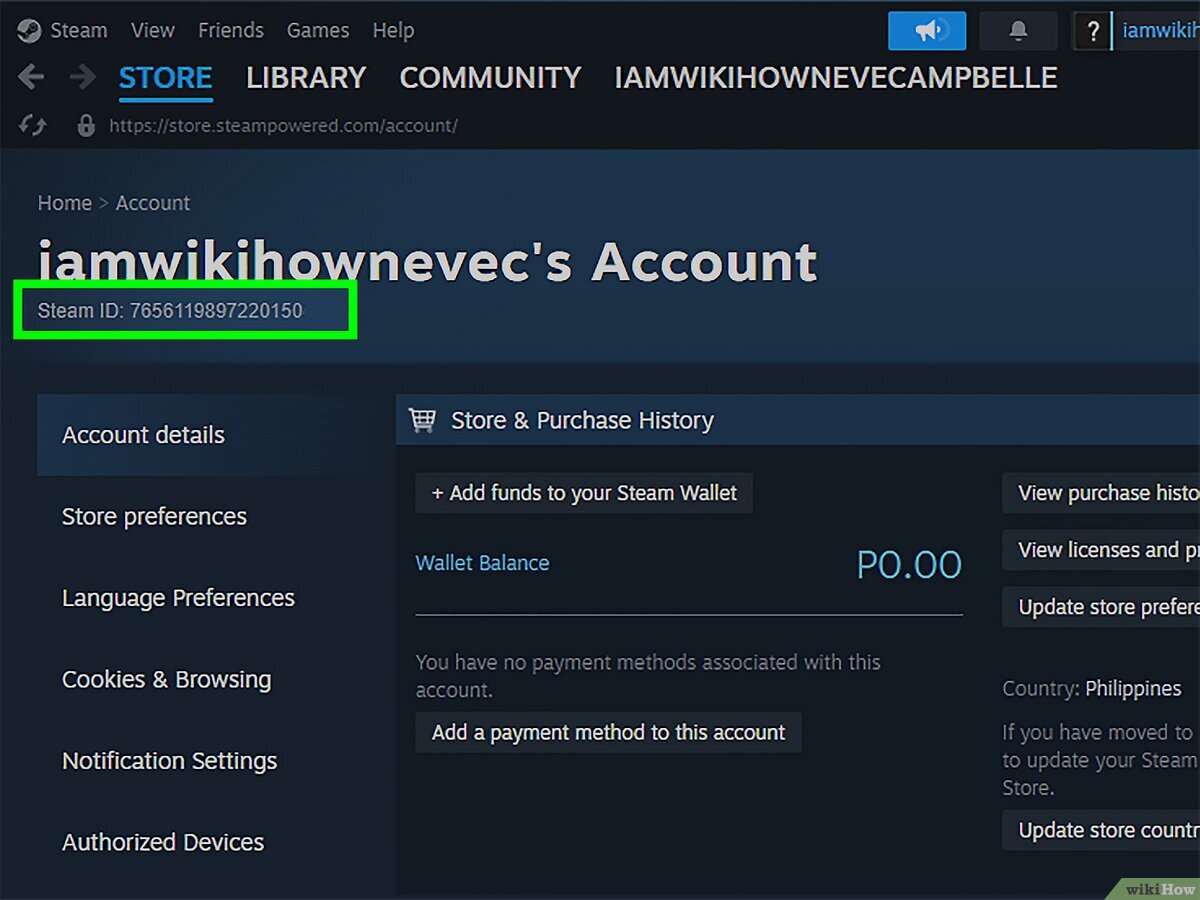
To view your account details:
- Open your Steam desktop client or log in at the official Steam website.
- Click on your profile name in the top-right corner of the screen.
- Select Account details from the dropdown menu.
- Your Steam Account Name and your primary wallet currency appear right at the top under your store balance overview.
- To locate your 64-bit Steam ID (UID), click View my profile, right-click anywhere on the page, and select Copy Page URL. The 17-digit number at the end of the URL is your unique Steam UID.
Step-by-Step Guide: How to Redeem a Steam Wallet Code
You can redeem your Steam Wallet digital code using the desktop client, a web browser, or the official mobile application.
Method 1: Redeeming on the Steam Desktop Client
- Launch the Steam application and sign in.
- Click on the Games menu located in the top navigation bar.
- Select Redeem a Steam Wallet Code.
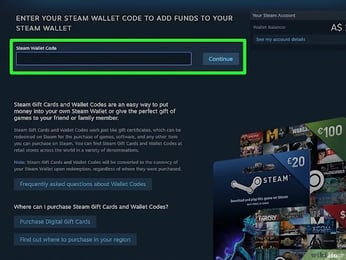
- Type or paste your digital code into the input field labeled Steam Wallet Code.
- Click Continue to confirm the balance addition.
Method 2: Redeeming via Web Browser
- Open your browser and go to the official redemption page:
store.steampowered.com/account/redeemwalletcode. - Sign in with your Steam credentials.
- Enter the alphanumeric code into the field and click Continue.
Method 3: Redeeming on the Steam Mobile App
- Open the Steam app on your iOS or Android device.
- Tap your profile icon or the main menu button.
- Go to Account Details > Add funds to your Steam Wallet.
- Select Redeem a Steam Gift Card or Wallet Code.
- Enter the code and confirm.
Steam Regional Restrictions and Currency Conversion Rules
Valve enforces strict regional currency policies to maintain fair pricing across global markets. Before purchasing a Steam gift card, make sure the card currency matches your Steam account store region.
| Region / Currency | Cross-Region Redemption | Conversion Supported? | Best Practice |
|---|---|---|---|
| USD (United States) | Restricted | No auto-conversion | Use strictly with US store accounts |
| EUR (Europe) | Eurozone countries only | Limited within EUR zone | Match to your local EU account country |
| GBP (United Kingdom) | Restricted | No auto-conversion | Use strictly with UK store accounts |
| Global / Multi-Currency | Selected regions only | Automatic conversion | Check currency compatibility before purchase |
If you try to activate a code denominated in a currency different from your registered Steam account region, Steam will reject the redemption with a currency mismatch error. Always check your registered store country under Account Details before ordering.
Unlocking Steam Community Features with the 5 USD Requirement
New Steam accounts start with "Limited User" status to prevent spam, scam networks, and botting. Limited accounts cannot access critical social and trading functions.
Adding at least $5.00 USD (or the equivalent in your local store currency) via a Steam Gift Card top up immediately lifts these restrictions. Once unlocked, your profile gains permanent access to:
- Sending friend invites to other players
- Opening and buying items on the Steam Community Market
- Creating Steam Group chats and participating in Steam Discussions
- Gaining Steam Profile levels and trading card drops
- Voting on Steam Greenlight / Workshop submissions
- Using the Steam Web API
Current package prices are shown below. Prices exclude Tax. Tax, payment fees and applicable coupons are shown at checkout.
Troubleshooting Common Steam Code Activation and Redemption Errors
If you run into an error while activating your code, review these practical fixes:
- "The code entered is invalid": Verify characters that are easily confused. Check the difference between
0(zero) andO,1(one) andIorL,Band8, orVandU. - "The currency of the Steam Wallet code does not match your account": Your Steam account country does not match the currency of the digital voucher. Switch your store region to the corresponding country using a local payment method, or obtain a code matching your current region.
- "An unexpected error has occurred": This issue is usually caused by temporary Steam server traffic or connection drops. Wait 15 to 30 minutes before trying again, or attempt redemption via a web browser instead of the client.
- "Code has already been redeemed": Check your Steam Account Details > View purchase history to verify if the credit was already applied to your balance. If not, verify that the code was not submitted twice.
Safe Digital Purchases with XPTopup: No Password Required
Protecting your Steam account security is critical. When purchasing digital codes on XPTopup, you never need to share your account login credentials, password, or Steam Guard authentication codes.
- 100% Secure Digital Codes: You receive a direct alphanumeric code that you redeem yourself inside your own Steam client.
- Zero Account Sharing: Your login information remains completely private.
- Multi-Region Selection: Choose the exact regional currency your account requires.
- 24/7 Dedicated Support: Support agents are available around the clock to assist you with order verification and delivery inquiries.
Frequently Asked Questions
How do I add money to my Steam balance?
Sign in to your Steam client or website, head to the "Redeem a Steam Wallet Code" section under the Games menu, enter your digital gift card code, and press Continue. The funds credit instantly to your total balance.
How to recharge a Steam wallet?
You can recharge your wallet by buying a Steam gift card on XPTopup. Once you receive your alphanumeric digital code, enter it directly into the redeem page on Steam to reload your wallet without using a direct bank card.
What is the Steam $5 rule for limited accounts?
Current package prices are shown below. Prices exclude Tax. Tax, payment fees and applicable coupons are shown at checkout.
Can I redeem a Steam gift card from a different region or currency?
No. Steam enforces strict region matching. Your gift card currency must match the currency assigned to your registered Steam store country. Steam will reject codes that do not match your account currency.
Do Steam gift card codes ever expire?
No. Steam Wallet digital codes do not have an expiration date. You can redeem your purchased code immediately or save it for upcoming seasonal game sales.
What should I do if my Steam wallet code shows as invalid?
Carefully check each character for common typos (such as mistaking zero for the letter O, or eight for the letter B). If the error continues, clear your Steam client cache or try activating the code directly on the web browser redemption page.
Current package prices
Current package prices are shown below. Prices exclude Tax. Tax, payment fees and applicable coupons are shown at checkout.
| Package | Price |
|---|---|
| Steam Gift Card MYR 5 | USD 1.17 |
| Steam Gift Card MYR 8 | USD 1.89 |
| Steam Gift Card MYR 10 | USD 2.34 |
| Steam Gift Card TWD 100 | USD 2.88 |
| Steam Gift Card SGD 5 | USD 3.47 |
| Steam Gift Card MYR 16 | USD 3.78 |
| Steam Gift Card TWD 150 | USD 4.37 |
| Steam Gift Card MYR 20 | USD 4.57 |
| Steam Gift Card HKD 40 | USD 4.58 |
| Steam Gift Card MYR 24 | USD 5.66 |
| Steam Gift Card HKD 50 | USD 5.73 |
| Steam Gift Card TWD 200 | USD 5.83 |
| Steam Gift Card SGD 10 | USD 6.94 |
| Steam Gift Card TWD 300 | USD 8.75 |
| Steam Gift Card HKD 80 | USD 9.16 |
| Steam Gift Card TWD 350 | USD 10.06 |
| Steam Gift Card MYR 50 | USD 11.41 |
| Steam Gift Card HKD 100 | USD 11.45 |
| Steam Gift Card TWD 400 | USD 11.65 |
| Steam Gift Card HKD 120 | USD 13.73 |
| Steam Gift Card SGD 20 | USD 14.05 |
| Steam Gift Card TWD 500 | USD 14.56 |
| Steam Gift Card MYR 80 | USD 18.19 |
| Steam Gift Card HKD 160 | USD 18.31 |
| Steam Gift Card SGD 30 | USD 21.03 |
| Steam Gift Card MYR 100 | USD 22.78 |
| Steam Gift Card HKD 200 | USD 22.90 |
| Steam Gift Card TWD 800 | USD 23.30 |
| Steam Gift Card HKD 240 | USD 27.47 |
| Steam Gift Card TWD 1000 | USD 29.03 |
| Steam Gift Card HKD 300 | USD 34.33 |
| Steam Gift Card SGD 50 | USD 35.04 |
| Steam Gift Card MYR 200 | USD 45.51 |
| Steam Gift Card HKD 400 | USD 45.77 |
| Steam Gift Card SGD 75 | USD 51.59 |
| Steam Gift Card HKD 500 | USD 57.21 |
| Steam Gift Card TWD 2000 | USD 57.28 |
| Steam Gift Card HKD 600 | USD 68.64 |
| Steam Gift Card HKD 1000 | USD 114.41 |