Crystalfall Top Up: In-Game Currency and Delta Coins Explained
Crystalfall delivers tactical team-based combat and deep character progression across challenging environments. To optimize hero builds, customize loadouts with weapon finishes, and secure progression resources, players use Delta Coins—the primary premium currency in Crystalfall.
When you buy a Crystalfall top up, Delta Coins are credited straight to your game account. You can use this currency to purchase a wide variety of items directly from the in-game store:
- Founder Packs and Seasonal Bundles: Get access to early tier unlockables, unique cosmetic titles, and themed cosmetic armor sets.
- Skill Progression Materials: Acquire character upgrade boosters, skill respec tokens, and specialized crafting components to adjust your combat builds.
- Weapon Skins and Cosmetics: Personalize your arsenal with premium weapon patterns, custom visual particle effects, and specialized character outfits.
- Utility Upgrades: Expand your inventory storage capacity, unlock extra loadout slots, and purchase resource gain booster passes.
Using XPTopup for your Crystalfall recharge ensures you get your Delta Coins quickly without grinding through repetitive daily missions.
| Currency / Package | Primary In-Game Purpose | Delivery Method |
|---|---|---|
| Delta Coins Packs | Store cosmetics, skin bundles, character progression items | Direct credit via User ID |
| Founder Packs | Exclusive launch items, vanity badges, bonus resources | Direct credit via User ID |
| Utility Boost Passes | Inventory expansions, loadout slots, booster passes | Direct credit via User ID |
Step-by-Step Guide: How to Top Up Crystalfall on XPTopup
Recharging your balance on XPTopup is direct and straightforward. Follow these steps to complete your order:
- Select the specific Delta Coins denomination or bundle you wish to purchase from the product catalog above.
- Enter your Crystalfall User ID in the designated player field. Double-check all characters to prevent delivery delays.
- Click the purchase button to move forward to the order summary and checkout screen.
- Select your preferred payment option from the available global and local payment solutions shown during checkout.
- Confirm your payment details and finalize the transaction.
- As soon as payment confirmation completes, our automated delivery system pushes your Delta Coins directly to your in-game profile.
- Open Crystalfall, verify your updated Delta Coins balance in the store or inventory menu, and start upgrading your gear.
How to Locate Your Crystalfall User ID in Game
You only need your Crystalfall User ID to receive your currency. You do not need to link any external accounts or share credentials.
Follow these steps to find your User ID:
- Launch the Crystalfall client on your system and log into your main game profile.
- Click on your profile icon or player display name positioned in the top-left corner of the main lobby screen.
- Open the Account Settings or Profile tab.
- Locate the User ID line printed directly under your display name. It contains a unique numeric or alphanumeric string.
- Click the copy icon right beside the User ID to save it to your clipboard, or carefully write down the exact sequence.
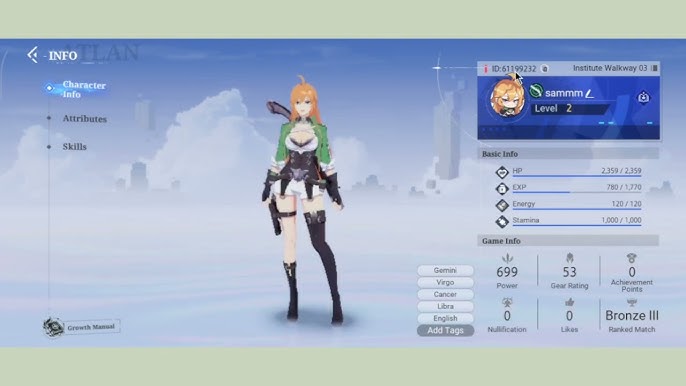
Paste this exact string into the User ID input box on XPTopup before making your purchase to ensure your Delta Coins reach the right account.
Why Top Up with User ID Only: Zero Password Risk
Keeping your gaming profile secure is critical. Many unofficial recharge methods ask players for their Steam passwords, game login details, or email verification codes. These practices expose your personal data to account compromise, unauthorized purchases, or security bans.
XPTopup uses a direct User ID injection process that completely eliminates these risks:
- No Passwords Required: You never share your Steam password, email address, or secondary authentication codes.
- No Account Sharing: You stay logged into your game. You do not need to hand over control to an unknown third party or risk location-based IP bans.
- Automated Order Dispatch: Deliveries are processed directly through automated systems. You do not need to wait for a live-chat operator to manually fulfill your order.
- Protected Billing Data: Your payment and personal details are processed through encrypted gateways, maintaining complete financial privacy.
Supported Payment Methods and Fast Order Processing
XPTopup provides a broad spectrum of secure payment methods to make buying Delta Coins convenient for players worldwide. Current pricing, localized currency conversions, and available payment processors are always displayed directly on the live checkout screen.
Options include major international credit cards, standard debit cards, trusted regional e-wallets, and instant online banking gateways. Every checkout session uses advanced SSL encryption to protect your transaction data. Once payment confirms, the automated fulfillment system initiates the transfer, crediting Delta Coins to your Crystalfall balance within moments.
Crystalfall Top-Up Troubleshooting and Delivery Verification
If your Delta Coins do not reflect on your account immediately after finishing checkout, use the following steps to verify your order:
- Restart the Crystalfall Client: Exit Crystalfall completely, wait thirty seconds, and launch the game again. A fresh login forces the client to synchronize its balance with the game servers.
- Inspect the In-Game Mailbox: Certain bundles, promo packs, or special event items are delivered directly into your game mailbox as attachments. Check your mail tab and press the claim button.
- Verify Your User ID Input: Review your order confirmation receipt on XPTopup. Check whether the User ID you entered matches your actual in-game User ID letter for letter.
- Check Payment Processing Status: Make sure your payment went through successfully on your bank or payment provider statement.
- Contact XPTopup 24/7 Support: If your balance has not updated after restarting or if you notice a typo in the submitted User ID, contact XPTopup customer support with your Order ID and correct User ID for rapid resolution.
Frequently Asked Questions About Crystalfall Recharge
How do I find my Crystalfall User ID for top up?
Open Crystalfall and click on your player avatar in the top corner of the lobby screen. Open your profile or account settings tab to find your unique User ID printed beneath your username. Click the copy icon to copy it directly.
Do I need to share my Steam or Crystalfall account password?
No. Recharging through XPTopup requires only your public Crystalfall User ID. You should never share your Steam password, game login details, or verification codes.
How long does it take for Crystalfall Delta Coins to arrive?
Orders are dispatched automatically once your payment is confirmed. In standard conditions, Delta Coins arrive in your in-game account within minutes. You can monitor your real-time order status directly on XPTopup.
What should I do if I entered the wrong Crystalfall User ID?
If you realize you made an error when typing your User ID, contact the XPTopup 24/7 support team immediately with your Order ID. If the delivery system has not yet processed the transfer, support can update the destination ID.
What payment options are available for Crystalfall recharge?
XPTopup accepts major credit and debit cards, digital wallets, and local payment methods depending on your region. The full list of available payment options and exact prices is visible on the live checkout page.
What can I purchase in Crystalfall with Delta Coins?
You can spend your Delta Coins on weapon skins, cosmetic character sets, Founder Packs, character respec tokens, skill upgrade materials, inventory capacity expansions, and utility boosters.
Current package prices
Current package prices are shown below. Prices exclude Tax. Tax, payment fees and applicable coupons are shown at checkout.
| Package | Price |
|---|---|
| 100 Crystalfall Credits | USD 8.21 |
| 200 Crystalfall Credits | USD 16.40 |
| Iron Founder Pack | USD 24.60 |
| Bronze Founder Pack | USD 49.19 |
| Silver Founder Pack | USD 81.98 |
| Gold Founder Pack | USD 196.74 |