Mango Live Diamonds Top Up: Uses, Benefits, and In-App Value
Mango Live Diamonds serve as the primary premium currency inside the Mango Live interactive streaming platform. Broadcasters, content creators, and active viewers rely on Diamonds to unlock exclusive features, trigger high-tier room interactions, and actively participate in live community events.
When you maintain an active Diamond balance, you can support your favorite hosts directly during live broadcasts. Sending virtual gifts not only highlights your profile in public chat streams but also helps creators rise up the platform leaderboards. In addition, Diamonds give you access to premium animations, interactive games, and custom entrance effects that display across the entire live room upon joining.
Mango Live In-App Currencies and Asset Breakdown
| Currency / Asset | How It Is Acquired | Primary Function in Mango Live |
|---|---|---|
| Diamonds | Direct recharge through XPTopup | Send virtual gifts, activate VIP badges, buy entrance effects, trigger PK boosts |
| Beans | Earned by broadcasters from received gifts | Creator revenue balance; can be withdrawn or converted internally into Diamonds |
| VIP Levels | Upgraded by spending Diamonds | Custom chat colors, priority placement on viewer lists, unique profile frames |
| Noble Titles | Activated via Diamond packages | Exclusive luxury car entries, special room sound effects, enhanced moderation resistance |
How to Top Up Mango Live Diamonds on XPTopup
Refilling your Mango Live balance through XPTopup takes only a few quick steps. Because the process is entirely UID-based, you never have to provide your social login or account password.
- Select Your Diamond Package: Review the available Diamond packages listed on the live checkout interface above and pick the amount you need.
- Enter Your User ID (UID): Type your exact numeric Mango Live UID into the required input field.
- Select Your Payment Method: Choose your preferred regional payment option supported at checkout.
- Review and Pay: Double-check your numeric ID and package size, then complete the transaction.
- Check Your Account: Open the Mango Live app on your phone to view your updated Diamond balance immediately.
How to Find Your Mango Live UID
To ensure your Diamonds arrive without delay, you must enter your numeric User ID rather than your display name or live room number. Follow these steps to locate your exact UID inside the mobile app:
- Launch the Mango Live app on your mobile device and log in to your account.
- Tap the Profile icon (labeled "User" or "Me") located at the bottom-right corner of the home screen.
- Look directly beneath your profile picture and nickname at the top of the screen.
- Find the numeric sequence labeled ID: or UID:.
- Tap the copy icon next to the number or carefully write down the digits.
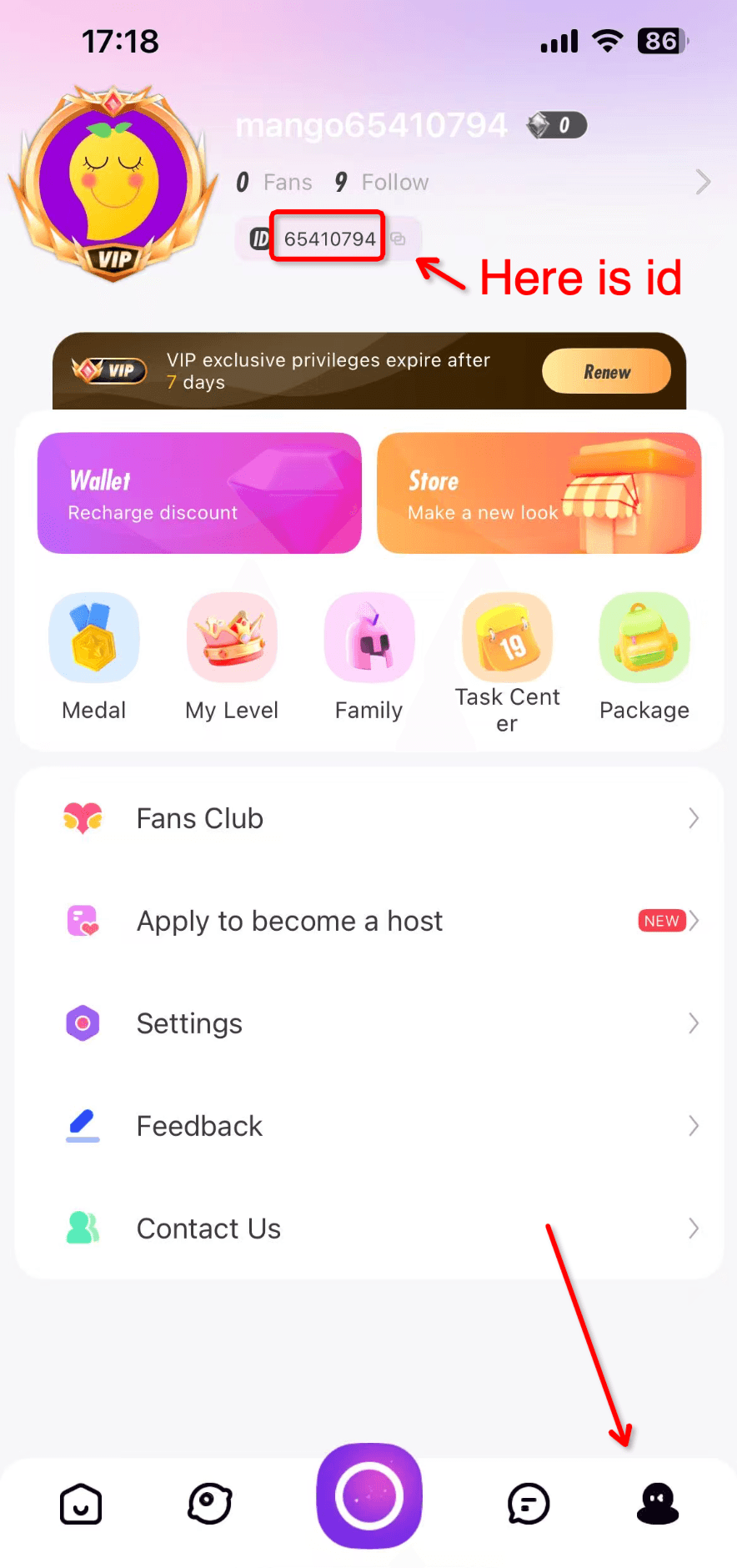
Tip: Do not use the Room ID displayed at the top of an active broadcast. Always copy the permanent UID found on your personal profile page.
VIP Levels, Virtual Gifting, and PK Battle Benefits
Using Mango Live Diamonds gives you access to multiple community privileges that standard accounts do not receive:
1. Live PK Battles and Broadcaster Support
During scheduled streamer PK duels, two broadcasters compete head-to-head within a set time limit. Points are determined by viewer gifts. By sending Diamond gifts such as sports cars, rocket ships, or luxury crowns, you directly contribute points to your chosen host, helping them win the round and secure top ranking on the daily and weekly streamer charts.
2. High-Tier VIP Status and Profile Customization
Every Diamond spent in Mango Live contributes toward your VIP progression bar. Higher VIP tiers grant distinct perks, including:* Glowing chat bubbles and colored text that stand out during high-traffic streams.* Exclusive avatar frames and profile medals.* Higher ranking on the broadcaster's "Top Fans" leaderboard.
3. Dynamic Entrance Effects
Entering a popular broadcaster's stream unnoticed is impossible with active Noble and VIP perks. Diamonds allow you to activate animated entrance vehicles—such as private jets, supercars, and cruise ships—that announce your arrival with custom screen animations and audio cues across the entire room.
Account Security: Why UID-Only Top Up Protects Your Credentials
Account safety is a core priority when buying virtual currencies online. XPTopup processes Mango Live Diamonds top up orders strictly through direct numeric UID routing.
- Zero Password Requirements: You never share your account password, email credentials, Facebook, Google, or Apple ID login tokens.
- No Verification Codes Needed: We will never ask for one-time SMS passwords (OTP) or authentication codes.
- Safe from Account Hijacking: Because no login access is granted, your private messages, stored Beans, friend lists, and streamer settings remain completely secure on your device.
- Direct Wallet Crediting: Diamonds are deposited directly to the platform database linked to your numeric UID, ensuring legitimate delivery.
Troubleshooting Delivery and Verifying Your Diamond Balance in 2026
If your Diamonds do not reflect in your account immediately after finishing checkout, follow these diagnostic steps:
- Refresh the Mango Live App: Return to your profile screen and pull down to refresh the page. You can also force-close the app from your device task manager and reopen it.
- Verify the Submitted UID: Check your XPTopup order confirmation receipt to confirm you entered the correct numeric UID without extra spaces or missing digits.
- Confirm Payment Completion: Ensure your payment provider finalized the transaction and that your order status displays as completed.
- Check In-App Transaction Logs: Open Mango Live, tap My Wallet, and check the Diamond record history to verify recent credits.
- Contact XPTopup Support: If your balance has not updated after following the steps above, reach out to XPTopup customer support with your Order ID and UID for fast verification and assistance.
Frequently Asked Questions
How do I top up Mango Live Diamonds with my UID?
Select your preferred Diamond package from the live selection on XPTopup, type your numeric Mango Live User ID into the UID field, select your payment method, and complete the order. Your Diamonds will credit directly to your account balance.
Where can I find my Mango Live User ID (UID)?
Open the Mango Live app and tap the "Me" or profile icon in the bottom-right corner. Your numeric UID is displayed directly beneath your profile picture and nickname.
Is it safe to buy Mango Live Diamonds without sharing my password?
Yes. XPTopup requires only your public numeric UID to deliver Diamonds. You never share your account password, email, or third-party login credentials, ensuring complete account security.
How long does it take for Mango Live Diamonds to appear in my account?
Diamonds are credited automatically once your payment finishes processing. In most cases, the balance updates in your Mango Live wallet within moments.
What is the difference between Mango Live Diamonds and Beans?
Diamonds are the premium currency that viewers purchase and spend to send gifts and activate VIP features. Beans are the reward currency earned by broadcasters when they receive gifts from viewers. Broadcasters can withdraw Beans or exchange them internally.
What should I do if my Mango Live Diamonds do not show up after payment?
First, restart your Mango Live app to refresh your wallet balance. If the balance remains unchanged, verify the UID on your order receipt and contact XPTopup customer service with your Order ID for prompt support.
Current package prices
Current package prices are shown below. Prices exclude Tax. Tax, payment fees and applicable coupons are shown at checkout.
| Package | Price |
|---|---|
| 10000 Diamonds | USD 1.99 |
| 20000 Diamonds | USD 3.99 |
| 25000 Diamonds | USD 4.98 |
| 50000 Diamonds | USD 9.97 |
| 100000 Diamonds | USD 19.93 |
| 125000 Diamonds | USD 24.92 |
| 150000 Diamonds | USD 29.90 |
| 200000 Diamonds | USD 39.87 |
| 250000 Diamonds | USD 49.84 |
| 500000 Diamonds | USD 99.67 |
| 750000 Diamonds | USD 149.51 |