Douyin Top Up: Recharge Douyin Diamonds with Direct UID Delivery
Douyin is China's premier short-form video and livestreaming platform. To interact with livestream creators, participate in competitive PK battles, or gain special viewer privileges, users need Douyin Diamonds (also known as 抖币 or Doubi).
For users outside mainland China, purchasing Douyin Diamonds directly inside the app can be difficult due to domestic payment restrictions requiring Chinese bank accounts, WeChat Pay, or Alipay. XPTopup provides a direct cross-border solution, allowing you to complete a Douyin recharge securely using only your Douyin User ID (UID).
What Are Douyin Diamonds and What Are They Used For?
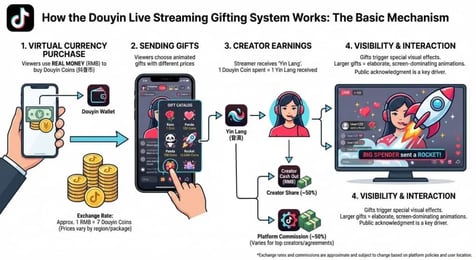
Douyin Diamonds serve as the universal digital currency across the Douyin ecosystem. Once added to your wallet, Diamonds can be used across several interactive features:
- Livestream Gifting: Send virtual gifts ranging from basic stickers to premium full-screen animated gifts to support your favorite content creators.
- Creator PK Battles: Vote for creators during live split-screen battles to boost their ranking and help them win competitive matches.
- Fan Club Memberships (粉丝团): Join creator fan clubs, unlock exclusive custom badges next to your username, and level up your fan intimacy score.
- DOU+ Video & Livestream Promotion: Boost video visibility, reach wider audiences, or increase live room traffic.
- Interactive In-Room Features: Purchase special chat banners, bullet comments (弹幕), and entry effects inside high-traffic live rooms.
Key Differences Between Douyin, Volcano Edition, and Global TikTok
Because ByteDance operates multiple video platforms, it is essential to distinguish between the Chinese domestic application and international versions before placing an order. Balances cannot be transferred across different platforms.
| Feature | Douyin (抖音) | Douyin Volcano Edition (抖音火山版) | International TikTok |
|---|---|---|---|
| Primary Region | Mainland China | Mainland China | Global (Excluding China) |
| In-App Currency | Douyin Diamonds (抖币) | Volcano Diamonds (火苗/抖币) | TikTok Coins |
| App Store Availability | China Region Apple App Store / Chinese Android Stores | Chinese App Stores | Global App Store / Google Play |
| Cross-Platform Wallet | Compatible only within mainland Douyin accounts | Syncs with linked Douyin accounts | Fully separate wallet & currency |
| Account Identifier | Douyin ID (抖音号) | Volcano ID / Douyin ID | TikTok Username / UID |
Note: A top-up completed for a Douyin ID cannot be credited to an international TikTok account.
How to Find Your Douyin User ID (UID) in the App
To ensure your recharge reaches the correct account, you must provide your exact Douyin ID. Follow these steps within the Chinese interface:
- Open the Douyin app on your smartphone.
- Tap the profile tab labeled 我 located in the bottom-right corner of the screen.
- Locate the text under your profile picture and display name that reads 抖音号:.
- Tap the alphanumeric string directly or press the copy icon next to it to copy your ID to your clipboard.
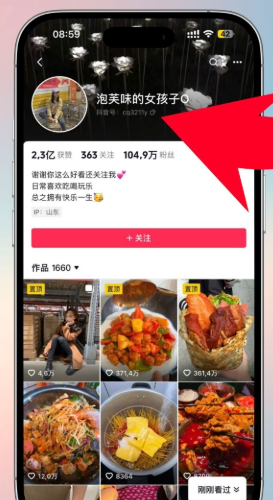
Tip: Douyin allows users to set a custom Douyin ID once. Whether your account displays an initial numeric string or a customized alphanumeric handle, both serve as your valid UID for top-up purposes.
How to Top Up Douyin Diamonds Safely on XPTopup
Recharging your account on XPTopup takes only a few quick steps:
- Select the Douyin Diamond package you wish to purchase from the live denomination list.
- Paste your copied Douyin ID (抖音号) into the account field.
- Double-check your Douyin ID to prevent delivery errors.
- Proceed to checkout and select your preferred payment method.
- Once payment is confirmed, the system processes your recharge directly to your Douyin balance.
Real-time bundle availability and prices are displayed directly on the selection menu above.
Account Security: Why UID-Only Top-Up Requires No Passwords
Account safety is critical when purchasing digital currency. XPTopup processes Douyin top-ups through direct UID crediting. This method offers complete protection for your personal profile:
- Zero Password Requirements: You never need to share your account password, SMS verification codes, or login credentials.
- No Third-Party Logins: No one accesses your account, ensuring your private messages, bookmarks, and account settings remain untouched.
- Protected Account Standing: Direct crediting follows standard platform crediting protocols, keeping your Douyin profile in full standing.
How to Check and Verify Your Douyin Wallet Balance After Recharge
Once your transaction on XPTopup is marked as completed, verify your updated balance inside the Douyin app:
- Open Douyin and tap 我 (Me) in the bottom-right corner.
- Tap the ≡ menu icon in the top-right corner of your profile screen.
- Select 我的钱包 (My Wallet) from the side menu.
- Your total available Diamonds will appear under the 抖币 section.
If your new balance does not display immediately, swipe the Douyin app closed from your device's multitasking menu and reopen it to force a server refresh.
Common Recharge Issues and Troubleshooting
- Incorrect Douyin ID Entry: Digital top-ups are automated. If you submit an incorrect ID that belongs to an active user, the Diamonds will be delivered to that account and cannot be recalled. Always copy and paste your ID directly from the app.
- Entering Global TikTok Details: Submitting a Global TikTok username instead of a Chinese Douyin ID will result in order failure or delivery delays. Make sure your account originates from the mainland Douyin app.
- Slow Balance Display: Network latency can occasionally delay the visual wallet update. If your order status on XPTopup shows completed, restart your app or check your Douyin transaction log within "我的钱包" -> "账单".