Era of Celestials Top Up: In-Game Diamonds and Benefits
Diamonds serve as the core premium currency in Era of Celestials, directly driving your character's Battle Rating (BR), cosmetic prestige, and combat efficiency. Whether you play as an Archer, Mage, or Warrior, acquiring Diamonds allows you to bypass extensive material grinds and unlock essential character enhancements.
Primary Uses for Era of Celestials Diamonds
- Sprite and Elysian Evolution: Sprites and Elysians provide critical stat bonuses and combat abilities. Diamonds allow you to purchase transformation essence, advance star levels, and unlock Elysian forms.
- Wing Morphing and Mount Upgrades: Upgrading your Wings and Mounts requires rare enhancement materials. Diamonds enable instant material purchases, granting permanent BR boosts and cosmetic visual auras.
- Boss Hunt Entry Resets: World Bosses and Boss Lairs drop high-tier divine gear. Spending Diamonds resets fatigue timers and purchases bonus dungeon entry tokens, giving you more loot opportunities per cycle.
- Gear Refining and Gem Sockets: Acquire high-level polishing stones, socket gems, and refining catalysts directly to maximize the stats on your weapons and armor sets.
- VIP Privilege Levels: Every Diamond recharge contributes directly toward your VIP tier, unlocking quality-of-life perks such as automatic looting, expanded bag space, bonus dungeon entries, and exclusive VIP daily reward packs.
How to Find Your Era of Celestials User ID and Server
To ensure your Diamonds credit directly to your character, you need to provide your exact numerical User ID and current Server Name. XPTopup processes orders using direct ID injection, so no password is ever required.
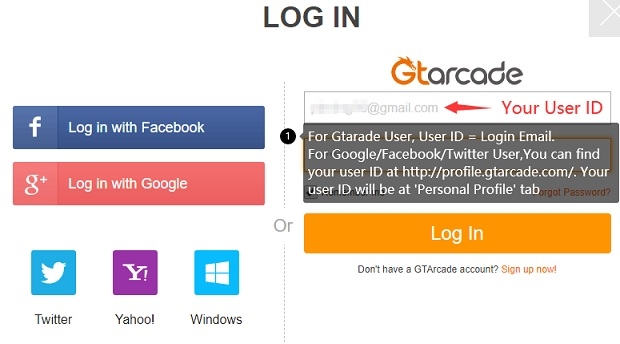
Finding Your User ID Across Different Login Methods
- Launch Era of Celestials on your mobile device or emulator.
- Identify Your Server: Before entering the world, check the login screen. Your assigned server code (such as HKT-M120 or HKT-Z15) is displayed directly on the server selection bar.
- Access Your Profile: Once in the game, tap your Character Avatar in the top-left corner of the main screen.
- Locate the User ID (UID): Open the User Center or Settings tab. Your numerical User ID is listed next to your account information.
- GTarcade, Google, Facebook, or Twitter Accounts: If you log in via social integrations or GTarcade, tap the floating assistant icon on your screen. The dropdown displays your linked numerical GTarcade Account ID/User ID.
- Copy Your ID: Write down or copy the numerical string accurately to input during checkout on XPTopup.
Supported Era of Celestials Servers (HKT-M & HKT-Z)
Era of Celestials divides its active player base across regional server clusters. When submitting your recharge on XPTopup, selecting the correct server partition ensures the automated delivery system targets the correct character database.
| Server Cluster | Cluster Type | Active Server List |
|---|---|---|
| HKT-M Series | Mainline Clusters | HKT-M120, HKT-M121, HKT-M122, HKT-M123, HKT-M124 |
| HKT-Z Series | Zone Expansion Clusters | HKT-Z5, HKT-Z6, HKT-Z7, HKT-Z8, HKT-Z9, HKT-Z10, HKT-Z11, HKT-Z12, HKT-Z13, HKT-Z14, HKT-Z15, HKT-Z16, HKT-Z17, HKT-Z18, HKT-Z19, HKT-Z20, HKT-Z21, HKT-Z22, HKT-Z23, HKT-Z24, HKT-Z25, HKT-Z26, HKT-Z27, HKT-Z28, HKT-Z29, HKT-Z31 |
Always double-check your current active server cluster before completing payment. Cross-server transfers of delivered currency are not supported by the game engine.
Step-by-Step Guide to Top Up Era of Celestials on XPTopup
Recharging your Diamonds on XPTopup is direct, fast, and structured for maximum convenience.
- Select the Diamond Package: Choose the specific Diamond denomination you wish to add to your character from the product catalogue.
- Enter Your User ID: Type your numerical User ID into the dedicated input field.
- Select Your Server: Choose your active game server (e.g., HKT-M120 or HKT-Z10) from the pre-configured server dropdown menu.
- Check Real-Time Pricing: Review the order summary on the checkout interface, where live regional prices and active payment methods are displayed.
- Complete Payment: Finalize your order using your preferred payment method on the secure checkout screen.
- Receive Diamonds: Once payment confirms, the automated system injects the Diamonds directly into your game balance. Open your game client to verify your new total.
Safe Top-Up: Zero Password or Account Login Required
Account safety is essential when purchasing digital game currency. XPTopup uses a direct ID fulfillment system that operates entirely through public player identifiers.
- Zero Password Exposure: You never need to enter your GTarcade password, Google login, Facebook credentials, or social media authentication details.
- No Account Handover: Your account remains strictly in your own hands. You do not need to log out, share access codes, or entrust your login to third parties.
- Direct System Fulfillment: The Diamonds deposit directly into the character associated with the provided UID and Server ID via standard game protocols, keeping your account secure from unauthorized alterations.
Troubleshooting Common Recharge and Delivery Questions
If your Diamonds do not reflect in your account balance immediately after completing checkout, follow these troubleshooting steps:
- Restart the Game Client: Completely force-close the Era of Celestials application on your device and launch it again. This forces the client to sync with the server database and refresh your wallet balance.
- Check Mailbox and Bag: Certain promotional bundles or event-linked Diamond packages are delivered via the in-game mailbox rather than injected directly into the top UI bar. Check your mailbox tab and tap Claim All.
- Verify Server Selection: Ensure that you did not accidentally select an older or alternative server on the title screen where you might have created an alt character.
- Retain Order Details: Keep your XPTopup order confirmation number handy. If you encounter any delays, submit your order ID and User ID to XPTopup customer support for rapid balance tracking and resolution.
Frequently Asked Questions
How do I find my Era of Celestials User ID and server name?
Launch the game and check the initial start screen for your server name (such as HKT-M121 or HKT-Z18). After logging in, tap your character portrait in the top-left corner, or open the floating GTarcade assistant window to view and copy your numerical User ID.
Do I need to provide my GTarcade account password to top up?
No. XPTopup requires only your User ID and server name. You will never be asked for your account password, email access, or social login credentials.
How quickly will the Diamonds be delivered to my character?
Deliveries are processed through automated systems immediately after your payment confirms on checkout. Most transactions credit your character balance within moments of order completion.
What should I do if I selected the wrong server during checkout?
Contact XPTopup customer support immediately with your order ID. If the order has not yet been processed by the automated injection queue, support agents can update the server information for you. If the Diamonds have already been credited to an existing character on the selected server, currency transfers cannot be reversed.
Can I top up Era of Celestials Diamonds for a friend?
Yes. Because the top-up process only requires a User ID and Server selection, you can send Diamonds to friends or guild members simply by entering their UID and choosing their active server at checkout.
What payment methods are supported for Era of Celestials top up on XPTopup?
XPTopup provides a variety of regional and international payment options. Available payment methods and dynamic local rates are updated live and visible directly on the checkout page when you place your order.
Current package prices
Current package prices are shown below. Prices exclude Tax. Tax, payment fees and applicable coupons are shown at checkout.
| Package | Price |
|---|---|
| 100 Diamonds | USD 0.75 |
| 500 Diamonds | USD 3.69 |
| 1,000 Diamonds | USD 7.36 |
| 1,500 Diamonds | USD 11.04 |
| 2,000 Diamonds | USD 14.72 |
| 5,000 Diamonds | USD 36.77 |
| 10,000 Diamonds | USD 73.55 |