State of Survival Diamonds Top Up: Instant Settlement Upgrades
State of Survival Diamonds serve as the core premium exchange currency in the post-apocalyptic strategy game by FunPlus. In 2026, Diamonds allow Chiefs to acquire in-game packs, special promotion bundles, hero recruitment vouchers, Plasma Cores, and critical speedups without making individual credit card transactions inside the game store.
When you top up Diamonds on XPTopup, they credit directly to your in-game balance. Inside State of Survival, these Diamonds function as a 1:1 direct cash voucher equivalent. You can open the in-game store, select any daily pack, monthly card, or event crate, and choose Diamonds as your payment method. This system gives you complete flexibility to time your pack purchases during peak alliance events and alliance armaments without exposing your payment details on mobile app stores.
How to Find Your State of Survival User ID
To ensure your State of Survival Diamonds top up arrives in the correct account, you only need to provide your numeric User ID. Finding this information takes just a few seconds inside the game client.
- Open State of Survival on your mobile device or official PC client.
- Tap your Chief avatar located in the top-left corner of the main settlement screen.
- Your Chief Profile window will open, displaying your Chief Name, State number, and current Battle Power.
- Locate the numeric User ID string displayed directly underneath your Chief Name.
- Tap the copy icon next to the User ID to save it directly to your clipboard.
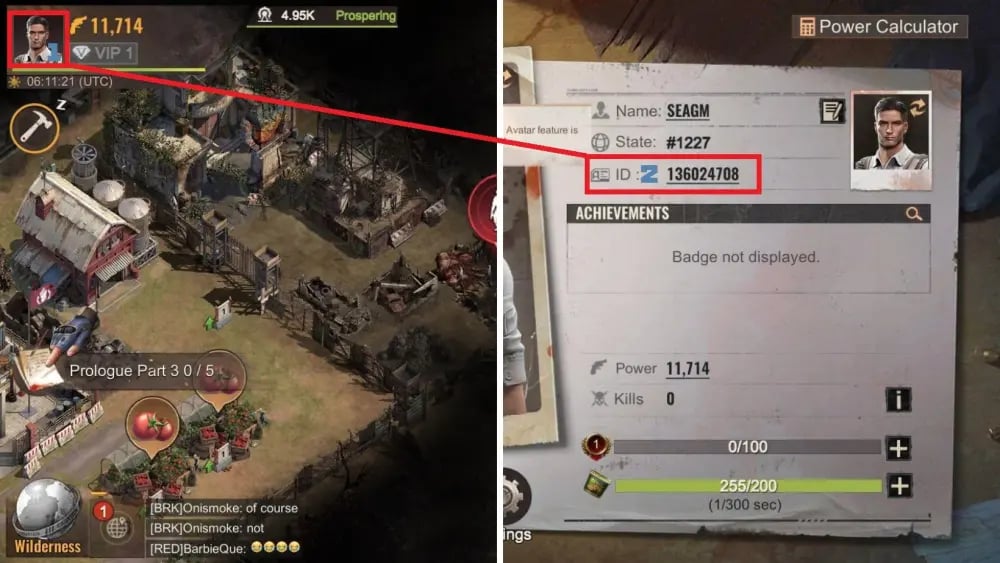
Always double-check your State number and Chief Name before submitting an order. Diamonds are bound to the specific character associated with the User ID you submit.
Step-by-Step Guide: How to Buy State of Survival Diamonds on XPTopup
Ordering Diamonds on XPTopup is direct, transparent, and requires no account passwords:
- Select your desired Diamond package or denomination from the product catalog.
- Enter your State of Survival User ID into the designated input field.
- Verify that the User ID entered matches your current profile in the game.
- Select your preferred local payment method. The exact price is clearly displayed on the live checkout screen.
- Complete your transaction. Once processed, the Diamonds are sent directly to your account balance.
- Open State of Survival, check your Diamond counter at the top of the interface, and exchange them for your chosen in-game packs.
Diamond Pack Denominations and Weekly Purchase Limits
State of Survival features structured purchase limits on lower-tier Diamond denominations to balance server progression. The weekly purchase cycle follows a strict global server schedule, resetting every Monday at 00:00 UTC.
| Diamond Pack Tier | Weekly Purchase Cap | Reset Schedule | Primary In-Game Use |
|---|---|---|---|
| 100 Diamonds Pack | 50 purchases per week | Monday 00:00 UTC | Daily stamina refills, basic resource crates, scouting buffs |
| 500 Diamonds Pack | 20 purchases per week | Monday 00:00 UTC | Research speedups, Chief badge material chests, Hero Search maps |
| 1,000 Diamonds Pack | 10 purchases per week | Monday 00:00 UTC | Plasma Core crates, Tactical Design blueprints, Hero gear upgrades |
| 5,000+ Diamonds Pack | Unlimited / Dynamic | No weekly limit | High-tier event bundles, SvS war prep packs, major construction packs |
If you reach your weekly cap on smaller denominations during a competitive event, you can choose higher-tier packs to continue preparing your troops without waiting for the Monday reset.
Safe Top-Up: Why User ID-Only Recharge Protects Your Account
Protecting your Chief profile against unauthorized access and game rule violations is vital. Some unauthorized third-party services ask players for login credentials, Google Play details, or social login tokens. Sharing your login details creates significant risks, including account theft, unauthorized spending of saved speedups, or permanent account suspensions under publisher terms of service.
On XPTopup, transactions use direct numeric User ID processing. Because the system relies solely on public account identifiers, you never reveal your passwords, email access, or multi-factor authentication codes. Your account stays completely in your hands, ensuring total account integrity while maintaining full access to premium Diamond packs.
Strategic Diamond Spending for SvS, Capital Clash, and Reservoir Raid
Maximizing the impact of your Diamonds requires focused allocation during key competitive events. Use these tactical guidelines to get the highest point returns in 2026:
State vs State (SvS)
Save your Diamonds for the SvS Preparation Phase. Focus purchases on specific stage requirements, such as Plasma Core upgrades during the Settlement Growth stage or recruitment maps during the Hero Development stage. Earning top individual rankings yields massive reward boxes and Chief gear materials. During the SvS Battle Phase, use Diamonds for emergency hospital healing speedups and war revival tokens to sustain front-line rallies against rival States.
Capital Clash
During Capital Clash, timing is everything. Keep a reserve of Diamonds to activate 24-hour Chief Battle Buffs (Attack Boost and Defense Boost) before marching on the Capital or defensive turrets. In intense battles where hospitals fill quickly, direct Diamond healing allows your high-tier infantry to return to defensive formations immediately.
Reservoir Raid and Water Raider
Competitive alliance warfare demands rapid tactical maneuvers. Use Diamonds prior to match registration to secure advanced relocation permits, March Speed buffs, and Energy Recovery items. Having these items ready allows your alliance to secure Water Treatment Centers and Central Purification Plants ahead of opponents.
Frequently Asked Questions About State of Survival Diamonds
What is my State of Survival User ID and where do I find it?
Your User ID is a unique numerical identifier assigned to your Chief profile. To find it, open State of Survival, tap your Chief avatar in the upper-left corner of the screen, and locate the number displayed right beneath your character name. Tap the copy icon next to it to copy your User ID.
What items can I buy with State of Survival Diamonds?
Diamonds act as direct purchasing credit inside the State of Survival store. You can use them to purchase standard resource packs, Plasma Cores, Hero Search maps, Chief gear blueprints, stamina cans, construction speedups, and limited-time event bundles. When purchasing a pack in the game shop, select Diamonds as the payment source instead of cash.
Do I need to share my game password to top up State of Survival Diamonds on XPTopup?
No. XPTopup processes your Diamond delivery using only your numeric User ID. You never need to share your game password, FunPlus login, Apple ID, Google Play credentials, or social media tokens. This method keeps your account fully protected.
Are there weekly purchase limits on State of Survival Diamond packs?
Yes. Lower-tier packs (such as 100, 500, and 1,000 Diamond packages) have weekly account caps set by the game server. These caps reset every Monday at 00:00 UTC. Higher-tier Diamond packages do not have strict weekly limits, allowing Chiefs to recharge as needed for major events.
What should I do if my State of Survival Diamonds do not appear immediately?
First, check your in-game mailbox and refresh your game client by closing the app completely and relaunching it. Ensure your game app is updated to the latest 2026 client version from your app store, as outdated builds can delay UI balance updates. If the Diamonds do not reflect after a few minutes, verify your order status on XPTopup and contact the 24/7 customer support team with your order number and User ID.
Can State of Survival Diamonds be transferred between different characters or servers?
No. Diamonds credit directly to the specific character linked to the User ID entered at checkout. They cannot be transferred, gifted, or moved to another character, even if both characters are linked to the same login account or located on different States. Always double-check your User ID before completing your purchase on XPTopup.
Current package prices
Current package prices are shown below. Prices exclude Tax. Tax, payment fees and applicable coupons are shown at checkout.
| Package | Price |
|---|---|
| 100 Diamonds | USD 0.68 |
| 500 Diamonds | USD 3.42 |
| 1,000 Diamonds | USD 6.80 |
| 2,000 Diamonds | USD 13.59 |
| 5,000 Diamonds | USD 33.97 |
| 10,000 Diamonds | USD 69.09 |
| 20,000 Diamonds | USD 135.88 |
| 50,000 Diamonds | USD 339.68 |
| 100,000 Diamonds | USD 690.87 |