Habby Top Up: Instant Account Credits via Player UID
Getting in-game resources for your favorite Habby titles is straightforward with direct UID-based transactions. When you order a Habby top up on XPTopup, your account receives in-game credits and currency directly without requiring account sharing, passwords, or linked social media logins.
Whether you need resources to upgrade equipment, purchase special event passes, or obtain premium currency, our system processes your player ID directly to credit your balance. This guide outlines the exact checkout steps, how to locate your UID across different titles, account safety protocols, and troubleshooting steps for your transactions.
How to Top Up Habby Credits Using Your UID
To ensure your in-game items arrive without delay, follow this step-by-step process on XPTopup:
- Select Your Credit Package: Review the available credit denominations on the live checkout interface and choose the package you want to purchase.
- Enter Your Habby UID: Type or paste your exact in-game Player UID into the designated field. Double-check all characters before proceeding.
- Select Your Payment Method: Choose your preferred payment option from the available regional checkout methods.
- Complete the Payment: Follow the on-screen prompts to finalize the transaction securely.
- Check Your In-Game Account: Launch your game to verify your updated balance or claim the delivery from your in-game mailbox.
Top-Up Overview
| Step | Action Required | Verification Details |
|---|---|---|
| 1. Package Selection | Choose your desired credit or item bundle | Check live prices and package contents on checkout |
| 2. UID Input | Provide your game-specific Player ID | Matches your in-game profile string exactly |
| 3. Checkout | Complete payment via secure payment gateway | Immediate electronic order receipt generated |
| 4. In-Game Claim | Open your Habby game client | Direct balance update or delivered to in-game mail |
How to Locate Your Habby Player UID In-Game
Your Player UID (User Identification) is a unique string of numbers and letters assigned to your game profile. Because Habby operates multiple mobile titles, the visual placement can vary slightly depending on the specific interface, but it is always accessible within your settings or profile screen.
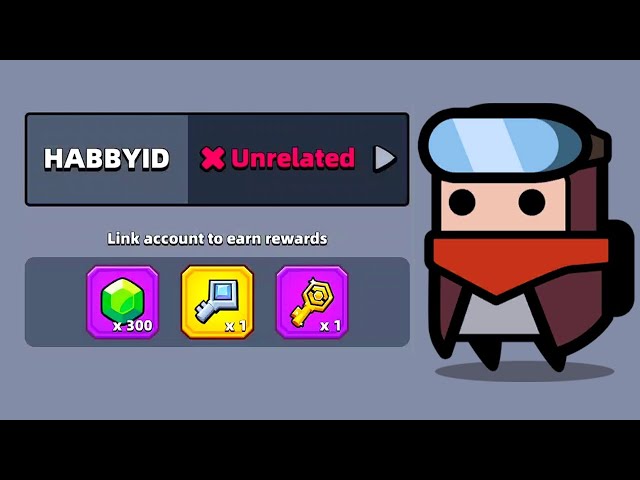
General Steps to Find Your UID
- Open your Habby game on your mobile device (iOS or Android).
- Tap the Settings (Gear) icon, usually located in the top-left or top-right corner of the main lobby screen.
- Look for the Player Info, Account, or User Profile section.
- Locate the field labeled Player ID, UID, or ID.
- Tap the Copy button next to your ID to copy the full string to your clipboard. If there is no copy button, write down the characters precisely, paying close attention to case sensitivity.
Paste this copied ID directly into the UID input box on XPTopup to avoid manual typing errors.
Supported Habby Titles and In-Game Delivery
Habby manages a diverse catalog of popular action and casual mobile games. Top-up systems route your purchase directly to the specific title linked with your UID. Common titles in the publisher's ecosystem include:
- Archero / Archero 2
- Survivor.io
- Capybara Go!
- Kinja Run
- SSSnaker
- PunBall
- Souls
Once a transaction is confirmed, the game server associates the package with your unique identifier. In most titles, credits are added directly to your main resource counters (such as Gems, Diamonds, or Event Tokens). In select titles, items may be delivered to the in-game mailbox where you must tap Claim to transfer them to your active inventory.
Account Safety: Password-Free UID Recharge Process
Account security is the most critical aspect of digital game top-ups. XPTopup uses a direct-to-UID API method that ensures complete account protection.
- Zero Password Requirements: We never ask for your Apple ID, Google Play credentials, Habby account passwords, or third-party login tokens.
- No Account Sharing: Your game profile remains exclusively on your device. You do not need to log out or give temporary access to external operators.
- Safe Server Routing: Transactions interact solely with publisher-approved distribution pathways, keeping your account fully compliant with standard terms of service.
- Data Privacy: Your UID is used strictly to route the purchased items and is not shared with unverified third parties.
Payment Options and Region Support on XPTopup
XPTopup provides support for players across multiple geographic regions and currencies. The checkout platform automatically displays regional payment methods suited to your location.
- Global and Localized Payment Methods: Choose from major credit cards, debit cards, e-wallets, and regional payment solutions displayed directly on the live checkout page.
- Cross-Platform Compatibility: UID top-ups work regardless of whether your game account was created on an Android or iOS device.
- Transparent Live Pricing: All pricing, fees, and currency conversions are clearly detailed before you confirm your payment.
Troubleshooting Common Habby Top-Up Issues
If you experience any delay or issue with your order, use the following troubleshooting checklist:
1. In-Game Delivery Delay
- Action: Restart your game app completely. Close the application from your background apps and relaunch it to force a server synchronization.
- Check Mailbox: Check both your current gem/credit balance and your in-game mailbox tab. Certain packages require manual claiming from the system inbox.
2. Mistyped Player UID
- Action: Check your order confirmation email from XPTopup to see the UID entered during checkout. If you notice a typo, contact our customer support team immediately with your transaction ID and the corrected UID. Prompt reporting increases the likelihood of resolving delivery discrepancies before processing is finalized.
3. Payment Completed but No Confirmation
- Action: Verify that the funds were deducted from your payment provider. If your payment went through, check your email spam folder for the digital receipt. Retain your invoice or transaction ID for fast support assistance.
Frequently Asked Questions
What is a Habby UID and where can I find it?
A Habby UID is a unique identifier assigned to your specific game account. You can find it by launching your Habby game, tapping the Settings (gear) icon in the main lobby, and checking the User Profile or Account section. Most games provide a copy button next to the UID.
Do I need to provide my Habby login password to top up?
No. You only need to provide your in-game Player UID. XPTopup never asks for your password, email login, or authentication codes.
Which games are supported for Habby top-ups?
Habby UID top-ups support popular titles across the publisher portfolio, including Archero, Survivor.io, Capybara Go!, SSSnaker, PunBall, and Souls. Ensure you enter the UID corresponding to the exact game you are playing.
How quickly will Habby credits arrive after completing payment?
In most cases, credits are routed immediately upon payment confirmation. You can access the items right away by relaunching the game client or checking your in-game mailbox.
What should I do if I entered an incorrect UID during checkout?
If you enter an incorrect UID, contact XPTopup customer support immediately with your transaction receipt and correct account ID. If the order has not yet been processed by the automated system, support can help correct the delivery target.
Can I top up Habby credits for an account on Android or iOS?
Yes. Because the top-up is routed through your unique in-game UID, it works equally well for accounts created on both Android and iOS devices.
Current package prices
Current package prices are shown below. Prices exclude Tax. Tax, payment fees and applicable coupons are shown at checkout.
| Package | Price |
|---|---|
| Habby - Habby*10000 | USD 0.97 |
| Habby - Habby*15000 | USD 1.46 |
| Habby - Habby*20000 | USD 1.95 |
| Habby - Habby*25000 | USD 2.44 |
| Habby - Habby*50000 | USD 4.88 |
| Habby - Habby*100000 | USD 9.75 |
| Habby - Habby*500000 | USD 48.75 |
| Habby - Habby*1000000 | USD 97.50 |
| Habby - Habby*5000 | USD 0.49 |