
King's Choice SEA Top Up via UID on XPTopup
Dominating the court and expanding your territory in King's Choice requires strategic resource management, elite knights, and high-tier council upgrades. A King's Choice SEA top up supplies your kingdom with the Diamonds and package privileges needed to recruit historical figures, enhance lover intimacy, and secure top rankings in cross-server alliance wars.
XPTopup provides a direct recharge system designed specifically for the Southeast Asian (SEA) player base. You only need to enter your in-game Lord UID to receive your Diamonds. You never have to share account passwords or wait in chat queues with third-party marketplace sellers. All transactions process automatically to ensure your items reach your kingdom quickly.
Step-by-Step: How to Top Up King's Choice SEA Diamonds
Completing your purchase on XPTopup takes only a couple of minutes. Follow these direct steps to fund your account:
- Select the Diamond pack or special privilege bundle you want to purchase from the catalog above.
- Enter your King's Choice SEA Lord UID into the designated user field.
- Verify that your UID numbers match your in-game profile exactly.
- View the live checkout screen to confirm regional pricing and payment options.
- Select your preferred local payment method and complete the transaction.
- Open King's Choice SEA on your device. Your Diamonds and VIP points will update directly in your balance.
How to Locate Your King's Choice Lord UID in Game
Your Lord UID is a unique numerical sequence assigned to your kingdom profile. It is distinct from your linked social media handles, email logins, or platform game center IDs.
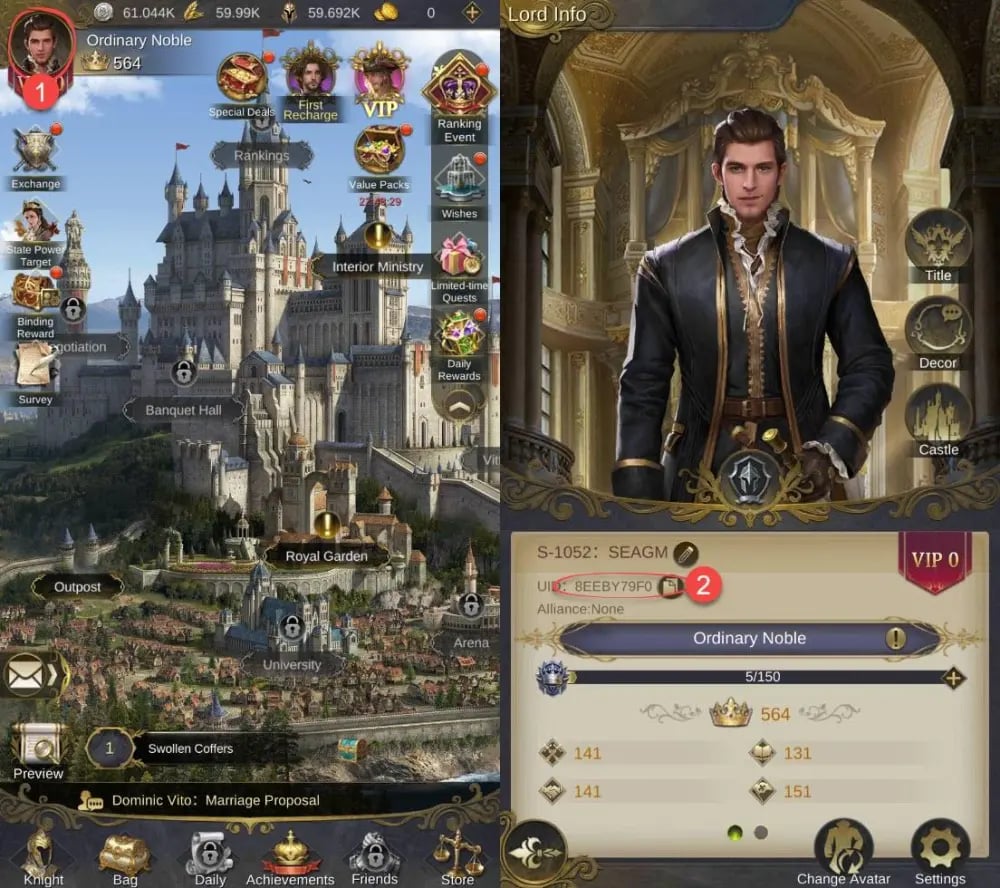
Follow these steps to find your exact Lord UID:
- Launch the King's Choice application on your mobile device.
- Tap your Lord Avatar located in the top-left corner of the main palace screen.
- Open your Lord Profile overview.
- Look directly below your character name and server tag to find your numerical UID.
- Tap the small copy icon next to the digits to copy the UID directly to your clipboard, preventing manual typos.
Be careful not to confuse your account binding identifier with your Lord UID. The binding identifier links your game to third-party login platforms, whereas the Lord UID is the internal routing number needed to deliver Diamonds to your specific character.
Server Verification: Ensuring Your Account is on King's Choice SEA
King's Choice operates separate server clusters across global regions, including SEA, Europe (EU), North America (NA), and other regional branches. Game data and purchased currencies do not transfer between separate server zones.
Before placing an order, confirm that your current character is hosted within the SEA server infrastructure.
| Server Region | Server Name Format | Product Compatibility |
|---|---|---|
| Southeast Asia (SEA) | SEA-S1 to SEA-S999+ | Compatible with this page |
| Europe (EU) | EU-S1 to EU-S999+ | Incompatible (Requires EU Top Up) |
| North America / Global | US-S1 / Global-S1+ | Incompatible (Requires Global Top Up) |
To verify your server zone, log in to the game and check the server selection label displayed on the start screen or right next to your Lord UID in your profile view. If your server begins with the SEA prefix, this product page is the correct destination for your account.
King's Choice Diamonds, Weekly Cards, and VIP Benefits Explained
Every top-up on XPTopup directly credits your account with resources that accelerate your kingdom's development:
- Diamonds: The primary premium currency used to purchase stamina potions, banquet invitations, arena seals, and high-value event packs during limited-time banner rotations.
- VIP EXP Points: Every direct recharge provides VIP progression points. Higher VIP tiers grant permanent bonuses, including increased collection efficiency, additional daily quest attempts, and exclusive 5-star Knights.
- Privilege & Weekly Cards: Purchasing active privilege packages provides instant daily Diamond claims, extra negotiation attempts, and automated production perks to keep your kingdom growing even while offline.
- Event Ranking Milestones: Using premium resources during cross-server state power rush events allows alliances to claim lord titles, exclusive outfits, and rare knight talent books.
Safe Top-Up Best Practices: Why You Never Need to Share Account Passwords
Account safety is a top priority when purchasing digital game goods. Legitimate top-up services never require access to your personal login credentials, social media passwords, or verification codes.
On XPTopup, orders are completed through official UID routing protocols. This offers several key security advantages:
- Zero Account Sharing: You retain complete control over your account at all times. You never need to hand over your login details to strangers.
- No Seller Chat Required: Unlike peer-to-peer marketplaces where you must coordinate with individual sellers, XPTopup uses direct automation to process orders instantly.
- Protection Against Account Recovery Scams: Keeping your password confidential eliminates the risk of unauthorized login attempts, email rebindings, or compromised account security.
Troubleshooting Missing Diamonds or Top-Up Delays
If your Diamonds or VIP EXP do not appear immediately after completing your order, follow these basic troubleshooting steps:
- Restart the Game: Force-close the King's Choice app and reopen it to refresh your connection with the game server.
- Check In-Game Mail: Certain special bundle items, first-purchase rewards, or event bonuses are delivered to your in-game mailbox rather than directly to your bag.
- Confirm Order Status: Check your order confirmation on XPTopup to verify that your transaction completed successfully.
- Verify UID Accuracy: Compare the UID on your purchase receipt with the UID displayed in your Lord Profile to ensure there were no typographical errors.
- Contact Support: If your payment is cleared and the UID is accurate but the resources have not credited after a short period, provide your Order ID and Lord UID to XPTopup customer support for fast resolution.






























