Get Your Weplay Top Up with Direct UID Delivery
WePlay is one of the most popular interactive party game and voice chat apps, bringing players together for casual board games, social deduction titles, and lively audio rooms. Whether you are playing Werewolf, Draw & Guess, Spyfall, or Mic Grab, having a ready balance of WePlay Gold allows you to fully customize your social presence and support your favorite room hosts.
XPTopup provides a direct and reliable way to process your Weplay recharge online. Using only your public User ID (UID), you can add Gold directly to your account balance without ever sharing your login credentials. Review the live catalog options, select the exact package you need, and complete your top-up quickly.
What is WePlay Gold and What Can You Use It For
WePlay features an in-app economy powered by Gold and Coins. While Coins can often be earned through regular gameplay, check-ins, and daily tasks, WePlay Gold is the premium currency used for exclusive social features, cosmetic customization, and VIP status progression.
Here is what you can access by topping up WePlay Gold:
- Luxury Voice Room Gifts: Send animated gifts such as supercars, yachts, castles, and custom fireworks to voice room creators, streamers, and friends.
- Profile and Avatar Customization: Purchase dynamic avatar frames, customized chat bubbles, special profile badges, and personalized microphone rings.
- Custom Entrance Effects: Display striking 3D entrance animations and custom banners whenever you step into a party room or game lobby.
- VIP Level Progression: Spending Gold contributes directly to your VIP experience points, unlocking tiered privileges, higher room capacities, and exclusive shop items.
- Party Passes and Game Perks: Unlock premium passes for seasonal mini-games, special voice filters, and private room themes.
| Feature / Item | WePlay Gold | WePlay Coins / Standard Currency |
|---|---|---|
| Animated Room Gifts | Full access to premium dynamic gifts | Limited to standard interaction icons |
| Avatar Frames & Badges | Exclusive animated & limited-edition items | Basic static frames and temporary event badges |
| VIP Tier Progression | Earns VIP points directly on every spend | Does not count toward VIP tier rank |
| Room Entrance Effects | Custom dynamic vehicles, banners, and sounds | Standard entry text notification |
| In-Game Mini-Game Items | Premium room themes, passes, and soundboards | Basic game room participation |
How to Find Your WePlay User ID (UID)
To ensure your Gold reaches the correct profile, you only need to provide your WePlay UID. Finding this identifier takes just a few seconds inside the mobile app:
- Open the WePlay application on your mobile device.
- Tap the Me (profile) tab located in the bottom-right corner of the home screen.
- Look directly below your profile picture and nickname at the top of the screen.
- Locate the numeric sequence labeled UID (or ID).
- Tap the copy icon next to your UID to copy the exact numbers to your clipboard.
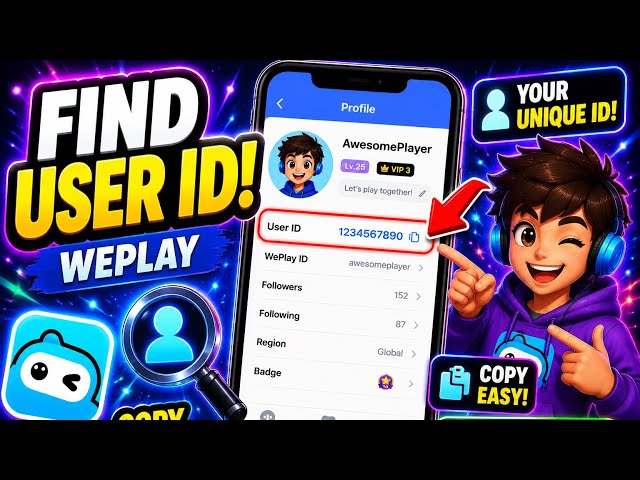
Double-check that you copy the numeric UID rather than your display name, as display names can be changed and are not unique.
How to Top Up WePlay Gold via UID on XPTopup
Recharging your WePlay account on XPTopup is designed to be straightforward and fast. Follow these simple steps:
- Select Your Package: Browse the available WePlay Gold denominations displayed on the product page and pick the amount you want to buy.
- Enter Your UID: Paste your numeric WePlay User ID into the dedicated UID input box.
- Confirm Your Account Info: Check the numbers carefully to prevent accidental delivery to an incorrect account.
- Proceed to Checkout: Select your preferred payment channel from the options available on the live checkout screen.
- Complete the Payment: Follow the on-screen prompts to finalize your transaction.
- Receive Your Gold: Once the order completes, open WePlay and check your updated Gold balance in your profile wallet.
Safe and Secure UID Top-Up (No Passwords Required)
Account safety is a major priority when buying gaming currencies online. Traditional top-up methods that ask for account usernames, passwords, or linked social media logins expose your personal data to unnecessary risks.
XPTopup operates on a UID-only direct recharge model:
- Zero Password Sharing: You never have to share your WePlay password, Google account, Apple ID, or phone verification codes.
- Privacy Protection: Your in-app chats, friend lists, and personal settings remain untouched and secure.
- No Account Lockouts: Because third parties do not log into your account from unfamiliar IP addresses, your profile remains completely safe from security flags or temporary suspensions.
WePlay In-Game Rewards, VIP Benefits, and Voice Room Gifts
Upgrading your account with WePlay Gold unlocks high-tier social interactions across all active voice rooms and mini-game lobbies.
VIP Status Tiers
Every time you spend Gold in WePlay, your profile accumulates VIP points. Climbing through the VIP levels unlocks permanent profile enhancements, exclusive chat colors, priority seating in popular party rooms, and unique gift collections reserved exclusively for high-tier supporters.
Interactive Room Gifting
Voice rooms thrive on community interaction. By sending luxury gifts, you can trigger full-screen animations that celebrate host milestones, support team competitions, and boost room rankings on the global leaderboard.
3D Avatar and Space Styling
WePlay features customizable 3D spaces and social plazas. Gold allows you to dress your 3D avatar in custom designer outfits, acquire rare interaction animations, and furnish personal party rooms to host game nights with friends.
Order Verification and Delivery Troubleshooting
Top-up orders on XPTopup are processed automatically once payment confirmation is received. If you want to verify your transaction or encounter any issue, follow this guide:
- Check Your In-App Wallet: Open WePlay, tap on Me, and select Wallet or Gold Balance. If the numbers have not updated, completely close the app and restart it to refresh your server connection.
- Review Order Status: Log in to your XPTopup account and view the Order History section to check the live status of your purchase.
- Verify the UID Entered: Check your order receipt to make sure the UID submitted matches your profile number exactly.
- Resolving Mistaken UID Entries: Because UID recharges are processed automatically to the designated account, double-checking your details before payment is essential. If you notice an error immediately after placing the order, contact XPTopup customer support right away with your order number.
Frequently Asked Questions
How do I find my WePlay User ID (UID)?
Open the WePlay app and tap the Me icon in the bottom-right corner. Your UID is the series of numbers displayed right below your avatar and nickname. Tap the copy icon next to the number to copy it to your clipboard.
Do I need to share my WePlay password to top up Gold?
No. XPTopup only requires your numeric UID. You never need to share your password, login credentials, or verification codes to receive your Gold.
How long does it take for WePlay Gold to reflect in my account?
Gold recharges are processed promptly after payment confirmation. In most cases, the currency appears in your in-game balance shortly after checkout. Restart your WePlay app to see the updated balance.
What can I buy with WePlay Gold and Coins?
Coins are generally used for entry into standard party games and basic interactions. Gold is the premium currency used to send animated voice room gifts, unlock VIP levels, purchase custom avatar frames, obtain entrance effects, and buy special event passes.
Can I top up WePlay Gold for a friend using their UID?
Yes. Because the checkout system only requires a valid UID, you can send Gold directly to a friend by entering their WePlay UID in the player field during purchase.
What should I do if my WePlay recharge does not appear?
First, force-close the WePlay app and reopen it to refresh your account data. If your balance still does not show the added Gold, check your order status on XPTopup and reach out to XPTopup customer support with your order number and UID for assistance.