Tarisland Top Up with Direct UID Delivery
Tarisland is a classic-style MMORPG built for PC and mobile that emphasizes class balance, cooperative raid mechanics, and fair seasonal progression. To customize your character, unlock premium cosmetics, obtain the latest seasonal Battle Pass, and manage your in-game resources, you need Tarisland Crystals.
XPTopup provides a direct Tarisland top up service that credits Crystals straight to your character using only your numeric User ID and designated Server. You never have to share login credentials, passwords, or authentication codes. Live pricing, bundle amounts, and current payment options are always updated directly on the active checkout screen above.
How to Top Up Tarisland Crystals with User ID
Recharging your account takes only a few steps:
- Select the Tarisland Crystal package you want to purchase from the product catalog above.
- Enter your numeric User ID in the designated field.
- Choose your active Server from the dropdown menu (e.g., NA-1, ASIA-1, EU-1, LATAM-1, EE-1).
- Review your order details and proceed to the checkout page.
- Select your preferred payment method and complete the transaction.
- Launch Tarisland on your PC or mobile device to verify your updated Crystal balance.
How to Find Your Tarisland User ID and Server
Finding your Tarisland account details is quick and can be done entirely from inside the game client.
- Launch Tarisland and log into your game account.
- Select your character and enter the world, or stay on the main character selection screen.
- Tap the Settings (gear) icon in the bottom right corner of the screen.
- Select the User Center / Account tab.
- Your numeric User ID will be listed on this page. Copy or write down the full number.
- Check your server region on the character select screen to ensure you choose the exact server matching your character.
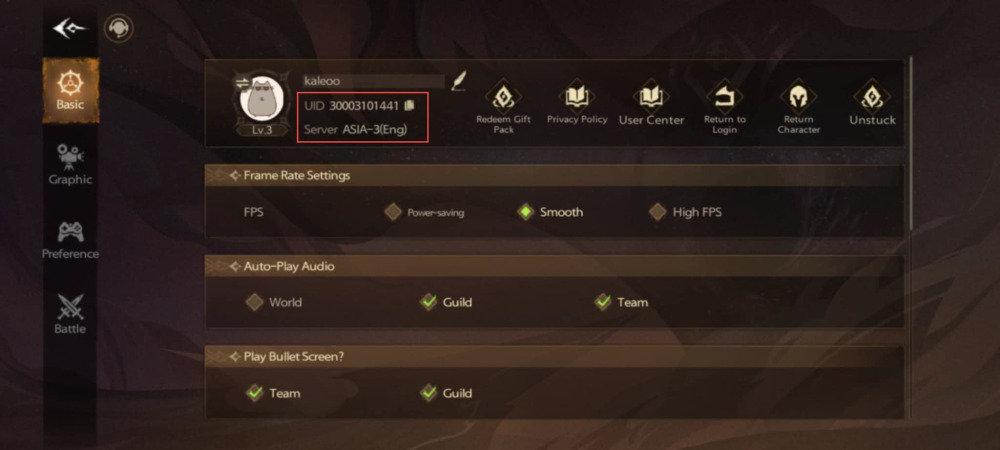
Double-check your numbers before submitting your order to prevent delivery delays.
Supported Tarisland Server List (ASIA, NA, LATAM, EU, EE)
Tarisland organizes its player base into distinct regional server clusters. Selecting the correct server code on XPTopup ensures your Crystals are delivered to the right character profile without routing errors.
| Region | Server Name | Server ID |
|---|---|---|
| Asia | ASIA-1 | 30001 |
| Asia | ASIA-2 | 30002 |
| Asia | ASIA-3 | 30003 |
| North America | NA-1 | 35001 |
| Latin America | LATAM-1 | 40001 |
| Latin America | LATAM-2 | 40002 |
| Europe | EU-1 | 45001 |
| Europe | EU-2 | 45002 |
| Europe | EU-3 | 45003 |
| Eastern Europe | EE-1 | 50001 |
If you play across multiple regions or have characters on separate servers, always confirm which server your intended character currently occupies before placing your order.
Tarisland In-Game Currencies: Crystals vs Tickets
Understanding the currency system in Tarisland helps you maximize the value of your recharge.
Tarisland Crystals (Premium Currency)
Crystals are the primary paid currency in Tarisland. When you complete a top up on XPTopup, you receive Crystals directly into your account wallet. Crystals are used for:- Purchasing the seasonal Battle Pass and unlocking premium tier tracks.- Buying exclusive character outfits, weapon appearances, mounts, and visual effects in the in-game Shop.- Converting directly into Tickets or Gold depending on your immediate progression needs.- Purchasing special event bundles and convenience items.
Tarisland Tickets
Tickets serve as a secondary utility currency within the game economy. They can be earned through gameplay milestones, events, and seasonal challenges, or exchanged directly from Crystals. Tickets are generally used for daily activity resets, purchasing specific crafting reagents, or acquiring bound character consumables.
Keeping a healthy reserve of Crystals gives you the flexibility to convert to Tickets when seasonal raid progression demands extra supplies, or save them for limited-time cosmetic releases.
Why Direct UID Top-Up is 100% Safe (No Password Required)
Account safety is critical in any MMORPG where players invest hundreds of hours into raid gear, reputation, and class builds. Traditional third-party account sharing—where a seller asks for your login credentials to make an in-game purchase—violates terms of service and exposes your personal data to high risk.
XPTopup uses a direct UID delivery system:- No Passwords Needed: You only provide your public User ID and Server. Your password, email, and two-factor authentication tokens remain private on your own device.- Zero Account Access: Nobody logs into your account. The transaction is processed directly into your character's ledger.- No Ban Risk from Shared IPs: Because no unauthorized external logins occur on your profile, your account avoids suspicious login flags or geographical mismatch triggers.
Troubleshooting Tarisland Delivery Delays & Account Check
Crystal deliveries are processed automatically once payment confirmation is received. If you do not see your updated balance right away, follow this troubleshooting checklist:
- Restart the Game Client: Completely close Tarisland and restart the application on your PC or mobile device. This forces the client to synchronize with the game server database.
- Check the In-Game Mailbox: Certain promotional pack items or bonus currency may be delivered directly to your character's mailbox rather than your top-bar balance.
- Verify Submitted Details: Check your order confirmation on XPTopup to verify that the User ID and Server selected match the character you are currently logged into.
- Check Character Selection: If you have multiple characters on the same account across different servers, log into the specific character residing on the server selected during checkout.
- Contact Support: If your balance does not reflect your purchase after completing these checks, reach out to XPTopup customer support with your Order ID and character details for immediate verification.
Tarisland Top Up FAQ
How do I find my Tarisland User ID and Server?
Open Tarisland, enter the game, and tap the Settings gear icon in the bottom right corner. Go to the Account or User Center section to view your numeric User ID. Your active server name (such as NA-1 or EU-1) is visible on the initial login and character selection screen.
Do I need to share my Tarisland password or login details?
No. XPTopup requires only your User ID and Server selection. You will never be asked for your password, social login credentials, or verification codes.
Which servers can I top up for Tarisland?
XPTopup supports all major global live servers in 2026, including ASIA-1, ASIA-2, ASIA-3, NA-1, LATAM-1, LATAM-2, EU-1, EU-2, EU-3, and EE-1.
What can I purchase with Tarisland Crystals?
Tarisland Crystals can be spent in the in-game store on seasonal Battle Passes, unique cosmetic skins, mounts, weapon effects, supply bundles, or converted directly into Tickets and Gold for progression utility.
Can I buy Tarisland Crystals for a friend using their User ID?
Yes. You only need your friend's numeric User ID and their active Server name. Select their server, enter their UID at checkout, and the Crystals will be credited straight to their character.
What should I do if my Tarisland Crystals have not arrived?
First, restart your game client and check your in-game mailbox. If the Crystals still do not display, confirm your submitted User ID and Server on your receipt, then contact XPTopup customer support with your Order ID for assistance.
Current package prices
Current package prices are shown below. Prices exclude Tax. Tax, payment fees and applicable coupons are shown at checkout.
| Package | Price |
|---|---|
| 60 Crystals | USD 0.71 |
| Weekly Ticket | USD 0.87 |
| Monthly Ticket | USD 2.57 |
| 330 Crystals | USD 3.45 |
| 700 Crystals | USD 7.01 |
| Semiannual Ticket | USD 14.47 |
| 1800 Crystals | USD 16.54 |
| 3600 Crystals | USD 33.12 |
| 7250 Crystals | USD 70.43 |