How to Top Up Onmyoji Arena Jade with User ID
To complete an Onmyoji Arena Jade top up on XPTopup, follow these direct steps:
- Select your desired Jade denomination from the available package options.
- Enter your numeric Onmyoji Arena User ID in the player field.
- Verify your User ID to prevent delivery errors.
- Click buy now and proceed to the live checkout page.
- Select your preferred payment method from the available regional and international options.
- Complete the transaction. Your Jade will be credited directly to your in-game account balance upon payment confirmation.
Because the recharge process relies entirely on your game identifier, you do not need to log out of the game or wait for manual transfer queues.
How to Find Your Onmyoji Arena User ID in the App
Locating your User ID inside Onmyoji Arena takes only a few seconds. Follow this walkthrough on either Android or iOS devices:
- Launch Onmyoji Arena on your mobile device and log in to your account.
- In the main game lobby, tap your avatar icon located in the upper-left corner of the screen.
- Your profile overview window will appear on screen.
- Look below your player nickname to find your numeric User ID.
- Tap the copy icon next to the number to copy the ID directly to your clipboard.
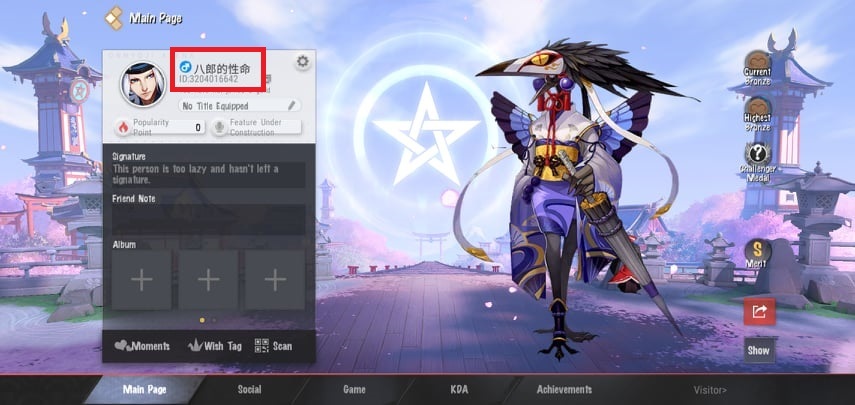
Paste this copied ID directly into the User ID field on XPTopup to avoid typos. User IDs function identically across all supported operating systems and official game servers.
What You Can Buy with Jade in Onmyoji Arena
Jade is the premium in-game currency in Onmyoji Arena, used to purchase characters, seasonal passes, and exclusive customization items:
- Shikigami Unlocks: Add new Shikigami across Samurai, Mage, Marksman, Ninja, Tank, and Support classes directly without grinding for gold coins.
- Exclusive Shikigami Skins: Purchase Epic, Legendary, Royal, and limited-time seasonal skins. Jade allows you to acquire skins with custom skill animations, voice lines, and special sound effects.
- Jade Pavilion Progression: Spending Jade counts toward your Jade Pavilion milestone points, unlocking high-tier collector skins and exclusive prestige badges.
- Battle Pass (S-Pass): Upgrade your seasonal S-Pass to unlock exclusive season skins, custom recall effects, seal effects, and bonus resource packs.
- Summoning and Gacha Items: Exchange Jade for Mystery Amulets, Daruma tokens, and event-specific lucky boxes to pull rare Shikigami cosmetics and accessories.
- Account Customization: Buy custom avatar frames, chat bubbles, pet accessories, dyed skin variations, and personalized battlefield announcer packs.
Available Onmyoji Arena Jade Packages (60 to 6,480 Jade)
XPTopup provides a full range of official Jade denominations to match your in-game spending goals. The table below outlines standard package sizes and their common uses:
| Jade Package | Base Jade Amount | Primary In-Game Use Case |
|---|---|---|
| 60 Jade | 60 Jade | Daily discounted draws, small consumables, item balance adjustments |
| 300 Jade | 300 Jade | Minor summon packs, dye variations, event vouchers |
| 680 Jade | 680 Jade | Standard seasonal S-Pass activation, mid-tier skins, Amulet packs |
| 1,280 Jade | 1,280 Jade | Epic-grade Shikigami skins, advanced battle pass bundles |
| 3,280 Jade | 3,280 Jade | Legendary skins, multiple hero unlocks, major event gacha runs |
| 6,480 Jade | 6,480 Jade | High-tier cosmetic bundles, Jade Pavilion milestone progression |
All real-time prices, regional currency conversions, and available payment options are displayed directly on the live checkout page.
Is It Safe to Recharge Onmyoji Arena Jade via XPTopup?
Safety is built into every transaction on XPTopup through our direct UID-only delivery protocol:
- No Passwords or Account Sharing: You only provide your public in-game User ID. We never ask for your game password, Google account, Apple ID, Facebook login, or third-party authentication tokens.
- Zero Risk of Account Compromise: Because login credentials are never shared, your account remains secure on your personal device at all times.
- Direct Server Credit: Jade purchases are delivered straight to the official game servers linked to your User ID.
- Encrypted Checkout: Every transaction is handled through secure, encrypted payment processing channels supporting multiple standard payment options.
Troubleshooting Delivery and Common Top-Up Inquiries
If you have completed your purchase and need assistance verifying your balance, review these operational steps:
- Restart the Game Client: In most cases, newly added Jade updates instantly. If your balance does not refresh right away, completely close Onmyoji Arena and relaunch the app to force a server synchronization.
- Check In-Game Shop Tab: Opening the in-game Jade store or the S-Pass menu triggers a balance check with the game server, refreshing your displayed balance.
- Verify the Submitted User ID: Confirm that the User ID entered during checkout matches your current profile ID. Submitting an incorrect User ID may direct the delivery to another account.
- Customer Support Assistance: If your balance has not updated after restarting your game, contact XPTopup customer support with your order number and transaction confirmation for quick resolution.
Frequently Asked Questions
How do I find my Onmyoji Arena User ID to top up Jade?
Open Onmyoji Arena, tap your profile avatar in the upper-left corner of the main lobby, and locate the numeric User ID displayed under your character name. Tap the copy icon next to the number to copy it to your clipboard.
Do I need to share my account password to purchase Onmyoji Arena Jade?
No. XPTopup uses a direct UID-only recharge system. You only need to provide your numeric User ID. Never share your password, verification codes, or login credentials with anyone.
What can I purchase with Jade in Onmyoji Arena?
Jade can be spent on Shikigami unlocks, seasonal S-Pass upgrades, Epic and Legendary skins, Jade Pavilion cosmetic milestones, Mystery Amulets, Daruma summoning tokens, and profile customization items.
How long does it take for Jade to arrive in my Onmyoji Arena account?
Jade deliveries are processed directly upon payment authorization. In most cases, the currency credits straight to your account balance. Relaunching the game helps display the updated balance immediately.
Can I top up Onmyoji Arena Jade for a friend using their User ID?
Yes. You can purchase Jade for friends or guildmates by entering their numeric User ID in the player field at checkout. As long as the User ID is accurate, the Jade will deliver directly to their account.
What should I do if my Onmyoji Arena Jade top-up has not arrived?
First, restart your game app to refresh your connection to the game server. If the balance remains unchanged, verify your order status on XPTopup and contact customer support with your order ID for immediate assistance.
Current package prices
Current package prices are shown below. Prices exclude Tax. Tax, payment fees and applicable coupons are shown at checkout.
| Package | Price |
|---|---|
| 60 Jade | USD 0.82 |
| 300 Jade | USD 4.10 |
| 680 Jade | USD 8.22 |
| 1280 Jade | USD 16.43 |
| 3280 Jade | USD 41.11 |
| 6480 Jade | USD 82.23 |