Razer Pay Link Top Up: What It Is and How It Works in 2026
A Razer Pay Link is a direct digital checkout URL generated by participating gaming platforms, publishers, and online web shops to settle transactions through authorized Razer channels. Instead of requiring you to link a personal credit card or manage complex payment authentications inside a game client, the publisher generates a unique, time-sensitive payment link containing your transaction order ID, currency, and purchase amount.
Completing a Razer Pay Link top up on XPTopup allows you to process these direct invoices safely and efficiently. By submitting your generated payment link directly on our platform, our automated fulfillment system resolves the merchant invoice on your behalf. This enables players worldwide to purchase in-game currencies, battle passes, seasonal event items, and DLC packages without exposing sensitive personal banking credentials or sharing private gaming account logins.
Step-by-Step Guide: How to Complete a Razer Pay Link Top Up on XPTopup
Fulfilling your transaction through XPTopup is straightforward. Follow these steps to ensure your payment link is generated and submitted correctly:
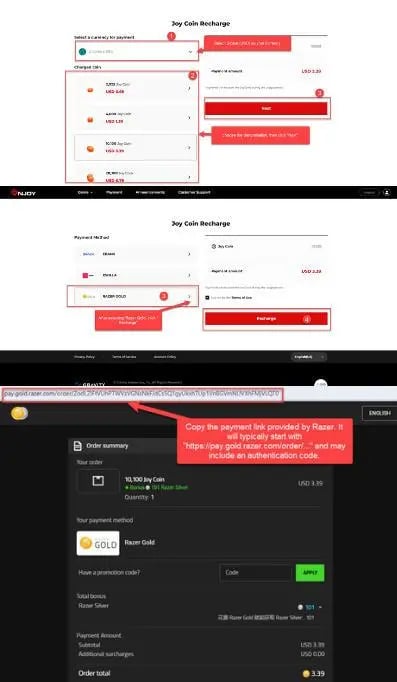
- Generate Your Payment Link: Open your game client, official web store, or top-up portal. Select the in-game item or currency package you wish to purchase, choose Razer as your payment method, and proceed to the payment gateway to generate your unique checkout link.
- Copy the Complete URL: Copy the full URL from your browser address bar or payment window. Ensure the entire link string—including all unique session tokens and parameters—is copied.
- Submit on XPTopup: Paste the complete URL into the Razer Pay Link input field on this product page.
- Review Order and Select Payment Method: View the live pricing on the checkout screen and select your preferred payment option.
- Complete Checkout: Finalize your payment. The XPTopup system processes the submitted link instantly, settling your in-game invoice without delay.
Always double-check that your payment link is active and copied in its entirety before submitting your order to prevent transaction delays.
Razer Pay Link vs. Razer Gold: Understanding the Differences
Many gamers confuse a direct Razer Pay Link with standard Razer Gold wallet top-ups or gift card PINs. While both utilize the Razer payment infrastructure, they function differently:
| Feature | Razer Pay Link Top Up | Standard Razer Gold / PIN |
|---|---|---|
| Input Required | Generated Merchant Checkout URL | Razer Gold Account ID or Serial PIN |
| Account Passwords | Never Required | Never Required |
| Purpose | Settles a specific, active in-game order invoice | Loads stored-value balance to a wallet |
| Expiration Window | Time-sensitive (typically 15–60 minutes) | Balance does not expire immediately |
| Regional Flexibility | Directly fulfills the specific order currency | Bound to specific Razer Gold wallet regions |
| Fulfillment Process | Automated external URL payment resolution | Manual code redemption or direct wallet reload |
A Razer Pay Link is an order-specific settlement token. You do not need to create or maintain a separate wallet balance; you simply generate the invoice from your game and let XPTopup process it directly.
Supported Global Payment Options and Multi-Currency Pricing
Gamers worldwide require flexible payment options that avoid high foreign exchange fees. On XPTopup, live pricing dynamically reflects current exchange rates, allowing you to settle your game purchases clearly without hidden surcharges.
Supported payment channels include:- International and Local Credit/Debit Cards: Fast, secure global card processing.- Digital Wallets and E-Wallets: Region-specific digital payment solutions for quick mobile checkout.- Direct Online Banking: Secure bank transfers and instant debit gateways.- Alternative Regional Gateways: Convenient localized checkout options tailored to your country.
All exchange rates and processing options are displayed transparently during checkout on XPTopup before you confirm payment.
Common Mistakes to Avoid When Submitting a Razer Pay Link
To ensure your order is processed smoothly without interruptions, avoid these common errors:
- Submitting Expired Links: Most game merchant links have a short validity window. Always submit your link to XPTopup immediately after generating it.
- Truncated or Broken URLs: Missing characters at the beginning (
https://) or end of the query string will prevent our system from verifying the order. Always copy the complete string. - Cancelling the Order on the Merchant Page: If you cancel or close the order on the game store side, the link becomes invalid and cannot be settled.
- Submitting Already Paid Links: Ensure the link has not already been completed through another payment window or session.
- Modifying Link Parameters: Do not edit amounts, tokens, or publisher codes inside the link, as this causes immediate security validation failures.
Account Safety and Secure Order Processing Without Passwords
Account security is critical when purchasing game top-ups online. The Razer Pay Link fulfillment system on XPTopup provides a non-custodial payment model designed to protect your gaming profile completely.
- Zero Password Requirement: You never provide your game password, Razer login, or two-factor authentication codes.
- Direct Invoice Settlement: The link only authorizes payment for the single transaction you generated. It gives no ongoing access to your gaming account or personal profile.
- Encrypted Checkout: XPTopup utilizes end-to-end encryption protocols to secure all transaction details and payment data.
- Buyer Protection: Every transaction is tracked with clear status reporting on your XPTopup order dashboard, giving you complete visibility from submission to completion.
Frequently Asked Questions
What is a Razer Pay Link and how do I obtain one?
A Razer Pay Link is a unique payment URL created when you initiate a purchase on a game client or web store that supports Razer payment processing. To obtain one, select the item you want in your game or publisher shop, choose Razer as the checkout method, and copy the full URL generated on the payment screen.
Do I need to provide my account login or password for a Razer Pay Link top up?
No. You never need to share your game login credentials, email passwords, or Razer account details. You only provide the generated checkout URL, allowing XPTopup to settle the specific invoice securely without touching your private profile.
How fast is the Razer Pay Link top up processed on XPTopup?
Orders submitted with a valid, unexpired Razer Pay Link are processed automatically through our secure system. Once your payment is confirmed on XPTopup, the order is settled on the merchant portal, and your in-game items or credits are delivered directly to your account.
What should I do if my Razer Pay Link has expired or is invalid?
If your link expires before completion, return to your game store, initiate the transaction again to generate a fresh payment link, and submit the new URL on XPTopup. If you experience persistent issues, contact 24/7 XPTopup customer support for immediate assistance.
Which payment options can I use to pay for my Razer Pay Link recharge?
XPTopup provides a broad range of payment channels, including major credit and debit cards, localized e-wallets, online bank transfers, and regional payment methods. Available options and exact multi-currency pricing are displayed live on the checkout screen.
Can I top up a Razer Pay Link for international or cross-region accounts in 2026?
Yes. Because the payment link directly represents the specific merchant checkout invoice, XPTopup can settle valid payment links across supported global gaming titles and regions regardless of your physical location.
Current package prices
Current package prices are shown below. Prices exclude Tax. Tax, payment fees and applicable coupons are shown at checkout.
| Package | Price |
|---|---|
| Razer Pay Link $0.99 | USD 0.84 |
| Razer Pay Link $2.99 | USD 2.48 |
| Razer Pay Link $4.99 | USD 4.13 |
| Razer Pay Link $9.99 | USD 8.26 |
| Razer Pay Link $19.99 | USD 16.52 |
| Razer Pay Link $29.99 | USD 24.79 |
| Razer Pay Link $34.99 | USD 28.92 |
| Razer Pay Link $49.99 | USD 41.31 |
| Razer Pay Link $59.99 | USD 49.56 |
| Razer Pay Link $74.99 | USD 61.96 |
| Razer Pay Link $86.99 | USD 71.86 |
| Razer Pay Link $99.99 | USD 82.60 |
| Razer Pay Link $199.99 | USD 165.20 |
| Razer Pay Link $299.99 | USD 247.81 |
| Razer Pay Link $599.99 | USD 495.60 |