WeTV Top Up: Coins and VIP Membership in 2026
WeTV stands as one of the premier digital streaming platforms for Asian entertainment, offering thousands of hours of Chinese dramas, anime, variety shows, and Southeast Asian regional productions. To get the most out of the viewing catalog, users can choose between two distinct in-app currencies: WeTV VIP Membership and WeTV Coins.
A VIP membership grants ongoing access to premium catalog tiers, eliminates standard video advertising, and enables high-resolution playback across multiple screens. In contrast, WeTV Coins function as flexible microtransaction credits used to unlock individual episodes, early-access express packages, web comics, and live broadcast gifts. On XPTopup, you can complete your WeTV recharge directly using your Player ID without sharing account login credentials.
Key Differences: WeTV Coins vs WeTV VIP Subscription
Before placing your order, review how these two currencies operate so you select the right product for your entertainment needs.
| Feature | WeTV VIP Membership | WeTV Coins |
|---|---|---|
| Model | Subscription (Monthly / Quarterly / Annual) | Direct Consumable Balance |
| Ad-Free Playback | Yes (Skips standard video ads) | No |
| Exclusive Catalog Access | Full access to VIP-only series and movies | Only unlocked per individual purchase |
| Express Episode Packages | Discounted or prioritized access | Direct purchase currency for Express runs |
| Extra Comic & Novel Content | Standard access | Unlocks paid chapters and bonus books |
| Virtual Gifting | No | Supports live streamer and creator tips |
| Account Delivery Requirement | Player ID | Player ID |
Exclusive WeTV VIP Membership Benefits
Upgrading your account to WeTV VIP transforms your everyday streaming experience with several dedicated privileges:
- Zero Video Ads: Skip mandatory pre-roll and mid-roll commercials so you can watch your favorite dramas uninterrupted.
- Watch Ahead of Free Viewers: VIP members get access to newly released drama episodes days or weeks before standard free-tier users.
- High-Definition Audio and Video: Stream your favorite titles in Full HD 1080p, 4K Ultra HD, and enhanced audio profiles like Dolby Atmos where supported.
- Multi-Device Support: Link your subscription across mobile phones, tablets, desktop browsers, and smart TVs with simultaneous playback on up to two devices.
- VIP-Exclusive Catalog: Gain instant access to premium dramas, uncut director cuts, special episodes, and backstage variety show footage.
What You Can Unlock With WeTV Coins
WeTV Coins give you targeted purchasing power inside the application without committing to a recurring subscription package:
- Express Episode Packages: When a hit drama reaches its final broadcast week, WeTV frequently offers Express Packages. You can spend Coins to unlock the finale episodes immediately instead of waiting for the weekly broadcast schedule.
- Comic and Web Novel Chapters: If you follow serialized manga, manhua, or web novels inside the WeTV ecosystem, Coins allow you to unlock paywalled chapters.
- Live Streamer Gifts: Support your favorite actors, idols, and content creators during live interactive sessions by purchasing digital gifts with your coin balance.
How to Find Your WeTV Player ID
XPTopup requires only your public WeTV Player ID to credit your account. You never need to supply your password, linked phone number, or social media logins.
- Open the WeTV app on your iOS or Android device.
- Tap the Account (or Me) icon in the bottom-right corner of the navigation bar.
- Tap your Profile Picture / Nickname near the top of the screen to open the profile overview.
- Locate your User ID / Player ID (a numerical string) displayed below your profile name.
- Tap the Copy button next to your Player ID to copy it to your clipboard.
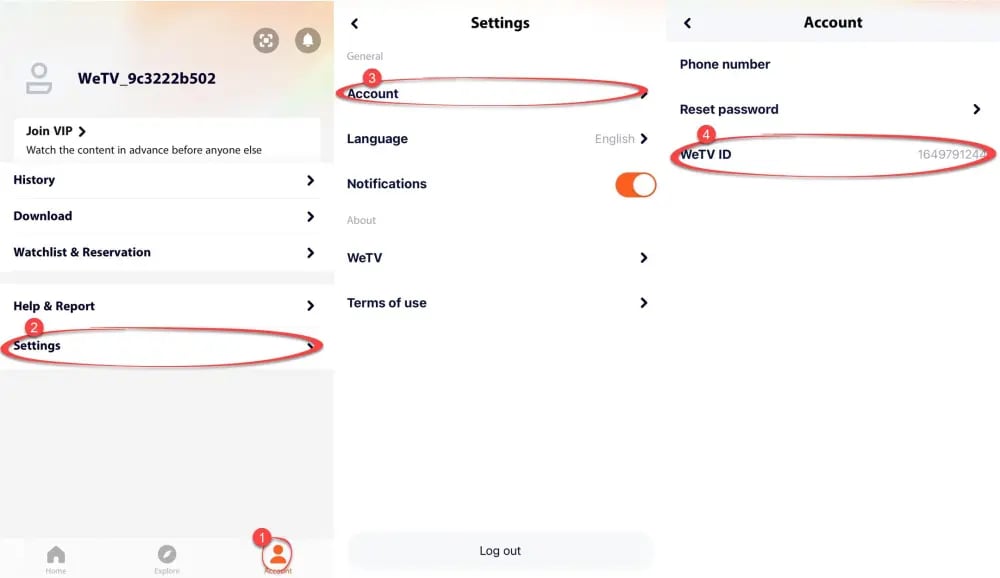
Tip: If you use the WeTV web browser interface, log in, click your avatar in the upper-right corner, select Account Settings, and copy the numerical User ID shown on your account dashboard.
Step-by-Step Guide to Top Up WeTV on XPTopup
Recharging your WeTV account on XPTopup takes just a few clicks:
- Select Your Item: Choose whether you want a specific denomination of WeTV Coins or a WeTV VIP Membership duration.
- Enter Your Account Info: Paste your copied Player ID into the designated input field.
- Choose Payment: Select your preferred local or international payment method on the checkout screen.
- Confirm and Pay: Review your order details and complete the transaction. Current prices and real-time conversion rates are calculated instantly at checkout.
- Check Your Balance: Open the WeTV application, refresh your account profile, and verify your updated Coin balance or active VIP badge.
Why Choose XPTopup for WeTV Recharge
- 100% Password-Free Security: We never ask for your account password or third-party login credentials. Direct Player ID routing keeps your personal data private.
- Flexible Catalog: Access a full array of Coin bundles alongside monthly, quarterly, and annual VIP membership passes in one place.
- Global & Localized Payments: Pay using trusted payment options tailored to your region with direct digital fulfillment.
- Dedicated Customer Support: Order tracking and customer care agents are available to assist with any order queries.
Troubleshooting Common WeTV Recharge & Balance Issues
If your coins or VIP status do not reflect immediately after payment, follow these quick diagnostic steps:
- Force Close and Restart the App: Log out of your WeTV account or close the mobile app completely from your device background processes, then relaunch it to force an account server refresh.
- Verify Your Player ID: Check your payment confirmation receipt to ensure there was no typo in the Player ID entered during checkout.
- Confirm Active Profile Switching: If you manage multiple profiles under one phone number or social login, ensure you are logged into the exact profile tied to the Player ID you submitted.
- Contact Support with Your Order ID: If the balance has not updated after a few minutes, reach out to XPTopup customer service with your transaction reference number for immediate assistance.
Frequently Asked Questions
How do I find my WeTV Player ID for top up?
Open the WeTV mobile application, tap the Account tab in the bottom-right corner, select your profile avatar at the top, and locate the numerical Player ID displayed beneath your nickname. Tap the copy icon to copy the number directly.
What is the difference between WeTV Coins and WeTV VIP Membership?
WeTV VIP Membership is a time-based subscription that removes standard video advertisements, unlocks the full VIP drama library, and grants 1080p/4K multi-screen playback. WeTV Coins are pay-as-you-go microtransaction credits used to purchase individual Express episode packages, comic chapters, and live stream gifts.
Can I use WeTV Coins to purchase a VIP Membership directly?
WeTV Coins are primarily designed for micro-content purchases like Express finale runs, digital novels, and virtual gifts. In most platform regions, VIP subscriptions must be activated directly as a membership package rather than converted from standard coin balances.
Do I need to share my WeTV account password to recharge on XPTopup?
No. XPTopup uses a direct ID-based recharge system. You only need to provide your public WeTV Player ID. Never share your account passwords or third-party authorization codes with anyone.
What content can I unlock using WeTV Coins?
You can spend WeTV Coins on Express on-demand packages to watch finale episodes ahead of regular VIP scheduling, unlock premium digital comic and web novel chapters, or send interactive digital gifts to creators during live streams.
How many devices can stream simultaneously with WeTV VIP?
A standard WeTV VIP membership supports simultaneous streaming on up to two separate devices at the same time, allowing you to watch across your mobile phone, tablet, computer, or TV app.
How long does it take for WeTV Coins or VIP membership to arrive after payment?
Orders processed through XPTopup are delivered directly to your WeTV account balance shortly after payment confirmation. Once the transaction completes, refresh your WeTV account screen to see your new balance or active VIP badge.
Current package prices
Current package prices are shown below. Prices exclude Tax. Tax, payment fees and applicable coupons are shown at checkout.
| Package | Price |
|---|---|
| 99 WeTV Coins | USD 0.79 |
| 199 WeTV Coins | USD 1.58 |
| 299 WeTV Coins | USD 2.39 |
| 1 Month VIP Membership | USD 2.71 |
| 699 WeTV Coins | USD 6.40 |
| 3 Months VIP Membership | USD 8.00 |
| 1099 WeTV Coins | USD 9.60 |
| 1599 WeTV Coins | USD 12.81 |
| 12 Months VIP Membership | USD 28.83 |
| 4199 WeTV Coins | USD 31.89 |
| 9999 WeTV Coins | USD 80.12 |
| 29999 WeTV Coins | USD 240.40 |