
First Farer Box

Total

USD 1.31

Skip to main content
XPTopup
Search...
Quick answer

To top up Shadowverse Worlds Beyond, pick a package, enter your Link and pay at checkout. It is credited to that account after payment is confirmed — no password needed.

Product specs
GameShadowverse Worlds Beyond
Product typeDirect top-up to your game account
Account details neededLink
Packages10
DeliveryAutomatic after payment is confirmed, usually within minutes
PaymentCards, e-wallets, local methods and crypto — options depend on your country

Shadowverse Worlds Beyond top up on XPTopup credits Crystals or a bundle to the account you identify in the checkout's Link field, with automatic delivery that usually finishes within a few minutes of payment confirmation. No password, no login and no account sharing are part of the process.

Shadowverse Worlds Beyond top-up specs

  • Game: Shadowverse Worlds Beyond
  • Currency: Crystals
  • Crystal packs: 490, 990, 1500, 2600 and 5500 Crystals
  • Bundles: First Farer Box, Starter Bundle, Deckboost Bundle, Special Deckboost Bundle, Crystals + Visage Bundle
  • Required: Link (one field)
  • Region: account region as shown at checkout
  • Delivery: automatic, usually within minutes
  • Login needed: no

Find the value for the Link field

Unlike games that ask for a numeric UID, this checkout has a single field called Link. It tells the system which Shadowverse Worlds Beyond account receives the order, so it has to come from the account you actually play on.

  1. Open Shadowverse Worlds Beyond on the account you want to recharge.
  2. Go to your profile or account section from the home screen.
  3. Find the account identifier or link the game lets you copy, and copy all of it.
  4. Paste it into the Link field exactly as copied.

Menu names can differ by version and platform. If you cannot tell which value belongs in the Link field, ask support before paying rather than guessing.

Crystals or a bundle: which one fits?

Crystals are the premium currency of Shadowverse Worlds Beyond, spent in the in-game shop, for example on card packs. Every Crystal pack credits the same currency, so the size only decides how much you have to spend at once.

  • 490 Crystals: closing a small gap in your balance.
  • 990 and 1500 Crystals: a moderate round of card packs when a new set arrives.
  • 2600 Crystals: a bigger push on a set you want to complete.
  • 5500 Crystals: the largest single pack, for players who prefer fewer, larger orders.
  • First Farer Box and Starter Bundle: as the names say, aimed at players early in their collection.
  • Deckboost Bundle and Special Deckboost Bundle: bundles built around strengthening a deck.
  • Crystals + Visage Bundle: Crystals plus a Visage item in a single purchase.

Bundle contents and purchase limits are set by the game and shown in its shop. Live prices for all ten products are in the table under this guide.

Common Link mistakes to avoid

  • Entering your player name: names can repeat and change, the Link identifies one account.
  • Copying only part of the value, or leaving a space at the start or end.
  • Using the Link of a second or old account, for example one on another device.
  • Typing the value by hand instead of pasting it.

Crystals delivered to the wrong account cannot be pulled back, so compare the pasted value with the game screen once more before you pay.
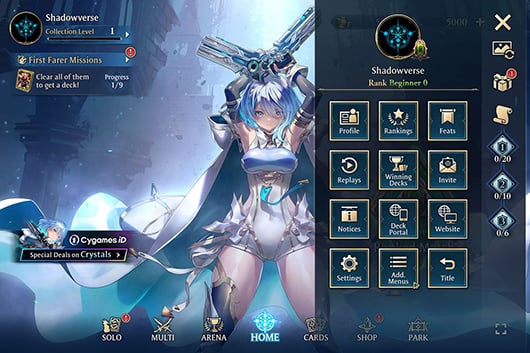
Top Up Shadowverse Worlds Beyond guide image

Recharge Process

Top-up Procedures

  1. 1

    Place Your Order & Check Out

    Complete your purchase securely through our checkout process.

  2. 2

    Instant Auto-Delivery to Your UID

    Once your payment is confirmed, your top-up is automatically delivered to the UID you entered — fast, 100% secure, and no account login required.

Shadowverse Worlds Beyond FAQ

01

How do I top up Shadowverse Worlds Beyond?

Paste your account's value into the Link field, choose a Crystal pack or bundle, and pay with a method available in your region. Delivery to that account then starts automatically.

02

What exactly goes into the Link field?

The account identifier or link that the game lets you copy from your profile or account area. If you are not sure which value it is, contact support before ordering.

03

How long does a Crystals recharge take?

It is automatic and usually completes within a few minutes after payment is confirmed. The order page shows the status; restart the game if your balance has not refreshed.

04

Are these the same Crystals I would buy inside the game?

They arrive as Crystals in your account balance through a direct recharge. Any special rules the game applies to purchased currency are set by the game and explained in its shop.

05

Can I buy Crystals for a friend's account?

Yes. Ask your friend to copy the Link from their own account and enter that value at checkout. The order is delivered to their account, not yours.

06

What if I entered the wrong Link?

Crystals delivered to another account cannot be recovered. If the order has not completed yet, contact support immediately with your order number.

07

Do I need my login or password?

No. The Link is the only detail needed. Nobody from the store will ask for your password or verification codes.

08

Can I buy the First Farer Box or Starter Bundle more than once?

Purchase limits for bundles are decided by the game, so check the in-game shop first. If an order cannot be delivered, support helps, and failed orders are refunded to the original payment method.

Shadowverse Worlds Beyond
Top Up Shadowverse Worlds Beyond

Shadowverse Worlds Beyond

4.3ksold

Prices exclude Tax. Tax is shown at checkout.

Payment Support

SBP (Faster Payments System)Credit / debit cardBLIKBank card (Belarus)Bank card (Kazakhstan)SPEIPayUBoostOctopusGate PayBinance PayTouch 'n Go eWalletBancontactFPSApple PayGoogle PayCredit / debit cardTrustlypaysafecardMyBankMultibancoXPTopup wallet balanceEps



















