Sky: Children of the Light Top Up with Sky ID
Candles are the core currency in Sky: Children of the Light, used to unlock cosmetics, advance friendship trees, upgrade expressions, and collect limited-edition items. Gathering enough daily wax for every outfit, cape, and musical instrument requires hours of daily candle runs across every realm. A direct Sky: Children of the Light top up allows you to obtain the regular candles and seasonal candles you need instantly.
XPTopup provides direct candle recharges using only your unique Sky ID. You do not need to share your account passwords, linked third-party credentials, or login verification codes. Select your preferred candle pack, enter your Sky ID, and complete your payment to receive in-game currency directly to your account.
Live pack options, seasonal offerings, and dynamic regional pricing are displayed directly on the checkout screen above.
How to Top Up Sky: Children of the Light Candles on XPTopup
Completing a recharge is straightforward and takes only a few moments:
- Select the candle denomination or Seasonal Candle pack you wish to purchase from the product list.
- Enter your accurate Sky ID in the required player field.
- Choose your preferred payment option from the checkout menu.
- Complete the transaction securely.
- Launch Sky: Children of the Light on your mobile device, PC, or console to verify your updated candle balance.
How to Find Your Sky ID in Sky: Children of the Light
Your Sky ID is a unique account identifier generated by the game server. It differs from your display name and is used to route top-up orders directly to your profile.
Follow these steps to locate your Sky ID:
- Launch Sky: Children of the Light and enter Home or Aviary Village.
- Tap the top-right corner of your screen (or open the pause menu if playing on PC or console) to open the main menu.
- Tap the Gear icon to open the Settings menu.
- Select the Account tab.
- Tap Account Info to display your unique Sky ID.
- Tap the copy icon next to your Sky ID to copy the code to your clipboard without making typing mistakes.
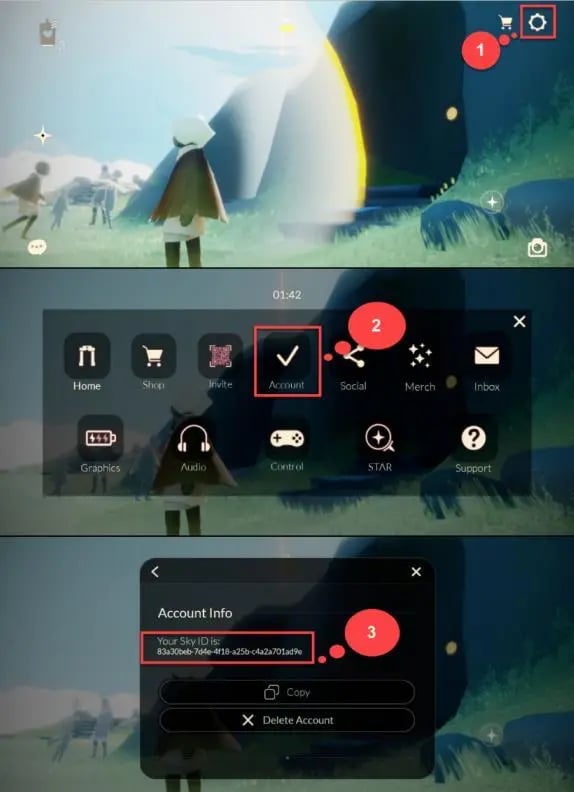
Always double-check that you paste the complete alphanumeric string. Because account IDs are case-sensitive and contain distinct characters, copying the code directly from the in-game settings screen ensures your order arrives without delays.
Sky COTL In-Game Currencies: Regular Candles vs Seasonal Candles
Sky: Children of the Light features distinct currency types, each serving specific purposes across spirit constellations, friendship progression, and cosmetic shops.
| Currency Type | Primary In-Game Purpose | Seasonal Expiration & Conversion |
|---|---|---|
| Regular Candles (White) | Unlocking base constellation cosmetics, friend tree upgrades, emotes, and hearts | Never expire; remain in your permanent account balance |
| Seasonal Candles (Orange) | Purchasing exclusive seasonal cosmetics and spells from active 2026 season spirits | Converted 1:1 into Regular Candles after the current season ends |
| Ascended Candles | Unlocking wing buffs and higher-tier friendship nodes | Permanent balance earned through Eye of Eden and shard events |
| Event Currency | Purchasing event-specific props and items during limited-time festivals | Cleared automatically when the specific event ends |
Regular Candles (White Candles)
White Candles are the standard currency. Players use them to forge friendships, send daily hearts to companions, unlock standard spirit cosmetics from the base constellations, and purchase spells from traveling spirits.
Seasonal Candles (Orange Candles)
Seasonal Candles are tied exclusively to active 2026 seasonal events. They allow you to purchase seasonal cosmetics from the visiting season spirits without waiting for future traveling spirit returns. Any Seasonal Candles remaining in your wallet when a season ends are automatically converted into regular White Candles at a 1:1 ratio.
Platform Compatibility and Candle Balance Sync Rules
Sky: Children of the Light supports cross-progression across iOS, Android, PC (Steam), Nintendo Switch, and PlayStation. However, platform-specific currency policies affect where certain purchased balances appear:
- Free & Earned Candles: Any candles forged from in-game wax or completed daily quests sync across all linked platforms.
- Mobile and PC (Steam) Balance: Candles purchased for mobile and PC versions share a unified balance when linked to the same Sky profile.
- Console Ecosystem Restrictions: Due to platform policies, candles purchased on specific consoles (such as Nintendo Switch) may remain isolated to that specific platform's wallet, although all cosmetics, wing buffs, and friendship nodes unlocked with those candles sync across every device.
To ensure your purchased candles are accessible where you play most, verify that your active game profile is linked across your intended devices before completing your order.
Safe & Secure Sky COTL Top-Up Without Account Passwords
Account safety is essential. Many third-party sellers request full login access, requiring you to hand over Google, Apple, Steam, or Nintendo credentials. This creates significant risks of account theft, compromised personal data, and accidental item deletion.
XPTopup uses a direct-to-ID delivery model:
- No Passwords Required: You only supply your public Sky ID. Your login credentials, recovery emails, and personal passwords remain private.
- Automated Processing: Orders are handled programmatically through direct backend delivery channels rather than manual peer-to-peer logins.
- Risk-Free Transactions: Avoiding account sharing protects your account against unauthorized account changes or policy violations associated with credential transfers.
What to Do If Your Candles Do Not Appear In-Game
If your order has been marked complete on XPTopup but your candle count has not updated inside the game, follow these troubleshooting steps:
- Restart the Game: Completely close the Sky: Children of the Light application, clear it from your active background apps, and relaunch it to force a fresh server sync.
- Verify Network Connection: Ensure your device has an active internet connection. A weak connection can prevent the game client from pulling updated account data.
- Switch Realms: Move your character from Home to Aviary Village or enter any realm portal. Triggering an in-game loading screen forces the server to update your inventory.
- Check Your Sky ID: Review your order confirmation receipt to make sure the Sky ID submitted matches the Account Info string displayed in your game settings.
- Contact Customer Support: If your balance does not update after restarting, reach out to XPTopup customer support with your Order Number and Sky ID for prompt assistance.
Frequently Asked Questions
How do I find my Sky ID to complete a top-up?
Open Sky: Children of the Light, tap the top-right corner to open the Settings menu (gear icon), select Account, and tap Account Info. Your unique Sky ID will be displayed on screen with a copy button.
Do I need to share my Sky account password for a candle recharge?
No. Top-ups on XPTopup require only your Sky ID. You never need to provide your password, authentication codes, or linked social login credentials.
Will purchased Candles appear on all platforms including PC and mobile?
Candles credited to your account sync across mobile and PC platforms linked to the same Sky profile. Due to platform-holder policies, some console ecosystems maintain separate purchased balances, though all cosmetics and items purchased with those candles sync everywhere.
What is the difference between regular Candles and Seasonal Candles?
Regular Candles are the permanent currency used for base constellations, standard spirits, and friend trees. Seasonal Candles are used exclusively for active season spirits and automatically turn into regular White Candles at a 1:1 ratio when the season concludes.
What should I do if my Sky: Children of the Light order has not arrived?
First, restart your game completely to refresh server data. If the currency still does not reflect, check that the Sky ID entered on your order matches your account screen, then contact XPTopup support with your transaction details.
Can I gift Candles to a friend using only their Sky ID?
Yes. Because our top-up process only requires a Sky ID, you can purchase candle packs for friends by entering their accurate Sky ID at checkout instead of your own.
Current package prices
Current package prices are shown below. Prices exclude Tax. Tax, payment fees and applicable coupons are shown at checkout.
| Package | Price |
|---|---|
| 15 Season Candles | USD 4.63 |
| 15 Season Candles | USD 4.63 |
| 30 + 5 Bonus Season Candles | USD 8.78 |
| 60 + 12 Bonus Season Candles | USD 18.11 |
| 150 + 40 Bonus Season Candles | USD 41.45 |