
60 Ornate Jades

Total

USD 0.84

Skip to main content
XPTopup
Search...
Quick answer

To top up Sword of Justice Jade, pick a package, enter your UID and Server and pay at checkout. It is credited to that account after payment is confirmed — no password needed.

Product specs
GameSword of Justice Jade
Product typeDirect top-up to your game account
Account details neededUIDServer
Packages10
DeliveryAutomatic after payment is confirmed, usually within minutes
PaymentCards, e-wallets, local methods and crypto — options depend on your country

Sword of Justice top up on XPTopup sends Ornate Jades and pass items to your UID on the server you name, with automatic delivery that usually completes a few minutes after payment is confirmed. Two fields, UID and Server, are all the order needs; your password and login stay with you.

Sword of Justice recharge specs

  • Game: Sword of Justice
  • Currency: Ornate Jades
  • Jade packs: 60, 300+30, 980+120, 1980+288, 3280+528 and 6480+1296 Ornate Jades
  • Passes: Monthly Pass, Basic Battle Pass, Advanced Battle Pass, Battle Pass Upgrade
  • Required: UID and Server (the server name is typed in, not picked from a list)
  • Region: account region as shown at checkout
  • Delivery: automatic, usually within minutes
  • Login needed: no

Find your UID and server name

Every Sword of Justice character is tied to a UID and a server. The checkout needs both, and because the Server field is a text box, the name you type has to match the game exactly.

  1. Log in to the character that should receive the Jades.
  2. Open the character profile from your avatar and find the line labelled UID; use the copy option if the game offers one.
  3. Check the exact name of the server that character plays on, for example on the screen where you pick a server at login.
  4. Paste the UID, then type the server name with the same spelling, spaces and numbers.

Your character name is not the UID. If you have characters on several servers, the UID and server must belong to the same character. A delivery to the wrong UID or server cannot be undone, so compare both with the game before paying.

Which Ornate Jades pack or pass to choose

Ornate Jades are the premium currency of Sword of Justice, spent in the in-game shop on items such as outfits and other cosmetics, depending on what the shop is offering. Apart from the single 60 pack, every Jade pack is listed as a base amount plus an extra amount, and you receive the pack exactly as named.

  • 60 Ornate Jades: a quick refill when one item is just out of reach.
  • 300+30 and 980+120 Ornate Jades: regular spending on a few shop items.
  • 1980+288 and 3280+528 Ornate Jades: a new outfit or a longer shopping list planned in advance.
  • 6480+1296 Ornate Jades: the largest pack, for building a big balance in one order.
  • Monthly Pass: for players who log in every day; the game describes what it gives.
  • Basic Battle Pass or Advanced Battle Pass: choose the track you want for the current season.
  • Battle Pass Upgrade: for moving up from a track you already own, so open your battle pass screen first and check which one is active.

Live prices for every Jade pack and pass are in the table below this guide.

Topping up a friend or guildmate

Ornate Jades and passes can go to another player's account: the order is delivered wherever the UID and server point. A few habits keep a gift from going astray:

  • Ask your friend to copy their UID from their own profile and send it to you as text, not as a screenshot you retype.
  • Ask for their server name exactly as the game shows it; it may be different from yours.
  • Before buying a pass for someone, check which battle pass track they already have.
  • Keep your order number until they confirm the delivery arrived.
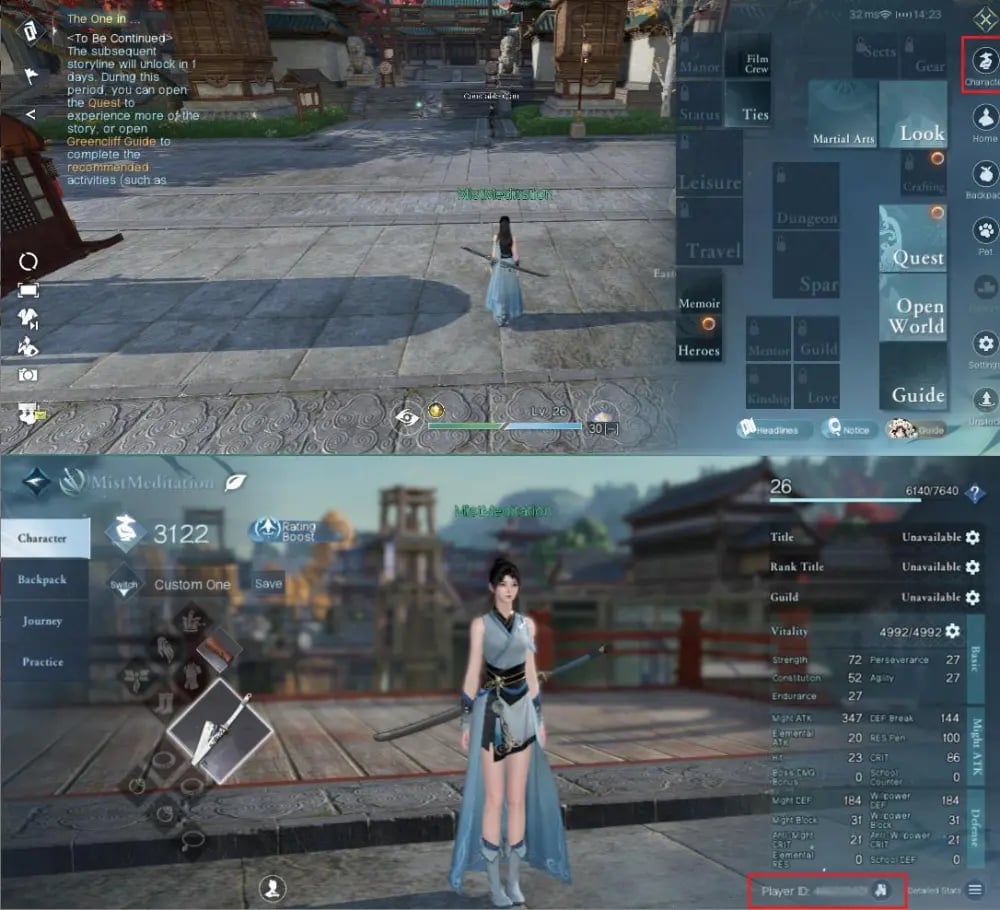
Sword of Justice Recharge guide image

Recharge Process

Top-up Procedures

  1. 1

    Place Your Order & Check Out

    Complete your purchase securely through our checkout process.

  2. 2

    Instant Auto-Delivery to Your UID

    Once your payment is confirmed, your top-up is automatically delivered to the UID you entered — fast, 100% secure, and no account login required.

Sword of Justice Jade FAQ

01

How do I top up Sword of Justice with UID and server?

Paste your UID, type your server name, choose an Ornate Jades pack or pass, and pay with a method available in your region. The recharge then runs automatically to that character.

02

Where is my UID in Sword of Justice?

Open your character profile from the avatar; the UID is shown as a labelled line in the character details. Copy it from there instead of typing it from memory.

03

What should I type into the Server field?

The exact name of the server your character is on, as the game displays it. The field is free text, so a typo or a different server name points the order to the wrong place.

04

What does 980+120 mean in a Jade pack name?

The pack name shows a base amount and an extra amount. Both figures are part of the pack, and the order is delivered as named; the same reading applies from 300+30 up to 6480+1296.

05

Basic, Advanced or Upgrade: which battle pass item do I need?

Pick Basic Battle Pass or Advanced Battle Pass if you have no paid track this season. Battle Pass Upgrade is for raising a track you already own; check your battle pass screen in the game before ordering.

06

How long do Ornate Jades take to arrive?

Delivery is automatic and usually completes within a few minutes after payment is confirmed. The order page shows the status; relog if the balance looks unchanged.

07

What if I entered the wrong UID or server?

Jades delivered to another character cannot be pulled back. If the order is not completed yet, contact support right away with your order number; failed orders are refunded to the original payment method.

08

Do I need to share my Sword of Justice password?

No. Only the UID and server name are needed. Never give your password or verification codes to anyone for a recharge.

Sword of Justice Jade Top-Up
Sword of Justice Recharge

Sword of Justice Jade Top-Up

2.6ksold

Prices exclude Tax. Tax is shown at checkout.

Payment Support

SBP (Faster Payments System)Credit / debit cardBLIKPmpromptpayBank card (Belarus)PixBank card (Kazakhstan)JKOPAYPrzelewy24PayUBoostDuitnowDragonpayAlipayHKOctopusAirwallex FpxBinance PayGate PayTouch 'n Go eWalletFPSBancontactApple PayGoogle PayCredit / debit cardTrustlypaysafecardMyBankMultibancoEps























