Tamashi: Rise of Yokai Top Up: Direct Sycee Refill on XPTopup
Power up your onmyoji journey across the demon-infested world of Glamland. Purchasing a Tamashi: Rise of Yokai top up on XPTopup gives you direct access to premium Sycee to summon powerful Yokai spirits, upgrade rare weapons, unlock VIP milestones, and dominate competitive cross-server boss battles.
XPTopup provides a direct-to-account reload system. You never have to share your game password, private login credentials, or third-party account details. Simply provide your numeric User ID and select your active game server to receive your Sycee balance directly in your game client.
What is Tamashi: Rise of Yokai Sycee and How is it Used?
Sycee is the primary premium currency in Tamashi: Rise of Yokai. While basic coins and bound resources are farmable through daily story missions, Sycee is required for high-tier progression, time-limited event pools, and exclusive character customization.
Here is how Sycee accelerates your character growth in the game:
- Yokai Summons & Spirit Banners: Draw top-tier SSR and SP Yokai spirits to accompany your character in combat, trigger elemental combo resonances, and build versatile battle formations.
- Equipment & Soul Enhancements: Purchase rare refining gems, socket upgrades, mount evolution stones, and artifact materials to maximize your overall combat rating.
- VIP Level Progression: Spending Sycee unlocks tiered VIP privileges, granting permanent bonus EXP multipliers, extra daily dungeon entries, and exclusive cosmetic titles.
- Daily Attempt Refreshes: Reset high-yield daily boss limits, demon tower stages, and resource dungeons to gather evolution items ahead of server resets.
- Limited-Time Gacha & Seasonal Outfits: Acquire festival-themed avatar skins, weapon illusions, and decorative wings during active 2026 server events.
How to Top Up Tamashi: Rise of Yokai Sycee on XPTopup
Refilling your balance on XPTopup takes only a few quick steps. Follow this guide to ensure your order processes without delay:
- Select Your Package: Browse the live listing and choose the Sycee denomination you want to purchase. Current prices and package contents are displayed on the live checkout interface.
- Enter Your User ID: Type your numeric in-game User ID into the required field.
- Select Your Server: Open the server list dropdown and pick your exact server name (e.g., AP, NA, or EU server clusters).
- Proceed to Checkout: Select your preferred payment method and finalize your transaction.
- Check Your In-Game Balance: Open Tamashi: Rise of Yokai. Your purchased Sycee will reflect directly in your account balance or in your system mailbox.
How to Find Your Tamashi: Rise of Yokai User ID and Server
To ensure your Sycee delivers to the correct character, obtain your exact User ID and Server Name directly from the game client.
- Launch Tamashi: Rise of Yokai on your mobile device.
- Log into the character you wish to top up.
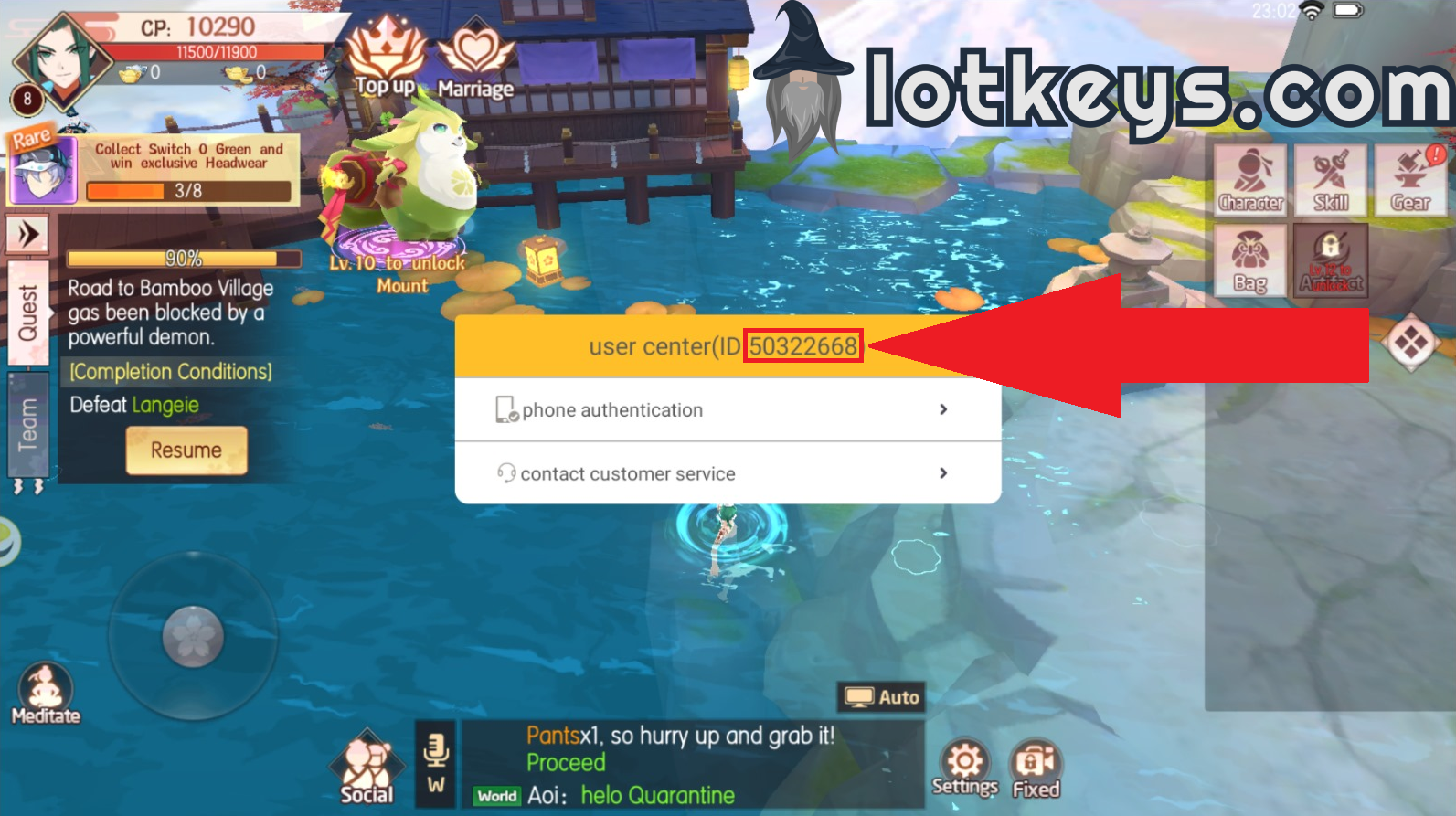
- Tap your Character Avatar / Profile Icon located in the top-left corner of the main screen.
- In the player profile window, locate your User ID (a series of numbers) and your assigned Server Name.
- Write down or copy the exact numeric ID and match the server name with the dropdown menu on XPTopup.
Supported Server Regions: AP, NA, and EU Server Guide
Tamashi: Rise of Yokai hosts players across multiple geographical clusters. XPTopup supports all active game servers across Asia-Pacific (AP), North America (NA), and Europe (EU).
Always ensure the server prefix matches the server where your character currently resides. Selecting a different server will cause the reload to fail or deliver Sycee to an inactive profile on that separate server.
| Region Cluster | Server Prefix Range | Example Server Names | Supported ID Input |
|---|---|---|---|
| Asia-Pacific (AP) | AP1 – AP482+ | AP1-Kojiro, AP100-Torite, AP300-Mana | Numeric User ID |
| North America (NA) | NA1 – NA154+ | NA1-Kisaragi, NA50-Akaru, NA154-Souta | Numeric User ID |
| Europe (EU) | EU1 – EU120+ | EU1-Tsuyemon, EU50-Kanai, EU120-Rie | Numeric User ID |
If your server underwent a server merge, select the original server name where your character was created, or choose the consolidated server name as shown on your current login screen.
Safe Top-Up Assurance: No Password Required Account Security
Account safety is a core priority when buying game currencies online. XPTopup operates on a strict direct ID recharge protocol:
- Zero Password Requests: You will never be asked for your account password, email credentials, or Google/Apple login tokens.
- No Account Sharing: Your account remains strictly in your hands. You do not need to log out or hand over your session to third parties.
- Official Delivery Paths: Transactions are routed directly to your character ID and server identifier, eliminating account ban risks associated with unauthorized modified clients or credential sharing.
Troubleshooting Delayed Sycee Credits and Common In-Game Refresh Steps
If your Sycee does not display immediately after completing your order, follow these diagnostic steps to update your balance:
- Allow Server Sync: Most orders complete immediately, but network congestion during high-traffic events may take a brief moment to synchronize.
- Check the In-Game Mailbox: Some direct recharge bonuses and package tokens are delivered as claimable attachments in your in-game system mail. Open your mailbox and claim all unread items.
- Restart the Game App: Completely close the Tamashi: Rise of Yokai app from your device's background tasks, then relaunch it to force a fresh connection with the game server.
- Change Game Maps / Channel: Teleporting your character to a different town or entering a dungeon instance forces the server to update your inventory and currency totals.
- Verify Your Order Information: Check your XPTopup receipt to confirm you entered the correct numeric User ID and selected the accurate server name.
- Contact Customer Support: If your balance does not update after these steps, reach out to the 24/7 XPTopup customer support team with your Order ID, User ID, and server name for rapid resolution.
Frequently Asked Questions
How do I find my Tamashi: Rise of Yokai User ID and Server?
Open Tamashi: Rise of Yokai and tap your character avatar in the upper-left corner of the screen. Your numeric User ID and your active Server Name are displayed inside your profile interface.
What are Sycee used for in Tamashi: Rise of Yokai?
Sycee is used to summon Yokai spirits, purchase weapon enhancement stones, refresh daily dungeon and boss encounter limits, progress VIP tiers, and unlock time-limited cosmetics during in-game events.
Do I need to share my game password to top up on XPTopup?
No. XPTopup only requires your in-game User ID and your character's server name. You should never share your account password or social login credentials with anyone.
Can I send Tamashi: Rise of Yokai Sycee to a friend?
Yes. As long as you know your friend's accurate User ID and the exact server their character is on, you can enter their details at checkout on XPTopup to send the Sycee directly to their account.
What should I do if my purchased Sycee does not appear immediately?
First, check your in-game mailbox for system delivery messages. Next, force close and restart the game application to refresh your client data. If the Sycee is still missing, contact XPTopup support with your Order ID for immediate assistance.
Which servers (AP, NA, EU) are supported for top-up?
XPTopup supports all active servers in the Asia-Pacific (AP), North America (NA), and Europe (EU) regions. Choose your specific server from the dropdown list before confirming your purchase.
Current package prices
Current package prices are shown below. Prices exclude Tax. Tax, payment fees and applicable coupons are shown at checkout.
| Package | Price |
|---|---|
| 60 Sycee | USD 0.74 |
| 300 Sycee | USD 3.65 |
| 600 Sycee | USD 7.33 |
| 900 Sycee | USD 11.03 |
| 1200 Sycee | USD 15.17 |
| 1800 Sycee | USD 22.07 |
| 3000 Sycee | USD 36.81 |
| 6000 Sycee | USD 73.66 |