Top Top Top Up: Fast Coin Recharge with Player ID
Top Top is one of the most popular social gaming apps in 2026, combining casual multiplayer board games like Ludo, Dominoes, Uno, and Carrom with interactive live voice rooms. To participate in high-stakes matches, enter premium rooms, or send virtual gifts to friends, you need a healthy balance of in-game coins.
A Top Top top up on XPTopup gives you direct, hassle-free access to coins without requiring sensitive account passwords. All you need is your numeric Player ID. Pick your coin package, complete your payment through our secure checkout, and get your coins credited straight to your account.
What Are TopTop Coins and How to Use Them in 2026
Top Top coins serve as the central currency across the entire application. Whether you play competitively or hang out in voice chat communities, having coins available expands your gameplay options:
- Match Stakes and Entry Fees: Every competitive match in games like Ludo, Dominoes, and Carrom requires a coin entry fee. Higher-tier rooms offer larger prize pools for winning players.
- Voice Room Gifting: Send animated digital gifts to room hosts, teammates, or friends in social rooms to increase your room influence and social level.
- Interactive Mini-Games: Use coins to spin lucky wheels, participate in seasonal mini-game events, and unlock extra reward chests.
- Profile Customization: Purchase decorative avatar frames, unique entrance effects, and animated chat bubbles to personalize your social presence.
Review the live checkout catalog above for current coin denominations and real-time pricing.
How to Top Up TopTop Coins Using Player ID on XPTopup
Recharging your Top Top account on XPTopup takes less than two minutes. Follow these direct steps:
- Select Your Coin Amount: Browse the available coin bundles on this page and choose the package that fits your gameplay needs.
- Enter Your Player ID: Type or paste your Top Top Player ID into the designated input field. Double-check the digits to ensure accurate delivery.
- Proceed to Checkout: Select your preferred payment method on the secure checkout screen.
- Complete Payment: Finalize your order. Once the payment confirms, your coins are sent directly to your Top Top account balance.
- Check In-App Balance: Open the Top Top app on your mobile device to verify your updated coin balance.
How to Find Your TopTop Player ID in the App
Locating your Player ID is simple and requires only a few taps inside the mobile application:
- Open the Top Top app on your Android or iOS device.
- Tap the Me (Profile) icon located in the bottom-right corner of the main screen.
- Look directly beneath your profile avatar and username.
- You will see your numeric Player ID (UID).
- Tap the small Copy icon next to the number to copy it directly to your clipboard.
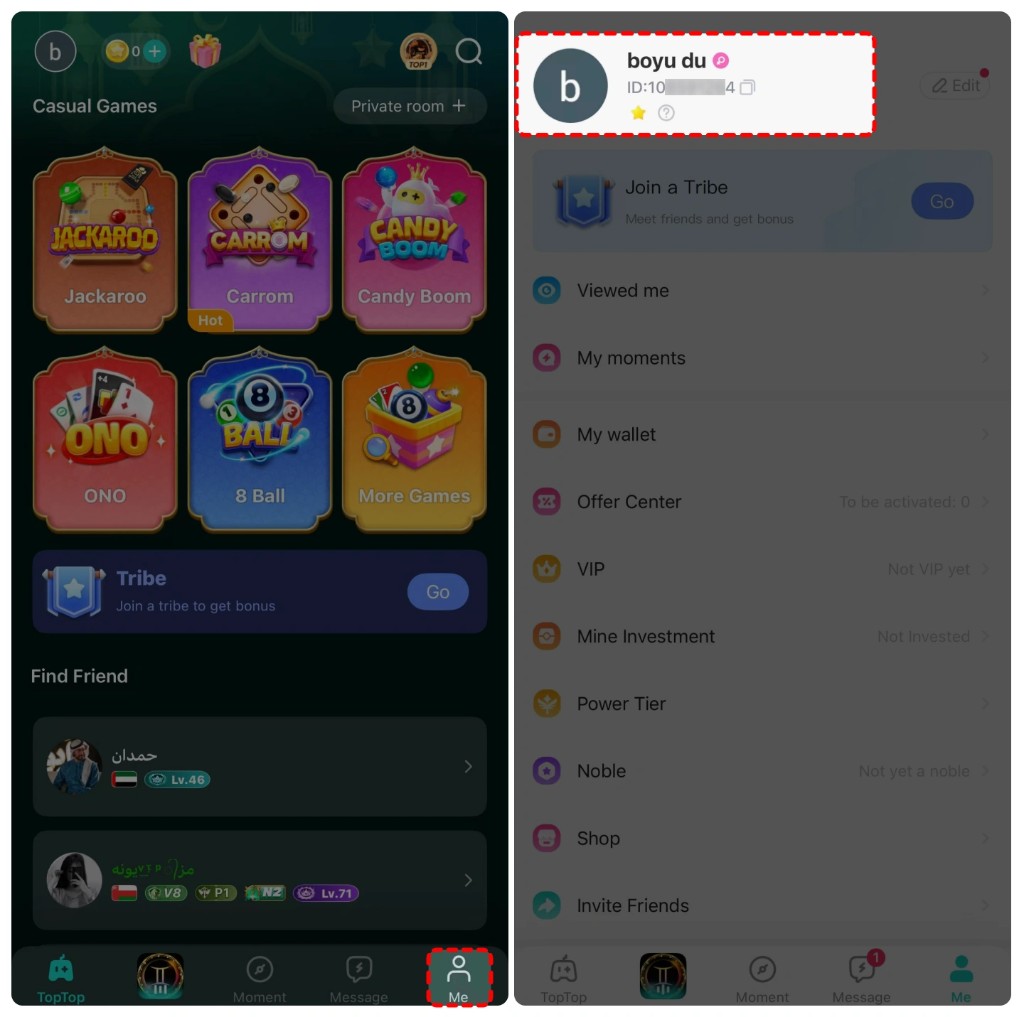
Paste this copied ID directly into the Player ID box on XPTopup during checkout to prevent any typing errors.
TopTop Mini-Games Coin Guide: Ludo, Dominoes, and Social Rooms
Coins power every major mode inside the Top Top app. Here is how your coin balance is utilized across key activities:
| Game Mode / Feature | Coin Purpose | Primary Benefit |
|---|---|---|
| Ludo (Classic & Quick) | Match entry fees and prize pool wagering | Compete in higher-tier rooms and multiply your coin balance |
| Domino & Domino Draw | Table stakes and round buy-ins | Access competitive tables with skilled players |
| Voice Chat Rooms | Interactive gifts, tips, and badges | Boost social level, support hosts, and gain room visibility |
| Carrom & Casual Games | Challenge wagers and tournament tickets | Play against friends or global players in structured matches |
| Profile Cosmetics | Avatar frames, chat bubbles, entry themes | Customize profile display across all mini-games and rooms |
Maintaining a sufficient coin reserve ensures you never miss a match invite or get locked out of high-reward tables.
Safety First: Why UID-Only Recharges Protect Your Account
Account safety is critical when purchasing digital currencies online. XPTopup uses a strictly UID-based system for Top Top recharges, providing complete protection for your account:
- No Password Required: You never have to share your Top Top password, linked social media credentials, or phone verification codes.
- No Account Sharing Risks: Because no third party logs into your profile, your account remains 100% in your hands at all times, preventing unauthorized access or accidental setting changes.
- Safe and Direct Credit: Coins are transferred directly through standard system top-up channels straight to your numeric ID.
- Encrypted Checkout: Every transaction on XPTopup is processed through encrypted payment gateways to ensure your financial details remain private.
Troubleshooting Delivery Issues and Balance Verification Steps
If your coins do not reflect immediately after completing a top up, run through these quick verification steps:
- Refresh the App: Fully close the Top Top app from your device background apps list and reopen it. This forces the client to sync with the game servers.
- Confirm the Player ID: Review your order confirmation receipt on XPTopup and check whether the Player ID entered matches your current in-app ID.
- Check Order Status: Look up your transaction under your XPTopup order history to verify that payment processing is complete.
- Contact Support: If the transaction shows completed but your balance has not updated after a few minutes, contact the XPTopup 24/7 customer service team with your Order ID and Player ID for immediate assistance.
Frequently Asked Questions About Top Top Recharge
How do I find my TopTop Player ID for recharge?
Open Top Top, tap the Me tab in the bottom-right corner, and locate the numeric ID displayed under your profile avatar and name. Tap the copy icon next to it to copy the exact number.
Do I need to provide my TopTop password to buy coins?
No. XPTopup only requires your Top Top Player ID. We never ask for your password, email logins, or SMS verification codes.
How quickly will coins be credited to my TopTop balance?
Coins are processed automatically once your payment is confirmed. In most cases, your coins appear in your account balance within moments of order completion.
What games inside TopTop require coins to play?
Coins are used for entry stakes and bets in Ludo, Dominoes, Uno, Carrom, and various mini-games, as well as for sending animated gifts in voice chat rooms.
Can I recharge TopTop coins for a friend using their Player ID?
Yes. You can top up coins for any friend or family member by simply entering their Top Top Player ID during the checkout process.
What should I do if my TopTop coins do not appear after purchase?
First, restart your Top Top application to refresh your balance. If the coins are still missing, check your order status on XPTopup and reach out to our 24/7 support team with your order details.