CarX Street Top Up: Direct In-Game Currency Recharge
Dominating the open roads of Sunset City requires elite vehicles, fine-tuned suspension setups, and high-performance engine parts. Whether you are competing in competitive club battles, drifting tight mountain passes, or building a dream garage, resources dictate how quickly you can push your cars to their mechanical limits.
A direct CarX Street top up provides the in-game Gold and Silver necessary to skip long resource grinds and focus on racing. Through XPTopup, you can recharge your account directly using only your CarX ID. There is no need to share your private account credentials, wait for manual peer-to-peer transfers, or risk your profile security.
Overview of CarX Street In-Game Currencies: Gold, Silver, and Street Pass
CarX Street operates on a dual-currency economic system alongside seasonal progression passes. Understanding how each resource functions ensures you allocate your top-up funds effectively.
| Currency / Item | Main Uses | How It Is Utilized |
|---|---|---|
| CarX Street Silver | Basic upgrades, repairs, club entry fees, visual paints, standard car purchases | Used for daily maintenance, basic bolt-on modifications, transmission tuning, and regional race entries. |
| CarX Street Gold | High-end sports cars, elite engine swaps, blueprint unlocking, premium bodykits, instant delivery | The premium currency required for top-tier vehicle acquisitions, specialized engine conversions, and high-performance racing parts. |
| Street Pass | Tiered seasonal rewards, exclusive styling, bonus currency drops | Progression-based rewards earned through racing milestones and active season participation. |
CarX Street Silver
Silver serves as the foundational operating currency in Sunset City. You spend Silver on standard engine modifications, weight-reduction stages, tire compounds, and routine vehicle refuels or repairs. Silver is also required to pay the entry fees for club sprint races and drift challenges throughout the city.
CarX Street Gold
Gold is the premium currency in CarX Street. Certain high-tier sports cars and exotic builds can only be unlocked directly with Gold. Beyond buying premium cars, Gold is critical for engine swaps—such as dropping high-revving rotary or V8 engines into lightweight chassis—and skipping delivery timers on specialized components.
How to Locate Your CarX ID in the Game Settings
To process your order, XPTopup only requires your unique numeric CarX ID. This identifier ensures your purchased Gold or Silver is sent directly to your character profile without accessing your login details.
Follow these steps to find your ID:
- Launch CarX Street on your mobile device or gaming platform.
- Tap the Settings (Gear Icon) located in the top corner of the main garage interface.
- Open the Profile / Account tab.
- Locate the numeric string labeled CarX ID displayed beneath your profile username.
- Copy or record this number accurately to use during checkout.
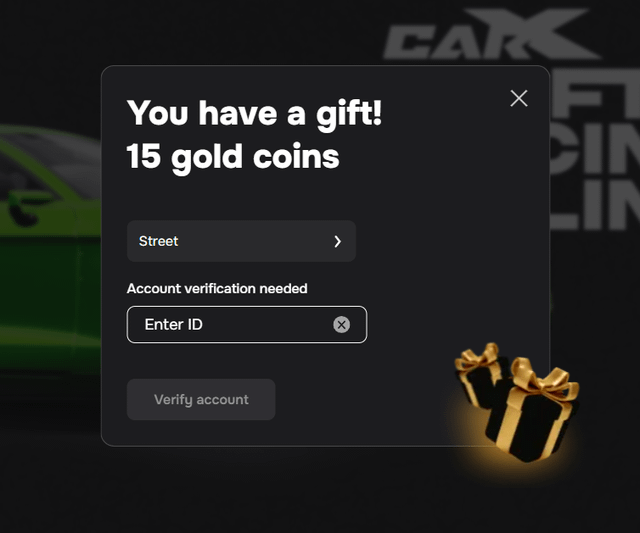
Double-check that the ID you enter matches your in-game profile exactly to prevent any processing delays.
How to Top Up CarX Street Online Using CarX ID
Recharging your CarX Street resources on XPTopup is designed to be direct, quick, and transparent. Follow this simple process:
- Select Your Currency Package: Review the available Gold and Silver bundles on the live product page and choose the pack that matches your upgrade goals.
- Input Your CarX ID: Enter your numeric CarX ID in the designated player field. Verify that every digit is correct.
- Review Order & Price: Check your order summary. The live checkout displays exact pricing in your local currency.
- Select Payment Option & Pay: Choose your preferred secure payment method and finalize the transaction.
- Receive Your In-Game Currency: The automated system delivers your purchased Gold or Silver straight to your game account. Open CarX Street to confirm your updated balance.
Why ID-Only Top-Up is Safer Than Account Sharing
Many unauthorized marketplaces and individual sellers require buyers to hand over their Apple ID, Google Play login, or CarX account passwords. Account sharing carries severe risks, including:
- Account Theft & Compromise: Third parties gain direct access to your personal emails, connected payment methods, and personal data.
- Game Bans: Account sharing and unauthorized third-party logins violate standard terms of service, which can lead to permanent account suspension.
- Save Data Corruption: Multiple active logins across different devices can disrupt your cloud-save sync, leading to lost vehicles and tuning setups.
By utilizing an ID-only top-up model, XPTopup eliminates these risks completely. Your password stays private on your own device. The transaction functions as a direct server-side credit to your player profile, keeping your account completely secure.
Best Ways to Spend CarX Street Gold and Silver for Upgrades
Maximizing your investment ensures you stay competitive across sprint circuits and drift zones throughout Sunset City. Here is how top drivers allocate their resources:
Prioritize Essential Handling Upgrades with Silver
Before spending premium Gold on massive horsepower gains, use Silver to upgrade:- Suspension Geometry & Coilovers: Dialing in camber, stiffness, and ride height makes your car manageable at high speeds.- Tire Compounds: Premium sport or racing tires dramatically reduce wheelspin and improve cornering grip.- Transmission Tuning: Adjusting gear ratios allows your vehicle to stay within its optimal powerband during acceleration.
Reserve Gold for Engine Swaps and Top-Tier Platforms
Gold provides the greatest return when used for game-changing modifications:- Engine Conversions: Converting an entry-level chassis with a high-displacement or forced-induction racing engine allows budget cars to beat exotic supercars.- Exclusive Vehicle Unlocks: Certain high-performance platforms require Gold for purchase. Securing these cars gives you an immediate advantage in high-ranking club races.- Aero & Widebody Kits: Enhance downforce and widen wheel tracks for maximum stability around high-speed highway loops.
Payment Options and Direct Delivery Verification on XPTopup
XPTopup provides a transparent checkout experience tailored to players worldwide. Pricing and available payment options are dynamically rendered on the checkout interface based on your region.
Once your transaction completes, the system routes the currency directly to your CarX ID. To verify delivery:1. Ensure your CarX Street app is completely closed or refreshed.2. Reopen the game and check your top balance bar in the garage menu.3. Your newly added Gold or Silver balance will reflect immediately.
Frequently Asked Questions About CarX Street Top-Ups
How to top up in CarX Street using CarX ID?
To top up using your CarX ID, select your desired Gold or Silver bundle on XPTopup, paste your numeric CarX ID into the player details field, and complete your payment. The selected currency will be credited directly to your in-game account.
Where can I find my CarX ID in CarX Street?
You can find your CarX ID by opening CarX Street, tapping the Gear/Settings icon in your main garage screen, and viewing your Account/Profile tab. Your unique ID number is displayed on this page.
Do I need to provide my game account password for top-up?
No. XPTopup never asks for your password, email login, or account credentials. You only need to provide your public in-game CarX ID to receive Gold and Silver packages.
What is the difference between Gold and Silver in CarX Street?
Silver is the standard currency used for common parts, maintenance, vehicle refueling, and club race entry fees. Gold is the premium currency required to unlock elite sports cars, perform complete engine swaps, purchase unique aerodynamic parts, and skip part delivery wait times.
How fast will the Gold or Silver arrive in my CarX Street account?
Orders processed through XPTopup are sent via direct automated delivery. In most cases, your currency appears in your account balance shortly after your payment is confirmed.
What should I do if my CarX Street top-up does not appear immediately?
If your balance does not update right away, close the CarX Street app completely from your device's background tasks and restart it to refresh your server connection. If your balance still does not show after restarting, check your order confirmation details and contact XPTopup customer support with your order number and CarX ID for immediate assistance.
Current package prices
Current package prices are shown below. Prices exclude Tax. Tax, payment fees and applicable coupons are shown at checkout.
| Package | Price |
|---|---|
| $10,000 Cash | USD 0.88 |
| 7-Day Premium | USD 0.88 |
| 15 Gold | USD 1.47 |
| Starter Pack #1 | USD 1.48 |
| $50,000 Cash | USD 2.99 |
| 30-Day Premium | USD 3.17 |
| 500 Event Points | USD 3.17 |
| Mountain Drive Pack | USD 3.46 |
| 40 Gold | USD 3.98 |
| Sunset Speedway Pack | USD 3.98 |
| $120,000 Cash | USD 4.46 |
| Pro Pack #2 | USD 6.37 |
| Street Pass | USD 6.37 |
| Mountain Drive Ultimate | USD 6.97 |
| $300,000 Cash | USD 8.14 |
| 1,500 Event Points | USD 8.14 |
| 90-Day Premium | USD 8.14 |
| 90 Gold | USD 8.14 |
| Sunset Speedway Ultimate | USD 8.14 |
| Elite Pack #3 | USD 11.05 |
| 2,800 Event Points | USD 11.64 |
| 4,000 Event Points | USD 15.06 |
| $800,000 Cash | USD 15.15 |
| 250 Gold | USD 15.15 |
| 180-Day Premium | USD 16.32 |
| Legendary Pack #4 | USD 23.33 |
| $2,500,000 Cash | USD 40.34 |
| 750 Gold | USD 40.34 |
| 1,800 Gold | USD 81.26 |