Dragon Nest M Classic Cash top up on XPTopup sends Cash or Gems packs to the account behind the User ID and Server ID you type in. There is no password step, and the order page tracks the delivery.
Dragon Nest M Classic top-up specs
- Currency: Cash, with the same ladder also listed as Gems packs
- Pack ladder: starts at 600 + 26 Gems (626 Cash) and climbs to 330000 Cash in the top pack
- Required: User ID and Server ID
- Region: account region as shown at checkout
- Delivery: automatic, usually within minutes after payment is confirmed
- Login needed: no
Where to read your User ID and Server ID
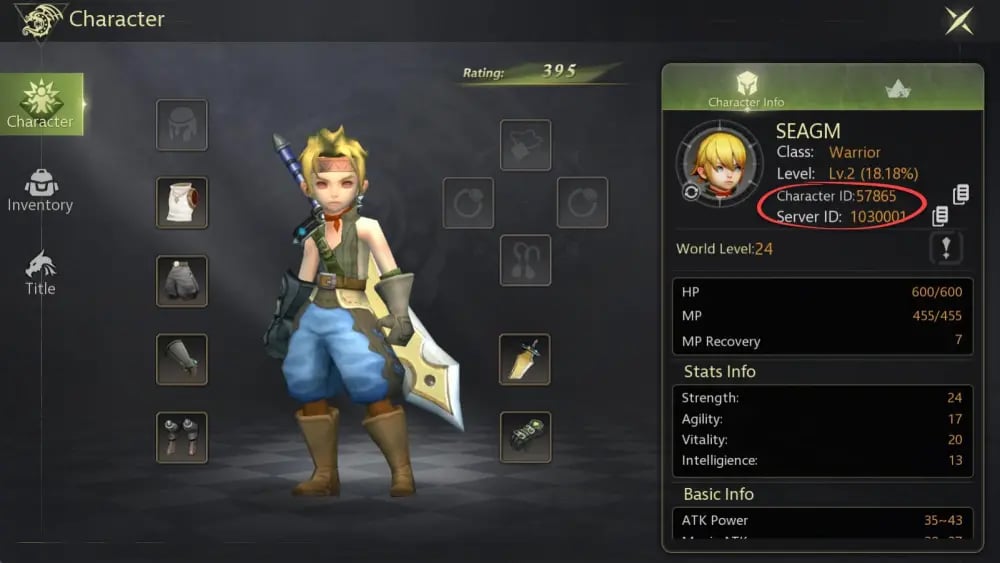
Both values come from inside the game. Open your character information in Dragon Nest M Classic and look for the User ID near your character name. The Server ID is the server your character lives on, which you can also see on the server selection screen before you enter the game.
Type them into the two checkout fields exactly as shown. The two numbers work as a pair, so a correct User ID with a wrong Server ID still points at the wrong account.
How the pack names are written
Many names in this list contain two numbers, for example 3000 + 130 Gems or 3130 (3000+130) Cash Pack. Read the first number as the base amount and the second as the extra amount included in the same pack; the total in brackets is what the matching Cash pack shows. Both versions describe the same ladder, so choose the form your account shows in the checkout.
Which pack should you pick?
- 626 to 3130: a small amount of Cash when a single item or a short top-up is all you need.
- 6366 to 19500: the middle of the ladder for gear upgrades and several purchases in one go.
- 32900 to 132000: bigger spending sessions, such as stocking up before a long play stretch.
- 198000 up to 330000: the largest packs, meant for heavy spenders who prefer to buy once.
Use your in-game shop list as a reference, add up what you plan to buy, and take the nearest pack. Current prices are in the live table under the guide and can change.