Crush Live Top Up: Instant Coin Recharge with UID
Crush Live is a popular live streaming and interactive social platform where users connect with broadcasters, join group party rooms, and participate in direct video conversations. To interact with your favorite creators and stand out in busy chat rooms, you need Crush Live Coins. These virtual tokens serve as the platform's primary in-app currency, allowing you to send animated gifts, activate room visual effects, and unlock exclusive features.
XPTopup provides a direct, secure, and straightforward Crush Live top up service. By using your numeric user ID (UID), you can recharge coins directly to your account without sharing passwords or sensitive login credentials. Select your desired coin package, enter your UID, complete your payment, and watch your balance update in moments.
What Are Crush Live Coins and How to Use Them
Crush Live Coins power all premium interactions on the platform. Having a ready coin balance lets you participate fully during live streams, special events, and private interactions.
Here is how you can use your Crush Live Coins:
- Send Interactive Gifts: Reward streamers during live sessions with visual gifts ranging from standard emojis to full-screen animated graphics and luxury effects.
- Boost Broadcaster Rankings: Sending gifts directly contributes to a streamer's leaderboard standing during daily, weekly, and seasonal platform events.
- Unlock Private Video and Audio Chats: Connect one-on-one with verified creators using coins to initiate direct calls.
- Activate VIP Visual Effects: Stand out in crowded stream rooms with special entrance animations, distinctive chat badges, and highlighted text effects.
- Access Exclusive Party Rooms: Join private audio and video party rooms that require coin entry or feature interactive games between participants.
Available Crush Live Coin Packages and Options
XPTopup offers a variety of coin denominations suited for both casual stream viewers and active community supporters. Whether you need a small top-up to send a quick token of appreciation or a large bundle for an ongoing streamer competition, you can choose the package that fits your needs.
| Package Tier | Primary Use Case | Recharge Method |
|---|---|---|
| Starter Pack (Low Tier) | Testing the service, sending basic chat gifts | Direct UID Top-Up |
| Supporter Pack (Mid Tier) | Active stream participation, room entrance effects | Direct UID Top-Up |
| VIP Bundle (High Tier) | Event leaderboards, heavy gifting, multi-room interactions | Direct UID Top-Up |
| Creator Patron (Max Tier) | Premium private calls, tournament support, top donor ranking | Direct UID Top-Up |
Note: Exact coin quantities, regional pricing, and available bundle promotions are displayed on the live checkout interface on XPTopup. Check the product selection panel above for real-time rates.
How to Find Your Crush Live UID
To ensure your coins are credited to the correct account, you must provide your exact Crush Live numeric User ID (UID). Your UID is permanently tied to your profile and is different from your display nickname, which can be changed at any time.
Follow these simple steps inside the mobile app to locate your UID:
- Open the Crush Live application on your mobile device.
- Tap the Profile or Me icon located in the bottom navigation bar.
- Look beneath your profile picture and nickname at the top of the screen.
- Locate the line labeled ID or UID followed by a series of numbers.
- Tap the copy icon next to the number, or write down the digits carefully.
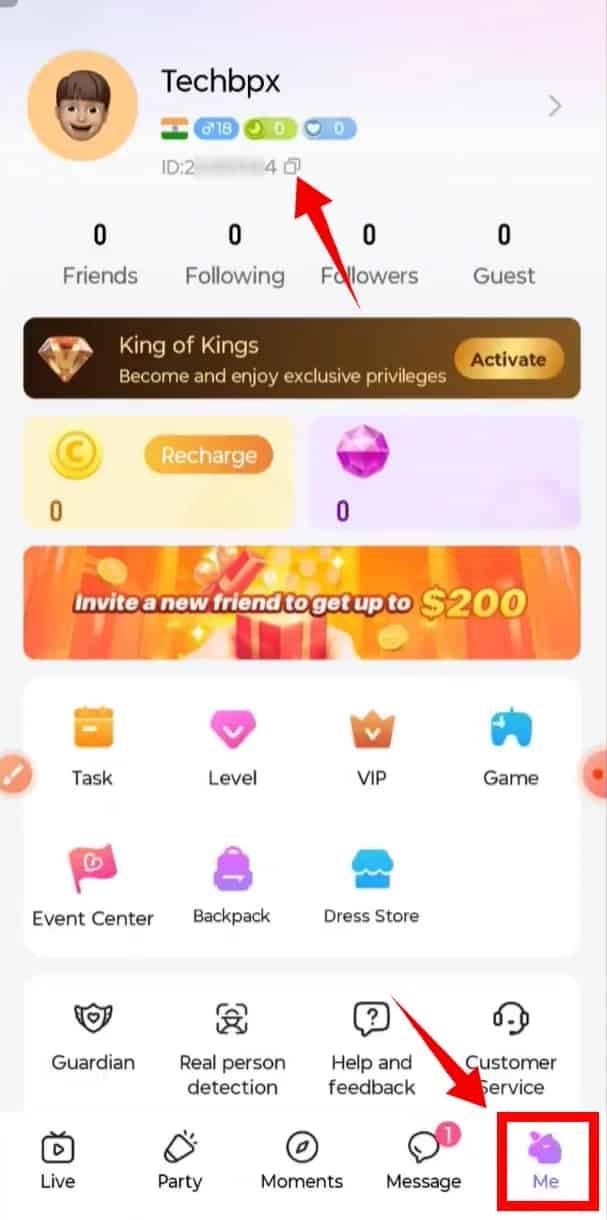
Always double-check the copied digits before submitting your order on XPTopup to prevent delivery delays.
Step-by-Step Guide to Top Up Crush Live Coins on XPTopup
Recharging your Crush Live account through XPTopup takes only a couple of minutes. Follow this step-by-step walkthrough:
- Select Your Package: Browse the coin packages listed on the XPTopup product page and choose the amount you want to purchase.
- Enter Your User ID: Type or paste your Crush Live UID into the required field. Ensure there are no accidental spaces or missing numbers.
- Choose Your Payment Method: Pick your preferred payment method from the available global and local checkout options.
- Review and Confirm: Verify that your UID and selected coin denomination are accurate, then confirm your purchase.
- Receive Your Coins: Once payment processing is complete, your Crush Live Coins are delivered directly to your account. Open the app to verify your new balance.
Account Safety: 100% Passwordless UID-Only Recharge
Account security is critical when purchasing digital currencies online. XPTopup operates strictly on a direct UID recharge model, meaning:
- No Passwords Required: You never need to enter your Crush Live password, email login, phone verification codes, or linked social media credentials.
- Zero Risk of Account Takeover: Because we never handle your login data, your account remains completely in your control at all times.
- Encrypted Transactions: All payment processes are secured using standard SSL encryption protocols to protect your financial information.
- Direct System Delivery: Coins are credited directly to your account through platform identification protocols, eliminating manual account access entirely.
Never share your password or verification codes with anyone offering coin top-ups. A legitimate direct recharge only ever requires your public numeric UID.
Payment Options and Global Checkout
XPTopup supports a wide range of international and regional payment methods to ensure smooth transactions regardless of your location. Users can complete purchases using major credit and debit cards, secure digital wallets, online banking solutions, and region-specific payment channels.
All exchange rates and processing fees are calculated clearly at checkout before you finalize your transaction. The price you see on the payment page is what you pay, giving you complete clarity on every order.
Troubleshooting Delayed Top-Ups and Order Issues
Most Crush Live coin deliveries process almost immediately after payment confirmation. If your balance does not update right away, follow these troubleshooting steps:
- Restart the Crush Live App: Fully close the Crush Live app from your device's recent apps manager and reopen it. This forces the app to fetch an updated balance from the server.
- Check Your Network Connection: Switch between Wi-Fi and mobile data to ensure your device is not experiencing connection latency.
- Verify Your UID on the Receipt: Check your XPTopup order confirmation email or order history to verify that the UID you entered matches your in-app profile.
- Check Order Status: Visit your XPTopup account dashboard to ensure your payment went through and the order status is marked as completed.
- Contact Support: If your order shows as completed on XPTopup but your coins are not visible after 15 to 30 minutes, contact the XPTopup 24/7 customer support team with your order number and UID for immediate assistance.
Frequently Asked Questions
How to recharge on Crush Live?
To recharge, select your preferred coin package on XPTopup, enter your numeric Crush Live UID, choose a payment method, and complete the checkout. Your coins will be credited directly to your Crush Live account.
How to buy coins on Crush Live?
You can buy coins directly on XPTopup by entering your app UID and paying with your preferred regional or international payment option. The process requires no account login and takes only a few minutes.
Where do I find my Crush Live UID?
Open the Crush Live app, tap the "Me" or "Profile" tab in the bottom right corner, and find the numeric ID displayed under your avatar and display name. Tap the copy icon next to the ID to copy it to your clipboard.
Do I need to provide my Crush Live password to top up?
No. XPTopup only requires your public numeric UID to process coin deliveries. You should never share your account password, email credentials, or SMS verification codes with third-party recharge platforms.
What can I purchase with Crush Live Coins?
Crush Live Coins allow you to send visual and animated gifts to live streamers, join private video or voice calls, activate custom chat badges, use special room entrance animations, and participate in exclusive audio party games.
How long does it take for Crush Live Coins to be added to my account?
Coin orders are processed automatically once payment is verified. In most cases, the coins reflect in your in-app balance within minutes. Reopening the app will refresh your updated total.
What should I do if my Crush Live top-up has not arrived?
First, force-close and relaunch the Crush Live app to refresh your wallet balance. If the coins still do not appear, check your XPTopup order history to confirm the UID entered was correct, and contact XPTopup customer support with your transaction details for quick resolution.
Current package prices
Current package prices are shown below. Prices exclude Tax. Tax, payment fees and applicable coupons are shown at checkout.
| Package | Price |
|---|---|
| Crush Live Coins * 15000 | USD 1.39 |
| Crush Live Coins * 20000 | USD 1.86 |
| Crush Live Coins * 25000 | USD 2.32 |
| Crush Live Coins * 50000 | USD 4.64 |
| Crush Live Coins * 100000 | USD 9.28 |
| Crush Live Coins * 500000 | USD 46.42 |
| Crush Live Coins * 1000000 | USD 92.84 |
| Crush Live Coins * 10000 | USD 0.93 |