Dazz Live Coins Top Up: Platform Uses and Features in 2026
Dazz Live is an interactive live-streaming and entertainment platform where users connect with broadcasters from around the globe. The core driver of engagement on the platform is its virtual currency, Dazz Live Coins. These digital coins allow viewers to participate actively in live broadcasts, support their favorite content creators, and access exclusive community features.
Primary Uses of Dazz Live Coins
- Sending Virtual Gifts: Broadcasters rely on viewer appreciation to grow their channels. You can convert your coins into diverse animated gifts, from small stickers and hearts to high-tier 3D entrance effects, sports cars, and luxury yachts that trigger screen-wide animations.
- Supporting PK Battles: Streamers frequently participate in head-to-head live PK competitions. Fans spend coins during these matches to send gifts that score points for their chosen host, directly influencing the match outcome.
- Unlocking VIP Badges and Titles: Regular coin spenders unlock distinct profile frames, custom chat bubble colors, and entrance banners that display your fan level as soon as you enter any stream room.
- Private Messaging and Special Rooms: Certain creators host private interactive streams or priority voice chats that require coin-based admission or tip thresholds.
Having an active coin balance ensures you never miss a moment to back your favorite hosts during live events and competitive leaderboards.
How to Find Your Dazz Live User ID (UID)
To ensure your coins reach your personal balance without error, you only need to provide your unique Dazz Live numeric UID. You never need to supply your login email, phone number, or account password.
Follow these quick steps to locate and copy your UID:
- Launch the Dazz Live app on your mobile device.
- Tap the Profile (or Me) icon located at the bottom right corner of the main screen.
- On your profile overview page, locate the ID / UID number displayed directly beneath your profile photo and username.
- Tap the copy icon next to your ID number or carefully record the numeric sequence.
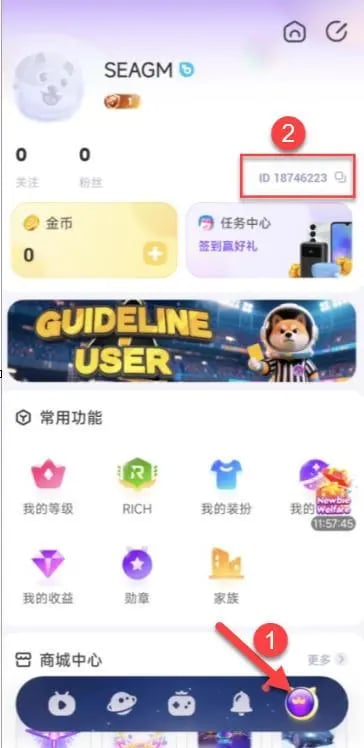
Always verify that you copy the numeric UID and not your customizable display nickname, as nicknames can change and are not used for payment routing.
How to Top Up Dazz Live Coins on XPTopup
Recharging your coin balance on XPTopup is direct, safe, and completed in a few short steps:
- Select Your Coin Package: Browse the available Dazz Live Coin packages on the live product catalog and select the denomination that fits your streaming needs.
- Enter Your Dazz Live UID: Input your numeric Dazz Live User ID into the designated player field. Double-check the number to ensure accuracy.
- Proceed to Secure Checkout: Review your selected package details and move to the payment screen. The live checkout displays the exact total with transparent pricing.
- Complete the Payment: Choose your preferred payment option and finalize the transaction.
- Receive Your Coins: Once payment confirmation is complete, the coins are credited directly to your Dazz Live account. Open the app to view your updated coin balance.
Why Choose UID-Only Recharge for Account Safety
Account security is essential when buying in-app currency online. XPTopup utilizes a direct-to-account delivery system that requires only your public User ID. This eliminates the security risks associated with sharing sensitive login credentials.
| Safety Metric | XPTopup Direct UID Recharge | Unofficial Account-Sharing Methods |
|---|---|---|
| Password Exposure | None (Zero credentials requested) | High (Password & 2FA codes required) |
| Account Takeover Risk | Zero | High (Unauthorized access possible) |
| TOS Compliance | Fully compliant with direct top-up | High risk of permanent platform bans |
| Ordering Convenience | Enter numeric UID and check out | Requires manual coordination with strangers |
| Privacy Protection | Personal messages and data stay secure | Third parties gain full account view |
By keeping your password private, you protect your linked social accounts, private chat histories, and platform standing while enjoying rapid coin replenishment.
Delivery Process and Transaction Verification
After submitting your order on XPTopup, the automated delivery system routes the selected coin denomination directly to the Dazz Live servers matching your UID.
How to Verify Your Coin Balance
- Open your Dazz Live application.
- Go to the Profile or Me section.
- Tap on My Wallet or Coin Balance.
- If your balance does not immediately reflect the new amount, pull down to refresh the profile screen or close and restart the app.
You can also monitor your order progress directly through your XPTopup user dashboard, where each order generates a distinct transaction ID for easy tracking.
Troubleshooting Common Dazz Live Top Up Issues
If you experience any delay or issue with your recharge, use these straightforward troubleshooting checks:
- App Cache Delay: Sometimes the mobile application caches older wallet numbers. Completely close Dazz Live from your device background apps, reopen it, and check your wallet again.
- Typo in UID Entry: If you entered an incorrect UID during checkout, contact XPTopup customer support immediately with your order reference number. If the order has not yet been processed by the automated system, support can help correct the destination ID.
- Payment Verification Pending: Some payment providers conduct temporary security checks. Ensure your payment went through successfully and that your bank did not flag the transaction.
- Network Latency: Ensure your mobile device has a stable internet connection so the app can fetch the latest wallet balance from the platform server.
Frequently Asked Questions
What are Dazz Live Coins used for?
Dazz Live Coins are used to send animated virtual gifts to streamers, support creators during live PK battles, buy entry into premium chat rooms, and unlock VIP profile badges and chat effects.
Where can I find my Dazz Live UID?
Open Dazz Live, tap the Profile (Me) tab at the bottom right of the screen, and locate the numeric ID printed directly below your avatar and display name.
Do I need to share my Dazz Live password to top up coins?
No. XPTopup requires only your Dazz Live User ID (UID). You should never share your password, verification codes, or login details with anyone.
How quickly are Dazz Live Coins credited to my account?
Coins are processed automatically once your payment is confirmed at checkout. In most instances, your balance updates in your in-app wallet within moments of transaction completion.
What happens if I enter the incorrect UID during checkout?
Orders are delivered to the exact UID provided. If you notice an error immediately after ordering, contact XPTopup customer support right away with your transaction details before processing is finalized.
Can I recharge Dazz Live Coins for a friend using their UID?
Yes. Because XPTopup only requires a numeric User ID, you can surprise a friend or favorite creator by entering their UID at checkout to send coins directly to their account balance.
Current package prices
Current package prices are shown below. Prices exclude Tax. Tax, payment fees and applicable coupons are shown at checkout.
| Package | Price |
|---|---|
| 12,500 + 625 Bonus Coins | USD 1.25 |
| 25,000 + 1,250 Bonus Coins | USD 2.52 |
| 50,000 + 2,500 Bonus Coins | USD 5.05 |
| 100,000 + 5,000 Bonus Coins | USD 10.09 |
| 150,000 + 7,500 Bonus Coins | USD 15.14 |
| 2,500,000 + 125,000 Bonus Coins | USD 252.28 |
| 4,000,000 + 200,000 Bonus Coins | USD 403.65 |