Yalla Ludo Gold Top Up: Quick Balance for Every Match
Yalla Ludo brings friends and competitors together across classic tabletop board games and live voice chat rooms. To participate in high-stakes matches, join custom tables, or challenge skilled opponents, you need an ample supply of Gold coins. A direct Yalla Ludo Gold top up on XPTopup ensures you never run out of entry funds right before an intense tournament or casual room game.
With direct Player ID top-ups on XPTopup, getting Gold into your game profile is straightforward, fast, and completely secure. You never have to share account passwords or login credentials. Simply enter your numeric game ID, select your preferred coin bundle, and receive your balance straight into your account.
What Is Yalla Ludo Gold and What Can You Use It For?
Gold is the primary in-game utility currency in Yalla Ludo. It fuels the core gameplay loops across multiple board formats and voice chat rooms.
Here is how Gold is used inside the app:
- Match Entry Fees: Every standard and competitive match requires a Gold wager. Higher entry tiers yield larger Gold pots upon victory.
- Game Room Creation: Setting up private matches with custom rules or betting limits requires Gold to open the table.
- Jackaroo and Domino Stakes: Aside from Ludo, Gold serves as the universal betting balance across Domino and Jackaroo game tables.
- Interactive Table Emotes and Quick Actions: Gold lets you send in-game visual reactions and basic room gifts during live matches.
Running low on Gold restricts your access to higher-reward tables. Topping up through XPTopup lets you get back into high-roller matches immediately.
Key Differences Between Yalla Ludo Gold and Diamonds
Yalla Ludo features two main currencies: Gold (Coins) and Diamonds (Gems). Understanding how each functions helps you select the right pack for your gameplay needs.
| Currency | Primary Function | Match Utility | Cosmetic / VIP Access |
|---|---|---|---|
| Gold (Coins) | Table entry fees, room wagers, standard table interactions | Required for Classic Ludo, Magic Ludo, Domino, and Jackaroo games | Used for standard room items and table actions |
| Diamonds (Gems) | Premium store purchases, luxury chat gifts, exclusive dice skins | Cannot be directly wagered at standard game tables | Unlocks VIP levels, rare frames, animated themes, and voice room gifts |
If your goal is to stay active at game tables, challenge rivals, and win larger prize pools, topping up Gold is your best option.
How to Find Your Yalla Ludo Player ID in the App
To complete your order on XPTopup, you only need your unique numeric Player ID. Follow these steps to find and copy it directly from your mobile game:
- Launch the Yalla Ludo app on your device.
- Tap your Profile Avatar in the top-left corner of the main lobby screen.
- Your personal profile card will open. Locate your numeric Player ID displayed right below your nickname.
- Tap the Copy icon next to your Player ID to copy it to your clipboard.
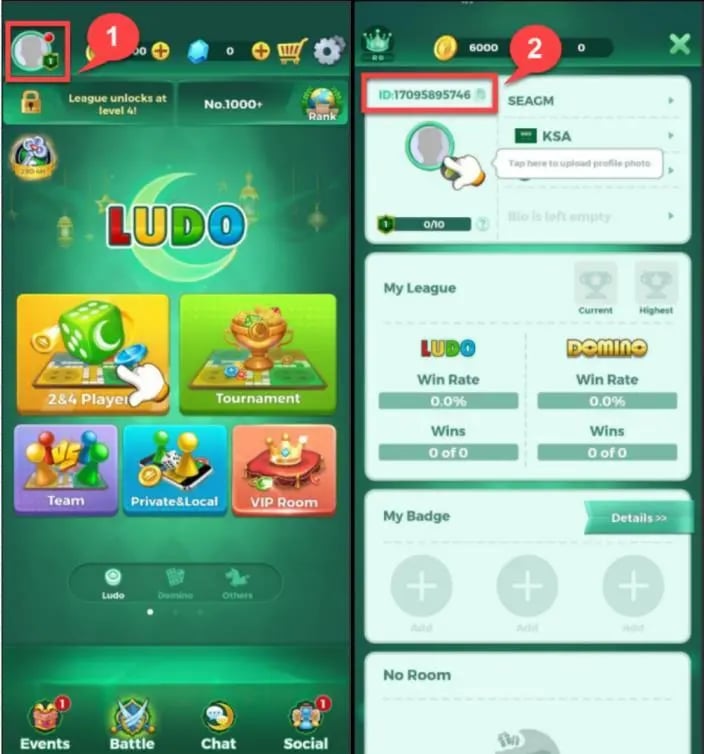
Double-check that the ID you copy contains only the numbers shown on your profile card. Pasting the correct numeric ID ensures your Gold reaches your account without delay.
Step-by-Step Guide: How to Top Up Yalla Ludo Gold on XPTopup
Buying Gold on XPTopup takes just a few quick steps:
- Select the Gold Denomination: Browse the live checkout list on XPTopup and choose the coin package you need.
- Enter Your Player ID: Paste your numeric Yalla Ludo Player ID into the designated input field.
- Confirm Your Order: Check your Player ID carefully to prevent delivery mismatches.
- Complete the Payment: Select your preferred payment method on our checkout screen and finalize the transaction.
- Check Your In-Game Balance: Open Yalla Ludo or refresh the app to view your updated Gold balance immediately.
Why UID Top-Up Is Safe and Ban-Free (No Passwords Required)
Security is paramount when buying digital game currencies. XPTopup uses a direct Player ID delivery system that keeps your account safe from unauthorized access.
- Zero Password Requirements: You will never be asked for your login password, social account credentials, or verification codes.
- Official Delivery Protocols: Gold is sent directly to your game balance using standard system injection methods, meaning zero risk of bans or profile flags.
- Global Account Compatibility: Whether your Yalla Ludo profile was registered in the Middle East, Southeast Asia, Europe, or the Americas, UID top-ups work across all regional servers.
- Protection Against Account Takeover: Because no login details change hands, your account ownership remains completely in your control at all times.
Supported Game Modes: Classic Ludo, Domino, Jackaroo, and Majlis Rooms
Your Gold balance can be used across all available game types inside Yalla Ludo:
- Classic Ludo: Play the traditional 2-player or 4-player Ludo formats with standard rules.
- Magic Mode & Master Mode: Engage in higher-variance Ludo modes featuring special board items, power-ups, and elevated stakes.
- Arrow Mode: Fast-paced board runs where specific arrow tiles provide movement boosts.
- Domino (Draw and Block): Put your strategic tile placements to work in classic Domino matches against global players.
- Jackaroo: Enjoy the popular team card-and-board game with friends or random partners.
- Majlis Voice Chat Rooms: Spend Gold on interactive table games and community activities while chatting via live voice channels.
2026 Guide to Resolving Delivery Inquiries and Top-Up Issues
Transactions on XPTopup process automatically. If you ever experience a slight delay or balance synchronization issue, use the following troubleshooting steps:
- Restart the Yalla Ludo App: Completely swipe away the game app from your recent apps screen and reopen it. This forces the client to sync with the central server and display your new balance.
- Verify Your Player ID in Order History: Check your order confirmation on XPTopup to verify that the Player ID entered matches your in-game profile number.
- Check Network Connectivity: Ensure your device has a stable internet connection so the app can refresh its local store data.
- Contact XPTopup Support: If your Gold does not reflect after a brief wait, reach out to customer support with your Order Number and Player ID for rapid assistance.
Frequently Asked Questions
How do I find my Yalla Ludo Player ID?
Open Yalla Ludo, tap your avatar icon in the upper-left corner of the lobby, and look directly beneath your nickname. Tap the copy icon next to the number to copy your numeric Player ID.
What is the difference between Gold and Diamonds in Yalla Ludo?
Gold is used as match entry fees, table bets, and room stakes across Ludo, Domino, and Jackaroo modes. Diamonds are the premium currency used to unlock VIP privileges, purchase luxury gifts, and obtain decorative dice or profile skins.
Do I need to provide my Yalla Ludo password to top up Gold?
No. XPTopup only requires your numeric Player ID. You should never share your account password or login credentials with anyone.
Can I top up Yalla Ludo Gold for my friends using their Player ID?
Yes. You can recharge Gold for any friend or family member simply by entering their numeric Player ID at checkout on XPTopup.
How long does it take for Yalla Ludo Gold to arrive after payment?
Delivery is handled automatically upon successful payment. In most cases, your Gold reflects in your account shortly after the transaction is confirmed.
What should I do if my Yalla Ludo Gold has not appeared in my account?
First, restart the Yalla Ludo app to force a data refresh. If the balance still does not update, verify your Player ID in your XPTopup order confirmation and contact our support team with your order details.
Current package prices
Current package prices are shown below. Prices exclude Tax. Tax, payment fees and applicable coupons are shown at checkout.
| Package | Price |
|---|---|
| 2,890 Gold | USD 20.42 |
| 5,930 Gold | USD 40.84 |
| 12,550 Gold | USD 81.67 |