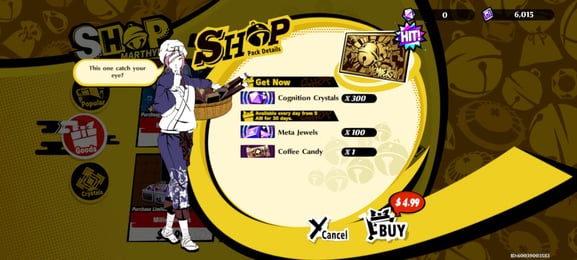
60 Cognition Crystals

Total

USD 0.77

Skip to main content
XPTopup
Search...
Quick answer

To top up Persona 5: The Phantom X Cognition Crystals, pick a package, enter your Game ID and Role ID and pay at checkout. It is credited to that account after payment is confirmed — no password needed.

Product specs
GamePersona 5: The Phantom X Cognition Crystals
PlatformsMobilePC
Product typeDirect top-up to your game account
Account details neededGame IDRole ID
Packages6
DeliveryAutomatic after payment is confirmed, usually within minutes
PaymentCards, e-wallets, local methods and crypto — options depend on your country

Persona 5 Phantom X top up on XPTopup credits Cognition Crystals to your account using two numbers, your Game ID and your Role ID; once payment is confirmed, the P5X recharge runs automatically and usually lands within a few minutes. No password, no login and no account handover are involved.

P5X top-up specs

  • Game: Persona 5: The Phantom X (P5X)
  • Currency: Cognition Crystal
  • Pack sizes: 60, 250, 490, 1500, 2500 and 5000 Cognition Crystal
  • Required: Game ID and Role ID (two separate fields)
  • Region: account region as shown at checkout
  • Delivery: automatic, usually within minutes
  • Login needed: no

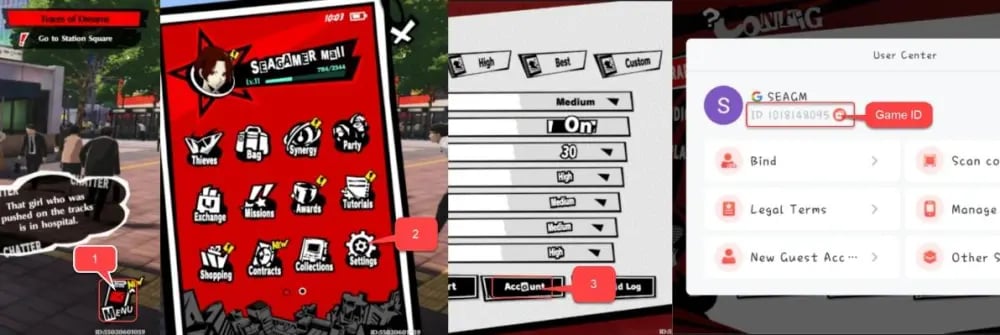
Locate your Game ID and Role ID

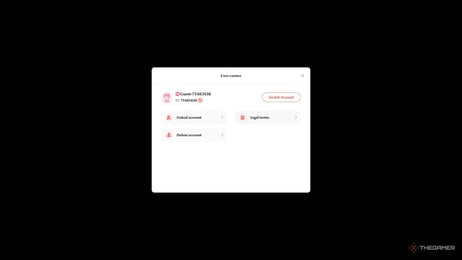
Where many games route a recharge through one UID, this checkout asks for two numbers. Both come from your own P5X account, and each one belongs in the field with the same name.

  1. Start Persona 5: The Phantom X on the account that should receive the crystals.
  2. Open your profile from the lobby.
  3. Look for the numeric IDs listed in your profile details.
  4. Copy each number into its matching field: Game ID into Game ID, Role ID into Role ID.

Menus can move after updates. If your profile shows numbers but you cannot tell which is the Game ID and which is the Role ID, ask support before paying instead of guessing.

Picking a Cognition Crystal pack

Cognition Crystals are the paid premium currency of P5X. You spend them through the in-game shop, and most players put them toward summons on the banner they are chasing; the shop itself shows exactly what they can buy. Settle on a target first, then choose:

  • 60 Cognition Crystal: the smallest step, for topping off a balance that is almost there.
  • 250 and 490 Cognition Crystal: a modest purchase or a few extra summons.
  • 1500 Cognition Crystal: a planned push on a single banner.
  • 2500 and 5000 Cognition Crystal: going after a limited character, or setting crystals aside for banners still to come.

If no single pack matches your target, you can place more than one order. Live prices for all six sizes are in the table under this guide.

Game ID vs. Role ID: common mistakes

  • Swapping the two numbers between the fields.
  • Typing a nickname instead of a number.
  • Copying IDs from an old or secondary account rather than the one you play.
  • Dropping a digit or adding a space when typing by hand.

Crystals delivered to the wrong account cannot be pulled back, so compare both fields with your profile once more before paying.
Persona 5: The Phantom X Top Up guide image

Recharge Process

Top-up Procedures

  1. 1

    Place Your Order & Check Out

    Complete your purchase securely through our checkout process.

  2. 2

    Instant Auto-Delivery to Your UID

    Once your payment is confirmed, your top-up is automatically delivered to the UID you entered — fast, 100% secure, and no account login required.

Persona 5: The Phantom X Cognition Crystals FAQ

01

How do I top up P5X by ID?

Enter your Game ID and Role ID in their fields, pick a Cognition Crystal pack, and pay with a method available in your region. The crystals are then delivered automatically.

02

Why does the checkout need both a Game ID and a Role ID?

The direct recharge is routed using both numbers, so both have to come from the same account and sit in their own fields. A missing or swapped number means the order cannot reach you correctly.

03

Where do I find the IDs in Persona 5: The Phantom X?

Open your profile from the lobby and check the profile details, where the numeric IDs are listed. If the labels are unclear in your version, contact support before you order.

04

How long do Cognition Crystals take to arrive?

Delivery is automatic and usually completes within a few minutes after payment is confirmed. The order page shows the status; restart the game if the balance has not refreshed.

05

Can I buy Cognition Crystals for a friend?

Yes. Enter your friend's Game ID and Role ID instead of yours. Ask them to copy both numbers from their own profile so nothing gets swapped.

06

What happens if I mix up the Game ID and Role ID?

The order may fail or reach a different account, and crystals delivered to another account cannot be recovered. Contact support right away with the order number; failed orders are refunded to the original payment method.

07

Do I need to give my P5X password?

No. Only the Game ID and Role ID are needed. Never share your password or verification codes for a top up.

08

Do the crystals count for in-game events or first-purchase bonuses?

Event and bonus eligibility is set by the game, not by the store. Check the rules on the in-game event or shop page before buying for a specific reward.

Persona 5: The Phantom X Cognition Crystals
Persona 5: The Phantom X Top Up

Persona 5: The Phantom X Cognition Crystals

MobilePC3.8ksold

Prices exclude Tax. Tax is shown at checkout.

Payment Support

SBP (Faster Payments System)Credit / debit cardBLIKPmpromptpayBank card (Belarus)PixBank card (Kazakhstan)JKOPAYPrzelewy24PayUBoostDuitnowDragonpayAlipayHKOctopusAirwallex FpxBinance PayGate PayTouch 'n Go eWalletFPSBancontactApple PayGoogle PayCredit / debit cardTrustlypaysafecardMyBankMultibancoEps