Devil May Cry Peak of Combat Top Up on XPTopup
Devil May Cry: Peak of Combat brings the signature hack-and-slash combat of the classic Capcom franchise directly to mobile screens. To keep your hunters geared, pull elite characters from banners, and upgrade your demonic weaponry, you need a steady supply of Devil Gems.
XPTopup provides a direct, secure Devil May Cry Peak of Combat top up service designed for speed and convenience. You only need your in-game User ID to complete an order. There is no requirement to hand over account passwords or link third-party social logins. Browse the denominations available on the live checkout, place your order, and receive your Devil Gems directly in your game account.
How to Top Up Devil May Cry: Peak of Combat Devil Gems on XPTopup
Recharging your balance on XPTopup takes less than two minutes. Follow these simple steps to complete your transaction:
- Select the Devil Gems denomination you wish to purchase from the product catalog.
- Enter your Devil May Cry: Peak of Combat User ID in the designated input field.
- Verify your User ID to prevent crediting the wrong profile.
- Click Buy Now or add the pack to your shopping cart.
- Select your preferred payment method available at the checkout screen.
- Complete your payment. Once verified, the Devil Gems are automatically sent directly to your in-game profile.
How to Locate Your Devil May Cry: Peak of Combat User ID
Your User ID is a unique numeric identifier linked directly to your character data and server profile. Finding it inside the game client is straightforward:
- Launch Devil May Cry: Peak of Combat on your mobile device or emulator.
- Complete any active tutorial or mission and return to the main hub screen.
- Tap your Avatar/Profile icon located in the top-left corner of the screen.
- In the profile overview window, locate your numeric User ID displayed next to your character name.
- Tap the copy icon next to the number to paste it accurately on the XPTopup checkout page.
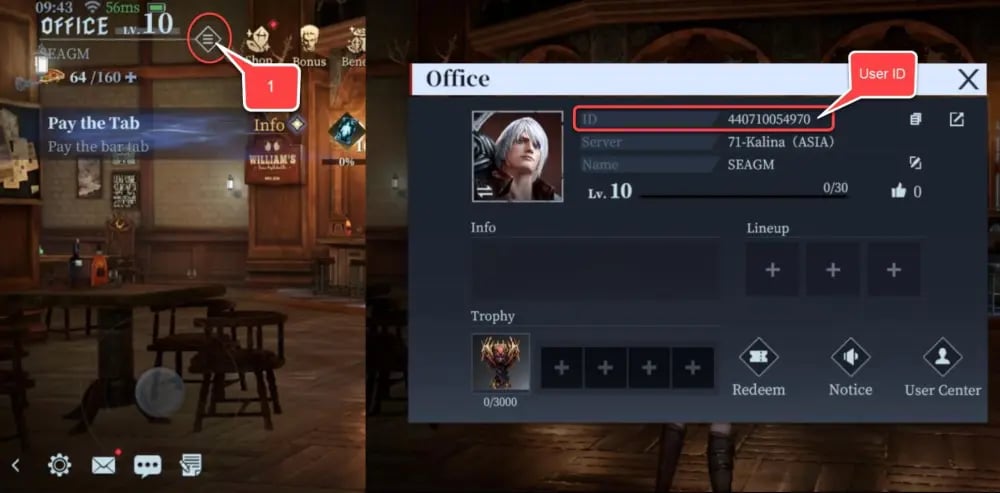
Always double-check that you copied the complete numeric sequence before submitting your order on XPTopup to ensure prompt processing.
What Are Devil Gems and In-Game Uses in DMC: Peak of Combat
Devil Gems serve as the premium currency in Devil May Cry: Peak of Combat. They are essential for progressing through high-tier story chapters, clearing Bloody Palace floors, and unlocking the full potential of your combat roster.
| Item / Function | In-Game Utility | Primary Priority |
|---|---|---|
| Vault Summons | Pull rare hunters, iconic variations (like Dante, Vergil, Nero, and Lady), and featured banners | High |
| Weapon Summons | Acquire signature legendary weapons and demon blades to increase combat power | High |
| Stamina / Vitality | Replenish daily stamina to farm character upgrade mats and talent books | Medium |
| Resource Bundles | Purchase skill growth books, red orbs, and weapon polish materials directly from the shop | Medium |
| Costumes & Skins | Unlock exclusive hunter appearances and thematic visual styles | Optional |
Character and Weapon Summons
The main driver for Devil Gems is the Hunter Vault. Summons allow you to recruit powerful character variants with unique combat styles, combo sets, and elemental affiliations. Equipping signature weapons also unlocks passive buffs and special moves that significantly boost your team damage ratings.
Stamina and Resource Progression
Endgame progression requires extensive farming across upgrade stages. Converting Devil Gems into stamina refills lets you clear daily challenge stages repeatedly, collecting the weapon enhancement materials and memory cards required to max out your roster.
Benefits of Direct User ID Top-Up over Marketplace Trading
Traditional peer-to-peer marketplaces often force buyers to communicate with individual sellers, coordinate schedules, or surrender private login credentials. Direct User ID top-up on XPTopup completely removes these friction points.
- Zero Password Risk: You never share your account password, email access, or social login credentials. Your login details remain entirely private.
- Automated Direct Delivery: Orders are processed through automated fulfillment systems, eliminating the need to wait for a third-party seller to log in manually.
- Reduced Transaction Errors: By inputting your exact User ID, currency is routed directly through server-side protocols straight to your account.
- Clean Account History: Direct UID top-ups avoid unauthorized account access flags from game security systems, keeping your account in good standing.
Supported Payment Options and Instant Delivery Process
XPTopup supports a comprehensive range of trusted payment methods at checkout, including major credit cards, regional e-wallets, and modern digital payment systems. The available options and exact live rates are dynamically updated on the checkout page.
Once your transaction completes, our automated delivery pipeline routes your selected Devil Gems pack to your Devil May Cry: Peak of Combat User ID. In most cases, the currency shows up in your game account instantly. If you are already logged into the game during payment, simply restart the game client or switch game zones to refresh your currency counter.
Devil May Cry: Peak of Combat Top Up FAQs
How do I find my Devil May Cry: Peak of Combat User ID?
Tap your character avatar in the upper-left corner of the main menu screen. Your numeric User ID is displayed under your player name. Tap the copy button to capture the exact numbers for checkout.
Do I need to share my game login password to buy Devil Gems?
No. XPTopup only requires your in-game User ID. You will never be asked for your login email, game password, or two-factor authentication codes.
What are Devil Gems used for in Devil May Cry: Peak of Combat?
Devil Gems are the premium currency used for Hunter Vault character summons, weapon gacha banners, stamina refreshes, resource packs, and cosmetic unlocks.
How fast will the Devil Gems be credited to my account?
Devil Gems are credited automatically once your payment is verified. Recharging takes only moments. If your game is open during the purchase, restart the application to update your in-game balance.
What should I do if I typed the wrong User ID during checkout?
Because digital currency deliveries are automated and irreversible once processed on the game server, please verify your User ID before completing payment. If you notice a typo before the transaction is processed, contact XPTopup customer support immediately with your order details.
Is it safe to top up Devil May Cry: Peak of Combat on XPTopup?
Yes. Recharging on XPTopup is secure because it relies exclusively on your public User ID. Your personal account credentials stay protected on your device, ensuring a safe purchasing experience.
Current package prices
Current package prices are shown below. Prices exclude Tax. Tax, payment fees and applicable coupons are shown at checkout.
| Package | Price |
|---|---|
| 60 Devil Gems | USD 0.50 |
| Daily Value Gem Pack I | USD 1.40 |
| Daily Mega Gem Pack II | USD 2.11 |
| 300 Devil Gems | USD 2.37 |
| Card EXP Pack | USD 3.52 |
| Daily Gem Luxury Pack III | USD 3.52 |
| Epic Weapon Selection | USD 3.52 |
| Hunter EXP Pack | USD 3.52 |
| Random Fragment Pack | USD 3.52 |
| Red Orb Pack | USD 3.52 |
| Weapon EXP Pack | USD 3.52 |
| 680 Devil Gems | USD 4.96 |
| Crimson Scale Pack | USD 7.16 |
| Epic Hunter Selection | USD 7.16 |
| Eye of Destruction Pack | USD 7.16 |
| Eye of the Abyss Pack | USD 7.16 |
| Skill Manual Pack | USD 7.16 |
| Weekly Gem Luxury Pack | USD 7.16 |
| 1280 Devil Gems | USD 9.77 |
| Advanced Rune Selection | USD 10.73 |
| 3280 Devil Gems | USD 25.16 |
| Hunter Premium Pack | USD 35.76 |
| Hunter Supreme Pack | USD 35.76 |
| Weapon Supreme Pack | USD 35.76 |
| 6480 Devil Gems | USD 48.80 |