EVE Echoes AUR Top Up: Fuel Your Fleet in New Eden
Aurum (AUR) serves as the premier currency in EVE Echoes, giving capsuleers the resources needed to acquire exclusive ship nanocores, activate high-tier event passes, purchase customization items, and convert wealth directly into market-ready assets. Whether you are fitting out faction battleships, securing Omega clone status, or preparing your corporation for sovereign territory battles, maintaining a healthy AUR balance keeps your fleet prepared for high-stakes encounters across New Eden.
XPTopup provides a direct, secure EVE Echoes AUR top up service that credits your pilot wallet directly via your in-game User ID. You do not need to share login credentials, passwords, or linked account details. Simply choose your AUR denomination, provide your player ID, confirm the Aurora server, and complete your order through our live checkout.
Step-by-Step Guide: How to Top Up EVE Echoes AUR on XPTopup
Recharging your AUR balance takes only a few simple steps. Follow this guide to complete your direct User ID top-up:
- Select Your AUR Package: Browse the denomination list on this page and choose the amount of AUR your character requires.
- Enter Your User ID: Input your numerical EVE Echoes User ID into the designated field. Double-check the digits to ensure accurate delivery.
- Select Your Server: Select Aurora from the server dropdown list.
- Proceed to Checkout: Click the purchase button to view real-time pricing and choose your preferred local or international payment method on the live checkout screen.
- Confirm and Receive: Complete the payment. Once processed, the AUR will be credited directly to your pilot's balance in New Eden.
How to Find Your EVE Echoes User ID
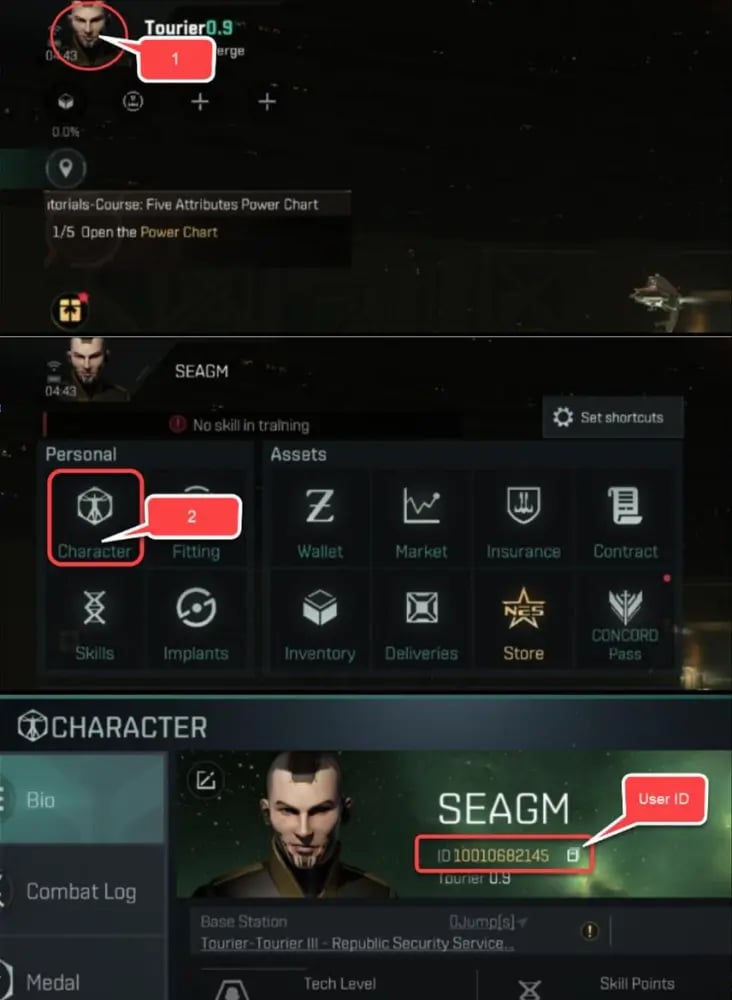
Locating your User ID inside the game client takes less than a minute. Your User ID is a unique numerical string distinct from your character's display name.
- Launch EVE Echoes on your mobile device and log into your pilot.
- Tap your Character Avatar in the top-left corner of the main station or space interface.
- Open your Pilot Profile screen.
- Look directly below or beside your pilot name to locate your numerical User ID.
- Tap the copy icon next to the number, or write down the exact sequence of digits for checkout.
EVE Echoes Currency Guide: Differences Between AUR, PLEX, and ISK
Understanding how economic exchange works in EVE Echoes helps you maximize the value of your purchases. The game operates on a tri-currency system, each serving distinct functions:
| Currency | Primary Source | Primary Function | Transferability |
|---|---|---|---|
| AUR (Aurum) | Direct Store Purchase | Store bundles, nanocores, skin crates, direct PLEX conversion | Account-bound (non-tradable on open market) |
| PLEX (Pilot License Extension) | Converted from AUR or bought on Market | Omega subscription activation, skill point resets, market sales | Fully tradable on the regional in-game market |
| ISK (Interstellar Kredits) | In-game activities, market trades, bounty hunting | Ships, modules, blueprints, manufacturing, market fees | Standard circulating currency among all pilots |
Converting AUR to PLEX and ISK
When you purchase AUR, you can use it inside the in-game store to acquire PLEX at fixed exchange ratios. Once you hold PLEX in your item hangar, you can sell it directly on the regional market to other players for ISK. This legal, developer-approved mechanic allows you to fund industrial manufacturing, replace lost PvP fleet ships, or acquire faction hulls without grinding low-security asteroid belts or running repetitive encounters.
Server Compatibility: Selecting the Aurora Server for Delivery
EVE Echoes hosts its global capsuleer population on the Aurora server. When completing an EVE Echoes AUR recharge on XPTopup:
- Ensure the server selection is set to Aurora.
- Aurora is the unified global environment for all international pilots on Android and iOS.
- Aligning your User ID with the Aurora server guarantees that your AUR tokens deposit directly into your character's active wallet without routing delays.
Account Safety: Secure Direct ID Recharge Without Password Access
Security is paramount when managing high-value MMO accounts. Third-party logins and credential-sharing methods create unnecessary risks of account compromise, unauthorized asset transfers, or security penalties.
XPTopup relies exclusively on official direct-to-account delivery via your public User ID:
- No Passwords Required: We will never ask for your game password, Google account, Apple ID, Twitter login, or Facebook credentials.
- Zero Account Access: Top-ups process externally through standard direct deposit protocols. Your inventory, ships, corporation hangars, and wallet remain completely untouched.
- Encrypted Checkout: All transaction data submitted through the live checkout is protected with standard enterprise encryption protocols.
Troubleshooting EVE Echoes AUR Delivery
If your AUR balance does not reflect immediately after finishing your payment, work through these standard verification steps:
- Restart the Game Client: Close the EVE Echoes application completely from your device task manager and relaunch it. This forces the client to sync with the server database.
- Verify Character Selection: If you have multiple pilot slots under one account, ensure you are logged into the character associated with the User ID submitted at checkout.
- Check the In-Game Store Wallet: Open the in-game Aurum store interface to confirm the numerical balance update, as UI elements on the main flight screen sometimes cache older values.
- Contact XPTopup Customer Support: If the currency does not appear after a short period, reach out to our 24/7 customer support team with your order number and transaction receipt for rapid assistance.
Frequently Asked Questions
How do I find my EVE Echoes User ID?
Open EVE Echoes, tap your character portrait in the top-left corner to access your Pilot Profile, and locate the numerical ID displayed beneath your pilot name. You can copy this number directly to your clipboard.
What is AUR used for in EVE Echoes?
AUR is used to purchase premium store bundles, advanced ship nanocores, limited-edition cosmetics, Omega combo packages, and event progression passes. It can also be converted directly into PLEX within the in-game store.
Do I need to share my EVE Echoes password to top up AUR?
No. XPTopup requires only your numerical User ID and server selection (Aurora). You never need to provide your password or grant access to your third-party login providers.
Can I convert AUR into PLEX or ISK in EVE Echoes?
Yes. You can exchange AUR for PLEX inside the official in-game store. You can then sell that PLEX on the open market in trade hubs like Jita for ISK, allowing you to fund in-game ships, modules, and industrial operations.
Which server should I select during the EVE Echoes top-up?
Select the Aurora server. Aurora is the primary global server hosting the international EVE Echoes pilot community.
Is EVE Echoes worth playing in 2026?
Yes. In 2026, EVE Echoes features an active null-sec territorial warfare scene, regular balance passes for faction and capital ships, expanded corporation mechanics, and a steady stream of seasonal events, making it a deep mobile space sandbox for both solo and fleet-focused pilots.
Current package prices
Current package prices are shown below. Prices exclude Tax. Tax, payment fees and applicable coupons are shown at checkout.
| Package | Price |
|---|---|
| 25 AUR | USD 0.89 |
| 125 AUR | USD 4.19 |
| 265 AUR | USD 8.39 |
| 525 AUR | USD 16.77 |
| 1315 AUR | USD 41.90 |
| Tech Leap Program | USD 64.52 |
| 2750 AUR | USD 83.80 |