LifeAfter Top Up: Direct Credits and Federation Membership Recharge
Surviving in the post-apocalyptic wilderness of LifeAfter demands reliable gear, strong camp fortifications, advanced drone parts, and abundant crafting resources. Whether you are building up your Manor, rolling for elite weapon blueprints, or gathering rare formula shards to face Infected hordes, having a direct supply of in-game currency keeps your character ahead of danger.
On XPTopup, you can complete your LifeAfter recharge safely and directly to your game profile. Top-ups require only your Account ID and designated server name. There is no need to share account passwords or log out of your session, giving you a smooth, secure way to purchase Federation Credits and Federation Membership.
How to Top Up LifeAfter Credits and Membership on XPTopup
Recharging your LifeAfter account takes only a few straightforward steps:
- Select Your Item: Choose between standard Federation Credit packs or Federation Membership.
- Enter Your Account ID: Type your numeric LifeAfter Account ID into the
Account IDfield. - Select Your Server: Open the dropdown menu and select the exact server where your character resides (for example, FallForest, MiskaTown, NancyCity, or ArkCity).
- Check Real-Time Pricing: Review the live rates displayed on the checkout page.
- Complete Payment: Choose your preferred payment method and confirm the transaction.
- Receive Your Items: Open your LifeAfter game client. Credits are credited straight to your balance, while membership privileges activate immediately upon delivery.
How to Locate Your LifeAfter Account ID and Server
To ensure your recharge reaches the correct character profile, confirm your numeric Account ID and active server before completing your order.
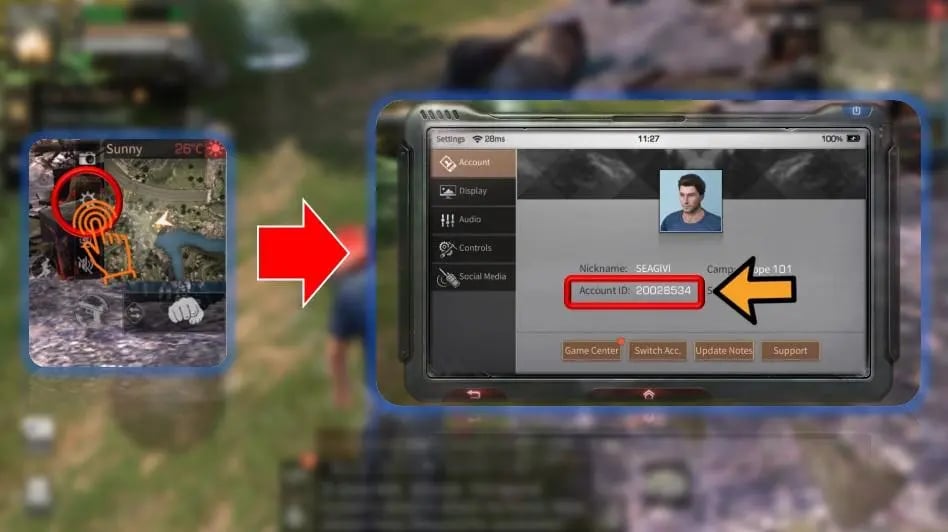
Step-by-Step ID Lookup Guide
- Launch the LifeAfter application on your mobile device or PC client.
- Before entering the game, check the start screen. Your current server name is listed directly under or beside the "Tap to Enter" prompt.
- Log into your active character.
- Tap the Settings gear icon in the top-right corner of your interface.
- Select the Account tab.
- Your numeric Account ID is displayed clearly on the profile card. Tap the copy icon next to your ID to copy it directly to your clipboard.
Note: Do not confuse your character nickname with your Account ID. XPTopup processes recharges using your exact numeric ID and designated server to ensure zero delivery errors.
Comprehensive LifeAfter Supported Server List
LifeAfter organizes survivor accounts across multiple distinct regional server clusters. Selecting the wrong server in the top-up menu will cause delivery delays or failed processing. Check the table below to verify your server zone:
| Cluster / Region | Supported Server Names |
|---|---|
| North America & Global | MiskaTown, SandCastle (500002), MouthSwamp, RedwoodTown, Obelisk, ChaosOutpost, IronStreet, NewLand, CrystalthornSea |
| Southeast Asia & Global A | FallForest (510001), MountSnow (510002), NancyCity, CharlesTown, SnowHighlands, Santopany, LevinCity, ChaosCity, TwinIslands, HopeWall, MileStone, LabyrinthSea |
| Korea (KR Cluster) | 파플래닛, 미스카대학, 희망의골짜기, 다베트설산, 가을빛산림, 스노우힐, 사막의요새 |
| New Horizons & Extended | FallForest (560001), HopeValley (560002), SandCastle (560003), MountSnow (560004), St.Rona, Oasis, SilentIsland, ArkCity |
| Specialized Survival | EasySurvival (730001), SimpleSurvival (720001) |
Always verify the exact server code or server name from your game launch screen before placing an order on XPTopup.
LifeAfter Credits vs Membership: Perks and Value
Choosing between Federation Credits and Federation Membership depends on your gameplay goals and resource management strategy.
Federation Credits
Federation Credits are the premium currency used for immediate purchases and high-tier progression in LifeAfter:
- Gacha and Formula Shards: Pull for rare weapon formulas, armor modifications, and exclusive Manor furniture.
- Marketplace Purchases: Convert Credits into Gold Bars to buy crafted gear, shield drones, and high-end materials directly from the trade stall.
- Cosmetics and Outfits: Unlock seasonal survivor outfits, vehicle skins, and decorative Manor blueprints.
- Speed-Up Crafting: Rush workbenches and construction queues when preparing for camp defense or territorial clashes.
Federation Membership (Trade VIP)
Federation Membership is a 30-day continuous privilege subscription designed for active daily survivors:
- Daily Credit and Resource Allowance: Claim daily packs containing Gold Bars, skill points, and valuable survival supplies.
- Expanded Storage and Backpack: Gain extra inventory slots to transport more gathered wood, stone, hemp, and infected blood.
- Lower Marketplace Tax: Pay reduced transaction fees when selling gear and rare drops at the trade city stall.
- Exclusive Sign-In Rewards: Double your check-in bonuses and claim exclusive membership titles.
Safe and Password-Free LifeAfter Top-Up Process
Account safety is essential when purchasing in-game currencies. XPTopup uses a direct ID-based fulfillment process that protects your credentials:
- Zero Password Requirements: You never have to share your game password, NetEase credentials, social login tokens, or secondary verification codes.
- No Account Sharing: The recharge is sent directly to your server ID via standard game distribution protocols. You never need to hand over control of your survivor.
- Safe Account Standing: All items supplied through XPTopup are genuine, keeping your account fully protected against game penalties or currency rollbacks.
Order Tracking and Troubleshooting for LifeAfter Deliveries
Deliveries on XPTopup process immediately once payment confirmation is received. Follow these tips to monitor and verify your order:
- Check In-Game Mail and Balances: Federation Credits appear directly in your upper wallet balance. Membership benefits activate automatically on your profile status bar.
- Restart the Game App: If you were logged into LifeAfter while completing your order, close the application completely and log back in to force a server refresh.
- Verify Server Selection: Double-check your confirmation receipt. If you selected an incorrect server (e.g., choosing SandCastle 500002 instead of SandCastle 560003), contact 24/7 customer support with your transaction reference number.
- Keep Your Order ID: Save your XPTopup order number to track status updates or request assistance at any time.
Frequently Asked Questions
How do I find my LifeAfter Account ID and Server?
Open LifeAfter, tap the Settings gear icon in the top-right corner, and open the Account tab. Your numeric Account ID is listed under your user details. Your server name appears on the initial login screen before entering the world map.
Do I need to share my LifeAfter game password to top up?
No. XPTopup only requires your numeric Account ID and your server selection. You never need to provide your password or temporary verification codes.
Which LifeAfter servers are available for top-up?
XPTopup supports all major regional servers across North America, Southeast Asia, Korea, and specialized zones including FallForest, MiskaTown, NancyCity, SandCastle, ArkCity, Oasis, EasySurvival, and the Korean cluster servers.
What is the difference between LifeAfter Credits and Federation Membership?
Federation Credits are instant lump-sum currency used for gacha pulls, formula crafting, cosmetic purchases, and Gold Bar conversion. Federation Membership provides 30 days of recurring daily perks, inventory expansions, and reduced marketplace taxes.
What should I do if my LifeAfter credits have not arrived?
First, restart your LifeAfter app to refresh the data connection. If the balance does not update within a few minutes, verify that your entered Account ID and server match your profile, then reach out to XPTopup customer support with your order number.
Can I buy LifeAfter credits for another player or friend?
Yes. Because XPTopup operates entirely via Account ID and server selection, you can top up any friend or campmate by entering their numeric Account ID and corresponding server during checkout.
Current package prices
Current package prices are shown below. Prices exclude Tax. Tax, payment fees and applicable coupons are shown at checkout.
| Package | Price |
|---|---|
| 65 Credits | USD 0.72 |
| Survival Expert Card | USD 2.51 |
| Trade VIP Card | USD 2.51 |
| 330 Credits | USD 3.37 |
| Federation Membership | USD 4.19 |
| 558 Credits | USD 5.15 |
| Lucky Star | USD 7.92 |
| 1108 Credits | USD 10.55 |
| LifeAfter Fund | USD 11.88 |
| 2268 Credits | USD 21.11 |
| 3468 Credits | USD 33.00 |
| 5768 Credits | USD 52.14 |
| 7768 Credits | USD 69.95 |