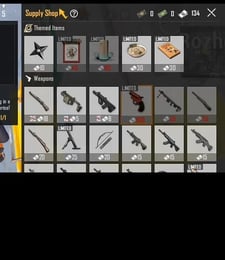
PUBG Mobile UC Top Up: Fast, Safe, and Direct to Your Account
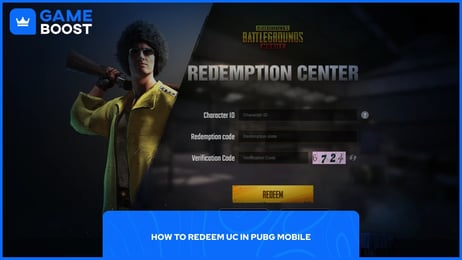
Unknown Cash (UC) is the primary in-game currency for PUBG Mobile. Players use UC to acquire the latest Royale Pass, unlock premium weapon finishes, upgrade firearms in the Workshop, purchase character outfits, and participate in limited-time Lucky Spin events. Having an adequate supply of UC ensures you never miss seasonal crates, collaboration items, or Mythic Forge rewards.
On XPTopup, purchasing UC is direct and straightforward. You only need your PUBG Mobile Player ID to process your recharge. Because the balance transfers straight to your character account through direct delivery systems, your personal login credentials remain completely private.
How to Top Up PUBG Mobile UC with Player ID on XPTopup
Follow these simple steps to complete your PUBG Mobile UC recharge in minutes:
- Select Your UC Package: Browse the available UC denominations on the product page and pick the amount you need.
- Enter Your Player ID: Type or paste your numeric PUBG Mobile Player ID into the designated input field.
- Verify Character Information: Double-check that your Player ID is accurate to avoid sending UC to an incorrect account.
- Proceed to Checkout: Choose your preferred payment method from the available local and international options.
- Complete the Payment: Finalize your transaction on our secure checkout gateway.
- Receive Your UC: Once payment confirms, the UC credits directly to your in-game PUBG Mobile balance. Launch the game to confirm your updated total.
How to Find Your PUBG Mobile Player ID
Your PUBG Mobile Player ID is a unique numeric sequence assigned to your profile. You do not need to share your account username or linked social media accounts—only this number is required for a top-up.
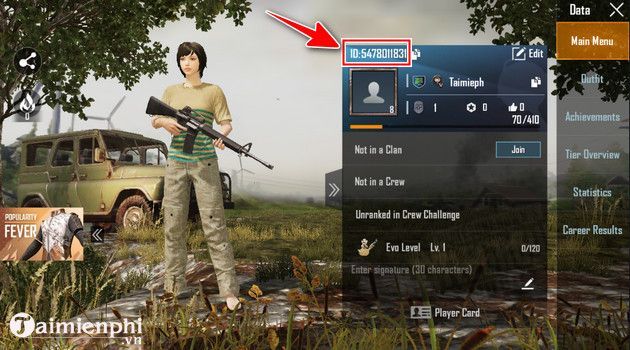
To locate your Player ID:
- Open the PUBG Mobile app on your mobile device.
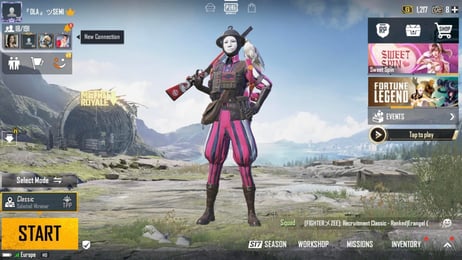
- Tap your Profile Avatar / Banner in the top-left corner of the main lobby screen.
- Open the Main Info tab on your profile page.
- Locate your Character ID (UID), which is a numeric string (usually 9 to 11 digits) displayed next to your avatar.
- Tap the Copy icon next to the number to copy your ID directly to your clipboard, then paste it into the order field on XPTopup.
PUBG Mobile UC Packages and Royale Pass Requirements
Choosing the right UC pack depends on what in-game items or events you plan to access. Below is an overview of common UC allocations for popular PUBG Mobile features:
| Purchase Goal | Typical UC Requirement | Key In-Game Benefits |
|---|---|---|
| Standard Elite Pass | 360 – 720 UC | Unlocks Elite Pass reward tracks, mission rank-ups, and seasonal outfits |
| Elite Pass Plus | 960 – 1920 UC | Grants instant rank boosts, exclusive cosmetic frames, and bonus rewards |
| Daily / Weekly Crates | 10 – 120 UC per pull | Provides access to daily discount draws, classic crates, and supply crates |
| Lucky Spin / Premium Draw | 300 – 540 UC (10-draw) | Unlocks progressive spin rewards, upgradable gun skins, and materials |
| Material / Mythic Forge | 500+ UC | Enables weapon laboratory upgrades, kill effects, and broadcast messages |
Note: Exact in-game costs for seasonal passes and event crates may vary based on ongoing events and regional server configurations. Check your in-game event tab for active pricing before topping up.
Account Security: Safe Direct Top-Up Without Passwords
Account safety is a major priority when recharging game currencies online. Traditional top-up methods that require your game login, social media passwords, or verification codes expose your profile to unauthorized access, accidental bans, or security leaks.
At XPTopup, all PUBG Mobile recharges are executed via direct Player ID processing:
- No Passwords Required: We will never ask for your email password, Apple ID, Google Play credentials, or social media logins.
- Zero Account Sharing: Your account stays entirely in your hands. You never need to log out or hand over control to a third party.
- Direct Delivery: Transactions route directly through official delivery channels to credit the UC balance straight to your in-game mailbox or wallet.
- Safe Data Protection: All transaction data is processed using modern encryption protocols to keep your payment details secure.
Supported Payment Methods in 2026
Global players need reliable, flexible ways to buy PUBG Mobile UC. In 2026, XPTopup offers a wide selection of international and localized payment solutions to make your purchase smooth regardless of where you play.
Depending on your country or region, available payment channels include:
- Major Credit and Debit Cards: Visa, Mastercard, and international bank cards.
- Digital Wallets and E-Wallets: Popular local and regional mobile wallets.
- Online Banking / Instant Bank Transfers: Direct account-to-account payments supported in multiple currencies.
- Localized Payment Gateways: Tailored regional options to ensure low transaction overhead.
All exchange rates, processing fees, and final localized totals are clearly shown in real-time on the live checkout screen before you confirm your order.
Delivery Expectations and Troubleshooting Missing UC
Top-ups placed on XPTopup are processed automatically. Under normal circumstances, UC delivers directly to your account shortly after payment confirmation.
If you have completed your payment but do not see your UC balance update immediately, follow these troubleshooting steps:
- Restart the Game Client: Close PUBG Mobile completely from your device's app switcher, then reopen the game. A fresh connection forces the game to fetch updated balance data from the server.
- Check In-Game Mail: Some promotional bundles or event-specific UC deliveries arrive through your in-game system mail. Open your mailbox and claim any pending messages.
- Verify Your Submitted Player ID: Review your XPTopup order confirmation receipt. Ensure the Player ID entered matches your actual account number without transposed digits.
- Confirm Payment Status: Check your banking app or wallet statement to confirm the transaction completed successfully and was not flagged as pending.
- Contact XPTopup Customer Support: If your balance does not update after restarting your game, reach out to our dedicated support team. Provide your XPTopup Order Number, your PUBG Mobile Player ID, and a screenshot of your payment receipt for rapid resolution.
Frequently Asked Questions
How do I recharge UC for PUBG Mobile?
To recharge UC, select the desired UC denomination on XPTopup, enter your numeric PUBG Mobile Player ID, and proceed to the checkout screen. Choose your preferred payment option, complete the transaction, and the UC will be credited directly to your PUBG Mobile account balance.
Where do I find my PUBG Mobile Player ID?
Open PUBG Mobile, tap your avatar in the upper-left corner of the lobby to open your profile, and select the Main Info tab. Your numeric Player ID is displayed next to your character name. Tap the copy icon next to the number to copy it accurately.
Do I need to provide my PUBG Mobile password to top up UC?
No. XPTopup only requires your numeric Player ID to deliver your UC. You should never share your game password, Google, Apple, or social media credentials with anyone.
How long does it take for PUBG Mobile UC to arrive after payment?
UC top-ups are processed automatically upon successful payment verification. Delivery generally takes just a few moments. During periods of heavy server load or game version updates, it may take a few minutes for the balance to refresh in-game.
How much UC is required to purchase the PUBG Mobile Royale Pass?
A standard monthly or seasonal Elite Pass typically requires 360 to 720 UC, while an Elite Pass Plus generally costs between 960 and 1920 UC depending on the active season structure. Check the Royale Pass tab inside your game client for exact current season pricing.
What should I do if my PUBG Mobile UC does not show up in my account?
First, fully close and restart the PUBG Mobile application to refresh your account data. If the UC still does not appear, check your in-game mailbox for system claims. If the balance remains unchanged, contact XPTopup customer support with your Order ID and payment receipt so our team can assist you.
Current package prices
Current package prices are shown below. Prices exclude Tax. Tax, payment fees and applicable coupons are shown at checkout.
| Package | Price |
|---|---|
| 60 UC | USD 0.79 |
| 300 + 25 Bonus UC | USD 4.00 |
| 600 + 60 Bonus UC | USD 8.00 |
| ELITE PASS | USD 8.79 |
| 1500 + 300 Bonus UC | USD 20.02 |
| ELITE PASS PLUS | USD 21.60 |
| 3000 + 850 Bonus UC | USD 40.04 |
| 6000 + 2100 Bonus UC | USD 80.09 |
| 12000 + 4200 Bonus UC | USD 160.19 |
| 18000 + 6300 Bonus UC | USD 240.29 |
| 24000 + 8400 Bonus UC | USD 320.39 |
| 30000 + 10500 Bonus UC | USD 400.49 |