Free Fire MAX Diamonds Top Up on XPTopup
Diamonds are the primary premium currency in Free Fire MAX, allowing players to unlock weapon skins, Booyah Passes, character skills, and exclusive event crates. When you want to upgrade your equipment or participate in limited-time Luck Royale draws, having a ready balance of Diamonds ensures you never miss seasonal releases.
XPTopup provides a direct recharge service for Free Fire MAX players worldwide. By using only your numeric User ID (UID), you can top up your account securely without sharing passwords or sensitive login credentials. Live pricing, bundle options, and checkout totals are displayed directly on the product selection page.
How to Top Up Free Fire MAX Diamonds on XPTopup
Recharging your balance on XPTopup takes only a few simple steps:
- Select the Free Fire MAX Diamond denomination or bundle you wish to purchase from the product catalog.
- Enter your numeric Free Fire MAX User ID (UID) in the required field.
- Verify that your UID is typed correctly to ensure delivery to the proper profile.
- Choose your preferred payment method at checkout and complete the transaction.
- Launch Free Fire MAX to confirm your updated Diamond balance.
Step-by-Step: How to Find Your Free Fire MAX User ID
Your numeric User ID is unique to your profile and is all that is required to process your top up.
- Open Free Fire MAX on your mobile device and log in to your account.
- Tap your profile banner or avatar located in the top-left corner of the main lobby screen.
- Stay on the Basic tab in your profile menu.
- Locate your UID (a sequence of 8 to 11 digits) displayed beneath your player nickname.
- Tap the small copy icon next to the number to copy your UID directly to your clipboard.
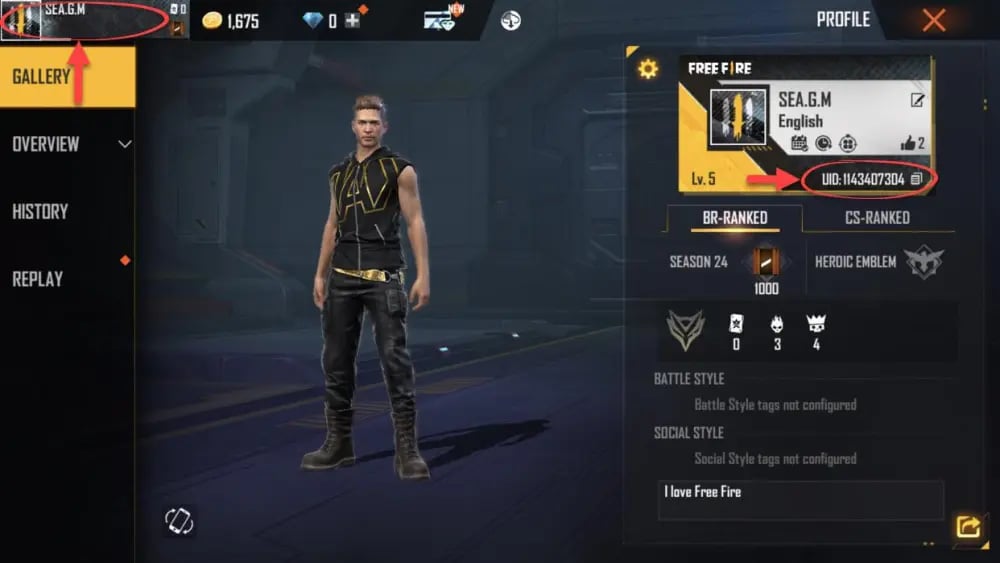
Paste this copied number into the User ID field on XPTopup before completing your order to prevent typos.
Diamond Sync: Using Diamonds Across Free Fire and Free Fire MAX
Free Fire and Free Fire MAX share account data through Garena Firelink technology. If your account is bound to the same login provider (such as Google, Facebook, Apple ID, or VK), your progress, unlocked cosmetics, and Diamond balance synchronize across both game clients.
When you top up Diamonds for Free Fire MAX on XPTopup, the currency is credited directly to your central Garena account database. This means:
- Any Diamonds added via your Free Fire MAX UID are immediately accessible if you log in through the standard Free Fire app.
- Purchases made with Diamonds in one client reflect instantly on the other.
- You do not need separate top ups or currency transfers between the two versions of the game.
What You Can Purchase with Free Fire MAX Diamonds in 2026
Diamonds give you access to the complete catalog of customization, progression, and seasonal items in Free Fire MAX throughout 2026.
| Item / Feature | Description | Primary Diamond Cost / Range |
|---|---|---|
| Booyah Pass | Unlocks premium seasonal reward tracks, themed costumes, and exclusive crates. | ~499 to 999 Diamonds |
| Evo Gun Upgrades | Evolution weapon levels, custom firing effects, kill animations, and stat boosts. | Variable via Evo Token Crates |
| Luck Royale Spins | Spins for Weapon Royale, Diamond Royale, Incubator, and special Faded Wheels. | ~9 to 40 Diamonds per single spin |
| Character & Pet Unlocks | Direct unlocks for competitive characters and support pets with active skills. | ~200 to 599 Diamonds |
| Emotes & Animations | Lobby dances, battle gestures, arrival animations, and victory poses. | ~199 to 599 Diamonds |
| Vehicle & Parachute Skins | Visual customizations for sports cars, motorbikes, surfboards, and drops. | ~100 to 399 Diamonds |
Direct UID Recharge: Account Safety and Zero Password Requirement
Account safety is a core priority when buying in-game currency. XPTopup utilizes a direct-to-account delivery system that requires only your public numeric User ID.
- No Password Needed: You never have to share your Google, Facebook, Apple, or VK account passwords.
- No Account Sharing: No third party needs to log into your account to perform the recharge.
- Reduced Risk: Direct UID top ups keep your login credentials protected on your own device at all times.
Always ensure that your UID is entered accurately before submitting your order on XPTopup.
Troubleshooting Free Fire MAX Diamond Delivery and Balance Updates
Diamond deliveries are processed quickly after your payment is confirmed. If your in-game balance does not reflect the new amount right away, follow these standard troubleshooting steps:
- Restart the Game Client: Close Free Fire MAX completely from your recent apps switcher and reopen it. This forces the client to query the server and update your local wallet cache.
- Check Your Network Connection: A fluctuating Wi-Fi or mobile data connection can delay client synchronization. Switch connection modes or refresh your data.
- Inspect the In-Game Mailbox: Certain event bonuses or promotional bundles are delivered as claimable vouchers or mail attachments rather than direct wallet increments.
- Verify the Submitted UID: Check your XPTopup order confirmation receipt to verify that the entered UID matches your active in-game profile.
- Contact XPTopup Support: If your balance does not update after restarting the game, reach out to XPTopup customer service with your order reference number for prompt assistance.
Frequently Asked Questions
How do I recharge Free Fire MAX Diamonds using my User ID?
Select your desired Diamond denomination on XPTopup, input your numeric User ID in the designated box, and proceed to checkout. Once your payment is complete, the Diamonds are delivered directly to your Free Fire MAX account.
Can Free Fire MAX Diamonds be used in the regular Free Fire game?
Yes. Because Free Fire and Free Fire MAX share the same linked account server, Diamonds added to your account are accessible and usable in both game clients simultaneously.
Do I need to share my Garena account login or password to top up on XPTopup?
No. XPTopup only requires your public numeric User ID (UID). You should never share your password, login tokens, or two-factor authentication codes with anyone.
Where can I find my Free Fire MAX User ID in the game?
Tap your player avatar in the top-left corner of the main Free Fire MAX lobby. In the Basic profile tab, your numeric UID is displayed right below your character name. Tap the copy icon next to it to copy the numbers.
What should I do if my Free Fire MAX Diamonds do not arrive immediately?
First, restart your Free Fire MAX application to refresh the balance display. Check your in-game mailbox for any attached items. If the Diamonds still do not appear, verify the UID on your order receipt and contact XPTopup customer assistance with your transaction details.
What items can I buy with Diamonds in Free Fire MAX?
Diamonds can be used to purchase the seasonal Booyah Pass, spin on Luck Royale wheels, unlock character abilities and pets, purchase Evo Gun upgrade tokens, and acquire weapon skins, outfits, emotes, and vehicle cosmetics.
Current package prices
Current package prices are shown below. Prices exclude Tax. Tax, payment fees and applicable coupons are shown at checkout.
| Package | Price |
|---|---|
| 210 Diamonds | USD 1.93 |
| 530 Diamonds | USD 4.80 |
| 1080 Diamonds | USD 9.60 |
| 2200 Diamonds | USD 19.20 |