Harry Potter: Magic Awakened Top Up Guide for Jewels and Starstones
Topping up your Harry Potter: Magic Awakened account gives you immediate access to premium items, exclusive outfits, Mystery Wheel keys, and card progression packs. On XPTopup, you can recharge Jewels and Starstones directly to your character profile without sharing login credentials or password details.
Follow these quick steps to complete your top up:
- Select your desired Jewels or Starstones bundle from the product list.
- Enter your User ID in the designated field.
- Choose your active Server from the dropdown menu (e.g., Ashwinder, Sphinx, Rougarou, Kelpie, Erumpent, 不死鳥, 니플러, or ユニコーン).
- Proceed to the checkout and select your preferred payment method.
- Complete the payment. Your purchased currencies will be sent directly to your in-game account.
How to Find Your Harry Potter: Magic Awakened User ID and Server
Locating your User ID takes only a few taps inside the game client. You do not need to log in to external web portals to retrieve it.
- Open Harry Potter: Magic Awakened on your mobile device or PC client.
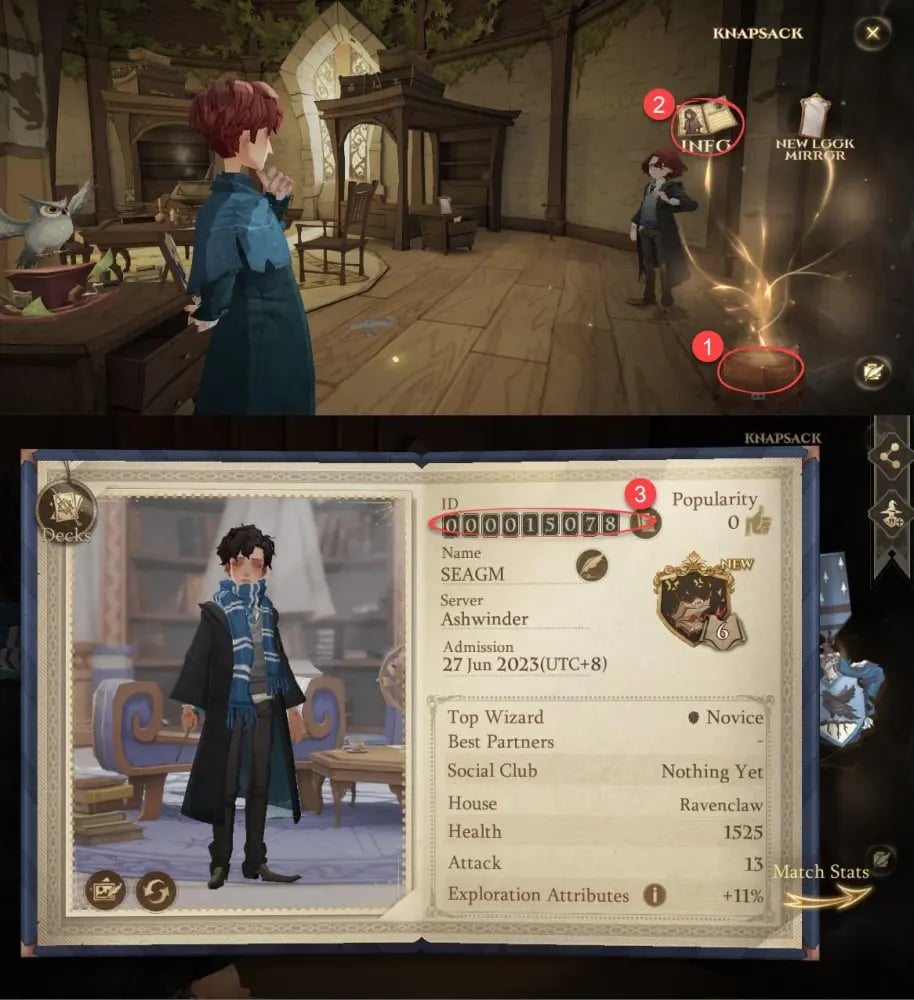
- Tap the Knapsack (Bag) icon located in the bottom-right corner of the main screen.
- Tap the Info button at the bottom of the knapsack menu to open your wizard profile.
- Your User ID is the numeric code displayed beneath your avatar and character name. Tap the copy icon next to it to copy your ID accurately.
- Verify your Server name on the character selection screen or login interface before placing your order.
Supported NetEase Servers: Ashwinder, Sphinx, Rougarou, and More
XPTopup provides direct recharge compatibility across all active global NetEase game servers. Following the global server migrations, ensure you select the specific server where your character currently resides.
| Server Name | Server Region / Language Base | Selection in XPTopup |
|---|---|---|
| Ashwinder | Global / SEA / Multi-region | Ashwinder |
| Sphinx | Global / North America / Europe | Sphinx |
| Rougarou | Global / Multi-region | Rougarou |
| Kelpie | Global / Multi-region | Kelpie |
| Erumpent | Global / Multi-region | Erumpent |
| 不死鳥 | Asia (Traditional Chinese) | 不死鳥 |
| 니플러 | Asia (Korean) | 니플러 |
| ユニコーン | Asia (Japanese) | ユニコーン |
Selecting the correct server ensures that your balance arrives instantly without routing delays.
Jewels vs Starstones: Uses and In-Game Benefits
Harry Potter: Magic Awakened features two primary premium currencies. Understanding how each currency works helps you choose the right top-up pack for your in-game goals.
Jewels
Jewels represent the direct paid currency in the game. They are primarily used for:* Mystery Wheel Draws: Purchasing Clockturn Keys to draw limited-time outfits, legendary wand skins, and exclusive owl companions.* Cosmetic Bundles: Direct purchases of premium robes, hairstyles, makeup items, and furniture sets in Diagon Alley.* Magic Pass Upgrades: Unlocking the Deluxe Magic Pass to gain seasonal rewards and avatar frames.* Converting to Starstones: Jewels can be converted directly into Starstones at a 1:1 ratio whenever needed.
Starstones
Starstones are used across standard progression systems and daily store rotations. You can spend Starstones on:* Card Draw Keys: Purchasing Ruby Keys and Silver Keys to obtain epic, legendary, and dark/mythic spell cards.* Daily Shop Resources: Buying gold packs, echo upgrade crystals, and potion ingredients.* Study Packs: Accessing discounted card advancement bundles during limited-time school events.
Why Choose Direct User ID Top Up on XPTopup
Traditional voucher codes or NetEase Pay cards often require complex manual redemption on external websites, where code errors or region lockouts can happen. XPTopup uses a direct User ID credit system that offers clear advantages:
- Zero Password Requirements: You never need to hand over your NetEase account, email, or social media login. All transactions require only your public User ID and Server selection.
- Direct Balance Delivery: Currencies are credited straight to your character profile. No code copying or secondary redemption portals required.
- Full Server Coverage: Works across all global and regional servers, including post-migration servers.
- Transparent Checkout: View all pricing, pack denominations, and available payment methods clearly on the live checkout screen.
Troubleshooting Delivery and First-Time Top-Up Mistakes
If you experience any delay or issue after submitting your recharge, check the following common points:
- Double-Check User ID Numbers: If you accidentally entered an incorrect digit, the order might fail validation or credit an unintended profile. Always use the in-game copy button to paste your exact ID.
- Confirm Server Selection: Ensure the server chosen on XPTopup matches your active character. If you have characters on multiple servers under the same account, the balance will credit to the specific server selected during checkout.
- Restart the Game App: In some instances, your in-game currency counter may not refresh while you remain logged in. Close the app completely and reopen it to force a server balance refresh.
- Check In-Game Mail: Certain package bonuses, event rebate tickets, or promotional items are sent directly to your in-game mailbox rather than added straight to your wallet counter.