Hiya Coins Top Up: Fast, Safe, and Automated UID Delivery
Hiya is a popular voice chat and social entertainment app where users connect across live voice rooms, participate in interactive audio parties, and support their favorite room hosts. To fully participate in room activities, send animated gifts, and unlock premium profile decorations, you need a steady balance of Hiya Coins.
XPTopup provides a direct Hiya Coins top up service designed for speed and account safety. You do not need to wait for manual customer service operators or share personal login credentials. By entering your unique numeric User ID (UID), your coin order processes automatically and credits directly to your Hiya account balance.
What Are Hiya Coins and What Can You Use Them For?
Hiya Coins (also referred to as Hiya gold coins) serve as the primary in-app currency within the Hiya voice chat ecosystem. Once credited to your account, you can use coins across multiple features:
- Virtual Gifting in Voice Rooms: Send standard and animated luxury gifts—such as sports cars, private jets, crowns, and celebration fireworks—to room owners and mic speakers.
- VIP Level Progression: Spending coins increases your account wealth tier and VIP status, displaying exclusive badges next to your name in public chat lists.
- Profile Customization: Purchase limited-edition avatar frames, customized chat bubbles, entrance banners, and ride-in animations that display whenever you enter a voice room.
- Interactive Party Games: Join in-room party games and interactive entertainment activities hosted by community creators.
How to Find Your Hiya UID for Top Up
To ensure your Hiya Coins recharge arrives without delay, you must provide your exact Hiya User ID (UID). Finding your UID takes only a few seconds within the app:
- Launch the Hiya app on your mobile device.
- Tap the Me (Profile) icon located in the bottom navigation bar.
- Your profile dashboard will appear showing your avatar, nickname, and account details.
- Look directly beneath your nickname to find your numeric ID (e.g.,
12345678). - Tap the copy icon next to your ID number to copy it to your clipboard.
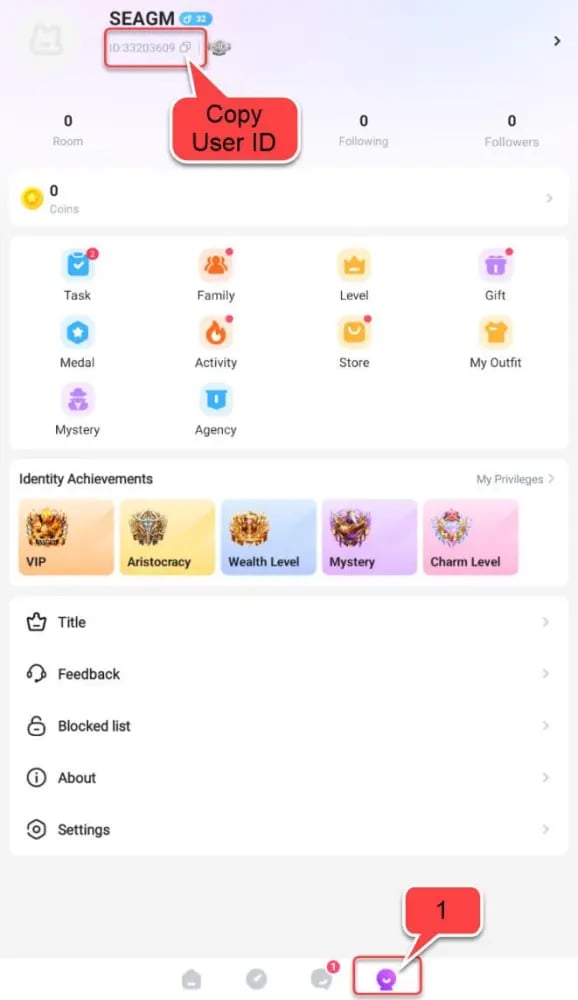
Always double-check that you copied the complete numeric string before placing your order on XPTopup.
Step-by-Step Guide to Top Up Hiya Coins on XPTopup
Recharging your account on XPTopup is simple and requires only your UID:
- Select Coin Denomination: Browse the available Hiya Coins packages on the product page and choose the amount you want to purchase.
- Enter Your Hiya UID: Paste your numeric UID into the designated player field.
- Verify Your Input: Check that the UID matches your in-app profile ID exactly.
- Proceed to Checkout: Choose your preferred payment method from the available checkout options.
- Receive Your Coins: Complete the payment. The system validates the order and delivers the coins directly to your Hiya balance.
Hiya Coins Recharge Packages and Denominations in 2026
XPTopup offers a comprehensive selection of coin packages to match your specific gifting and room-hosting needs. Current prices and package availability are updated directly on the live checkout selector above.
| Package Tier | Common Use Case | Delivery Method |
|---|---|---|
| Starter Packs (Small) | Daily room greetings, basic chat gifts, and activity participation | Direct UID Delivery |
| Creator Packs (Medium) | Supporting friends on mic, unlocking entry effects, and custom frames | Direct UID Delivery |
| Party Host Packs (Large) | Hosting party events, group gifting battles, and rapid VIP leveling | Direct UID Delivery |
| VIP Tier Packs (Mega) | High-roller room status, luxury animated gifts, and leaderboards | Direct UID Delivery |
Regional Account Compatibility and MENA Server Guidelines
Hiya maintains active user bases across the Middle East and North Africa (MENA) region—including Saudi Arabia, the United Arab Emirates, Egypt, Kuwait, Iraq, and Qatar—as well as international global servers.
When you top up on XPTopup via your numeric UID, our system automatically routes the recharge through the global distribution network corresponding to your account registration. As long as your UID is active and valid in the official Hiya app, the coins will credit properly regardless of your current physical location.
Account Security: UID-Only Direct Delivery with No Passwords Needed
Protecting your personal data is essential. XPTopup never asks for your Hiya account password, SMS verification codes, or linked social media credentials (Google, Apple ID, or Facebook).
- No Password Sharing: UID-based top-ups only require your public account identifier.
- No Account Handover: You do not need to log out or transfer your account to a third party.
- Safe Transactions: All checkout routes use encrypted payment gateways to protect your billing information.
Never share your login credentials with anyone offering coin top-ups. Real direct recharges only require your public UID.
Troubleshooting Common Hiya Recharge Issues and Delays
If you experience an unexpected delay after completing your purchase, follow these basic troubleshooting steps:
- Restart the Hiya App: In-app balances do not always refresh automatically while a room is open. Force-close the Hiya application and reopen it to trigger a balance sync with the server.
- Check Your Coin History: In the Hiya app, go to Me > Wallet / Coins > Transaction History to confirm if the transaction was logged.
- Verify the UID Entered: Review your XPTopup order confirmation to ensure you did not mistype any digits of your UID.
- Contact Support with Order Details: If your balance does not update after restarting the app, submit your XPTopup Order Number along with a screenshot of your in-app profile to our customer support team for instant investigation.
Frequently Asked Questions About Hiya Coins Recharge
What is a Hiya UID and where do I find it?
A Hiya UID is a unique numeric identifier assigned to your account upon registration. You can find it by opening the Hiya app, tapping the Me profile tab in the bottom right corner, and checking the number displayed right under your username.
How quickly are Hiya Coins delivered after completing checkout?
Deliveries are processed through automated systems. In most cases, your coins credit directly to your in-app wallet within moments after payment confirmation.
Do I need to provide my Hiya password to recharge coins?
No. XPTopup only requires your numeric UID. You should never disclose your password, one-time verification codes, or private login details to recharge coins.
Can I top up Hiya Coins for a friend using their UID?
Yes. You can purchase coins for any active Hiya user. Enter your friend's numeric UID in the player field instead of your own. Once payment is complete, the coins credit directly to their profile.
Is Hiya Coins recharge restricted to MENA region accounts?
No. The UID delivery system supports both MENA regional accounts and global accounts registered on the Hiya platform.
What should I do if I entered the wrong UID during top up?
Because coin deliveries process automatically, orders sent to an existing, valid UID cannot be reversed. If you notice an error before the order completes, or if you entered an invalid UID that caused the order to pause, contact XPTopup customer support immediately with your order number and correct UID.
What can Hiya Coins be spent on within the voice chat app?
Hiya Coins are used to purchase animated gifts for live voice room hosts, unlock exclusive VIP profile badges, customize avatar frames and entrance effects, and participate in interactive room activities.
Current package prices
Current package prices are shown below. Prices exclude Tax. Tax, payment fees and applicable coupons are shown at checkout.
| Package | Price |
|---|---|
| 3,000 Hiya Coins | USD 2.93 |
| 5,000 Hiya Coins | USD 4.88 |
| 6,000 Hiya Coins | USD 5.85 |
| 9,000 Hiya Coins | USD 8.78 |
| 12,000 Hiya Coins | USD 11.70 |
| 15,000 Hiya Coins | USD 14.63 |
| 30,000 Hiya Coins | USD 29.25 |
| 50,000 Hiya Coins | USD 48.75 |
| 100,000 Hiya Coins | USD 97.51 |