Kiti Top Up: Quick Balance Recharge for Live Streaming
Kiti is an interactive social live streaming application where users connect with broadcasters, watch entertainment streams, join voice rooms, and participate in community events. Kiti coins serve as the primary in-app digital currency, allowing viewers to send animated virtual gifts, unlock special entry effects, support favorite content creators, and access exclusive interaction features.
Performing a Kiti top up on XPTopup gives you direct access to coins delivered straight to your account balance. With a straightforward UID-based ordering system, you can recharge your account within minutes and resume supporting your favorite streamers without interrupting your viewing experience.
What Are Kiti Coins and How Are They Used in Live Streams
Kiti coins power the entire interactive ecosystem within the Kiti application. When you load your wallet with coins, you gain access to multiple community tools and social perks:
- Sending Virtual Gifts: Send animated gifts, roses, luxury cars, crowns, and custom effects directly into the live broadcast chat to capture the streamer's attention.
- Boosting Creator Rankings: Gifts purchased with Kiti coins contribute directly to a host's popularity score and leaderboard ranking during live broadcast competitions and PK battles.
- Unlocking VIP Badges and Chat Effects: High-tier gift senders receive special badge displays next to their username, unique chat bubble colors, and entrance effects when joining live rooms.
- Participating in Interactive Events: Use your balance to vote in community polls, join private voice room sessions, and enter community activities hosted by creators.
Safe and Secure Kiti Recharge Without Password Sharing
Account safety is a top priority when purchasing digital currencies online. XPTopup uses a direct ID-based delivery system that requires only your public Kiti UID.
- Zero Password Requirements: You never need to share your account password, linked phone number, email address, or third-party login credentials.
- Protected Personal Data: Your private messages, payment details, and streaming activity remain completely private on your own device.
- Safe Transactions: Every transaction is processed through verified, secure payment gateways to safeguard your billing details.
Because the recharge relies exclusively on your numeric user ID, your account security is never compromised during or after the checkout process.
Step-by-Step: How to Find Your Kiti UID
To ensure your Kiti coins arrive in the correct account, you must enter your exact numeric UID at checkout. Follow these simple steps inside the mobile app to locate your ID:
- Launch the Kiti application on your mobile phone or tablet.
- Log in to your personal profile.
- Tap the Profile or My icon located in the lower right corner of the main screen.
- View your profile card located at the top of the page.
- Locate the UID number displayed directly below your nickname and profile avatar.
- Tap the copy icon next to the number to copy your UID directly to your clipboard.
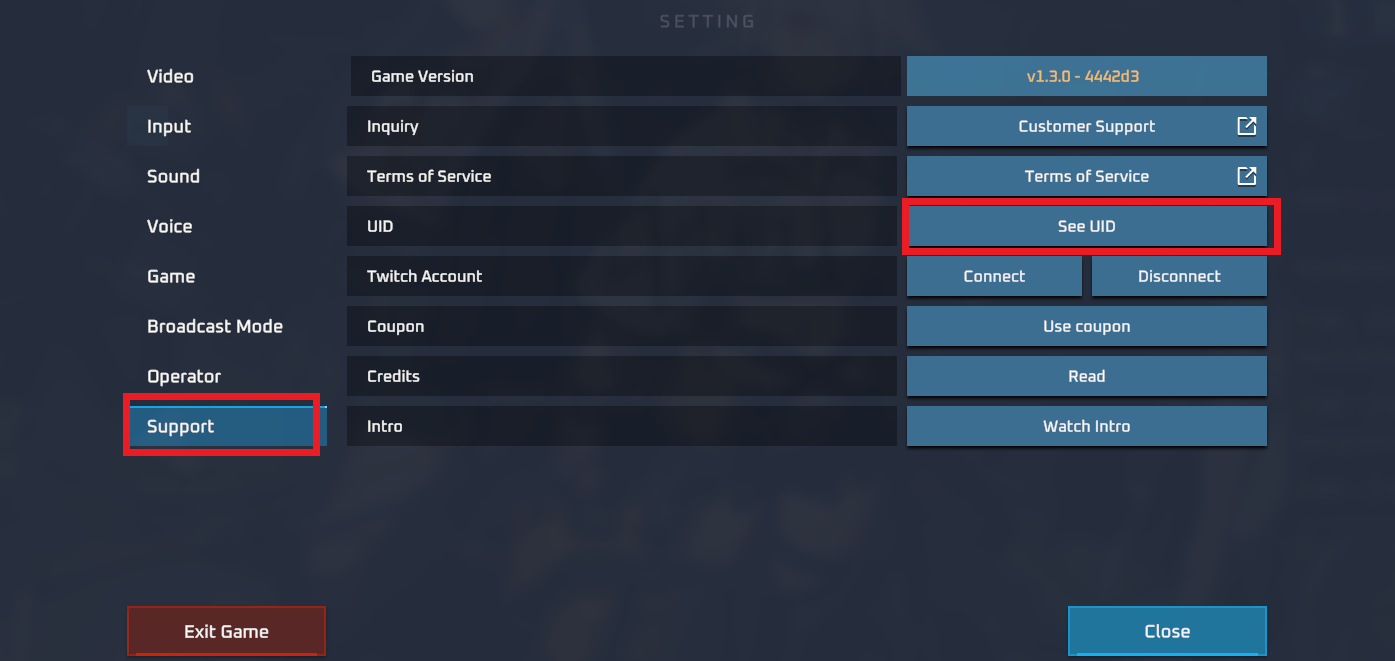
Always double-check the copied digits before submitting your order to prevent sending credits to an incorrect profile.
How to Top Up Kiti Balance Using Your UID on XPTopup
Recharging your Kiti wallet on XPTopup is designed to be quick and easy. Follow this straightforward walkthrough to complete your order:
- Select Your Coin Package: Browse the available Kiti coin packages listed on this page and pick the amount that matches your needs.
- Enter Your Kiti UID: Paste your numeric UID into the designated user ID input box.
- Confirm Order Details: Check the coin denomination and verify your UID digits.
- Proceed to Checkout: Select your preferred payment channel from the available options at checkout.
- Complete Payment: Finalize your payment through the secure billing gateway.
- Receive Coins: Once payment confirmation is complete, the coins are credited directly to your Kiti in-app balance.
Order Process and Verification Summary
| Recharge Step | Action Required | Important Note |
|---|---|---|
| 1. Package Selection | Choose the desired coin denomination | Live pricing is shown directly on the checkout screen |
| 2. UID Input | Enter your exact numeric Kiti UID | Verify all digits to ensure correct delivery |
| 3. Payment Processing | Select your preferred payment method | No login credentials or account passwords requested |
| 4. In-App Verification | Refresh your Kiti wallet balance | Check the updated coin total in your profile tab |
Virtual Gifts and Creator Support Features in Kiti
Live streaming thrives on real-time feedback between audiences and creators. When you hold an active Kiti coin balance, your interaction options expand significantly:
- PK Battle Support: During competitive PK battles between two streamers, sending gifts increases your chosen creator's score bar in real time, helping them win the match.
- Fan Club Membership: Frequent gifting unlocks fan badges that display your loyalty level inside specific creator communities.
- Special Event Gifts: During holiday campaigns and seasonal festivals in 2026, Kiti releases limited-edition animated gifts that offer exclusive visual effects and community rewards.
- Direct Broadcaster Interaction: High-value gifts trigger full-screen animations that notify the streamer immediately, making it easy to request songs, ask questions, or receive personalized shoutouts.
Delivery Time and Balance Verification Guide
After completing your purchase on XPTopup, the coin balance is credited straight to your Kiti account through the automated dispatch system.
How to Check Your Updated Balance:
- Return to the Kiti mobile app.
- Navigate to your Profile / My tab.
- Tap on the Wallet or Coins section.
- Pull down on the screen to refresh the page.
- Confirm that your new coin balance matches your purchased denomination.
If you have the app open during the transaction, closing and reopening the app helps refresh the server connection and updates your displayed wallet total immediately.
Why Choose XPTopup for Your Kiti Coins Top Up
- Direct UID Processing: Keep your account safe with a checkout system that never asks for sensitive login information.
- Transparent Live Pricing: Current package rates and available coin amounts are clearly presented on the product page before you pay.
- Multi-Device Compatibility: Place orders smoothly on desktop or mobile browsers with an optimized checkout flow.
- Reliable Customer Assistance: If you ever experience questions regarding your order status or UID submission, the XPTopup support team is ready to help resolve your inquiry.
Frequently Asked Questions About Kiti Recharge
What details do I need to provide to top up Kiti coins?
You only need to provide your numeric Kiti UID. You can find this number in your app profile. No passwords, verification codes, or personal email logins are ever needed.
How do I find my Kiti UID number?
Open the Kiti app, tap the Profile or My tab in the bottom menu, and locate the numeric UID shown directly beneath your profile picture and username. Tap the copy icon next to it to copy the exact number.
Do I need to share my Kiti account password for top up?
No. XPTopup never asks for your Kiti account password, private security questions, or linked social login credentials. The entire recharge process is completed using only your public UID.
What can I do with Kiti coins and credits?
Kiti coins allow you to purchase and send virtual gifts to live streamers, participate in PK battle scoring, unlock VIP chat privileges, obtain special entrance effects, and join exclusive interactive broadcast events.
How quickly will the Kiti recharge reflect in my account?
Recharges are processed promptly after payment confirmation. In most cases, the coins appear in your in-app wallet within a few minutes. You can refresh your profile wallet screen to view the updated total.
What should I do if I entered the wrong UID during checkout?
Because top-up deliveries are automated based on the UID submitted, orders delivered to an existing, valid UID cannot be reversed. If you notice an error immediately before payment processing finishes, contact XPTopup customer support right away with your order number and the correct UID to check if the transaction can be corrected prior to dispatch.