
Silver and Blood Top Up: Moonflow Uses and In-Game Value
Moonflow is the primary premium currency in Silver and Blood. Players use Moonflow to access exclusive summons, recruit top-tier units, purchase limited-time resource packs, and accelerate character progression. Having an adequate supply of Moonflow gives your team a decisive advantage across challenging campaign chapters, seasonal dungeons, and competitive battle modes.
Key uses for Moonflow in Silver and Blood include:
- Character Summoning: Convert Moonflow into summon currency to pull limited-banner heroes and expand your roster.
- Resource Bundles: Purchase growth packs, ascension materials, and weapon upgrade caches directly from the in-game shop.
- Energy & Stamina Refills: Refresh daily activity points to farm artifact domains, exp stages, and weekly boss encounters.
- Battle Pass Activation: Purchase premium seasonal passes to unlock exclusive milestone rewards, cosmetics, and avatar frames.
- Direct Conversion: Convert Moonflow into Moon Tears at a fixed rate for general store purchases.
All pack sizes and live pricing are listed directly on the checkout page of XPTopup, allowing you to choose the exact amount of Moonflow needed for your next summoning milestone.
Moonflow vs Moon Tears: Currency Conversion and Mechanics
Understanding the currency ecosystem in Silver and Blood ensures you spend your resources efficiently. The game utilizes two main currencies for transactions: Moonflow and Moon Tears.
Moonflow is acquired strictly through external top-ups, while Moon Tears serve as the universal standard currency spent across banners and daily supply stores.
| Currency | How It Is Acquired | Primary Functions | Conversion Rate |
|---|---|---|---|
| Moonflow | External direct top-up via UID | Purchasing premium packs, special bundles, and converting to Moon Tears | 1 Moonflow = 1 Moon Tear |
| MoonTears | Converted from Moonflow or earned via achievements | Banner pulls, daily shop items, stamina restoration, general upgrades | Standard spending currency |
Because Moonflow converts into Moon Tears at a direct 1:1 ratio, topping up Moonflow provides complete flexibility. You can hold your Moonflow balance for upcoming limited bundles or immediately convert it to Moon Tears when a rate-up banner goes live.
How to Find Your Silver and Blood User ID and Server
To complete a recharge on XPTopup, you only need to provide your in-game User ID and your active Server. You do not need to share any login credentials. Follow these steps to find your account details:
- Launch Silver and Blood on your device and log in to the game.
- Tap your Avatar / Profile Icon located in the top-left corner of the main screen.
- Open the Account Info tab.
- Locate your User ID (UID), which is a numeric string displayed below your player name.
- Tap the copy icon next to your UID to prevent typing errors.
- Note the exact Server name displayed on your profile or login screen.
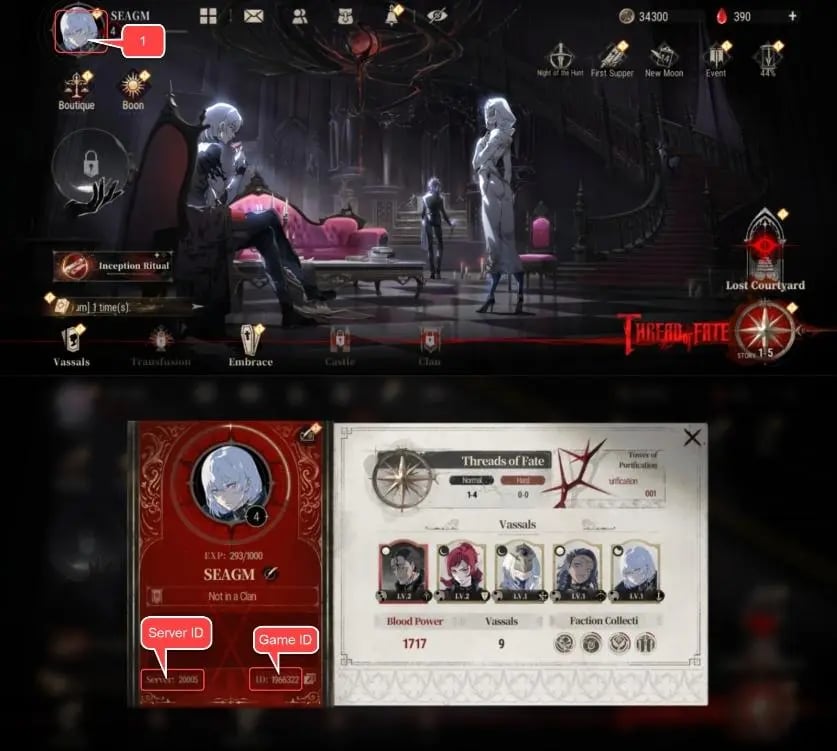
Make sure your selected server matches the server where your character currently resides. If your account contains characters across multiple servers, the top-up will be credited to the specific server selected during checkout.
Step-by-Step Guide to Buy Silver and Blood Moonflow on XPTopup
XPTopup provides a direct order flow that sends Moonflow directly to your in-game mailbox or account balance using your UID. Follow these steps to complete your purchase:
- Select the Package: Choose the desired amount of Moonflow from the available product cards on XPTopup.
- Input Player Details: Enter your numeric User ID in the ID field and specify your Server in the designated box.
- Review Your Information: Double-check the UID and Server spelling to ensure your order routes to the correct account.
- Proceed to Payment: Click the purchase button and select your preferred regional payment method on the checkout screen.
- Complete Checkout: Finalize the payment. Once confirmed, the system processes your request and credits the Moonflow to your Silver and Blood account.
Account Security: Safe and Passwordless UID Recharges
Keeping your gaming account safe is essential. Traditional account-sharing top-ups require you to hand over your login credentials, email passwords, or third-party tokens, which creates substantial security risks.
XPTopup uses a direct UID-only delivery model:
- No Passwords Required: You never share your account password, email access, or verification codes.
- No Account Sharing: Your profile remains strictly in your hands without external login sessions from unknown IP addresses.
- Clean Transaction Records: Direct recharges route through standard balance crediting, keeping your account compliant with game terms.
- Safe for Gifting: Because only a UID and Server are required, you can easily top up Moonflow for friends or guildmates without accessing their personal devices.
Troubleshooting Delayed Delivery and Order Verification
Most Moonflow top-ups reflect in your Silver and Blood account shortly after payment confirmation. If your balance does not update right away, follow these diagnostic steps:
- Restart the Client: Close Silver and Blood completely, clear the background process, and relaunch the game. This forces the client to fetch updated balance data from the game server.
- Check In-Game Mail: Certain bonus packs and promotional items are delivered as mail attachments rather than direct currency additions. Open your in-game mailbox to collect pending items.
- Verify Server Selection: Confirm that you logged into the exact server specified during your XPTopup order.
- Inspect Order Status: Check your order history on XPTopup to verify that the transaction status shows completed.
- Contact Support: If the currency has not arrived after a short wait, contact XPTopup 24/7 customer support with your Order Number, User ID, and payment receipt for immediate assistance.






























