Fast and Secure LitChat Top Up
LitChat is a dynamic live audio party and social voice streaming application where users join interactive voice chat rooms, connect with creators, and take part in group entertainment. LitChat is dedicated specifically to real-time voice chat rooms, interactive audio games, and virtual gifting. It is completely distinct from unrelated platforms such as LitCharts (literature analysis guides) or Litmatch (a dating application).
To engage in voice rooms, support room hosts, and stand out with premium visual effects, you need in-app credits and diamonds. A direct LitChat top up via XPTopup gives you a safe, password-free way to reload your in-app balance using only your LitChat User ID (UID).
In-App Utility: What LitChat Credits and Diamonds Do
LitChat credits and diamonds are the primary virtual currencies driving the platform's social interactions. Keeping a balance of credits allows you to access premium features across audio rooms:
- Animated Virtual Gifts: Send animated gifts to room hosts and speakers. Special visual animations play directly inside the voice room to highlight your support.
- Room Personalization & Badges: Room owners can apply special room themes, upgrade mic frame designs, and activate entry banners that trigger whenever you join a chat room.
- Interactive Social Mini-Games: Participate in audio-based party games and challenges hosted inside rooms, where credits serve as round entries and reward drivers.
- Supporter Ranking: Gifting creators boosts your ranking on daily, weekly, and monthly contributor boards, earning you exclusive profile frames and high-tier badges.
| Credit Tier | Practical Application | In-App Advantages |
|---|---|---|
| 10,000 - 50,000 Credits | Casual Chat & Micro-Gifts | Daily entry reactions, standard room stickers, text effects |
| 100,000 - 500,000 Credits | Voice Room Participation | Mid-tier animated gifts, custom room themes, minigame entries |
| 1,000,000+ Credits | Major Creator Support | Full-screen 3D room animations, leaderboard badges, elite frames |
How to Top Up LitChat on XPTopup
Recharging your LitChat balance is straightforward and requires no complex account linking:
- Select your desired LitChat credit package on the live XPTopup checkout screen.
- Enter your numerical LitChat UID into the required account field.
- Verify that your entered UID matches the numbers on your in-app profile.
- Complete your order using your preferred payment method on our secure checkout.
- Open your LitChat application to check your updated credit balance in your wallet.
How to Find Your LitChat UID
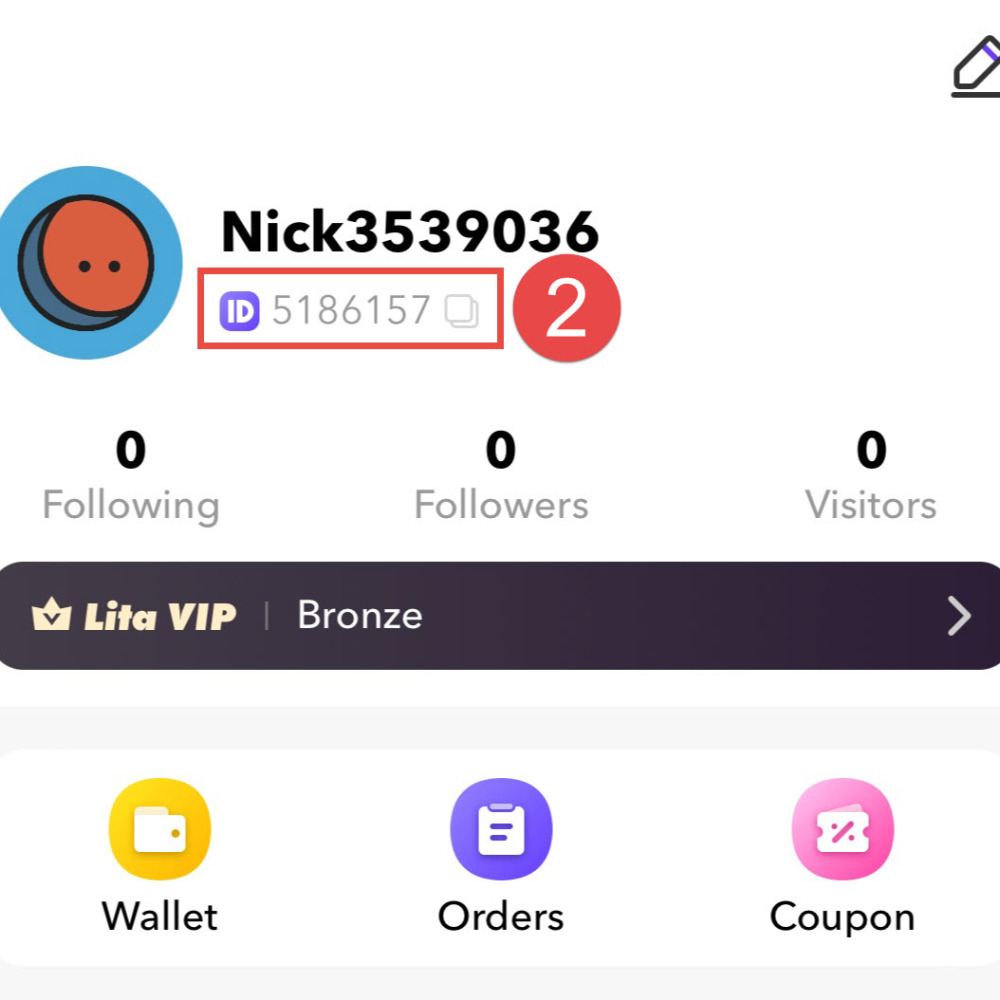
To ensure your purchased credits arrive without delays, you must provide the exact numerical UID tied to your LitChat account. Finding this ID takes only a few seconds inside the app.
- Open the LitChat app on your mobile device.
- Tap the Profile or Me tab located in the bottom navigation bar.
- Look beneath your avatar image and nickname. Your UID is listed as a dedicated numeric string.
- Tap the copy icon beside your UID or write down the numbers precisely.
Why Choose XPTopup for LitChat Recharges
XPTopup provides a transparent, secure ordering environment designed specifically for gaming and social audio enthusiasts:
- Password-Free UID Ordering: Your account security comes first. You only provide your public LitChat UID; you never need to reveal account passwords, social logins, or private credentials.
- Live Package Selection: Choose from a wide selection of credit tiers, from budget-friendly micro-packs to high-volume creator packages, with exact pricing displayed on the live checkout.
- Prompt Order Dispatch: Once your transaction clears, our direct UID delivery system credits your LitChat profile swiftly so you do not miss ongoing voice room events.
- Dedicated Customer Support: If you ever have a question about package availability or transaction confirmation, our support team is available to assist you.
Safety and UID Verification Guidelines
Maintaining account security while purchasing in-app credits is essential. Follow these standard security practices whenever buying virtual currency:
- Check UID Accuracy: Because recharges are automated directly to the UID specified at checkout, verify each digit before clicking purchase. A single mistyped number can route credits to another active user.
- Keep Login Credentials Secret: Legitimate top-up services like XPTopup will never ask for your email passwords, login codes, or two-factor authentication tokens. Recharges only require your public UID.
- Check Stable Connection: When opening the LitChat app after completing an order, make sure you are connected to a stable Wi-Fi or cellular network so the in-app wallet balance can refresh smoothly.
LitChat Top-Up Troubleshooting and Order Delivery
If your credits do not appear immediately in your LitChat account after your transaction completes, follow these troubleshooting steps:
- Restart the Application: Completely exit LitChat from your device's app switcher and reopen it. This forces the app to sync with the server database.
- Inspect In-App Wallet History: Open your profile, go to your balance page, and review your transaction log to see if the new credit balance has registered.
- Confirm Order Details: Check your XPTopup transaction confirmation to make sure the submitted UID corresponds exactly with the profile you are currently logged into.
- Reach Out to Support: If the balance has not updated after a short wait, reach out to XPTopup support with your order reference number and UID for fast verification.
Frequently Asked Questions
How do I find my LitChat UID to recharge credits?
Open LitChat and tap the Me icon in the lower navigation menu. Your UID is displayed directly beneath your profile picture and nickname. Tap the copy icon next to the number to copy your UID accurately.
Do I need to share my LitChat account password for top up?
No. Top-ups on XPTopup only require your numerical LitChat UID. You should never share your account passwords, verification codes, or personal login information.
What are LitChat credits and diamonds used for?
LitChat credits and diamonds allow you to send animated gifts to room hosts, unlock exclusive mic frames and room themes, join interactive audio minigames, and climb contributor leaderboards.
How fast are LitChat credits delivered after payment?
Credits are dispatched directly after payment confirmation. In most cases, the credits appear in your LitChat wallet within moments of completing your purchase on XPTopup.
Can I top up LitChat credits for a friend using their UID?
Yes. Because the checkout process only requires a valid UID, you can send credits directly to a friend by entering their LitChat UID into the player ID field during order placement.
What should I do if I entered the wrong LitChat UID during checkout?
If you catch the error before submitting payment, update the UID field on the checkout page. If the order has already been processed to an existing incorrect account, digital deliveries generally cannot be reversed. Contact XPTopup customer support right away with your transaction details to see if the order status allows manual intervention.
Current package prices
Current package prices are shown below. Prices exclude Tax. Tax, payment fees and applicable coupons are shown at checkout.
| Package | Price |
|---|---|
| LitChat - LitChat*15000 | USD 2.42 |
| LitChat - LitChat*20000 | USD 3.23 |
| LitChat - LitChat*25000 | USD 4.04 |
| LitChat - LitChat*50000 | USD 8.07 |
| LitChat - LitChat*100000 | USD 16.15 |
| LitChat - LitChat*500000 | USD 80.74 |
| LitChat - LitChat*1000000 | USD 161.49 |
| LitChat - LitChat*10000 | USD 1.61 |