StarMaker Coins Top Up: How to Recharge Online Using SID
Topping up your StarMaker account takes only a few moments when you use your StarMaker SID (User ID). Purchasing coins directly through XPTopup sends your balance straight to your in-app wallet without requiring personal login details or account handovers.
Follow these steps to complete your StarMaker Coins recharge:
- Select your desired coin package from the denomination catalog above.
- Enter your StarMaker SID into the player information field.
- Verify that your SID is correct to prevent delivery to another user.
- Choose your preferred payment option from the available checkout methods.
- Click Buy Now and complete your payment transaction.
- Open your StarMaker app to confirm that your updated coin balance is reflected in your profile.
How to Find Your StarMaker SID (User ID)
Your StarMaker SID is your unique numeric account identifier. You must provide the correct SID during checkout so your coins arrive instantly.
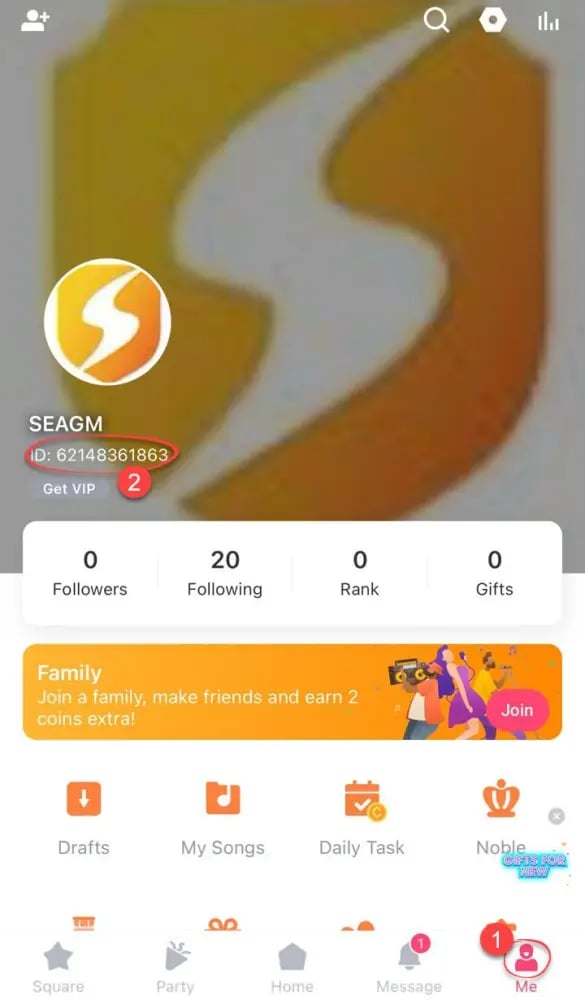
Follow this visual walkthrough to locate your SID inside the app:
- Launch the StarMaker application on your mobile device.
- Tap the Me or Profile icon located in the bottom-right corner of the home screen.
- Look directly beneath your profile picture and username near the top of the screen.
- You will see your account ID labeled as SID or ID followed by a string of numbers.
- Tap the copy icon next to your SID, or write it down carefully to paste into the checkout field.
Why Recharge StarMaker Coins on XPTopup
XPTopup provides a direct, secure, and hassle-free system for purchasing in-app currency for your favorite singing and social platforms. Here is why singers and live creators recharge their accounts through XPTopup:
- Password-Free Security: You only ever need to supply your StarMaker SID. XPTopup never asks for your login credentials, passwords, social media logins, or recovery codes.
- Fast Automated Crediting: Orders are processed directly to your StarMaker SID immediately after payment confirmation, letting you jump straight back into singing rooms without delays.
- Clear Live Pricing: All package amounts and local currency conversions are displayed upfront on the live checkout interface with zero hidden service fees.
- Dedicated Customer Support: If you ever experience payment delays or have questions about your order, our customer care team is available to assist you quickly.
What Are StarMaker Coins Used For?
StarMaker Coins are the primary premium currency used across the StarMaker ecosystem. They give you the tools to interact with your favorite singers, build your community, and boost your room standing:
- Sending Virtual Gifts: Send roses, cars, luxury effects, and custom animated gifts to performers in live party rooms, karaoke duets, and broadcast channels.
- Unlocking VIP Membership and Badges: Gain access to exclusive VIP badges, profile borders, entry announcement banners, and premium audio filters.
- Customizing Live Party Rooms: Host karaoke parties with customized room backgrounds, dynamic microphone themes, and exclusive gift sound effects.
- Boosting Family and Clan Rankings: Donate gifts during family battles and events to raise your singing group to the top of the global leaderboards.
StarMaker Coins vs. Diamonds: What You Need to Know
StarMaker features two main virtual currencies: Coins and Diamonds. Understanding the difference ensures you buy the correct balance for your needs.
| Feature | StarMaker Coins | StarMaker Diamonds |
|---|---|---|
| Source | Purchased directly via SID recharge | Earned by creators receiving gifts during live streams |
| Primary Use | Sending gifts, purchasing VIP, buying room effects | Cashed out by creators or converted to rewards |
| Direct Recharge | Yes, available for direct top up on XPTopup | No, cannot be bought directly with fiat currency |
| Account Role | Consumer and supporter currency | Creator and broadcaster earning metric |
Coins are what you need if you want to support streamers, send gifts, or buy in-app cosmetics. Diamonds represent the earnings that broadcasters accumulate when other users send them gifts funded by coins.
Payment Methods and Currency Options for StarMaker Top Up
XPTopup supports a comprehensive range of international and localized payment solutions. Depending on your region, you can select from:
- Major credit and debit cards
- Local e-wallets and digital payment apps
- Direct online banking and regional instant transfer networks
- Regional mobile payment solutions
All available methods and regional currency totals update dynamically on the product page. Check the live order selection above to view current rates and available processors in your country.
StarMaker Coin Delivery and Troubleshooting Guide
While most coin recharges arrive within moments after payment confirmation, here are standard troubleshooting steps if your balance has not updated:
- Restart the StarMaker App: Completely close the StarMaker application from your device task manager and open it again. A fresh session forces the app to pull your updated wallet balance from the server.
- Check Your In-App Mail: Look inside your StarMaker system notifications for an official recharge receipt message.
- Confirm Payment Status: Check your payment method or bank app to ensure the transaction was marked as completed rather than pending.
- Verify Your SID: Review the order confirmation from XPTopup to verify that the SID you submitted matches your account profile.
- Contact Support with Your Order ID: If your coins have not reflected after a few minutes, reach out to XPTopup support with your transaction reference number and SID for rapid resolution.
Frequently Asked Questions
How do I find my StarMaker SID for recharge?
Open the StarMaker app and tap the Me tab in the lower-right corner. Your SID is displayed as a sequence of numbers directly below your profile photo and nickname. Tap the copy icon beside the number to paste it accurately into the XPTopup checkout field.
Is StarMaker recharge safe on XPTopup?
Yes. Topping up through XPTopup is completely safe. Transactions are processed through encrypted payment gateways, and orders are fulfilled using only your public StarMaker SID without touching your account credentials.
Do I need to share my StarMaker password to top up coins?
No. You never need to share your password, verification code, or social login details. XPTopup only requires your numeric SID to credit the coins directly to your account.
How long does it take for StarMaker Coins to arrive after payment?
Coins are credited directly to your account immediately after your payment is successfully processed. In rare cases of network congestion, delivery may take a few extra minutes. Restarting your app usually updates your wallet balance instantly.
What is the difference between StarMaker Coins and Diamonds?
Coins are the purchasing currency you buy to send gifts, purchase VIP privileges, and enter karaoke events. Diamonds are reward points earned by streamers and performers when they receive gifts from other users in live rooms.
What should I do if I entered the wrong StarMaker SID?
Because top ups are processed instantly to the SID submitted at checkout, orders sent to an existing incorrect account cannot be reversed. Always double-check your SID before completing payment. If you realize an error occurred before your order processes, contact XPTopup customer support immediately with your order details.
Current package prices
Current package prices are shown below. Prices exclude Tax. Tax, payment fees and applicable coupons are shown at checkout.
| Package | Price |
|---|---|
| 60 + 5 Bonus Coins | USD 0.63 |
| 300 + 25 Bonus Coins | USD 3.15 |
| 1,000 + 110 Bonus Coins | USD 10.74 |
| 1,200 + 150 Bonus Coins | USD 13.06 |
| 1,600 + 200 Bonus Coins | USD 17.42 |
| 2,100 + 300 Bonus Coins | USD 23.23 |
| 2,700 + 400 Bonus Coins | USD 30.00 |
| 3,000 + 450 Bonus Coins | USD 33.39 |
| 3,400 + 550 Bonus Coins | USD 38.22 |
| 5,000 + 850 Bonus Coins | USD 56.61 |
| 6,000 + 1,100 Bonus Coins | USD 68.71 |
| 6,500 + 1,200 Bonus Coins | USD 74.51 |
| 7,000 + 1,300 Bonus Coins | USD 80.32 |
| 10,000 + 1,900 Bonus Coins | USD 115.16 |
| 14,000 + 2,800 Bonus Coins | USD 162.58 |