Hatsune Miku: Colorful Stage Crystals Top Up on XPTopup
Crystals serve as the primary premium currency in Hatsune Miku: Colorful Stage! (Project Sekai). Players use them to scout new 4-star character cards, replenish live energy for competitive event tiering, purchase exclusive 3D live costumes, and acquire special stamps.
XPTopup provides a direct Crystal recharge service that requires only your Player ID. You do not need to share your account passwords, linked social accounts, or transfer codes. The entire checkout workflow is designed for speed and security, crediting your account directly through official delivery channels. Live prices, available crystal bundles, and active package options are displayed on the live checkout interface above.
Paid Crystals vs Free Crystals: Key Differences in Project Sekai
Understanding the distinction between Paid Crystals and Free Crystals is essential before planning your gacha pulls and store purchases. Hatsune Miku: Colorful Stage tracks these two balances separately in your profile overview.
- Paid Crystals: Acquired strictly through direct currency purchases on platforms like XPTopup. These are required for special high-value gacha banners, including Guaranteed 4-Star banners, Select Gacha, daily 100-crystal discount pulls, and premium costume bundles.
- Free Crystals: Earned by playing the game—such as clearing songs, achieving Full Combos, leveling up Character Ranks, reading Event Stories, and unlocking card side stories. Free Crystals can be used for standard rate-up banners, event scouting, and Live Boost restoration, but they cannot be used on paid-exclusive gacha pools.
Crystal Balance & Feature Comparison
| Feature / In-Game Use | Paid Crystals | Free Crystals |
|---|---|---|
| Standard Event Banners | Yes | Yes |
| Color Festival (ColorFest) Banners | Yes | Yes |
| Daily Discount Single Pull (100 Crystals) | Yes | No |
| Guaranteed 4-Star Paid Gacha | Yes | No |
| Character Selection Gacha | Yes | No |
| Premium 3D Costume Shop Packs | Yes | No |
| Live Boost Recovery (Energy) | Yes | Yes |
| Acquisition Method | Direct Top-Up (XPTopup) | Story, Songs, Events, Missions |
When you top up on XPTopup, the delivered amount counts toward your Paid Crystal balance, allowing you to access premium-only banners and daily discounted pulls immediately.
What You Can Purchase with Crystals in Hatsune Miku: Colorful Stage
Crystals give you the resources necessary to build competitive teams and enjoy virtual performances:
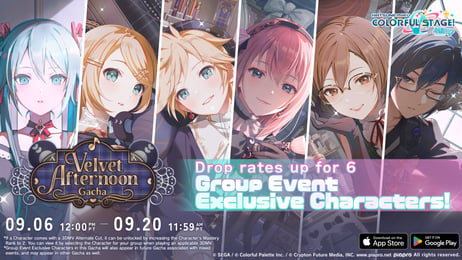
- Member Scouting (Gacha): Pull on limited-time event banners, Colorful Festival banners with doubled 4-star rates, and character birthday showcases to collect cards featuring Hatsune Miku, Kagamine Rin, Kagamine Len, Megurine Luka, MEIKO, KAITO, and original unit members.
- Daily Discount Scouting: Perform single pulls for only 100 Paid Crystals once per day on active banners, cutting standard single-pull costs by more than half.
- 3D Outfits and Accessories: Unlock outfits in the Costume Shop to customize your favorite singers and unit members during 3D Music Videos and Virtual Lives.
- Live Bonus Recovery: Refill your Live Boosts during intense event ranking periods to maximize event point gains and climb the leaderboard efficiently.
- Virtual Live Items & Penlights: Purchase cheer items, special effects, and virtual avatar costumes to use inside the Virtual Live lobby.
How to Find Your Player ID in Hatsune Miku: Colorful Stage
To top up your account on XPTopup, you only need your 18-digit numerical Player ID. Follow these steps to locate and copy it directly from the game client:
- Open Hatsune Miku: Colorful Stage! on your device.
- From the main title screen or home screen, tap the Menu icon (three horizontal lines) in the top-right corner, or tap directly on your User Profile banner in the upper-left area.
- Select Profile from the menu options.
- Look directly underneath your player nickname. You will see a string of numbers labeled as your Player ID.
- Tap the Copy icon (two overlapping squares) next to the number string to copy your Player ID directly to your clipboard.
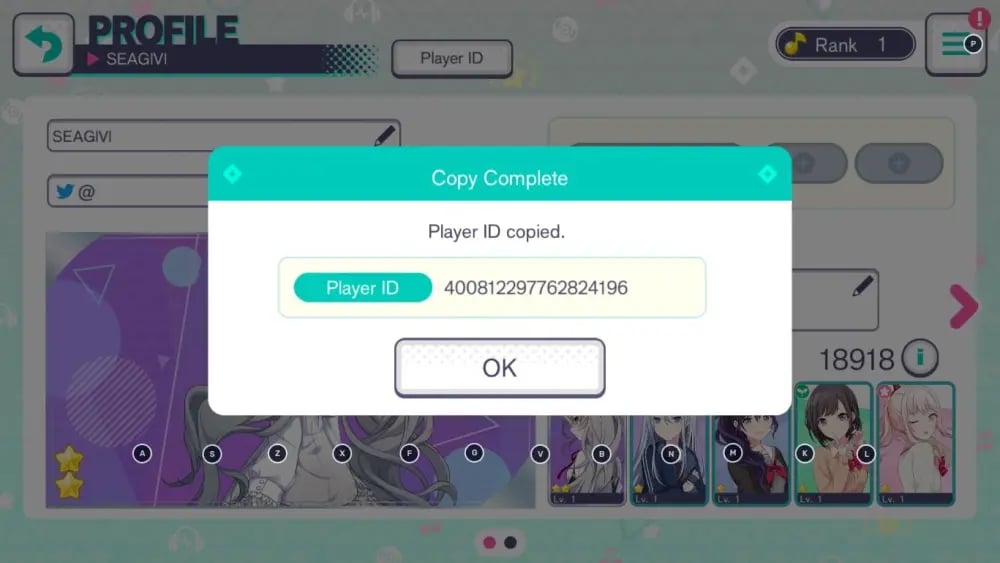
- Paste this ID into the Player ID field on the XPTopup order form before proceeding to payment.
Server and Region Compatibility Guidelines
Ensure that you are purchasing the package matching your game client's regional edition:
- Global / EN Server: Designed for players running the English global version of Hatsune Miku: Colorful Stage! distributed across North America, Europe, Oceania, and other global territories.
- Player ID Verification: Always verify that the Player ID copied from your game client corresponds to the active regional version. Entering an ID from a different regional server can cause transaction delays or order failures.
If you play on multiple accounts or servers, switch to the target profile inside your app settings first, copy the specific ID, and double-check the copied string on XPTopup.
Direct Player ID Top-Up Safety and Account Protection
XPTopup uses a direct Player ID delivery system to protect your gaming profile:
- Zero Password Requirements: You will never be asked for your game password, Google Play login, Apple ID credentials, or account transfer codes.
- No Account Sharing: Your account remains strictly in your hands. You do not need to log out, share verification codes, or risk credential leaks.
- Safe Delivery Protocol: Recharges are credited through secure, standard distribution channels, eliminating the risk of third-party account suspensions or unauthorized chargebacks.
- Data Protection: All transactions are processed over SSL-encrypted connections to keep your billing information protected.
How to Claim Your Purchased Crystals from the In-Game Gift Box
After your order on XPTopup is processed, follow these steps to collect your Crystals:
- Launch or switch back to the Hatsune Miku: Colorful Stage! app.
- On the main home screen, locate and tap the Gift Box / Present icon on the right-hand menu.
- Open the Present Box tab. Your newly credited Crystal package will appear in the list.
- Tap Claim or Accept All to move the Crystals into your active balance.
- If the Crystals do not show up immediately, tap through to a song selection screen or restart the game app to force a server synchronization with your client.
If you experience any unexpected delay, check your order status on XPTopup and reach out to our 24/7 customer support team with your order number for fast assistance.
How to Top Up Hatsune Miku: Colorful Stage Crystals on XPTopup
Recharging your Crystals takes just a few moments:
- Select Package: Choose your desired Crystal denomination from the available catalog on this page.
- Input Player ID: Paste your 18-digit Player ID into the provided field.
- Select Payment Option: Choose your preferred payment method from the available checkout channels.
- Complete Checkout: Review your order details and confirm the transaction.
- Collect In-Game: Open Hatsune Miku: Colorful Stage!, check your in-game Gift Box, claim your Crystals, and pull on your favorite banners.
Frequently Asked Questions
How do I find my Player ID in Hatsune Miku: Colorful Stage?
Open the game, tap your Profile banner in the top-left corner of the home screen, and look underneath your nickname. Tap the copy icon next to your 18-digit numerical ID to copy it to your clipboard.
What is the difference between Paid Crystals and Free Crystals in Project Sekai?
Paid Crystals are acquired through real-money purchases and can be used on all gacha banners, including Guaranteed 4-Star pools, daily 100-crystal discount pulls, and the Costume Shop. Free Crystals are earned via gameplay (stories, songs, character ranks) and work on standard banners and energy recovery, but cannot be used on paid-only banners.
Do I need to provide my game account password to top up on XPTopup?
No. XPTopup only requires your numerical Player ID. You should never share your game passwords, transfer codes, or third-party login credentials with anyone.
Where do my Crystals appear after completing the top-up?
Your purchased Crystals are delivered directly to your in-game Gift Box (Present Box). Open the app, tap the present box icon on the main screen, and tap "Accept All" to claim them into your balance.
What should I do if I entered the wrong Player ID during checkout?
If you realize you entered an incorrect Player ID, contact XPTopup customer support immediately with your order number. If the order has not yet been processed by the automated dispatch system, our support staff can help correct the information.
Can I use topped-up Crystals for paid-only gacha banners and costumes?
Yes. All Crystals purchased through XPTopup are delivered as Paid Crystals, meaning they are fully eligible for Guaranteed 4-Star scouting, daily single discount pulls, Select Gachas, and premium costume packs in the shop.
Current package prices
Current package prices are shown below. Prices exclude Tax. Tax, payment fees and applicable coupons are shown at checkout.
| Package | Price |
|---|---|
| 110 Crystals | USD 0.63 |
| 350 Crystals | USD 1.94 |
| 950 Crystals | USD 5.09 |
| 1,800 Crystals | USD 9.81 |
| 3,060 Crystals | USD 15.72 |
| 5,000 Crystals | USD 25.58 |
| 10,500 Crystals | USD 51.19 |