PUBG: New State Top Up: Direct NC Recharge Online
PUBG: New State (New State Mobile) delivers futuristic battle royale combat set in the expanded PUBG universe. To access premium cosmetic upgrades, tactical weapon skins, Survivor Passes, and exclusive crate drops, players require NC (New State Credit).
XPTopup provides a direct, secure PUBG: New State top up service designed for mobile gamers worldwide. By entering your unique in-game User ID, you can purchase NC packages that credit straight to your account balance without sharing passwords or sensitive login credentials.
What is PUBG: New State NC Currency and What Can You Buy With It?
NC (New State Credit) is the official premium currency of PUBG: New State. Unlike standard BP (Battle Points) earned by completing matches, NC allows you to obtain premium items and seasonal content directly from the in-game shop.
Here is what you can purchase with NC:
- Survivor Pass & Premium Pass Plus: Upgrade your seasonal pass to unlock exclusive character sets, weapon finishes, vehicle skins, and bonus NC cashback tiers.
- Royale & Themed Crates: Open limited-edition loot crates containing futuristic weapon designs, legendary outfits, and rare drop items.
- Upgradable Gun Skins (Upgrade Lab): Purchase materials and special crates to level up weapon aesthetics, custom kill effects, hit markers, and loot box broadcasts.
- Vehicle & Drone Skins: Personalize electric vehicles, buggies, bikes, and drone delivery boxes with custom paint jobs.
- Emotes and Victory Dances: Acquire interactive lobby gestures and post-match victory expressions.
- Name Change Cards and Utility Items: Update your in-game identity or reset personal profile cosmetics.
PUBG: New State NC vs PUBG Mobile UC: What Is the Difference?
A frequent point of confusion among mobile battle royale players is the difference between NC and UC. Although both games belong to the broader PUBG franchise, they run on separate game engines, use different account databases, and operate distinct currency systems.
| Feature | PUBG: New State (New State Mobile) | PUBG Mobile |
|---|---|---|
| Primary Premium Currency | NC (New State Credit) | UC (Unknown Cash) |
| Game Developer / Publisher | Krafton | LightSpeed & Quantum / Level Infinite |
| Cross-Game Transfer | Not Supported | Not Supported |
| Top-Up Identifier | User ID (Account ID String) | Player ID (Numeric UID) |
| Seasonal Battle Pass | Survivor Pass | Royale Pass |
Because these currencies are strictly incompatible, PUBG Mobile UC cannot be converted or transferred to PUBG: New State, and NC cannot be used in PUBG Mobile. Make sure you select the correct game catalog before placing your order on XPTopup.
How to Locate Your PUBG: New State User ID in Game Settings
To ensure your NC delivery reaches your account without delay, you must provide your exact User ID. You do not need to share your character name or linked social login.
Follow these steps to find your ID:
- Open the PUBG: New State application on your mobile device.
- In the main lobby screen, tap the Menu icon (three dots or gear icon) located at the top-right corner.
- Select Basic Settings or navigate to the Account tab.
- Look for the Account ID / User ID field displaying your unique string.
- Tap the Copy button next to your User ID to copy it to your clipboard.
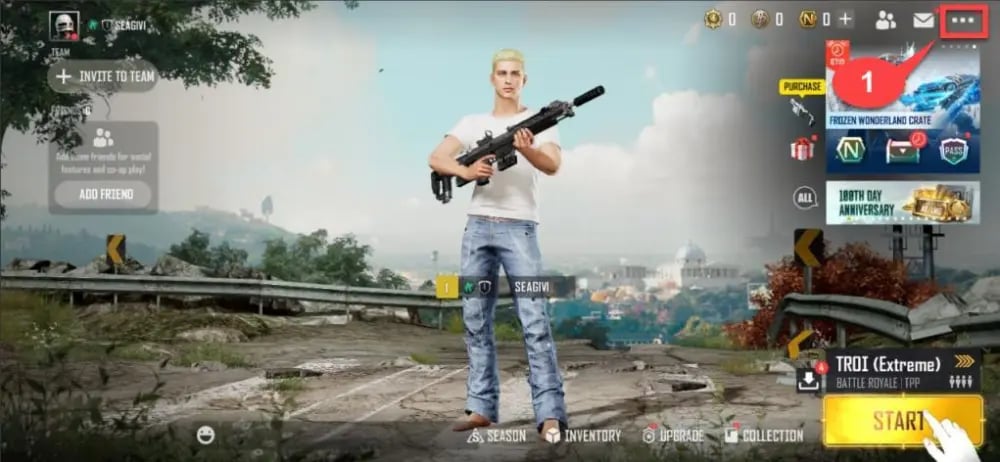
Paste this copied User ID directly into the input field on the XPTopup product page before checking out.
Step-by-Step Guide: How to Top Up PUBG: New State NC on XPTopup
To complete a PUBG: New State recharge on XPTopup, follow this simple process:
- Select Your NC Package: Choose your desired amount of NC from the denomination list on the live checkout page.
- Enter Your User ID: Paste your copied PUBG: New State User ID into the designated player field.
- Select Your Payment Method: Choose from available payment methods and your local currency.
- Review and Confirm: Verify that your User ID is entered correctly, then proceed to complete the payment.
- Receive Your NC: Once the transaction completes, your NC will automatically be credited to your PUBG: New State account balance.
Safe Top-Up Assurance: Why You Only Need Your User ID (No Passwords)
Account safety is a core priority when buying gaming currency online. XPTopup uses a direct UID-based crediting protocol that protects your account:
- Zero Password Requirements: You will never be asked for your Apple ID, Google Play credentials, Facebook login, or game password.
- No Account Sharing: Your account remains strictly in your hands throughout the transaction, eliminating any risk of unauthorized modifications.
- Secure Payment Processing: All transactions are routed through encrypted payment channels to safeguard your financial details.
- Safe Delivery Standards: Recharges follow standard fulfillment methods that keep your gaming profile in good standing.
Payment Methods and Global Currency Options for New State Mobile
XPTopup accommodates international players by supporting a variety of localized and global payment solutions. The checkout system automatically adjusts to your preferred currency, displaying transparent pricing with no hidden processing surcharges.
Available options include standard credit and debit cards, secure digital wallets, instant banking transfers, and regional payment rails. The exact pricing and payment channels available for your region are displayed directly on the live checkout screen.
PUBG: New State Delivery Time, Order Tracking, and Troubleshooting
Order Delivery Time
Orders on XPTopup are processed through an automated fulfillment system. In most instances, your NC balance updates shortly after payment confirmation.
How to Verify NC in the Game
- Launch or restart PUBG: New State.
- Check the NC balance counter in the top-right corner of the lobby.
- If your purchase included special bonus packs or event crates, check your in-game Mailbox to claim any pending attachments.
Order Tracking and Support
You can track the status of your purchase at any time inside your XPTopup account profile using your Order ID. If your order shows completed but the NC has not updated after restarting your game client, reach out to the XPTopup 24/7 customer support team with your order reference number for rapid assistance.
Frequently Asked Questions
Is PUBG: New State still active and supported in 2026?
Yes. PUBG: New State (New State Mobile) is actively maintained in 2026 by Krafton, featuring continuous seasonal updates, active Survivor Passes, balance patches, and community competitive events.
How do I find my PUBG: New State User ID?
Launch the game, tap the settings menu in the top-right corner of the lobby screen, select the Account tab, and tap the copy icon next to your Account ID string.
Can I use PUBG Mobile UC in PUBG: New State?
No. PUBG: New State uses NC (New State Credit), which is completely separate from PUBG Mobile UC. The two currencies cannot be exchanged or transferred between titles.
Do I need to give my account password to top up PUBG: New State NC?
No. XPTopup only requires your in-game User ID. You do not need to share passwords, email logins, or verification codes.
How quickly will the purchased NC be delivered to my PUBG: New State account?
Orders are dispatched automatically once your payment clears. The currency generally reflects on your account balance within a few moments of order completion.
What should I do if I entered the wrong User ID during checkout?
If you realize an incorrect User ID was entered, contact XPTopup customer support immediately with your order number. If the order has not yet been processed by the automated dispatch system, our team will assist in updating the account details.
Current package prices
Current package prices are shown below. Prices exclude Tax. Tax, payment fees and applicable coupons are shown at checkout.
| Package | Price |
|---|---|
| 300 NC | USD 0.79 |
| 1500 + 80 NC Bonus | USD 4.00 |
| 3600 + 250 NC Bonus | USD 9.60 |
| 9300 + 930 NC Bonus | USD 24.64 |
| 15000 + 1800 NC Bonus | USD 39.23 |
| 30000 + 5000 NC Bonus | USD 80.01 |