Racing Master Top Up: Step-by-Step Guide for Gems & Packs
Acquiring Gems and specialty packs in Racing Master allows you to expand your garage, tune high-performance engines, and secure exclusive vehicle blueprints. On XPTopup, you can top up your account directly using only your User ID (UID), without exposing login credentials or waiting on manual chat brokers.
Follow these simple steps to complete your purchase:
- Select Your Item: Choose the quantity of Racing Master Gems, Monthly Cards, or promotional resource packs you wish to purchase from the product catalog.
- Enter Your UID: Type your numeric Racing Master User ID into the input field labeled UID. Double-check that the numbers match your in-game profile.
- Proceed to Checkout: Click the purchase button to view the available payment channels on the live checkout screen.
- Complete Payment: Select your preferred payment method and finalize the order.
- Check In-Game Balance: Open Racing Master on your mobile device. Your Gems or pack rewards will credit directly to your account or arrive in your system mailbox.
All package pricing, local payment methods, and applicable regional currencies are calculated dynamically on the live checkout page.
How to Find Your Racing Master UID in Game Settings
Your User ID (UID) is the unique identifier tied to your Racing Master profile. Entering the correct UID ensures your purchased Gems route directly to your garage without delay.
Here is how to locate your UID inside the game client:
- Open Racing Master on your mobile device and log in to your account.
- From the main garage lobby screen, tap your Profile Avatar / Driver Icon located in the top-left corner.
- Stay on the primary Personal Info / Overview tab.
- Look directly below your character's display name to find your numeric UID.
- Tap the small Copy icon next to the number sequence to copy your UID directly to your clipboard.
- Paste this number into the UID field on XPTopup.
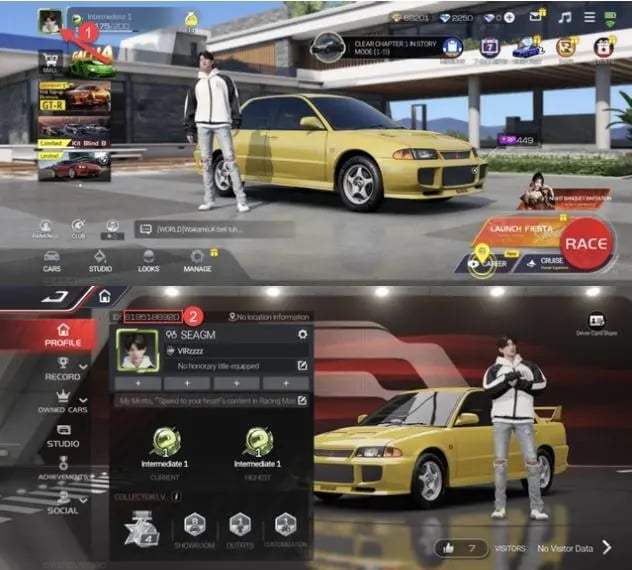
Tip: Always use the in-game copy button rather than typing long numeric strings manually to prevent accidental typos.
Racing Master In-Game Currencies: Gems vs Diamonds Explained
Racing Master uses distinct currencies to balance economy progression, vehicle tuning, and cosmetic upgrades. Understanding how these currencies operate helps you manage your spending effectively.
| Currency / Item | Acquisition Method | Primary In-Game Usage |
|---|---|---|
| Gems (Paid) | Direct top up via UID on XPTopup | Purchasing premium gacha keys, exclusive packs, Master Pass, and converting into Diamonds. |
| Diamonds (Free/Converted) | Event milestones, career races, or converted from Gems | Standard vehicle draws, blueprint crates, parts gacha, and stamina refills. |
| Gold / Coins | Daily missions, ranked races, track rewards | Installing performance parts, ECU upgrades, and tire adjustments. |
| Master Pass | Direct seasonal pack purchase or Gems | Unlocking premium reward tiers, vehicle skins, driver outfits, and bonus tuning materials. |
| Monthly Cards | Direct pack purchase | Daily allocation of Gems/Diamonds and persistent resource drop buffs. |
Paid Gems are the core currency for acquiring top-tier supercars from timed banner events. When limited-edition vehicle draws appear, having an available Gem balance allows you to perform multi-pulls immediately.
Racing Master Value Packs, Monthly Cards, and Master Pass Overview
In addition to standalone Gem bundles, several recurring and milestone-based packs provide structured progression rewards:
Monthly Privilege Cards
Monthly Cards grant an immediate lump sum of Gems upon purchase, followed by daily Diamond disbursements sent directly to your in-game inbox for 30 days. This option is ideal for drivers who log in consistently to complete daily challenge tracks.
Master Pass
The Master Pass functions as the seasonal battle pass for Racing Master. As you earn pass EXP through ranked matchmaking and weekly race targets, you advance through reward milestones. Upgrading to the premium pass track unlocks exclusive vehicle blueprints, tuning kits, custom liveries, and premium gacha vouchers.
Limited-Time Resource Bundles
During major updates and competitive seasons, limited packs feature bundled items such as ECU upgrade chips, tire grip compounds, paint vouchers, and banner keys. Purchasing these bundles supplies your workshop with the exact resources needed to max out specific vehicle classes (Sports, Racing, Extreme).
Why Choose UID-Only Top Up for Account Safety
Protecting your gaming account is critical. Account security risks often stem from sharing private credentials, social media passwords, or verification codes with unverified sellers.
XPTopup provides a direct-to-account fulfillment process designed around player security:
- Zero Password Requirements: You never need to supply your game password, Google Play login, Apple ID, or Facebook credentials. We only require your public numeric UID.
- No Third-Party Chat Handoffs: Orders process through automated systems directly linked to game server routing. You do not need to wait for a seller to log into your profile or coordinate via external messaging platforms.
- Zero Risk of Account Hijacking: Because your login credentials remain private, your account settings, friends list, and vehicle inventory stay entirely in your control.
- Direct System Delivery: Purchased items are credited straight to your game balance by the server, minimizing processing errors.
Troubleshooting Delivery and Server Region Verification
While direct top-ups process automatically, keep the following considerations in mind to ensure smooth order fulfillment:
1. Verify Server Region Compatibility
Racing Master operates regional servers across Southeast Asia (SEA) and global clusters. Ensure your game client version aligns with the regional product selection before finalizing payment. Entering a UID from an unsupported region can lead to processing delays.
2. Confirm UID Accuracy
Double-check that the copied UID contains no missing digits or extra spaces. If you manage multiple accounts or guest profiles, confirm that the UID matches the exact driver profile you intend to credit.
3. In-Game Balance Refresh
If your Gems do not reflect immediately after payment completion:* Completely close the Racing Master client on your mobile device.* Relaunch the game and check your garage lobby balance.* Check your in-game Mailbox; certain package items and bonus rewards require manual collection from system mail.
4. Order Tracking and Support
If your items have not arrived after restarting your game client, locate your Order ID in your XPTopup order history. Contact our customer support team with your order reference number and UID for rapid verification and resolution.
Frequently Asked Questions About Racing Master Recharge
How to top up Racing Master Gems and packs?
Select your required Gems bundle or pack on XPTopup, input your in-game UID, click through to the live checkout to choose your payment channel, and complete the order. Your items credit directly to your game profile.
Where can I find my Racing Master UID?
Tap your driver avatar in the top-left corner of the main lobby. In your profile overview screen, your numeric UID is displayed directly beneath your player name. Use the copy button beside it to copy the string accurately.
Do I need to provide my Racing Master password for top up?
No. Top-ups on XPTopup require only your public numeric UID. Never share your game password or third-party login credentials with anyone.
What is the difference between Gems and Diamonds in Racing Master?
Gems are the premium paid currency purchased through direct recharge, used for banner draws, store bundles, and pass upgrades. Diamonds are earned through gameplay achievements or converted from Gems to spend on standard draws and stamina.
Which servers or regions are supported for Racing Master top up?
Top-ups support regional servers including Racing Master SEA. Ensure that your account was created within the corresponding server zone before ordering.
What should I do if my purchased Gems do not appear in my game account?
First, restart the Racing Master application to trigger a server synchronization. Check your in-game mailbox for bundled items. If the balance remains unchanged after a few minutes, reach out to XPTopup customer service with your Order ID and UID for assistance.
Current package prices
Current package prices are shown below. Prices exclude Tax. Tax, payment fees and applicable coupons are shown at checkout.
| Package | Price |
|---|---|
| Novice Pack | USD 0.21 |
| Weekly Card | USD 0.81 |
| 70+4 Gems | USD 0.83 |
| Value Outfit Pack | USD 0.84 |
| 140+7 Gems | USD 1.65 |
| Monthly Card | USD 1.85 |
| 210+11 Gems | USD 2.48 |
| Upgrade to the Premium MP | USD 3.53 |
| DELUXE MP | USD 4.12 |
| Honda Speed Challenge Deluxe Master Pass | USD 4.13 |
| 350+18 Gems | USD 4.15 |
| Growth Fund | USD 5.22 |
| Initial D Crossover MP | USD 7.59 |
| PREMIUM MP | USD 7.63 |
| 700+35 Gems | USD 8.22 |
| Legend Returns Car Pack | USD 11.67 |
| 1000+50 Gems | USD 11.82 |
| Legendary New Car Pack | USD 12.77 |
| Upgrade MP (Legend Returns Pack) | USD 15.42 |
| Upgrade MP (Legendary New Car Pack) | USD 15.61 |
| 1400+70 Gems | USD 16.29 |
| MP Combo Pack (Legend Returns) | USD 17.59 |
| MP Combo(Legendary New Car) | USD 17.61 |
| 2100+105 Gems | USD 24.31 |
| 3400+170 Gems | USD 36.99 |
| 6600+330 Gems | USD 75.96 |