Sawa Play Top Up: Direct and Secure In-Game Coin Recharge
Sawa Play is one of the most popular social board game and voice lounge apps in the Middle East and Gulf region. From competitive Jackaroo matches and classic Ludo games to interactive VIP voice chat rooms, having enough in-game currency keeps your competitive edge sharp and unlocks all community features.
Recharging on XPTopup provides a direct, secure pathway to credit your account using only your numeric User ID. You never need to share sensitive account login details, social credentials, or passwords. Select your coin pack, submit your User ID, and proceed through checkout to receive your balance directly in your app.
How to Top Up Sawa Play Coins on XPTopup
To complete your Sawa Play recharge quickly, follow these simple steps:
- Select Your Package: Browse the available Sawa Play coin packages above and choose the amount that fits your gaming needs. Current prices and unit amounts are displayed live on the checkout card.
- Enter Your User ID: Input your exact Sawa Play numeric User ID into the designated account field.
- Proceed to Checkout: Select your preferred payment option from the available options.
- Confirm Your Order: Complete the payment. The system processes the order directly to your in-app account using your provided ID.
- Check Your In-App Balance: Open or restart Sawa Play to see your updated coin balance immediately.
Where to Find Your Sawa Play User ID
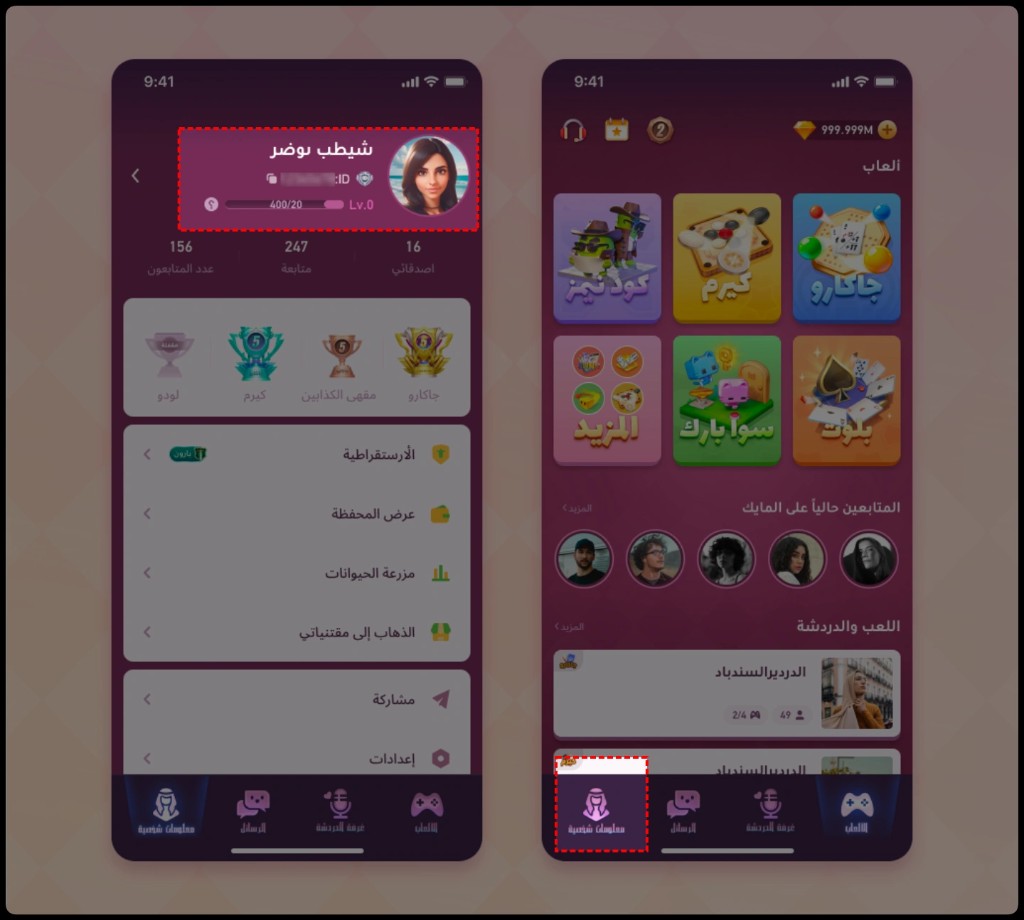
Finding your numeric account identifier in Sawa Play takes only a few seconds. Follow this step-by-step walkthrough:
- Launch the Sawa Play app on your mobile device.
- Tap your Profile Avatar icon located at the top-left corner of the main lobby screen.
- On your personal profile card, look directly beneath your nickname and profile photo.
- Locate your User ID (a sequence of numbers).
- Tap the copy icon next to your ID to copy it directly to your clipboard, ensuring zero typos during purchase.
Always verify that your User ID belongs to the intended account before confirming your order on XPTopup.
What Are Sawa Play Coins and In-App Perks
Coins serve as the primary currency across Sawa Play (formerly recognized by players during early updates as Sawa Jackaroo). Depending on in-app updates and specific event shops, currency terms like coins and diamonds are used to access different tiers of features:
- Table Stakes and Entry Fees: Enter higher-tier rooms in competitive board games like Jackaroo, Ludo, and Dominoes where coin stakes yield larger win pools.
- Animated Voice Room Gifts: Send interactive, high-value virtual gifts to broadcasters, friends, and room hosts inside live audio lounges.
- Profile Customization: Buy limited-edition avatar frames, animated entry vehicles, custom card backs, and distinct chat speech bubbles.
- VIP Privileges: Unlock VIP tier badges that display your status in rooms, grant priority room seating, and provide special interaction emotes.
Sawa Play Games: Jackaroo, Ludo, Dominoes, and VIP Voice Rooms
Sawa Play combines competitive traditional tabletop games with real-time social audio features. Below is an overview of the core game modes and how in-game currency enhances your gameplay:
| Sawa Play Feature | Currency Role | In-Game Utility |
|---|---|---|
| Jackaroo | Sawa Play Coins | Table buy-ins for 2v2 partner play, competitive tournaments, and custom tables |
| Ludo & Dominoes | Sawa Play Coins | Classic board stakes, quick 1v1 duels, and 4-player competitive rooms |
| Voice Chat Lounges | Coins / Diamonds | Sending animated gifts, tipping hosts, and accessing private lounge seating |
| Profile Cosmetics | Sawa Play Coins | Equipping custom table themes, entrance banners, and unique avatar frames |
Regional Compatibility across the GCC
Whether your account was registered in Saudi Arabia (KSA), the United Arab Emirates (UAE), Kuwait, Qatar, Bahrain, Oman, or internationally, direct User ID top-ups on XPTopup are compatible across all regional app servers. As long as your numeric User ID is entered correctly, coins are credited directly to your profile.
Safety Guarantee: Password-Free Direct Top-Up via User ID
Account safety is essential when purchasing in-game items online. Traditional top-up methods that require sharing email addresses, phone numbers, social media passwords, or SMS verification codes expose players to account theft, unauthorized data access, and potential platform bans.
XPTopup operates strictly on a direct UID system. This means:
- Zero Passwords Required: We never ask for your account password, Apple ID, Google Play login, or social credentials.
- Safe Delivery Mechanism: Coin packages are transferred straight into your game account using the platform's public ID interface.
- Protected Payment Gateway: All transactions are encrypted to keep your financial details secure.
Troubleshooting and Top-Up Support for Sawa Play
If you experience any issues during or after your purchase, review these quick troubleshooting steps:
- Coins Not Showing Immediately: Close the Sawa Play app completely from your device's background task manager and reopen it. This forces the game client to refresh your balance with the server.
- Mistyped User ID: If you entered an incorrect User ID during checkout, check the transaction status on your XPTopup account dashboard. If the order has not yet been processed, reach out to XPTopup 24/7 customer support immediately with your order reference number.
- Payment Confirmation Delays: Some payment methods require a brief authorization window. Check your payment receipt and monitor your live order status on XPTopup for real-time order updates.
Frequently Asked Questions About Sawa Play Top-Up
How do I find my Sawa Play User ID?
Open Sawa Play, tap your profile picture in the top corner of the home lobby, and view the numeric ID displayed under your display name. You can copy this number directly to your clipboard.
What can I use Sawa Play Coins for in the app?
You can use coins to join high-stakes Jackaroo and Ludo matches, send animated gifts in voice chat rooms, purchase visual customization items for your profile, and upgrade your VIP perks.
Do I need to share my Sawa Play password to top up?
No. XPTopup only requires your numeric Sawa Play User ID. Never share your game password or login credentials with anyone.
How long does it take to receive Sawa Play Coins after purchase?
Orders are processed through an automated system. In most cases, the coins reflect in your in-game balance shortly after payment confirmation. Restart your app if your balance does not update right away.
Can I top up Sawa Play Coins for a friend using their User ID?
Yes. You can surprise a friend or teammate by entering their numeric User ID into the account field during checkout on XPTopup. The coins will be delivered directly to their account.
What should I do if my Sawa Play Coins do not appear after payment?
First, restart the Sawa Play app to refresh your profile data. If your balance still does not show your new coins, check your order status on XPTopup and contact the 24/7 customer support team with your order number for fast assistance.
Current package prices
Current package prices are shown below. Prices exclude Tax. Tax, payment fees and applicable coupons are shown at checkout.
| Package | Price |
|---|---|
| Sawa Play - 220 Coins | USD 1.90 |
| Sawa Play - 625 Coins | USD 5.22 |
| Sawa Play - 5710 Coins | USD 46.06 |
| Sawa Play - 12830 Coins | USD 103.42 |
| Sawa Play - 37721 Coins | USD 303.28 |