Safe and Direct Identity V Echoes Top Up
Identity V Echoes are the primary premium currency used in NetEase Games' asymmetrical multiplayer horror title. Echoes allow players to purchase exclusive items, cosmetics, and seasonal content directly through the in-game Illusion Hall.
Acquiring Echoes through XPTopup provides a direct recharge pathway using only your in-game User ID (UID) and server region. You never need to share account passwords or grant access to third-party logins. Select your desired Echoes bundle, enter your player details, and complete your transaction to receive your balance directly in your Identity V account.
What Are Identity V Echoes and What Can You Purchase?
Echoes serve as the core transactional balance in Identity V. While Clues and Fragments can be earned through gameplay and logic paths, premium cosmetics, limited crossovers, and special bundle offers require Echoes.
In 2026, Echoes give you access to a wide variety of in-game content:
- Exclusive Costumes: Purchase S-tier and A-tier costumes for both Survivors and Hunters straight from the Illusion Hall.
- Seasonal and Crossover Essences: Open limited-edition Essences during major collaboration events to obtain rare crossover skins, accessories, and portraits.
- Character Unlocks: Instantly unlock new Survivors and Hunters without spending weeks grinding Clues on the Logic Path.
- Custom Room Customization: Buy dynamic lobby furniture, interactive items, music tracks, and expandable room blueprints to customize your personal Manor.
- Accessories and Effects: Equip special carry animations, ability particle effects, standby motions, and custom graffiti.
- Name Change Cards and Monthly Deals: Purchase utility items such as 4-Sided Dice packages, Spy Glasses packs, and account rename certificates.
How to Top Up Identity V Echoes on XPTopup
To complete an Identity V Echoes recharge, follow these simple steps:
- Select the Echoes denomination you wish to purchase from the product catalog.
- In the UID field, enter your numerical Identity V User ID.
- In the Server dropdown, choose your active account region (Asia or NA / EU).
- Review your order details and check the live checkout price.
- Click the purchase button and complete payment through your preferred payment option.
- Launch Identity V to verify that your Echoes have been credited directly to your balance.
Live pricing is calculated and displayed in real time on the checkout interface before payment confirmation.
How to Find Your Identity V UID and Server
Your User ID is a unique numeric identifier tied to your Identity V profile. You do not need to share your login email, Google Play account, Apple ID, or password to recharge.
Follow these steps to find your UID:
- Launch Identity V on your mobile device or PC client.
- On the main lobby screen, click your Profile Avatar located in the top-right corner.
- Your personal profile card will open.
- Look below your in-game username to locate your numeric User ID (UID).
- Click the copy icon next to the number to copy your UID directly to your clipboard.
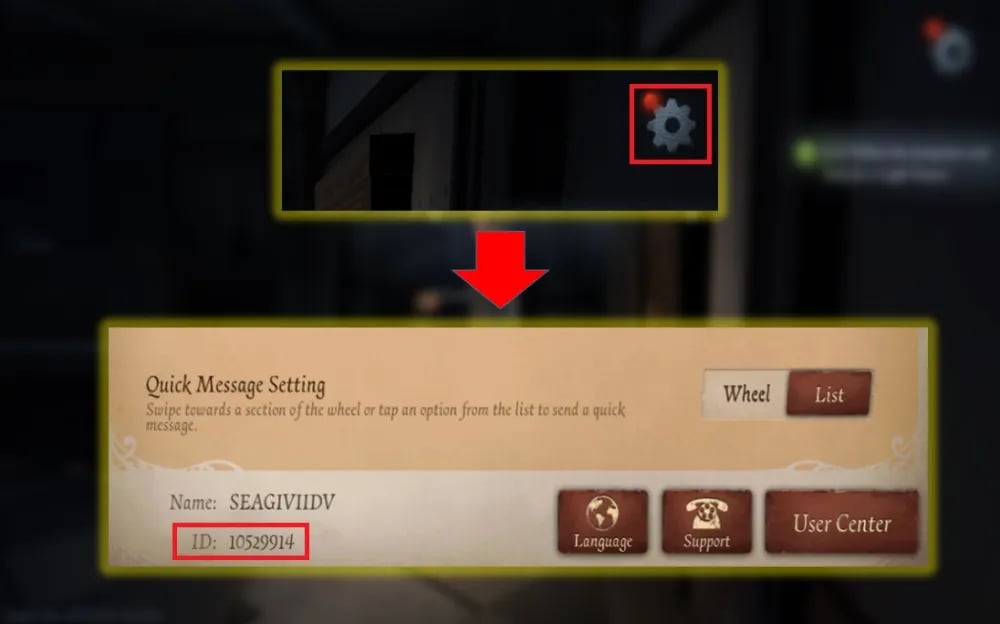
Make sure to copy the entire numerical string without extra spaces before pasting it into the XPTopup order form.
Selecting Your Identity V Server: Asia vs NA / EU
Identity V operates on two primary global server clusters. Choosing the correct server ensures that your Echoes land in the intended game profile without delay.
| Server Option | Target Region | Required Information | Delivery Method |
|---|---|---|---|
| Asia | Players connecting to the Asia regional server cluster | Numerical UID | Direct In-Game Credit |
| NA / EU | Players connecting to North America or Europe servers | Numerical UID | Direct In-Game Credit |
How to Check Your Current Server
When you open the Identity V startup screen before entering the Manor, your selected server is visible directly on the start gate:* If your startup screen reads Asia, select Asia on XPTopup.* If your startup screen reads NA / EU, select NA / EU on XPTopup.
Accounts created on the Asia server do not share data with the NA / EU server. Entering the correct server prevents routing failures.
Account Security: Why Passwordless UID Top-Up Protects You
Account safety is a major priority when recharging in-game currencies. XPTopup relies exclusively on UID-based direct distribution, which offers clear security advantages:
- Zero Password Exposure: You never disclose your NetEase, Facebook, Google, Line, Twitter, or Apple login credentials.
- No Account Sharing: Your account remains strictly in your hands. You do not need to log out, share verification codes, or disable two-factor authentication.
- Official System Compatibility: UID recharging routes transactions through standard server distribution channels, eliminating the risk of policy flags caused by unauthorized overseas logins.
Troubleshooting and Verifying Your Echoes Balance
After completing your order, check your updated Echoes balance inside the game. If your balance does not change immediately, use the following checklist:
- Restart the Game Client: Close Identity V completely from your task switcher or PC desktop and relaunch it to refresh your server connection.
- Check the Illusion Hall: Open the in-game shop. Your updated Echoes total displays in the top-right corner.
- Verify UID and Server: Check your XPTopup order confirmation to ensure you submitted the exact numerical UID and matching server cluster.
- Check Mailbox: On rare occasions, promotional bonus items or system notifications regarding purchases appear in your in-game mailbox.
Frequently Asked Questions
How do I top up Echoes in Identity V?
To top up Echoes, select your preferred Echoes package on XPTopup, enter your in-game UID, select your server (Asia or NA / EU), and complete your payment. The Echoes are sent straight to your Identity V profile.
Where can I find my Identity V UID and Server?
Open Identity V, tap your profile avatar in the upper right corner of the screen, and locate the numeric UID under your username. Your server (Asia or NA / EU) is displayed on the main title screen before you tap to enter the game.
Do I need to provide my Identity V password to buy Echoes?
No. You only need to provide your public in-game UID and server. Never share your password, social login details, or verification codes with anyone.
Which servers are supported for Identity V Echoes top up?
XPTopup supports both Global game servers: Asia and NA / EU. Make sure you pick the server matching your account.
What can I purchase with Echoes in Identity V?
Echoes can be spent in the Illusion Hall to buy S-tier and A-tier costumes, unlock new Survivors and Hunters, purchase crossover and seasonal Essences, acquire room furniture, buy accessories with custom effects, and obtain monthly bonus packs.
How to refund echoes in idv?
Echoes delivered to a correct UID and server are consumed or bound to your account immediately upon delivery. Because direct top-ups process digitally in real time, orders sent to valid accounts cannot be cancelled, reversed, or refunded once fulfilled. Ensure all order details and UID numbers are correct before confirming payment.
Current package prices
Current package prices are shown below. Prices exclude Tax. Tax, payment fees and applicable coupons are shown at checkout.
| Package | Price |
|---|---|
| 60 + 6 Echoes | USD 0.79 |
| 185 + 18 Echoes | USD 2.51 |
| 305 + 30 Echoes | USD 4.01 |
| 690 + 69 Echoes | USD 8.05 |
| 2025 + 202 Echoes | USD 25.09 |
| 3330 + 333 Echoes | USD 40.28 |
| 6590 + 659 Echoes | USD 80.57 |