What Are YoHo Coins and How Does YoHo Coins Top Up Work?
YoHo is a popular social group voice chat and entertainment application where users connect in real-time audio rooms, play interactive games, and build online communities. Within the app, YoHo Coins serve as the primary premium currency required to access interactive features, express appreciation to broadcasters, and customize your profile presence.
When you complete a YoHo Coins Top Up, your purchased coins credit directly to your account balance via your public User ID (UID). These coins allow you to participate actively in room activities, send animated gifts, trigger dynamic entry effects, and climb the room popularity rankings.
Primary Uses for YoHo Coins
- Virtual Gifting: Send 3D gifts, luxury presents, and room-wide effects to your favorite room hosts and friends.
- VIP Progression: Accumulate VIP experience points with every coin spent to unlock exclusive profile frames, custom chat bubbles, and prestige badges.
- Room Entrance Effects: Announce your arrival in any voice room with custom vehicles, avatar banners, and special audio cues.
- In-Room Mini-Games: Use coins to join popular multiplayer casual games such as Ludo and Domino directly inside active chat rooms.
- Microphone Privileges: Stand out during live discussions and support community room goals.
How to Find Your YoHo Account UID
To ensure your recharge delivers directly to your account without delay, you only need to provide your numeric YoHo User ID. Follow these steps on your mobile device:
- Open the YoHo application on your device.
- Tap the Profile (or Me) tab located in the bottom-right corner of the main navigation bar.
- Locate your numeric UID displayed directly underneath your profile avatar and nickname.
- Tap the Copy icon next to the UID number to save it directly to your device clipboard.
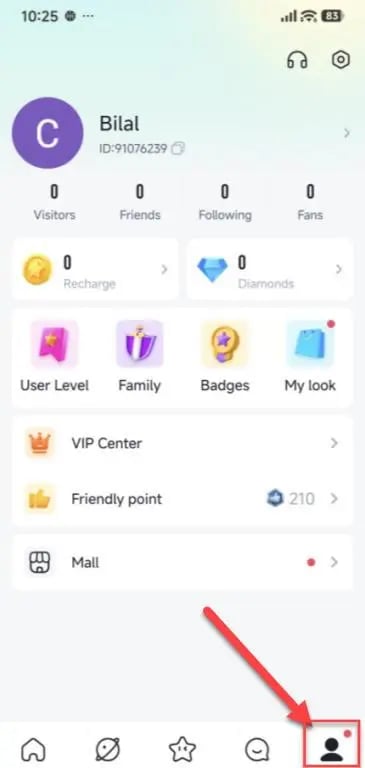
Always paste your numeric UID directly into the order field on XPTopup to eliminate manual typing mistakes.
How to Top Up YoHo Coins on XPTopup
Recharging your YoHo balance on XPTopup takes just a few steps with no account passwords required:
- Select Your Coin Package: Choose the number of YoHo Coins you wish to purchase from the selection list. Live pricing is displayed directly on the checkout screen.
- Enter Your UID: Paste your numeric YoHo User ID into the required UID input box.
- Choose Payment Option: Pick your preferred payment method from the available checkout options.
- Confirm and Pay: Review your order details, complete the transaction securely, and wait for confirmation.
- Check Your In-App Balance: Open the YoHo app, navigate to your wallet or profile screen, and confirm your updated coin total.
Difference Between YoHo Coins and Diamonds/Beans
Understanding the distinction between YoHo Coins and receiver rewards (Diamonds or Beans) prevents confusion when managing your in-app wallet balance.
| Attribute | YoHo Coins | YoHo Beans / Diamonds |
|---|---|---|
| How Obtained | Direct UID top-up on XPTopup | Received as gifts from other users in voice rooms |
| Main Function | Sending gifts, entering mini-games, buying VIP perks | Measuring host earnings and broadcaster rank |
| Withdrawable | No, virtual currency for in-app spending only | Yes, eligible hosts can redeem or convert per app rules |
| Transferable | Spent via gifts; cannot be directly traded as raw coins | Converted according to official creator payout terms |
| VIP Contribution | Grants VIP experience points when spent | Reflects creator popularity rather than buyer VIP rank |
Coins are strictly buyer-facing consumption units. When you send a gift using coins, the recipient receives the value in Diamonds or Beans, supporting creators while boosting your personal VIP standing.
YoHo VIP Level Perks, Animated Gifting, and Room Privileges
Spending YoHo Coins directly advances your account through VIP levels 1 through 10. Higher VIP ranks provide clear social advantages within the community:
Exclusive Entrance Vehicles and Badges
High-tier VIP members trigger custom animated entrances when entering any public voice room. From luxury sports cars to fantasy mounts, entrance effects alert everyone in the room to your arrival. Special glowing badges also display next to your username on the speaker mic and in the active listener list.
Animated Full-Screen Gifts
Sending premium gifts triggers full-screen animations that take over the room display. These gifts notify all active participants in the room, boosting your profile visibility and placing you at the top of the room's daily contribution leaderboard.
Custom Chat Bubbles and Profile Rings
VIP members receive access to distinctive text bubbles, animated avatar frames, and custom sound effects during live conversations, ensuring your messages remain prominent in high-traffic chat feeds.
Why UID-Only Top-Up is Safe and Secure for YoHo Users
Protecting your social accounts against unauthorized access is critical. Using a UID-only top-up system on XPTopup offers key security protections:
- Zero Password Sharing: You never need to enter your YoHo password, linked phone number, or third-party social login credentials (such as Google, Facebook, or Apple ID).
- Scam and Phishing Protection: Third parties can never access your private chat logs, friend lists, or stored account data through a public UID number.
- Direct System Delivery: Orders process automatically by sending the selected coin package directly to your account on the official server.
- No Account Sharing Risks: Your account stays logged into your own personal device at all times with zero risk of temporary bans caused by multi-location logins.
Troubleshooting Common YoHo Coin Delivery and Payment Questions
What happens if I enter the wrong UID?
Because top-up orders deliver automatically to the UID entered during checkout, transactions sent to another valid account cannot be reversed or transferred. Double-check your numeric ID before completing payment.
My coins have not arrived yet. What should I do?
If your order shows completed on XPTopup but your balance has not updated inside YoHo:1. Completely close the YoHo app and restart it to refresh your server connection.2. Switch between Wi-Fi and mobile data to ensure your local connection is updating your wallet balance.3. Check your profile wallet screen rather than relying on in-room cached counters.4. If your balance does not update after several minutes, contact XPTopup customer support with your Order ID and UID for quick verification.
Frequently Asked Questions
How do I find my YoHo UID to complete a coin top up?
Open the YoHo app, go to your profile tab in the bottom-right corner, and locate the numeric ID directly beneath your profile picture and nickname. Tap the copy icon next to the number and paste it into the UID field on XPTopup.
Do I need to provide my YoHo password or login credentials?
No. XPTopup requires only your public numeric UID. You should never share your password, login verification codes, or personal account credentials with anyone.
What is the difference between YoHo Coins and Beans/Diamonds?
YoHo Coins are purchased through top-ups to send gifts, play in-room games, and unlock VIP privileges. Beans and Diamonds are reward units accumulated by room hosts and broadcasters when they receive gifts from other users.
Can I withdraw or refund YoHo Coins after recharging?
No. YoHo Coins are non-refundable virtual items intended solely for in-app spending on gifts, games, and profile enhancements. Once credited to your UID, coins cannot be withdrawn as cash.
What features do YoHo Coins unlock in voice chat rooms?
Coins allow you to send static and animated gifts, trigger entrance effects, unlock custom chat bubbles, gain VIP status levels, join multiplayer mini-games like Ludo and Domino, and support active room broadcasters.
What should I do if my YoHo Coins do not reflect in my account balance?
Force-close the YoHo app and reopen it to trigger a wallet balance sync. If the coins still do not appear after a short period, reach out to XPTopup customer support with your transaction receipt and numeric UID for fast assistance.
Current package prices
Current package prices are shown below. Prices exclude Tax. Tax, payment fees and applicable coupons are shown at checkout.
| Package | Price |
|---|---|
| Yoho Coins *20000 | USD 1.84 |
| Yoho Coins *35000 | USD 3.21 |
| Yoho Coins *70500 | USD 6.47 |
| Yoho Coins *353000 | USD 32.41 |
| Yoho Coins *708000 | USD 65.00 |