Tayyb Chat Top Up: Voice Room Credits and In-App Utility
Tayyb Chat is an interactive social audio platform where users connect in real-time voice chat rooms, organize group conversations, listen to music, and interact with broadcasters. The platform runs on an in-app currency system, commonly referred to as credits or coins, which allows users to engage fully with host events, show appreciation to creators, and customize their social presence.
Recharging your balance through a Tayyb Chat top up enables you to access premium social features across the app. In-app credits serve several main functions:
- Sending Virtual Gifts: Support room hosts, celebrate special moments, or send interactive animated gifts to friends on mic.
- Activating Visual Effects: Stand out when joining voice rooms with customized entrance banners, audio effects, and unique avatar frames.
- Unlocking Room Customization: Create distinctive room themes, pin special announcements, and run interactive mini-games within your own voice spaces.
- Climbing Community Leaderboards: Sending gifts and supporting rooms increases your contributor rank, placing your profile at the top of daily, weekly, and room-specific leaderboards.
How to Find Your Tayyb Chat User ID (UID)
To complete an order on XPTopup, you only need to provide your Tayyb Chat User ID (UID). You do not need to share your password or social media login details. Follow these steps to find your UID:
- Open the Tayyb Chat application on your mobile device.
- Log in to your personal account.
- Tap the Profile or Me icon located in the bottom navigation bar.
- Look directly below your profile picture and nickname to find your numeric UID.
- Tap the copy icon next to the number or write it down carefully to use during checkout.
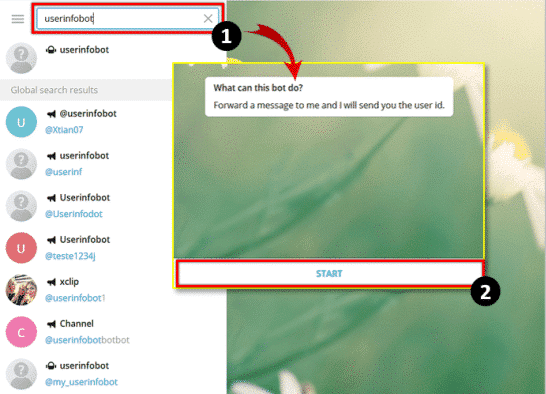
Tip: Always double-check your UID before finalizing your payment. Tayyb Chat credits are credited directly to the account number entered on the order screen.
Step-by-Step Guide to Top Up Tayyb Chat on XPTopup
Topping up your Tayyb Chat account on XPTopup is straightforward. Follow this walk-through to complete your purchase:
- Select Your Credit Amount: Browse the available denomination options and choose the package that fits your voice room needs.
- Input Your Tayyb Chat UID: Enter your numeric UID in the designated field. Ensure no extra spaces or incorrect digits are added.
- Review Order Details: Confirm the package size and your account number.
- Select a Payment Method: Choose your preferred payment option from the live checkout menu.
- Complete Checkout: Finalize your payment. Once confirmed, the system processes your order and sends credits directly to your Tayyb Chat account.
Note: Live pricing, payment options, and package availability are updated dynamically and displayed directly on the live checkout page on XPTopup.
Tayyb Chat Credit Packages and Usage Overview
Different credit packages allow you to manage your balance depending on whether you want to send casual reactions or support large-scale community events. The table below outlines how credits are typically applied across the app:
| Feature Category | In-App Purpose | Recommended Package Size |
|---|---|---|
| Casual Gifting | Standard roses, claps, and basic interactive stickers | Starter / Small Packs |
| Featured Animations | 3D full-screen gift effects and celebration banners | Medium Packs |
| Profile Customization | Entrance cars, luxury avatar frames, and special badges | Medium to Large Packs |
| Room Hosting & Events | Running large community events and rewarding top contributors | Large / Top-Tier Packs |
Check the live catalog on XPTopup to view all active credit packages and their corresponding rates.
Account Safety: Why You Only Need a UID for Top-Ups
Account security is essential when buying in-app currencies online. XPTopup uses a direct-to-account delivery system that requires only your public Tayyb Chat UID.
- Zero Password Requirements: You will never be asked for your login password, security code, or linked phone/email authentication details.
- Protection Against Account Takeover: Keeping your credentials private ensures your profile, personal chats, and stored data remain completely secure.
- Gifting Capabilities: Because only a UID is needed, you can easily top up credits for friends, room hosts, or community members without needing access to their devices.
Always ensure that you are purchasing on verified platforms and never disclose sensitive login credentials to third parties.
Troubleshooting Delayed Delivery and Support Assistance
Credit top-ups are typically processed quickly. However, temporary network latency or local app cache delays can occasionally occur. If your balance does not update immediately, follow these troubleshooting steps:
- Restart the Tayyb Chat App: Close the app completely from your device task manager and reopen it.
- Check Your In-App Wallet History: Open your profile and navigate to your balance or wallet tab to verify if the latest transaction has settled.
- Verify Your UID on the Order Receipt: Check your XPTopup order confirmation to make sure the UID submitted matches your actual account.
- Contact XPTopup Customer Support: If the credits do not reflect after restarting your app, reach out to the XPTopup customer service team with your Order ID and UID. The support team will inspect the transaction status and help resolve any delivery delays.
Frequently Asked Questions
How do I find my Tayyb Chat UID for top up?
Open the Tayyb Chat app, tap the Profile or Me icon at the bottom of the screen, and locate the numeric UID displayed under your profile avatar and display name. Tap the copy icon to copy your UID accurately.
Do I need to provide my Tayyb Chat password to recharge credits?
No. Recharging through XPTopup requires only your public Tayyb Chat UID. Never provide your account password, email credentials, or verification codes to anyone.
How long does it take for Tayyb Chat credits to arrive after purchase?
Deliveries are processed promptly once your payment is confirmed. In rare cases of server maintenance or network congestion, delivery may take a few extra minutes. Restarting your Tayyb Chat app helps refresh your balance display.
What can I use Tayyb Chat credits for in the app?
You can use Tayyb Chat credits to send virtual gifts to broadcasters, purchase profile decorations such as avatar frames and entrance effects, unlock custom voice room themes, and participate in special in-app events.
Can I buy Tayyb Chat credits for a friend using their UID?
Yes. Because the checkout process only requires a UID, you can enter your friend's Tayyb Chat UID during checkout to send credits directly to their account.
What should I do if my Tayyb Chat top up does not reflect in my balance?
First, force-close and restart the Tayyb Chat application. If the balance still does not update, check your order summary to ensure the UID entered was correct, then contact XPTopup customer support with your Order ID for assistance.
Current package prices
Current package prices are shown below. Prices exclude Tax. Tax, payment fees and applicable coupons are shown at checkout.
| Package | Price |
|---|---|
| Tayyb Chat - Tayyb Chat*10000000 | USD 6.57 |
| Tayyb Chat - Tayyb Chat*50000000 | USD 32.85 |
| Tayyb Chat - Tayyb Chat*100000000 | USD 65.70 |
| Tayyb Chat - Tayyb Chat*5000000 | USD 3.29 |