SUGO Coins Top Up: Fast Account Credit with UID
SUGO is a popular voice live chat and social party app where users join interactive rooms, stream audio, meet friends globally, and play mini-games. Inside the app, coins serve as the primary virtual currency. A SUGO Coins Top Up lets you participate fully in party rooms, send gifts to your favorite hosts, and personalize your profile with unique effects.
XPTopup provides a direct top-up process requiring only your SUGO User ID (UID). You do not need to share passwords, verify external phone prompts, or surrender account control. Your recharge is processed directly to your balance, letting you get back to your audio rooms without interruption.
What Are SUGO Coins and Their Role in Voice Live Chat Party
SUGO coins are the core in-app currency used to purchase virtual goods and access interactive features within SUGO Voice Live Chat Party rooms. The app connects creators, streamers, and listeners in real-time audio spaces.
While browsing and listening to voice rooms is free, most active interactions depend on coins. Whether you want to reward a talented singer, boost your personal ranking on room leaderboards, or stand out when entering popular group calls, coins give you the tools to interact on your own terms.
How SUGO Coins Enhance Your Experience
Recharging your SUGO account unlocks several features across personal chats and group voice rooms:
- Animated Virtual Gifts: Send small tokens of appreciation or large, screen-filling animations to broadcasters and room hosts. Gifting increases host popularity and raises your contributor ranking.
- Exclusive Entrance Effects: Catch the attention of everyone in the room. When you enter a party room with premium entrance vehicles or avatar animations, your profile displays custom visual banners.
- Custom Profile Frames and Badges: Showcase your status with collectible avatar frames, relationship rings, and event badges earned or unlocked through coin usage.
- Room Interaction Tools: Start interactive mini-games, drop lucky bags for other listeners in the room, and bid for priority speaking slots on open mics.
| Feature Category | How Coins Are Used | In-App Benefit |
|---|---|---|
| Gifting | Sending single or combo animated gifts | Boosts host popularity rank and user wealth rank |
| Profile Style | Purchasing frames, chat bubbles, and name colors | Distinct visual identity across chat lists and rooms |
| Entry Effects | Equipping cars, wings, and entry banners | High-visibility notifications when joining voice rooms |
| Party Tools | Launching lucky draws and mini-games | Keeps voice room members engaged and entertained |
How to Find Your SUGO User ID (UID)
To ensure your recharge reaches the correct account, you only need to provide your numeric SUGO UID. Follow these steps to find it inside the app:
- Open the SUGO app on your mobile device.
- Tap the Profile / Me icon located in the bottom-right corner of the home screen.
- Look beneath your display name and avatar.
- Locate the numeric string labeled ID or UID.
- Tap the copy icon next to the number to copy your exact UID to your clipboard.
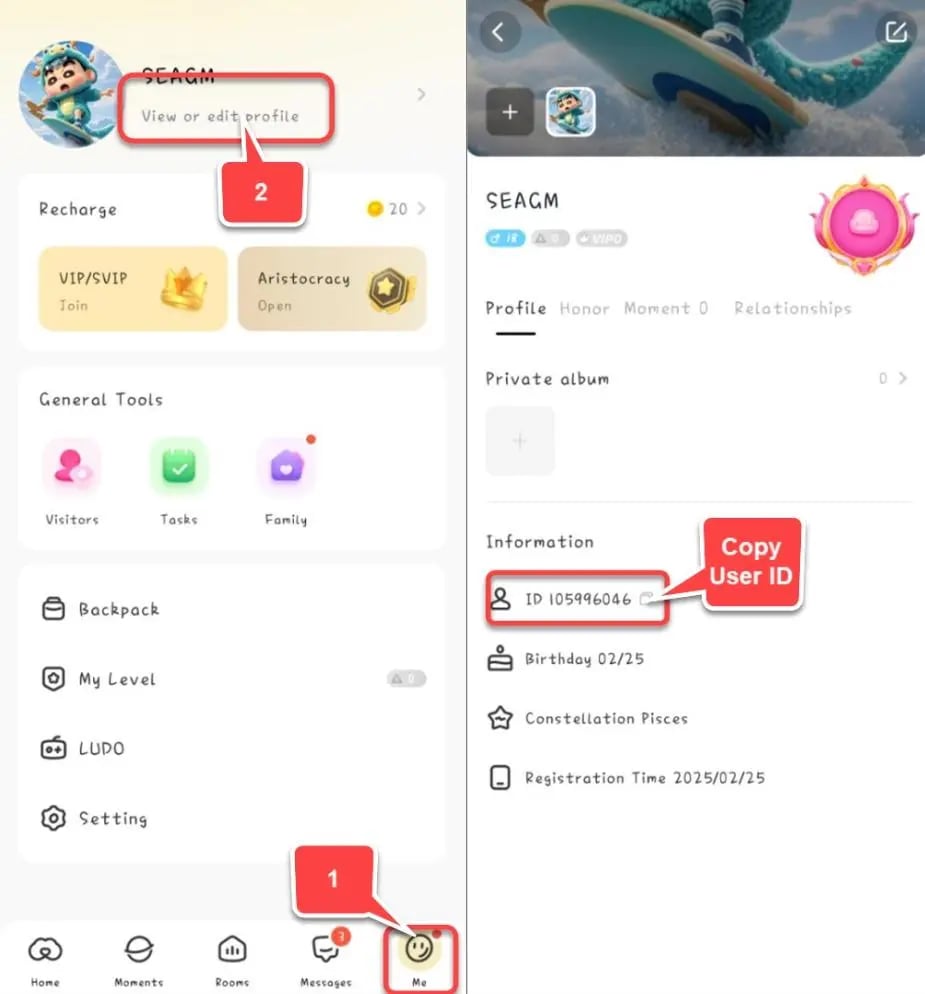
Note: Always double-check that you copy the numeric UID and not your custom username or nickname. Usernames can change, but your numeric UID remains permanent.
Step-by-Step Guide to SUGO Coins Top Up on XPTopup
Recharging your account balance on XPTopup is straightforward and does not require complex setup:
- Select Your Coin Package: Choose the coin denomination that fits your planned in-app gifting or room activities. Current pricing and pack amounts appear directly on the live checkout interface.
- Enter Your SUGO UID: Paste your numeric User ID into the required account field.
- Confirm Selection and Pay: Review your order details, select your preferred local or international payment option, and complete the secure transaction.
- Receive Your Coins: Once your order completes, the coins are credited directly to your SUGO balance. Open your app to verify your updated balance.
Why UID-Only Top Up Protects Your Account Security
Account safety is essential when buying in-app currency online. XPTopup uses a direct UID-only delivery system, which offers significant security advantages over unverified third-party methods:
- No Password Sharing: You will never be asked for your login password, Apple ID, Google account credentials, or SMS verification codes. Your personal account data stays completely in your control.
- Zero Risk of Account Lockouts: Logging into social apps from unfamiliar IP addresses or unauthorized devices can trigger automated fraud freezes or account bans. UID top-ups process externally via standard delivery channels, eliminating this danger.
- Protection Against Fraudulent "Free Coin" Scams: Many websites advertise coin generators, hacks, or cracked APKs promising free balances. These tools are fraudulent and designed to harvest credentials or install malware. Authentic recharges require legitimate transaction processing directly tied to your UID.
What to Do If Coins Do Not Appear Immediately After Recharge
Transactions on XPTopup process quickly, but network synchronization can occasionally introduce brief delays. If your updated coin balance does not show up right away, follow these troubleshooting steps:
- Refresh the App: Close the SUGO app completely from your device's multi-tasking / recent apps menu, then reopen it.
- Check Your Wallet Balance Tab: Go to Me > Wallet / My Coins inside SUGO to force the app to retrieve the latest account state from the server.
- Verify the Submitted UID: Check your order confirmation receipt on XPTopup to verify that the UID entered matches your in-app profile ID exactly.
- Contact Customer Support: If your balance does not update after a few minutes, reach out to XPTopup 24/7 customer support with your Order ID and UID for rapid verification and assistance.
Frequently Asked Questions About SUGO Coins Recharge
How do I top up SUGO Coins with my UID?
Select your desired coin package on XPTopup, type or paste your numeric SUGO UID into the field, choose your payment method, and complete the checkout. The coins will be delivered directly to your SUGO account balance.
Where can I find my SUGO User ID (UID) in the app?
Open the SUGO application, select the Me tab in the bottom navigation bar, and look directly below your profile picture and nickname. Your UID is the series of numbers displayed next to the copy icon.
Do I need to share my SUGO login password to buy coins?
No. XPTopup never asks for your password, email login, or verification codes. You only need to provide your public numeric UID to receive your coins.
Can I recharge SUGO coins for free?
No legitimate method exists to generate free SUGO coins. Websites or software claiming to generate free currency are scams that can compromise your account. Official coin acquisition requires standard purchasing through trusted platforms.
What can I purchase with SUGO Coins in voice rooms?
SUGO coins allow you to send animated gifts to room hosts, purchase dynamic entrance effects, unlock avatar frames, participate in room games, and drop lucky bags for other users in the chat.
How do I check if my SUGO Coins were successfully added?
Open SUGO, navigate to the Me profile section, and tap on Wallet or Coins. Your updated total balance will reflect the new coins added from your transaction.
Current package prices
Current package prices are shown below. Prices exclude Tax. Tax, payment fees and applicable coupons are shown at checkout.
| Package | Price |
|---|---|
| 1200 Coins | USD 0.74 |
| 2400 Coins | USD 1.48 |
| 6250 Coins | USD 3.86 |
| 12500 Coins | USD 7.70 |
| 37500 Coins | USD 23.05 |
| 65000 Coins | USD 39.99 |
| 130000 Coins | USD 79.98 |