The Division Resurgence Premium Credits Top Up on XPTopup
Premium Credits serve as the primary premium currency in The Division Resurgence, allowing agents deployed across the ruins of New York City to acquire exclusive character customizations, seasonal Battle Passes, weapon finishes, and apparel caches. Whether you want to customize your tactical agent with distinct gear or gain access to premium seasonal reward tracks, acquiring Premium Credits gives you direct access to the in-game cosmetic store.
XPTopup provides a direct recharge service for The Division Resurgence. By utilizing direct User ID crediting, you can top up your balance without sharing sensitive Ubisoft login details or personal passwords. All active packages, localized currency rates, and payment methods update automatically on the live checkout menu above.
How to Top Up The Division Resurgence Premium Credits on XPTopup
To complete your recharge quickly and securely, follow these simple steps:
- Review the available Premium Credits denominations listed on the live product grid above and select your desired amount.
- Enter your numerical The Division Resurgence User ID in the designated input field.
- Choose your preferred payment option from the real-time checkout list.
- Confirm your order details and finish the transaction.
- Open The Division Resurgence on your mobile device to verify that your new Premium Credits balance is available in your agent wallet.
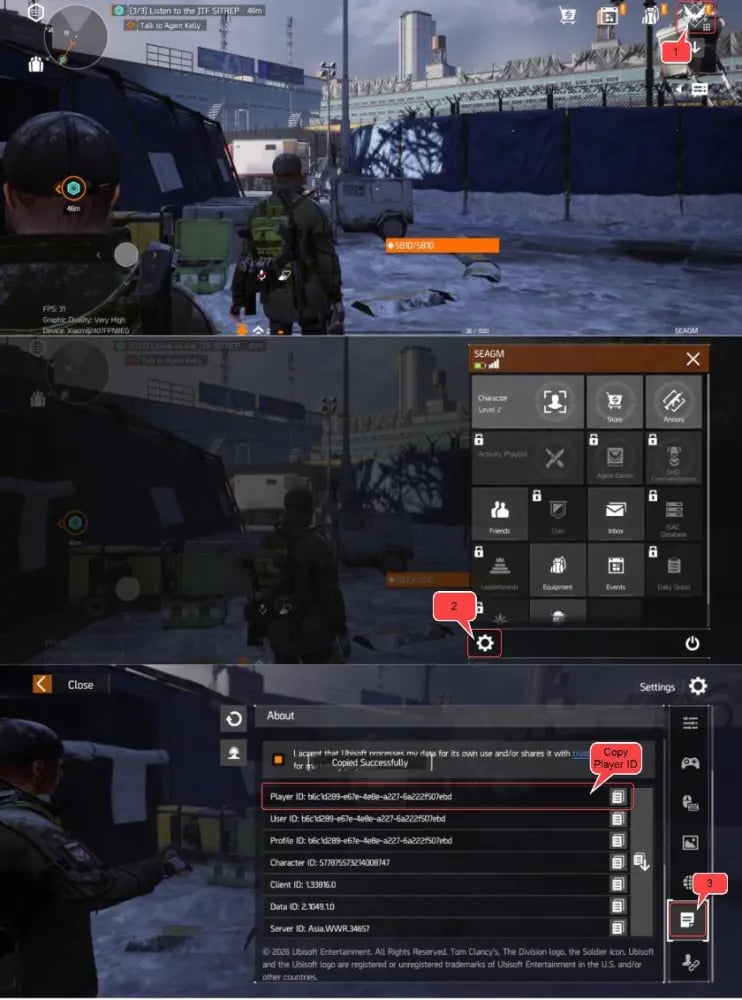
How to Find Your The Division Resurgence User ID
Your User ID is a unique numeric identifier linked to your agent profile. You do not need to share your email or account password; only this ID is required to route your credits correctly.
- Launch The Division Resurgence on your mobile device and log in to your account.
- Finish the prologue or tutorial mission if you are playing on a newly created character.
- From the main game screen, tap your Agent Avatar / Profile Icon located in the top-left corner of the HUD.
- Select the profile overview tab to display your agent details.
- Look for your User ID, displayed as a series of numbers beneath your agent name.
- Tap the small Copy icon next to the number to copy it directly to your clipboard, preventing manual entry mistakes.
What Can You Purchase with Premium Credits in The Division Resurgence?
Premium Credits are dedicated to cosmetic enhancements, progression convenience, and seasonal access rather than direct competitive combat advantages. Investing credits allows you to personalize your squad presence in both open-world PvE encounters and Dark Zone extractions.
| Item Category | In-Game Utility | Gameplay Impact |
|---|---|---|
| Apparel Caches | Unlocks exclusive agent clothing, headwear, jackets, and footwear | Cosmetic Only |
| Weapon Skins | Customizes visual camo patterns, colors, and attachments | Visual Only |
| Premium Battle Pass | Unlocks the premium progression track for seasonal cosmetics and bonus items | Cosmetic & Resource Pace |
| Emotes & Vanity Packs | Themed animations, tactical patches, and squad visual flair | Cosmetic Only |
Seasonal Battle Pass Tracks
Each season introduces a multi-tier Battle Pass. Using Premium Credits to activate the premium track grants access to exclusive agent outfits, weapon coatings, crafting materials, and vanity caches that cannot be obtained through standard progression.
Exclusive Vanity & Apparel Items
Apparel caches allow you to assemble custom tactical looks. From urban stealth jackets to specialized division gear, vanity collections help your agent stand out across Manhattan's contested zones.
Safety and Privacy: Why No Passwords Are Required for UID Top-Up
Account safety is essential when purchasing digital currencies. Traditional account-sharing methods carry significant risks, including unauthorized access and security flags. XPTopup operates strictly via direct UID routing.
- No Account Passwords Needed: You never need to supply your Ubisoft account password, social login credentials, or verification codes.
- Direct System Delivery: Credits route straight to your game ID through direct balance assignment.
- Private and Secure: Your personal contact information and gameplay credentials remain entirely under your control at all times.
How to Gift Premium Credits to Friends in The Division Resurgence
Because top-ups on XPTopup require only an in-game User ID, you can easily send Premium Credits to squadmates, clan leaders, or friends without accessing their devices:
- Ask your friend to copy their User ID from their in-game profile menu.
- Return to this XPTopup product page and select the credit package you wish to send.
- Paste your friend's User ID into the ID field instead of your own.
- Complete the checkout process.
- Once processed, the credits will deposit directly into your friend's in-game account upon their next login.
Delivery Time and What to Do If Credits Do Not Appear Instantly
Orders placed on XPTopup are processed automatically. In most cases, your Premium Credits reflect in your account within moments of payment completion. If your balance does not update right away, use the following checklist:
- Restart the Game Client: Completely close The Division Resurgence and reopen it to establish a fresh connection with the game servers.
- Verify Order Confirmation: Check your order status on XPTopup to ensure the payment cleared successfully.
- Confirm Your User ID: Check your receipt to ensure the User ID submitted matches your in-game profile without missing digits.
- Contact 24/7 Support: If the credits have not appeared after restarting, reach out directly to the XPTopup customer support team with your transaction reference number for immediate assistance.
Frequently Asked Questions
How do I find my The Division Resurgence User ID?
Tap your character avatar in the upper-left corner of the main menu screen. Your User ID is the numeric string listed directly under your player codename. Use the copy button next to the ID to paste it directly during checkout.
Do I need to share my Ubisoft account password to top up Premium Credits?
No. Top-ups on XPTopup only require your in-game User ID. You never need to share passwords, secondary authorization codes, or private login credentials.
What are Premium Credits used for in The Division Resurgence?
Premium Credits are used to unlock the Premium Battle Pass track, open apparel caches, acquire weapon finishes, and buy cosmetic vanity bundles in the in-game shop.
Is The Division Resurgence pay to win?
No. Premium Credits focus on cosmetic customization, emotes, vanity gear, and seasonal pass rewards. Core combat performance depends on your agent build, gear farming, skill calibration, and tactical teamwork.
How long does it take for Premium Credits to arrive after top up?
Delivery occurs almost immediately after your payment is verified. If the balance does not display right away, restart your game app to force a server balance refresh.
Can I top up The Division Resurgence Premium Credits for a friend?
Yes. Enter your friend's User ID in the input field on XPTopup instead of your own. Once the payment finishes, the selected credit package will be credited directly to their game account.
Current package prices
Current package prices are shown below. Prices exclude Tax. Tax, payment fees and applicable coupons are shown at checkout.
| Package | Price |
|---|---|
| 125 (120 + 5) Premium Credits | USD 1.57 |
| 315 (300 + 15) Premium Credits | USD 3.92 |
| 645 (600 + 45) Premium Credits | USD 7.84 |
| 1650 (1500 + 150) Premium Credits | USD 19.58 |
| 3450 (3000 + 450) Premium Credits | USD 38.89 |
| 7200 (6000 + 1200) Premium Credits | USD 78.04 |